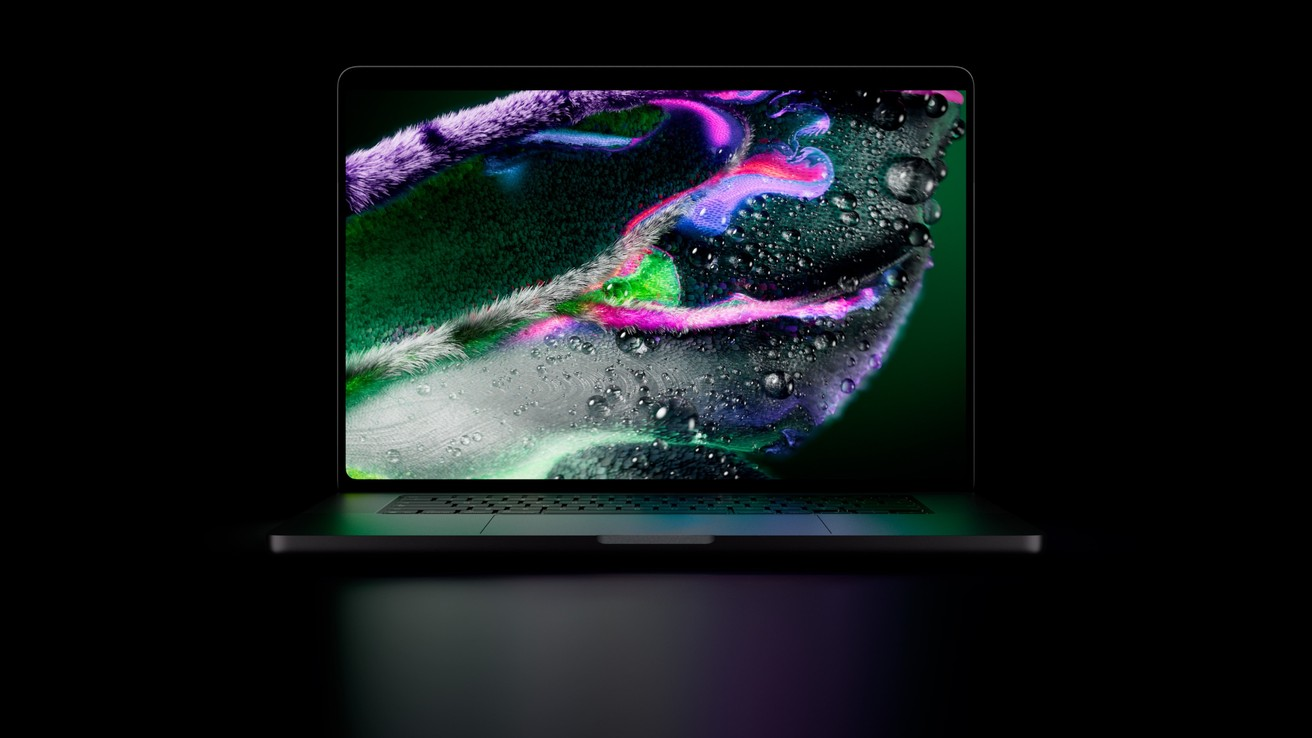
Header image: the MacBook Pro with PROLED XDR Display, open, front view. Image: Apple.
Disclosure: some links below are Amazon affiliate links (tag cao04-20). They cost you nothing, and the picks would be the same without them. Prices and specs are sourced at the bottom.
Note: Published October 29, 2026, the day after Apple’s announcement. Preorders are open, and the new models ship November 6. Prices move fast after a launch, so check the live listing before you buy.
Apple launched two new MacBook Pros on October 28: the MacBook Pro OLED, with a price that starts at $2,899, and the M6 14-inch at $1,999. They solve different problems.
The MacBook Pro with PROLED XDR Display is the headline model. It has a tandem OLED screen, it’s the first touchscreen Mac, and it adds a Dynamic Island. Inside is an M5 Pro or M5 Max chip, the same chip family Apple already sells.
The M6 14-inch MacBook Pro keeps the familiar display and gets the newer base chip, for about $900 less.
So the OLED model is a display and touch upgrade on last generation’s high-end chips. The M6 is a newer chip at a lower price. Pay for the one your work actually uses.
Who this decision bites
This is for you if you’re buying a work laptop in the next couple of weeks and the money comes out of a business account:
- You write code and ship web apps, APIs, or internal tools.
- You run the business from the laptop: books, inventory, email, invoicing, maybe a POS back end.
- You do photo or video work for clients, or for your own store’s product shots and ads.
- You’re holding an older Intel or M1 MacBook that’s starting to slow you down.
If your current Apple silicon laptop still does the job, you can skip this whole launch cycle. Nothing below changes that.
What goes wrong when you buy this week
Two mistakes come up after every big Apple launch, and this one makes both easy.
1. Paying for touch you won’t use. The OLED model is the first Mac you can touch. That’s new, and new is tempting. But touch only helps when your apps are built for it. Your terminal, your IDE, QuickBooks, and your browser-based admin panels were designed for a pointer. Until the apps you use every day add real touch support, the touchscreen is a $900 feature you’ll use to scroll a web page now and then.
2. Mixing up the chip tiers. “M6” sounds newer than “M5 Pro,” and it is a newer generation. But Pro and Max chips are a different tier with more CPU and GPU cores, more memory bandwidth, and higher memory ceilings. A newer base chip doesn’t automatically beat an older Pro or Max chip in every workload. Before you pay $900 for either the newer chip or the bigger chip, figure out which one your work needs. Compiling a mid-size codebase and running a business stack don’t need Max-class hardware. Grading 8K footage does.
MacBook Pro OLED price and specs
Here’s what Apple announced for the OLED model (Apple Newsroom, MacRumors):
- Display: tandem OLED “PROLED XDR,” up to 2,000 nits, 120Hz, P3 and Adobe RGB color
- Input: touchscreen (a first for the Mac), plus the Dynamic Island
- Chip: M5 Pro or M5 Max
- Memory / storage: up to 128GB and up to 16TB
- Weight: 3 lb (14-inch), 4 lb (16-inch)
- Ports: three Thunderbolt 5
- Battery: up to 24 hours (Apple’s figure)
- Options: nano-texture glass
- Availability: preorders open now, ships November 6
Prices (Apple’s announcement and MacRumors, per launch coverage, checked Oct 29, 2026, 7:05 AM ET):
- 14-inch, M5 Pro: $2,899 ($2,749 education)
- 16-inch, M5 Pro: $3,399 ($3,199 education)
- 14-inch, M5 Max: $4,499
- 16-inch, M5 Max: $4,799
The Adobe RGB coverage matters more than the brightness number. If you print, or deliver to clients who work in Adobe RGB, this is the first MacBook Pro display that covers that space. If you don’t know what color space your work lands in, that’s a good sign you don’t need it.
Is the MacBook Pro OLED touchscreen worth it in 2026?
The MacBook Pro touchscreen in 2026 is a version-one feature. Apple built the hardware. What’s still unclear is how fast the apps you rely on add touch, and what touch adds once they do.
Here’s the practical test: list the five apps you have open most of the day. For each one, ask whether you’d rather tap the screen than use the trackpad. For a photo editor working on masks and curves, maybe yes. For a developer in VS Code and a terminal, almost certainly no. For a store owner in Shopify admin and a spreadsheet, probably not.
Don’t buy the OLED model for touch alone. Buy it for the display, the Pro/Max chip, or the weight. If touch turns out to be useful later, that’s a bonus.
M6 14-inch MacBook Pro: the newer chip for less
The M6 14-inch keeps the standard display (nano-texture is still an option) and gets Apple’s newest base chip: a 12-core CPU and 12-core GPU, per Apple’s store listing.
Price: $1,999, checked on apple.com Oct 29, 2026, 7:05 AM ET. Education price is $1,899 on Apple’s education store (checked Oct 29, 2026, 7:07 AM ET).
That’s $900 less than the 14-inch OLED model. For most builders and business owners, it’s the right default:
- Coding: a newer base chip (up to 32GB of memory) handles builds, Docker containers, local dev servers, and a browser with 40 tabs. Memory matters more than cores here, so put part of the $900 you saved toward more RAM.
- Running the business: books, inventory, email, Zoom, and a few SaaS dashboards don’t come close to needing an M5 Max.
- Light creative work: product photos and short social videos run fine on a base chip.
Where the M6 falls short: it doesn’t have the OLED’s Adobe RGB coverage or touch, and it doesn’t reach Pro/Max-class core counts or memory ceilings. If you’re running large local AI models or doing heavy multi-stream video, that’s the gap that matters.
OLED vs M6 vs M5: the decision matrix
| MacBook Pro OLED (14”/16”) | MacBook Pro M6 14” | Discounted M5 MacBook Pro 14” | |
|---|---|---|---|
| Starting price | $2,899 / $3,399 (per launch coverage, checked Oct 29, 2026, 7:05 AM ET) | $1,999 | Below its original price at some retailers |
| Chip | M5 Pro or M5 Max | M6 (newest base chip) | M5 (previous base chip) |
| Display | Tandem OLED, 2,000 nits, P3 + Adobe RGB, touch | Standard Liquid Retina XDR | Liquid Retina XDR, 1,600 nits peak |
| Max memory / storage | 128GB / 16TB | 32GB / 4TB | Lower base-chip ceiling |
| Weight | 3 lb / 4 lb | 3.4 lb | 3.4 lb |
| Ports | 3x Thunderbolt 5 | 3x Thunderbolt 4, HDMI, SDXC, MagSafe 3 | 3x Thunderbolt 4, HDMI, SDXC |
| Availability | Preorder, ships Nov 6 | Preorder, ships Nov 6 | In stock at some retailers |
| Buy it if | Color-critical photo/video, Pro/Max-class power, or the lighter body | You code or run the business | The price gap matters more than the newest chip |
| Skip it if | You want touch and nothing else | You need Adobe RGB or Max-class GPU | You plan to keep the laptop 5+ years and want max headroom |
There’s no single best MacBook Pro here. The OLED model is best for color-critical and heavy-GPU work. The M6 is best for code and business. The discounted M5 is best when you’re on a strict budget. Pick the column that matches your work.
M6 MacBook Pro vs M5 MacBook Pro: the discount lane
This is the secondary lane, and it splits two ways.
If you already own an M5 MacBook Pro, keep it. One chip generation is rarely worth the cost of replacing a working laptop, especially one that’s a year old. Spend the money on more storage, a better monitor, or a backup that actually runs.
If you’re buying and the budget is tight, look for a discounted M5. Check Apple’s certified refurbished store first, since it carries Apple’s one-year warranty, then compare the current M5 MacBook Pro 14-inch listing on Amazon. Stock is spotty after a launch, so compare on the day you buy.
On M6 vs M5: the M6 is the newer chip, and Apple’s store lists it with 12 CPU cores against the M5’s 10. Whether that’s worth a few hundred dollars depends on how hard you push the machine. For email, invoicing, and a browser, an M5 at a good price is enough.
A quick word on the iMac
If the laptop never leaves your desk, the M6 iMac is worth a look: $1,499 and $1,699 on apple.com (checked Oct 29, 2026, 7:05 AM ET). You get a big screen, camera, and speakers in one box for less than the M6 MacBook Pro. For a front desk or a shared back-office machine, that’s often the smarter buy. If you want an even cheaper desktop, see our Mac mini M6 at $899 guide or our list of Windows mini PCs under $700.
Trade-offs and skip-if
OLED model trade-offs
- You pay about $900 more than the M6 for a display, touch, and Pro/Max chips. If you don’t need any of those three, it’s wasted money.
- It’s a first-generation OLED and touch design. First-generation hardware sometimes has issues that only show up after launch. Apple’s return window is your safety net, so test it hard in the first two weeks.
- Skip if: you mostly code, run the business, or want touch and nothing else.
M6 14-inch trade-offs
- It’s a base chip. If your workload grows into big local models or heavy video, you’ll hit its ceiling sooner than a Pro or Max.
- You don’t get the Adobe RGB display or touch.
- Skip if: you do client color work, or you already own an M5 that runs fine.
Discounted M5 trade-offs
- It’s last year’s chip with Thunderbolt 4, not 5.
- Discounts depend on stock, and the best ones sell out quickly.
- Skip if: you plan to keep the laptop for five-plus years and want as much headroom as possible.
If you’re weighing a Windows workstation instead, our RTX Spark laptops vs MacBook Pro comparison covers the GPU-heavy side.
Buy checklist and next steps
- Write down your top five apps. If none is a color-critical photo or video tool, cross off the OLED model.
- Check whether your workload needs a Pro or Max chip. Large local AI models, multi-stream 4K/8K editing, and heavy 3D do. Web dev, SaaS, and office work usually don’t.
- Size memory before the chip. On any of these, 16GB is the floor for development, and more is better if you run containers or local models. You can’t upgrade memory later.
- Price the M6 with the memory you need, then compare. A well-configured M6 often beats a base OLED model for code-heavy work.
- If budget comes first, look for a discounted M5 at Apple Certified Refurbished or on Amazon, and check the seller and return policy.
- Order at Apple for the new models. OLED and M6 preorders are at apple.com, and both ship November 6. Neither is on Amazon yet.
- Use the return window. Test touch, battery, and your real workload in the first 14 days.
FAQ
What is the MacBook Pro OLED price?
Per Apple’s announcement and MacRumors, the 14-inch with M5 Pro starts at $2,899 and the 16-inch at $3,399 (per launch coverage, checked Oct 29, 2026, 7:05 AM ET). M5 Max models start at $4,499 (14-inch) and $4,799 (16-inch). Education pricing is $2,749 and $3,199 for the M5 Pro models.
Is the MacBook Pro OLED touchscreen worth paying for?
Not by itself. It’s the first touch Mac, and app support is still new. Buy the OLED model for the display, the M5 Pro/Max chip, or the lighter body, and treat touch as a bonus.
M6 MacBook Pro vs M5 MacBook Pro: should I upgrade?
Not from a working M5. If you’re buying new, the M6 is the newer chip at $1,999. A discounted M5 makes sense if saving money matters more than the newest chip.
Is the M6 faster than the M5 Pro in the OLED model?
It depends on the workload. The M6 is a newer generation, but the M5 Pro is a higher tier with more cores and higher memory ceilings. For code and office work, the M6 is plenty. For heavy GPU and video work, the Pro/Max tier is where you get more headroom.
When does the new MacBook Pro ship?
Preorders opened October 28, 2026, and both the OLED and M6 models ship November 6 (MacRumors).
The bottom line
The OLED MacBook Pro is a great screen with touch, running last generation’s Pro and Max chips. The M6 14-inch is the newer chip for $900 less. If you edit color-critical photos or video, or you need Pro/Max-class power, buy the OLED. If you write code or run a business, buy the M6 and spend the difference on memory. If money is tight, look for a discounted M5. Wait on touch until your apps support it.
Our pick for the discount lane
Apple 2025 MacBook Pro 14-inch, M5, 16GB / 512GB, Space Black
A 10-core M5 with 16GB of memory, a 512GB SSD, a Liquid Retina XDR display, and up to 24 hours of battery (Apple’s figure). It’s the pick if you’d rather save money than get the newest chip. Availability changes often, so check that it’s in stock and confirm the price and seller before you buy. The new OLED and M6 models are preorder-only at Apple.
Sources
7 refsAll accessed October 29, 2026.
- Apple unveils groundbreaking MacBook Pro with PROLED XDR Display — Apple Newsroom: OLED specs, M5 Pro/Max prices, education prices, ship date.apple.com
- Apple Announces OLED MacBook Pro With Touch Display — MacRumors: launch coverage, preorder and ship dates.macrumors.com
- How to preorder Apple’s M6 iMac, MacBook Pro OLED — PCMag: preorder details.pcmag.com
- M6 MacBook Pro guide — Macworld: M6 release and spec overview.macworld.com
- Apple Store: Buy MacBook Pro and Buy iMac: M6 $1,999 and iMac $1,499/$1,699, checked Oct 29, 2026, 7:05 AM ET.apple.com
- MacBook Pro tech specs — Apple: M6 memory (16GB to 32GB), storage (up to 4TB), ports, and 3.4 lb weight.apple.com
- Apple Store for Education: MacBook Pro: M6 $1,899 education price.apple.com
comments
loading comments…
No comments yet. Start the thread.