
Header image: NVIDIA’s launch artwork for the Nemotron 3.5 models, app icons in front of a night-lit globe. Image: NVIDIA.
Disclosure: some links below are Amazon affiliate links (tag cao04-20). Costs you nothing; the picks are the same either way.
Nemotron 3.5 Bolt is NVIDIA’s new local model with “24GB” in its name, so does it run on a 24GB graphics card? Mostly, yes, with less room than the name suggests. The 2-bit file is 22.0 GB before you add vision, the speed drafter or any context. One independent test ran it on an RTX 4090, RTX 3090 and RTX 5090. NVIDIA’s own setup recipes start at 32GB. Here’s what fits, how fast each card was, what works with Ollama and Macs, and which card to buy.
Note: NVIDIA released Nemotron 3.5 Bolt 74B-A9B 24GB on October 15, 2026. We haven’t run it on any of these cards, so nothing below is our test result. The speeds come from llm-speed’s runs dated October 15. Amazon prices were checked October 19, 2026, and GPU prices are moving fast.
The short answer
- You own an RTX 4090: run it. llm-speed measured 107.3 tokens per second at 4K context, and the 4090 is on NVIDIA’s supported list. Leave the drafter off at first and keep context modest.
- You own an RTX 3090: it ran at 87.8 tokens per second in the same test, but Ampere isn’t on the model card’s supported list.
- You want NVIDIA’s own setup with long context: that needs a 32GB card such as the RTX 5090 (154.7 tokens per second) or an RTX Spark machine.
- You’re on a Mac: no NVIDIA recipe, Ollama says Apple Silicon isn’t supported, and no Mac speed has been published.
- You’re buying a card for this: a renewed 3090 is the cheap way in, the 4090 is the supported 24GB card, and the 5090 costs more than 3.5 times its list price.
What Nemotron 3.5 Bolt 74B-A9B is
The “74B a9b” in the name means 74 billion parameters in total, with about 9 billion active for each token. It’s a mixture-of-experts model, so it’s quicker than a 74B model sounds.
NVIDIA’s Hugging Face model card describes a vision-language model on a hybrid of Mamba-2 and Transformer layers, with up to 256K tokens of context. It was compressed from the bigger Nemotron 3.5 Super VL 120B-A12B. The experts are stored at 2 bits per weight (IQ2_XXS), trained with that precision in mind rather than squeezed afterward. The license is OpenMDW-1.1, which has a patent-termination clause, as Bodega One notes. Bodega One sells a local AI coding tool and says it isn’t neutral, so weigh its claims with that in mind. Its file sizes match LocalRigCheck’s.
NVIDIA’s launch post pitches it at “everyday agentic tasks” on RTX Spark laptops and says it “also runs on GeForce RTX PCs.”
Does Nemotron 3.5 Bolt fit in 24GB?
The weights fit. NVIDIA’s GGUF repo has three files. Bodega One lists 22.02 GB for the model, 1.73 GB for the vision projector (mmproj) and 1.00 GB for the LiLiCorr drafter, which speeds up output. That’s 24.75 GB.
GPU memory is counted in binary units, and a 24GB card has about 24 GiB. The model alone is about 20.5 GiB. With vision it’s about 22.1 GiB, leaving about 1.9 GiB, per LocalRigCheck. With the drafter too it’s about 23 GiB, leaving roughly 1 GiB. Both sources say that’s arithmetic, not a tested setup.
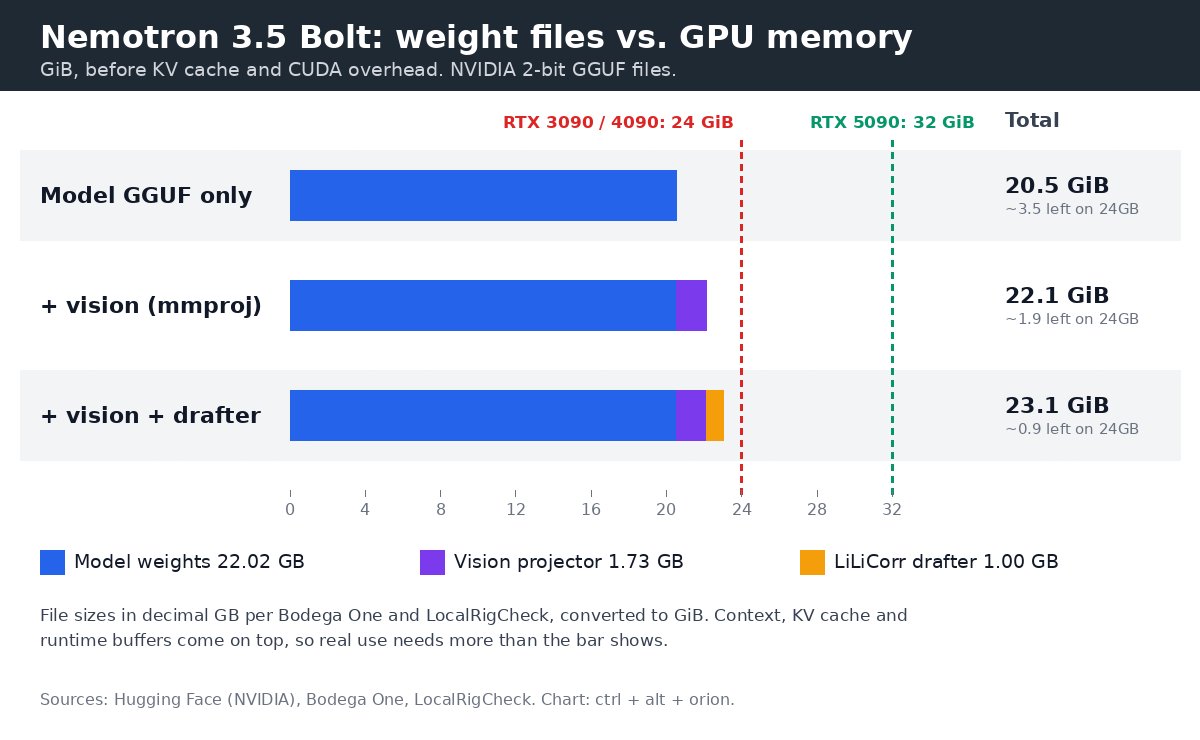
Bolt’s files against 24GB and 32GB cards, before context. Chart: ctrl + alt + orion, from NVIDIA’s Hugging Face repo, Bodega One and LocalRigCheck.
It runs. llm-speed loaded NVIDIA’s 2-bit GGUF in llama.cpp and saw peak memory of about 22.0 of 24.6 GB on the 4090 and 21.8 of 24.6 GB on the 3090 at 4K context. It doesn’t say whether vision or the drafter were loaded, and its table lists the quant as “not reported.”
But it’s tight. llm-speed reports that “concurrent-decode at 4K/8K on the 24GB cards logged Context size has been exceeded retries.” One user was fine; several requests at once weren’t.
Context itself is cheap. LocalRigCheck puts the KV cache, the memory that holds your conversation, at about 8 KiB per token: roughly 1.1 GB at 128K and 2.1 GB at 256K, because only 8 attention layers keep one. The squeeze is weights plus runtime buffers, plus your desktop if the card drives a monitor.
Why NVIDIA’s recipes start at 32GB
NVIDIA’s model card targets “RTX/DGX Spark (64GB / 128GB) or RTX discrete GPUs (32GB+ / 48GB+),” with two recipes:
- 32GB recipe: a 128GB RTX Spark or a 48GB+ card, with the full 262,144-token context and up to 7 drafted tokens.
- 28GB recipe: a 64GB RTX Spark or a 32GB+ card, with 65,536 tokens, 6 drafted tokens and a q8_0 KV cache.
There’s no 24GB recipe. The “24GB” describes the model: NVIDIA says the 2-bit format lets it “fit in 24GB of memory and run alongside other applications.” On an RTX Spark laptop, that’s a slice of a bigger shared pool. On a 24GB graphics card, it’s nearly the whole card.
How to run it on a 24GB card
- Load the model file alone first. Skip vision unless you need images, and add the drafter later. That’s about 3.5 GiB free versus about 1 GiB.
- Use a q8_0 KV cache, as NVIDIA’s 28GB recipe does.
- Keep context modest and raise it until you hit errors.
- Run one request at a time. That’s where llm-speed’s retries came from.
- Try a smaller quant as a last resort. LocalRigCheck lists Unsloth’s 1-bit UD-IQ1_M at 20.3 GB and UD-IQ1_S at 18.5 GB. Nobody has published quality numbers for them.
Bodega One says you need a llama.cpp build from October 15 or later, when drafter support merged.
Nemotron 3.5 Bolt on an RTX 4090, 3090 and 5090: measured speed
llm-speed ran all three cards on October 15 with the same llama.cpp build (commit 620d2225). These are single runs, not medians.
| Card | Decode, 4K context | Time to first token, 3,249-token prompt | Peak memory |
|---|---|---|---|
| RTX 3090 (24GB) | 87.8 tok/s | 2.75 s | 21.8 of 24.6 GB |
| RTX 4090 (24GB) | 107.3 tok/s | 1.79 s | 22.0 of 24.6 GB |
| RTX 5090 (32GB) | 154.7 tok/s | 1.24 s | 22.3 of 32.6 GB |
The 4090 decoded about 22 percent faster than the 3090, and the 5090 about 44 percent faster than the 4090. The bigger gap is on long prompts: the 3090 took more than twice as long as the 5090 to start answering. On the same 5090, Bolt ran 2.06 times as fast as Qwen3.8-27B at Q4_K_M.
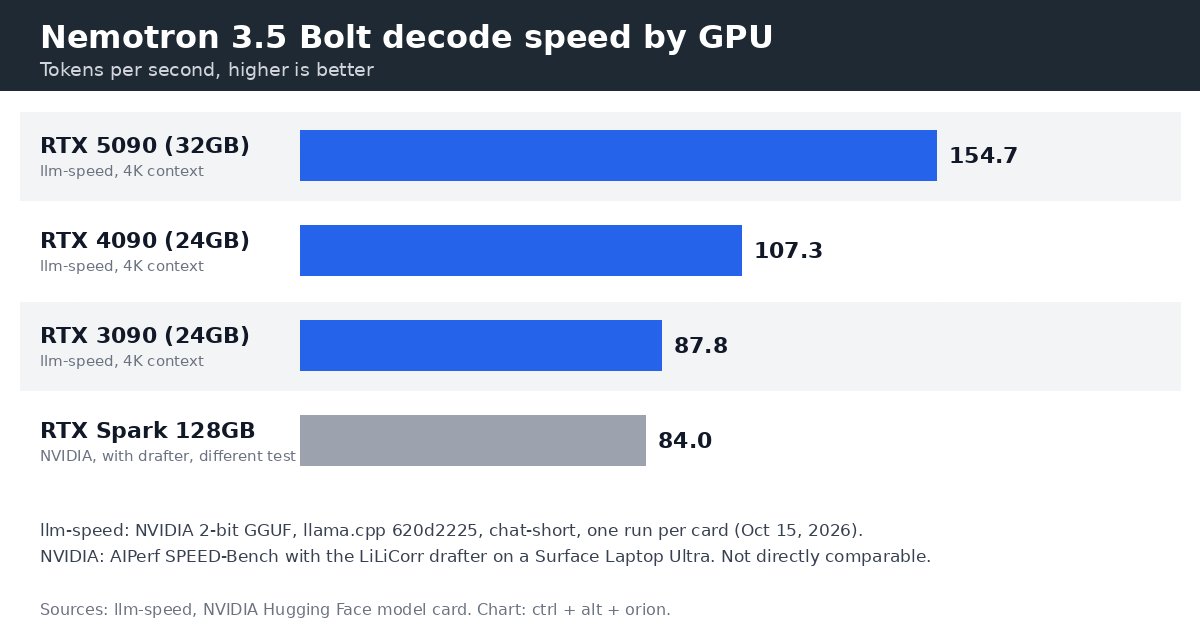
Decode speed by GPU. Chart: ctrl + alt + orion, from llm-speed (October 15, 2026) and NVIDIA’s model card.
NVIDIA’s only published local speed is 84 tokens per second on a 128GB RTX Spark Surface Laptop Ultra with the drafter on. It’s a different test. For the laptop route, see our RTX Spark laptops vs MacBook Pro comparison.
Does it work on an RTX 3090?
NVIDIA’s GGUF model card lists Ada Lovelace and Blackwell GPUs, on Windows and Linux. The 4090 is Ada, the 5090 is Blackwell, and the 3090 is Ampere, which isn’t listed. llm-speed ran it on a 3090 anyway. “Unsupported” here means NVIDIA didn’t validate it, not that it won’t load.
NVIDIA’s separate card for the vLLM version contradicts itself: the summary mentions Ampere (A100), Hopper and Blackwell, but the compatibility line lists only Blackwell SM120 and SM121 on Linux, and it needs a vLLM nightly. Don’t count on vLLM for a 3090 or 4090.
Mac support: no official path
NVIDIA lists Windows and Linux only. Bodega One reports that Ollama’s model page says Apple Silicon and Metal aren’t supported. Unsloth’s llama.cpp guide covers Metal builds, per LocalRigCheck, but nobody we found had published a working Mac setup or speed.
Ollama, LM Studio and llama.cpp
Ollama: the sources conflict because they tested different versions. llm-speed’s October 16 post says “Ollama 0.40.4 cannot load it yet.” Bodega One says Bolt was added in Ollama 0.40.5, released October 14, as a 25 GB package with vision and the drafter. Use 0.40.5 or newer. Ollama defaults to a 4,096-token context; Bodega One suggests OLLAMA_CONTEXT_LENGTH=32768.
LM Studio: NVIDIA lists support, but LocalRigCheck found no Bolt page in LM Studio on October 17. Check first.
llama.cpp: the route behind every independent speed number here.
How good is it?
NVIDIA’s model card compares Bolt with models of similar memory size. These are NVIDIA’s numbers:
| Benchmark | Bolt 74B-A9B | Qwen3.6-35B-A3B | Gemma 4 26B | Nemotron 3.5 Lightning 30B |
|---|---|---|---|---|
| Terminal-Bench 2.1 | 50.98 | 44.38 | 37.22 | 23.46 |
| GPQA Diamond | 86.43 | 83.40 | 79.61 | 75.57 |
| BrowseComp | 66.75 | 48.74 | 26.30 | 36.81 |
| PinchBench | 87.82 | 88.07 | 74.70 | 83.43 |
| AA-Omniscience non-hallucination | 61.27 | 65.85 | 14.22 | 68.81 |
Bolt leads on terminal and browsing tasks, roughly ties Qwen on PinchBench, and trails Qwen and Lightning on hallucination. On MCP-Atlas, NVIDIA lists Qwen at 51.20, but Qwen’s own reported score is 62.8, ahead of Bolt’s 52.20. Read vendor tables closely. If you’ve run Nemotron 3.5 Lightning as an always-on agent, Bolt is the bigger, slower step up.
Which card should you buy for Nemotron 3.5 Bolt?
Prices decide this more than speed. On Amazon on October 19:
- Renewed RTX 3090: $1,699.99, about $19 per token per second of measured decode. Cheapest, but unsupported.
- RTX 4090: $4,479.95, about $42 per token per second. Supported, but nearly three times its $1,599 launch price.
- RTX 5090: $7,112.36 plus delivery, about $46 per token per second. Fits NVIDIA’s 28GB recipe, at more than 3.5 times its $1,999 list price.
Our RTX 5090 alternatives for local AI guide found the 5090 at roughly 3.5 times list in late September too. If you’ll want bigger models later, read its dollars-per-gigabyte math first. For single-card picks, see our local LLM GPU guide.
Our take
We haven’t tested any of these cards, and none has an existing rating on this site, including in our RTX 5090 alternatives guide. So none is rated yet. Speeds are llm-speed’s; support status is NVIDIA’s.
Our take: ASUS ROG Strix GeForce RTX 4090 OC (24GB) — not rated yet
The 24GB card NVIDIA’s GGUF model card supports, at a painful price.
- Pro: Ada Lovelace is on NVIDIA’s supported list for the GGUF.
- Pro: 107.3 tokens per second at 4K context and 1.79 s to first token on a 3,249-token prompt, per llm-speed.
- Pro: About 2.6 GB of memory left at peak in that test.
- Con: No NVIDIA recipe for 24GB, and context-exceeded retries showed up when several requests ran at once.
- Con: Nearly three times its $1,599 launch price, from a third-party seller with one unit left when we checked. Why no rating: we haven’t tested it, and the site has no existing rating for it.
Price: $4,479.95 on Amazon (new, sold by TekDepo), checked October 19, 2026. Not tested by us.
Our take: ASUS TUF Gaming GeForce RTX 5090 OC (32GB) — not rated yet
The card that runs NVIDIA’s own setup, if you can stomach the price.
- Pro: Fastest in llm-speed’s test: 154.7 tokens per second and 1.24 s to first token.
- Pro: 32GB meets NVIDIA’s 28GB recipe, with a 65,536-token context and the drafter.
- Pro: Blackwell is on the supported list for both the GGUF and the vLLM version.
- Con: More than 3.5 times its $1,999 list price.
- Con: No regular Amazon buy box when we checked; the cheapest new offer shipped from Amazon Germany. Why no rating: we haven’t tested it, and the site has no existing rating for it.
Price: $7,112.36 on Amazon (new, cheapest listed offer, sold by Amazon Germany, plus $60.56 delivery), checked October 19, 2026. Not tested by us.
Our take: Gigabyte GeForce RTX 3090 Eagle OC 24G (Renewed) — not rated yet
The cheap 24GB route, as long as you accept no NVIDIA support.
- Pro: 87.8 tokens per second at 4K context in llm-speed’s test, fast enough for one user.
- Pro: The lowest cost per token per second of the three at October 19 prices.
- Pro: Ships from Amazon, listed as Refurbished - Excellent, with a 90-day refund or replacement.
- Con: Ampere isn’t on NVIDIA’s supported hardware list for Bolt.
- Con: Slowest on long prompts (2.75 s to first token), with a 90-day limited warranty on a card from 2020. Why no rating: we haven’t tested it, and the site has no existing rating for it.
Price: $1,699.99 on Amazon (Renewed, sold by Renewed Technology Group), checked October 19, 2026. Not tested by us.
Our September guide put used 3090s around $1,000, so you’re paying extra for Amazon’s return window.
FAQ
What does “74B A9B” mean in Nemotron 3.5 Bolt? 74 billion parameters in total, with about 9 billion active for each token. It’s a mixture-of-experts model, so it runs far faster than a dense 74B model would.
Does Nemotron 3.5 Bolt fit on a 24GB GPU? Yes, for one user with modest context. The 2-bit model file is 22.0 GB (about 20.5 GiB). With the vision file and drafter it’s 24.75 GB, about 23 GiB, leaving roughly 1 GiB on a 24GB card. llm-speed saw peak memory of about 22.0 GB on an RTX 4090, but hit context-exceeded retries with several requests at once.
How fast is Nemotron 3.5 Bolt on an RTX 4090? llm-speed measured 107.3 tokens per second at 4K context, with 1.79 seconds to first token on a 3,249-token prompt. That’s one run, on llama.cpp commit 620d2225, on October 15, 2026.
Does it run on an RTX 3090? It did in llm-speed’s test, at 87.8 tokens per second. But NVIDIA’s model card lists only Ada Lovelace and Blackwell GPUs, so the 3090 (Ampere) isn’t officially supported.
Does Nemotron 3.5 Bolt work with Ollama? Yes, from Ollama 0.40.5, released October 14, per Bodega One. Ollama 0.40.4 couldn’t load it, per llm-speed. The Ollama package is 25 GB and defaults to a 4,096-token context.
Can I run Nemotron 3.5 Bolt on a Mac? Not officially. NVIDIA supports Windows and Linux only, and Ollama’s page says Apple Silicon isn’t supported. No Mac speed has been published.
What GPU does NVIDIA recommend? Its recipes start at a 32GB card or a 64GB RTX Spark. There’s no 24GB recipe.
Sources
6 refs- NVIDIA, “NVIDIA-Nemotron-3.5-Bolt-74B-A9B-24GB-GGUF” model card on Hugging Face (released October 15, 2026; read October 19): architecture, 74B/9B parameters, quantization formats, 256K context, license, deployment line and the 32GB and 28GB recipes, quick-start context, supported hardware (Ada Lovelace and Blackwell, Windows and Linux), 84 tok/s RTX Spark figure, benchmark table, file list. https://huggingface.co/nvidia/NVIDIA-Nemotron-3.5-Bolt-74B-A9B-24GB-GGUFhuggingface.co
- NVIDIA, “NVIDIA-Nemotron-3.5-Bolt-74B-A9B-24GB” model card on Hugging Face (read October 19, 2026): the vLLM summary line naming Ampere (A100), Hopper and Blackwell, the compatibility line listing only Blackwell SM120 and SM121 on Linux, and the vLLM nightly requirement. https://huggingface.co/nvidia/NVIDIA-Nemotron-3.5-Bolt-74B-A9B-24GBhuggingface.co
- NVIDIA Blog, “Open From Data Center to Desktop: NVIDIA Expands Nemotron Family With Highest Efficiency Super VL and Bolt Models” (October 15, 2026): positioning, “fit in 24GB of memory” claim, PinchBench and BrowseComp rankings, listed support for llama.cpp, Ollama, LM Studio, Unsloth and vLLM, RTX Spark laptops on October 16, Bolt E4B on October 23. Header image. https://blogs.nvidia.com/blog/nemotron-3-5-super-vl/blogs.nvidia.com
- llm-speed, “Nemotron 3.5 Bolt 74B fits 24GB: 3 GPUs tested” (published October 16, 2026; runs dated October 15): decode, time to first token, prompt processing and peak memory on the RTX 3090, 4090 and 5090; llama.cpp build; context-exceeded retries; Qwen3.8-27B comparison; Ollama 0.40.4. https://llm-speed.com/blog/nemotron-3-5-bolt-74b-24gb-measuredllm-speed.com
- LocalRigCheck, “Nemotron 3.5 Hardware Requirements: Bolt and Super VL” (updated October 19, 2026; sources checked October 17): file sizes including Unsloth quants and the safetensors pack, 24GB headroom arithmetic, KV cache per token, Unsloth memory budget and Metal guide, LM Studio status. https://localrigcheck.com/nemotron-3-5/localrigcheck.com
- Bodega One, “Run Nemotron 3.5 Bolt Locally: Does It Fit 24 GB?” (October 18, 2026): file sizes in GB and GiB, Ollama 0.40.5 and its package size, Apple Silicon note, default context, llama.cpp build and port notes, NVIDIA’s RTX Spark speed table, license caveat. Bodega One sells a local AI coding tool (Bodega One Code) and says it isn’t neutral. https://www.bodegaone.ai/blog/run-nemotron-3-5-bolt-locallybodegaone.ai
comments
loading comments…
No comments yet. Start the thread.