
If your shop has a Facebook Page, an Instagram business profile or a WhatsApp channel, the Meta business terms you agreed to are changing on October 30. This Meta terms of service update folds crawling permissions into Meta’s general commercial terms. In plain English, by keeping a business account you authorize Meta’s bots to crawl websites “associated with” your products or services and use what they collect for Meta’s “advertising and business products.”
Meta has already walked back the most alarming word in the first draft. Legal experts say the revised wording is still broad, and the terms still say nothing about honoring robots.txt. Business accounts can’t opt out before October 30.
Here’s what changed, what it means for a small business, and a robots.txt recipe that blocks Meta’s AI-training crawler without breaking the link previews that make your posts look good.
Note (October 18, 2026): This piece reflects Meta’s revised terms as quoted by Nieman Lab on October 17 and Meta’s Web Crawlers documentation as it stood the same day. Meta could revise the terms again before October 30. Check the current text before you act.
What happened, in order
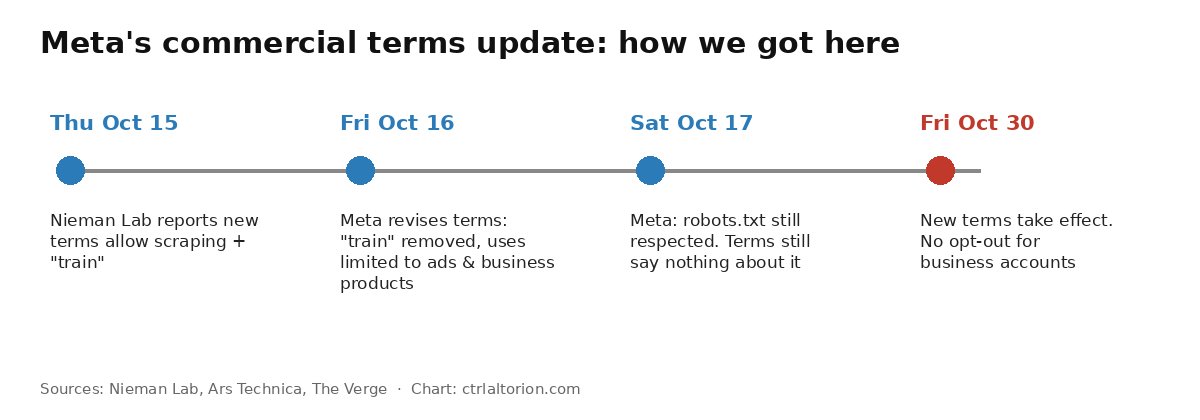
Thursday, October 15. Nieman Lab reported that Meta’s upcoming commercial terms would let Meta use automated software to “access, index, cache, analyze, collect, retrieve, or crawl” domains associated with a business account’s products or services. The original draft added that Meta “may use any content from such domains, web pages, or URLs to provide, develop, improve, research, train, and maintain the integrity of” Meta’s products. The word “train” set off alarms about AI.
Friday, October 16. Ars Technica compared the new terms against the old ones. Before this update, Meta’s crawling language lived mainly in its Ad Creative Generative AI Terms, and scraping was limited to your ads. Ars also flagged new language about “test credentials,” which experts told Nieman Lab could be used to get past paywalls. A Meta spokesperson pointed Ars to an existing Seller Agreement that already uses that phrase for e-commerce sellers. That afternoon, Meta published a revision. Per Nieman Lab, it removed “train” from the list of allowed uses and limited those uses to “advertising and business products” rather than all Meta products.
Saturday, October 17. The Verge reported the change. A Meta spokesperson said: “We’ve heard you and want to clarify: the crawling terms we consolidated only applied to our ads and business products, and we’ve clarified that in the terms themselves. It does not change how Meta uses web crawlers.” Meta told Nieman Lab that “news sites, like all other content owners, still have the ability to disable the crawler via robots.txt flags.”
Friday, October 30. The new terms take effect.
What the revised terms actually say
According to Nieman Lab’s copy of the revised clause, you authorize Meta “(or any entity acting on our behalf)” to use scrapers, bots and crawlers, and to “create test credentials,” to crawl the domains, pages or URLs “associated with your products or services,” and to pull updates periodically:
“…in order to provide, develop, improve, research, and maintain advertising and business products (including business, commercial and related products to help you create and deliver ads and other commercial content, provide users information about your products and services, and connect you with users who may be interested in your products and services)…”
Three things stand out for a small business.
“Train” is gone, but “develop” isn’t. Matt Topic, a media and intellectual property attorney at Loevy & Loevy, told Nieman Lab: “I think ‘develop’ is broad enough to include ‘train.’” He noted that “business product” doesn’t seem to be a defined term, and that Meta is presumably developing AI business products. Meta’s own listed examples of business products are “ads, Meta Business Tools and Meta Business Suite.”
The scope is still your whole site. Cornell law professor James Grimmelmann told Nieman Lab that “develop…advertising and business products” is “still broad enough to drive a truck through,” and that the revision “does nothing to restrict the ‘associated with your products or services’ [language] that would let Meta scrape entire sites.”
There’s still no robots.txt clause. Meta says robots.txt preferences are respected, and its spokesperson said the updates “don’t give us new rights that supersede those preferences.” But as Nieman Lab points out, none of that is written into the revised terms. A promise in a press statement is not the same as a promise in the contract you sign.
What didn’t check out in the early coverage
Some headlines said Meta “removed the language” entirely. The Verge’s report that the passage “no longer appears” is accurate for the specific sentence it quoted, the one with “train.” The crawling authorization itself is still there, rewritten and narrowed to advertising and business products, per Nieman Lab. Also, the revision was published Friday afternoon, October 16. October 17 is when most outlets reported it.
What it means if you run a small business
Most of the coverage has focused on news publishers, who could otherwise license their archives for real money. A bakery, a bike shop or a consultancy has less at stake in licensing fees. It’s still worth paying attention, for three reasons.
Your site is your content. Product descriptions, menus, guides and photos took time to make. Under these terms, Meta can use them to develop its business products, which may include AI tools that write ads or answer customer questions. You may be fine with that. You should get to decide.
There’s no opt-out short of leaving. Ars Technica reports that the update doesn’t let businesses opt out, and Nieman Lab confirms there’s no opt-out before October 30. For most small businesses, deleting the Facebook Page isn’t realistic. That leaves the technical controls covered below.
It’s a good moment to check your dependence on Meta. If a terms change you can’t refuse makes you uneasy, that’s a sign too much of your customer relationship runs through one company. We made that case in stop relying on Facebook for every customer, and in your Instagram is not a customer list we covered moving followers onto an email list you own.
Meet Meta’s crawlers
Before writing any robots.txt rules, you need to know who you’re talking to. Meta’s Web Crawlers page (updated May 21, 2026) lists five user agents. Here’s what Meta says each one does:
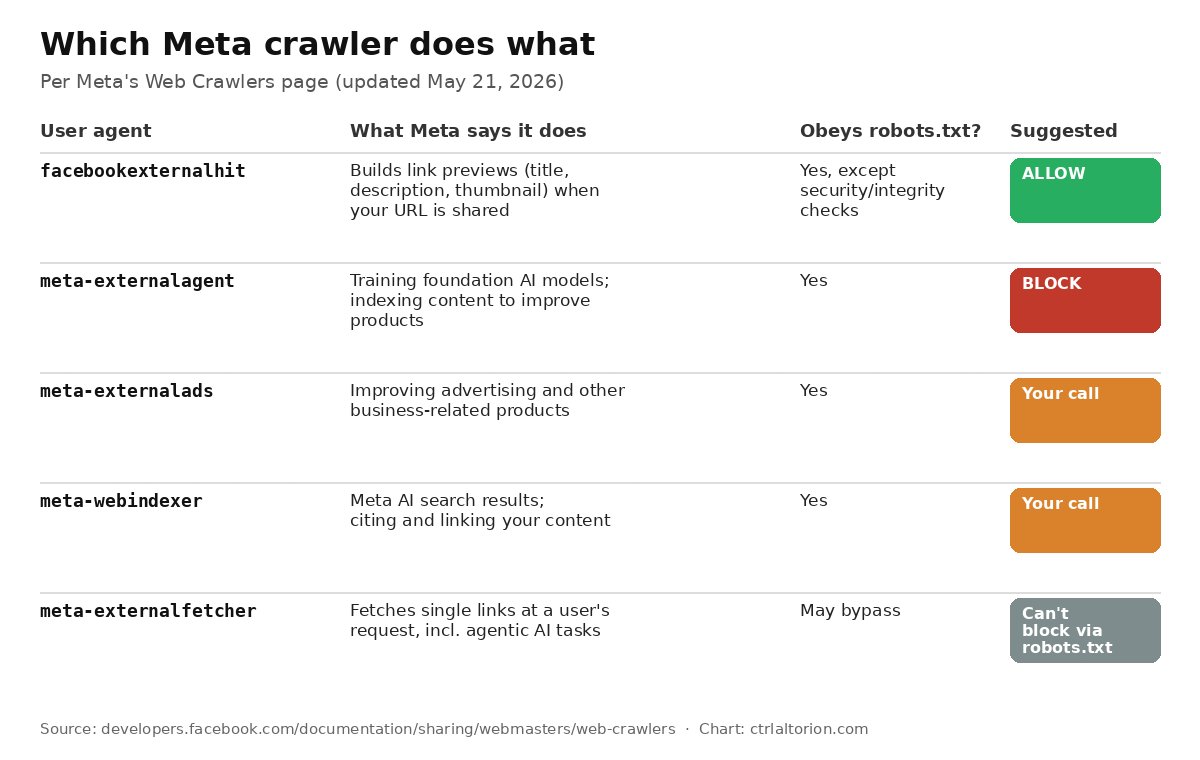
- facebookexternalhit crawls a page when it’s shared on Facebook, Instagram or Messenger. It “gathers, caches, and displays information about the app or website such as its title, description, and thumbnail image.” This is your link preview. Meta notes it “might bypass robots.txt when performing security or integrity checks, such as checking for malware.”
- meta-externalagent “crawls the web for use cases such as training foundation AI models or improving products by indexing content directly.” This is the AI-training crawler most people mean when they say “block Meta’s AI.”
- meta-externalads “crawls the web for use cases such as improving advertising and other business-related products and services.” Note the overlap with the new terms’ “advertising and business products” wording.
- meta-webindexer “navigates the web to improve Meta AI search result quality.” Meta says allowing it “helps us cite and link to your content in Meta AI’s responses.”
- meta-externalfetcher fetches individual links at a user’s request, including for agentic AI tasks. Meta says plainly that it “may bypass robots.txt rules.”
That last point matters. Meta’s own documentation lists two cases where robots.txt may not apply: facebookexternalhit doing security checks, and meta-externalfetcher doing user-requested fetches.
The robots.txt recipe
Here’s a starting point for a typical small-business site. It blocks the AI-training crawler and keeps link previews working:
# Block Meta's AI-training crawler
User-agent: meta-externalagent
Disallow: /

# Keep Facebook/Instagram/Messenger link previews working
User-agent: facebookexternalhit
Allow: /

# Everyone else: your normal rules
User-agent: *
Allow: /
How to add it:
- Find your site’s robots.txt at
https://yourdomain.com/robots.txt. If you’re on WordPress, Shopify, Squarespace or Wix, your platform or an SEO plugin usually has a robots.txt editor. - Add the two Meta blocks above your existing
User-agent: *section. Keep whatever rules you already have. - Save, then load
/robots.txtin a browser to confirm the new lines are live. - Wait. Meta says its crawlers “may cache the contents of robots.txt for up to 24 hours.”
- Test a link preview with Meta’s Sharing Debugger to confirm previews still work.
Should you also block meta-externalads?
The recipe above only blocks meta-externalagent. But if your concern is specifically the new terms, Meta’s own docs describe meta-externalads as the crawler for “advertising and other business-related products,” which is the exact purpose the revised terms authorize. Blocking it is the closer match:
User-agent: meta-externalads
Disallow: /
The trade-off: if you run Meta ads or use features that read your site to generate ad creative or product info, blocking this crawler could weaken those features. Meta doesn’t spell out the effects in its crawler docs. If you don’t advertise on Meta, blocking it costs you little.
What about meta-webindexer?
This one is about appearing, with citations, in Meta AI’s answers. If you want customers who ask Meta AI about “best coffee near me” to see your shop, leave it allowed. It’s the same judgment call as deciding whether to let AI search engines read your product pages, which we covered in your product page is read by an agent now.
Don’t block facebookexternalhit by accident
Some “block all AI bots” lists online sweep up every Meta user agent. If you block facebookexternalhit, links to your site shared on Facebook, Instagram and Messenger will lose their title, description and image. That’s a real cost for a small business whose customers share links in group chats. Keep the explicit Allow line for it.
What robots.txt can’t guarantee
Be clear-eyed about this part.
robots.txt is a request, not a lock. University of Wisconsin law professor Benjamin Sobel told Nieman Lab that compliance is “completely voluntary,” like a homeowner putting up a sign saying “Don’t look at my house.” Cloudflare’s documentation says the same: the file “expresses your preferences, but it does not prevent crawlers from accessing your content at a technical level.”
Meta’s own exceptions apply. By Meta’s description, meta-externalfetcher “may bypass robots.txt,” and facebookexternalhit may do so for security checks.
It only works going forward. Blocking a crawler today doesn’t remove anything it collected before.
It doesn’t change the contract. Your robots.txt says what you’d like. The terms you accept on October 30 say what you’ve authorized. Meta says it respects robots.txt, but that commitment isn’t in the terms. If the two ever conflict, nobody knows yet how a court would rule.
If you’re on Cloudflare: enforce it at the edge
If your domain runs through Cloudflare, you can go beyond a polite request. Cloudflare’s AI Crawl Control lists AI crawlers seen on your site and lets you set each one to Allow or Block. When you block one, Cloudflare “creates or updates a WAF custom rule on your zone to enforce that block,” so the request is refused rather than merely discouraged.
A few specifics from Cloudflare’s docs:
- On the free plan, AI Crawl Control identifies crawlers by user agent, so it catches well-known bots that identify themselves. Paid plans add more thorough detection through Bot Management.
- The Robots.txt violations column shows how often a crawler ignored your robots.txt, which is a useful way to check whether Meta’s crawlers are honoring your rules.
- Cloudflare can also generate a managed robots.txt for AI training crawlers through its AI bot policies, on all plans. Cloudflare’s example of the managed file includes a
Disallow: /for meta-externalagent, and it’s added in front of your existing robots.txt rather than replacing it. Setting Training to Disallow with Bot Preference Sync on also turns on edge blocking for AI training crawlers, though Cloudflare excludes “mixed-use crawlers” from that block. Cloudflare’s docs pair the two approaches: use robots.txt “to express your preferences and AI Crawl Control to enforce crawler-specific blocks.”
Check the Crawlers tab to confirm Meta’s user agents appear before you rely on it. As with robots.txt, make sure you don’t block facebookexternalhit unless you’re willing to lose link previews. Paid plans can also return a custom 403 or 402 response to blocked crawlers.
If you’re not on Cloudflare, your host or CDN may offer similar user-agent blocking. A user-agent block only stops crawlers that tell the truth about who they are, but that covers Meta’s documented ones.
A 30-minute checklist before October 30
- Read the current terms. Meta may revise them again. Skim the crawling clause in Meta’s commercial terms before the deadline.
- List the domains tied to your business account. The terms cover sites “associated with your products or services,” so think about your main site, your shop and any landing pages.
- Update robots.txt on each one. Block meta-externalagent. Decide on meta-externalads and meta-webindexer. Explicitly allow facebookexternalhit.
- Test link previews with Meta’s Sharing Debugger after 24 hours.
- Enforce at the edge if you can. Use Cloudflare AI Crawl Control or your host’s equivalent.
- Watch your logs. Look for meta-externalagent requests after the 24-hour cache window. If your analytics tool doesn’t show bots, server logs will. If you’re picking a new analytics tool anyway, our privacy-friendly analytics guide covers options that don’t feed the same ad networks.
- Start an email list if you don’t have one. It’s the hedge against the next terms change you can’t refuse.
Our take
Meta backed down on the word that caused the uproar, and that matters. But the revised Meta business terms still authorize broad crawling of anything “associated with” your business, for purposes legal experts call wide open, and the robots.txt promise lives only in press statements. For a small business, the right response isn’t panic or quitting Facebook. It’s a few lines in robots.txt, an edge block if you’re on Cloudflare, and a little less reliance on a platform that can rewrite its contract and give you two weeks to accept it.
FAQ
What is changing in Meta’s business terms on October 30?
Meta is folding crawling permissions, previously limited mostly to its generative AI ad terms, into its general commercial terms. Business accounts authorize Meta’s bots to crawl sites “associated with” their products or services and use that content to develop and improve Meta’s advertising and business products.
Did Meta remove the AI training language?
It removed the word “train” in a revision published Friday, October 16. Legal experts quoted by Nieman Lab say “develop… advertising and business products” is still broad enough to cover AI development, and the crawling authorization itself remains.
Can I opt out of Meta’s new business terms?
Not before October 30, according to Nieman Lab and Ars Technica. The only way to refuse is to stop using Meta business accounts. You can still use robots.txt and server-side blocking to limit which Meta crawlers reach your site.
How do I block meta-externalagent in robots.txt?
Add User-agent: meta-externalagent followed by Disallow: / to your robots.txt. Meta says changes can take up to 24 hours because its crawlers cache the file.
Will blocking Meta’s crawler break Facebook link previews?
Not if you block only meta-externalagent (and optionally meta-externalads). Link previews come from facebookexternalhit, which you should explicitly allow.
Does robots.txt legally stop Meta from scraping my site?
No. robots.txt is a voluntary standard. Meta says it honors it, but that commitment isn’t in the new terms, and Meta’s documentation notes two crawlers that may bypass it in certain cases. Cloudflare’s AI Crawl Control or a similar server-side block can enforce the choice technically.
Sources
5 refs- Nieman Lab, “Legal experts warn Meta’s new terms still grant broad scraping permissions, despite language changes” (October 17, 2026): https://www.niemanlab.org/2026/10/legal-experts-warn-metas-new-terms-still-grant-broad-scraping-permissions-despite-language-changes/niemanlab.org
- Ars Technica, “Meta may use sweeping new commercial TOS to avoid millions in AI licensing fees” (October 16, 2026): https://arstechnica.com/tech-policy/2026/10/meta-may-use-sweeping-new-commercial-tos-to-avoid-millions-in-ai-licensing-fees/arstechnica.com
- The Verge, “Meta removes language that may have allowed it to scrape news sites” (October 17, 2026): https://www.theverge.com/tech/1013409/meta-removes-language-that-may-have-allowed-it-to-scrape-news-sitestheverge.com
- Meta for Developers, “Meta Web Crawlers” (updated May 21, 2026): https://developers.facebook.com/documentation/sharing/webmasters/web-crawlersdevelopers.facebook.com
- Cloudflare Docs, “Manage AI crawlers” (updated July 28, 2026): https://developers.cloudflare.com/ai-crawl-control/features/manage-ai-crawlers/ and “robots.txt setting” (updated October 8, 2026): https://developers.cloudflare.com/bots/additional-configurations/managed-robots-txt/developers.cloudflare.com
comments
loading comments…
No comments yet. Start the thread.