Header image: a silver Mac Studio on a white desk next to a trailing pothos plant. Photo: Tranmautritam on Pexels (https://www.pexels.com/photo/mac-studio-computer-and-a-smart-phone-on-a-white-desk-18024477/).
Note: Meta released Muse Spark Open on October 15, 2026, one day before this was written. Prices and provider lists below were checked on October 16, 2026. Pre-orders for the M5 Ultra Mac Studio opened on October 16, 2026, but Apple’s configurator says the “512GB memory option for M5 Ultra coming late October,” and lists no price for it yet. Today the M5 Ultra starts at $5,499 (30-core CPU, 64-core GPU) or $6,799 (36-core CPU, 80-core GPU), with up to 256GB of memory. We’ll add the two-Studio total and payback once Apple prices the 512GB option. Meta says a full evaluation report is “available soon”; benchmark figures here are Meta’s own.
Meta’s Muse Spark Open is the first open-weight model in its class that Meta says will run on a desk. The pitch, from Meta’s launch post: an 816-billion-parameter model, 42 billion active per token, with a 1M-token context window, running “on your desktop using two Apple M5 Ultra Mac Studios with the latest MLX framework” (Meta AI Research). Meta calls it “the most capable US open-weight model to date.”
That’s a real milestone. It’s also easy to misread. “Runs on two Mac Studios” doesn’t mean “runs on the Mac Studio you might buy.” And “open weights” doesn’t mean “free for anything.” For a small shop, the question is simpler: should you buy hardware for this, rent it by the token, or wait?
This piece works through what Meta and Apple have actually published: what the model needs, what configuration fits it, what the hosted API costs today, where the break-even sits, and what the Muse Model License lets you do.
What Muse Spark Open is
From Meta’s model card on Hugging Face (Hugging Face):
| Spec | Muse Spark Open |
|---|---|
| Parameters | 816B total / 42B active |
| Architecture | Mixture-of-Experts transformer, 256 experts, 8 active per token, plus a 1.8B-parameter perception encoder |
| Context | 1M tokens at inference |
| Inputs / output | Text, image, video, audio in; text out |
| Checkpoints | BF16 and NVFP4 |
| License | Muse Model License |
| Release | October 15, 2026 |
Mixture-of-Experts (MoE) is the reason a Mac can run it at all. Only about 42B of the 816B parameters are used for each token, so each step reads a small slice of the weights. But every expert still has to sit in memory, because any token might need any of them. That’s why memory capacity, not raw compute, is the wall you hit.
Meta positions the model for coding and agentic work: long multi-step tasks, tool use, and software engineering. Its launch post describes on-device tests that included shipping iOS changes to the open-source Mastodon client Ice Cubes and driving DaVinci Resolve end to end. Those are Meta’s demonstrations, not independent tests.
Meta’s benchmark table compares Muse Spark Open with other open-weight models. On some, Meta reports it ahead (MCP-Atlas 89.2, HLE-Diamond without tools 26.1). On others, Meta’s own table shows rivals ahead: GLM 5.3 and Kimi K3 score higher on the Artificial Analysis Intelligence Index (45 and 44 vs 39) and on Terminal-Bench 2.1 (83.9 and 85.0 vs 76.4). So “most capable” depends on which column you read, and all of it comes from Meta’s own report.
What it takes to run Muse Spark Open locally
Meta’s model card states the floor plainly: running the weights yourself “requires a GPU with at least 700GB of VRAM for NVFP4 and 2TB for BF16.”
NVFP4 is a 4-bit floating-point format. It’s the compressed checkpoint, and it’s the one Meta tells Mac owners to use. The card notes that “quantized inference may show minor quality differences in edge cases compared to full-precision,” so the Mac version is not bit-for-bit the BF16 model.
Meta’s hardware platforms page lists the validated setups (Meta developer docs):
| Vendor | Hardware | Checkpoint | Runtime |
|---|---|---|---|
| NVIDIA | Blackwell, such as B300 and GB300: 4 GPUs for NVFP4, 8 for BF16 | BF16, NVFP4 | SGLang, vLLM, TensorRT-LLM, Dynamo |
| AMD | Instinct MI355X or MI350X, 8 GPUs | BF16, MXFP4, FP8 | vLLM |
| Intel | Xeon 6 with P-cores, such as the 6980P | INT4 | SGLang |
| Apple | Mac Studio with M5 Ultra: 2 × 512GB or 4 × 256GB unified memory | NVFP4 | MLX |
Everything except the Apple row is data-center hardware. Multi-GPU Blackwell and Instinct nodes are not things a five-person office buys. The Mac row is the only one that looks like a desk.
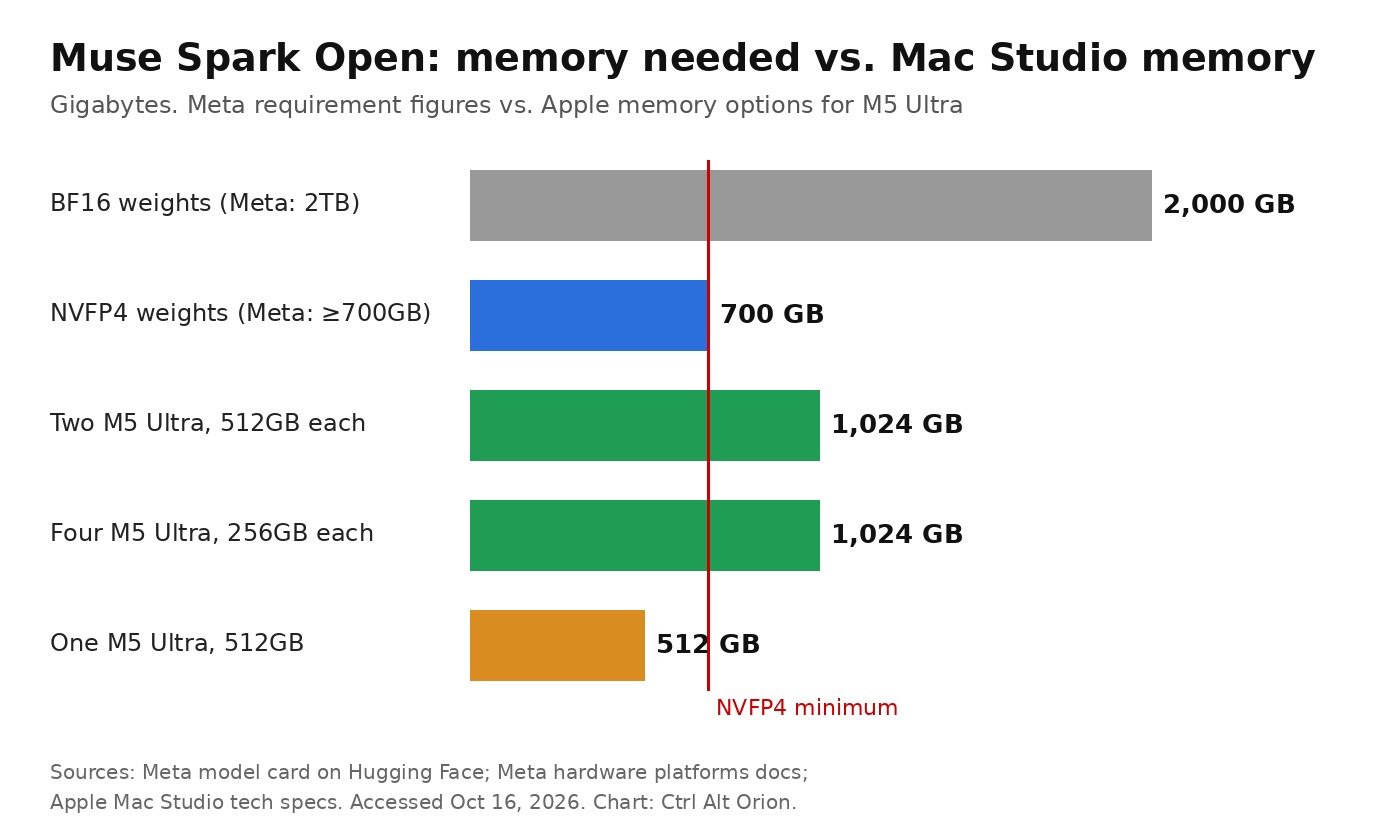 One 512GB Mac Studio falls short of the 700GB NVFP4 floor; two or four clear it. Chart: Ctrl Alt Orion, from Meta’s Hugging Face model card, Meta’s hardware platforms docs and Apple’s Mac Studio tech specs.
The Mac Studio setup Meta actually means
Apple’s Mac Studio tech specs list the M5 Ultra version with a 36-core CPU, 80-core GPU and 1.2TB/s of memory bandwidth, with 96GB of unified memory standard and options for 256GB or 512GB. Storage runs from 2TB to 16TB on the M5 Ultra. Each M5 Ultra Mac Studio has six Thunderbolt 5 ports, four on the back and two on the front, rated up to 120Gb/s (Apple).
Meta’s docs require one of two configurations:
- Two Mac Studios with M5 Ultra and 512GB each, or
- Four Mac Studios with M5 Ultra and 256GB each.
Either way you get 1,024GB of combined unified memory, the “terabyte of unified memory” Meta’s blog describes. The base 96GB M5 Ultra Mac Studio, the one Apple’s store page leads with, is nowhere near enough. Neither is a single 512GB machine.
Meta’s Mac cookbook adds the rest of the shopping list (Meta developer docs):
- macOS 26.2 or later on every Mac, which adds the RDMA-over-Thunderbolt driver MLX uses.
- MLX 0.30.1 or later, and mlx-lm installed on each Mac.
- A direct Thunderbolt 5 link between every pair of Macs. Meta suggests two cables per pair to double link bandwidth. With four Macs, each Mac connects to the other three.
- Disk space for the full NVFP4 checkpoint on each Mac, because each machine loads the model from its own disk.
- Passwordless SSH from the primary Mac to the others.
Meta estimates about four hours to complete the setup. When it’s running, mlx_lm.server exposes an OpenAI-compatible API on port 8080, so tools that talk to OpenAI-style endpoints can point at your Macs instead.
One detail matters for buyers: the cookbook says “four Macs serve fastest.” Meta doesn’t publish tokens-per-second figures for either Mac configuration, so we can’t tell you how much faster, or how fast either is in absolute terms. Treat any speed number you see on social media as unverified until Meta or Apple publishes one, or until you measure it yourself.
What the hardware costs
Here’s the honest answer for October 16: we can’t give you Apple’s price for that setup yet. Pre-orders opened on October 16, 2026, with the M5 Ultra starting at $5,499 or $6,799, but Apple lists the 512GB memory option as coming late October and hasn’t priced it. We’re not going to print a number from a rumor site or a reseller.
What we can tell you is how to do the math once the price is live:
- Price the right configuration. In Apple’s configurator, pick M5 Ultra with 512GB of unified memory (or 256GB if you’re going the four-Mac route). Storage has to hold the full NVFP4 checkpoint plus macOS and your apps.
- Multiply by the machine count. Two for the 512GB route, four for the 256GB route.
- Add Thunderbolt 5 cables. Two Macs with two cables per pair is two cables. Four Macs fully meshed is six pairs, so twelve cables at two per pair.
- Add AppleCare+ and sales tax if you’d buy them anyway.
That total is your hardware number. Call it H.
Remember what you’re buying: a pair (or quartet) of top-configuration workstations dedicated to one model. They’ll still be powerful Macs if Muse Spark Open gets replaced by something better next year, but the 512GB memory option only pays for itself if you use that much memory.
If you’re weighing a GPU rig instead, our RTX 5090 alternatives for local AI covers consumer cards. None of them gets anywhere near 700GB of memory, which is why Meta’s non-Apple options are all data-center hardware.
What the API costs instead
Meta says Muse Spark Open is available through API platforms at Baseten, Fireworks AI, Groq, Modal, Nebius, OpenRouter and Together AI.
We checked OpenRouter’s listing on October 16 (OpenRouter). It shows five providers serving the model, all at the same list price:
| Provider (via OpenRouter) | Input per 1M tokens | Output per 1M tokens | Cache read per 1M tokens |
|---|---|---|---|
| Modal | $1.25 | $4.25 | $0.15 |
| Together | $1.25 | $4.25 | $0.15 |
| Nebius Token Factory | $1.25 | $4.25 | not listed |
| Fireworks | $1.25 | $4.25 | $0.15 |
| Baseten | $1.25 | $4.25 | $0.15 |
OpenRouter lists a 1,048,576-token context and up to 262,144 completion tokens, with support for tool calling and structured JSON output.
Groq is on Meta’s partner list but did not appear among the OpenRouter providers when we checked. We didn’t confirm Groq’s own pricing, so we’ve left it out of the table.
At those prices, the math for a monthly workload is simple: input tokens in millions × $1.25, plus output tokens in millions × $4.25.
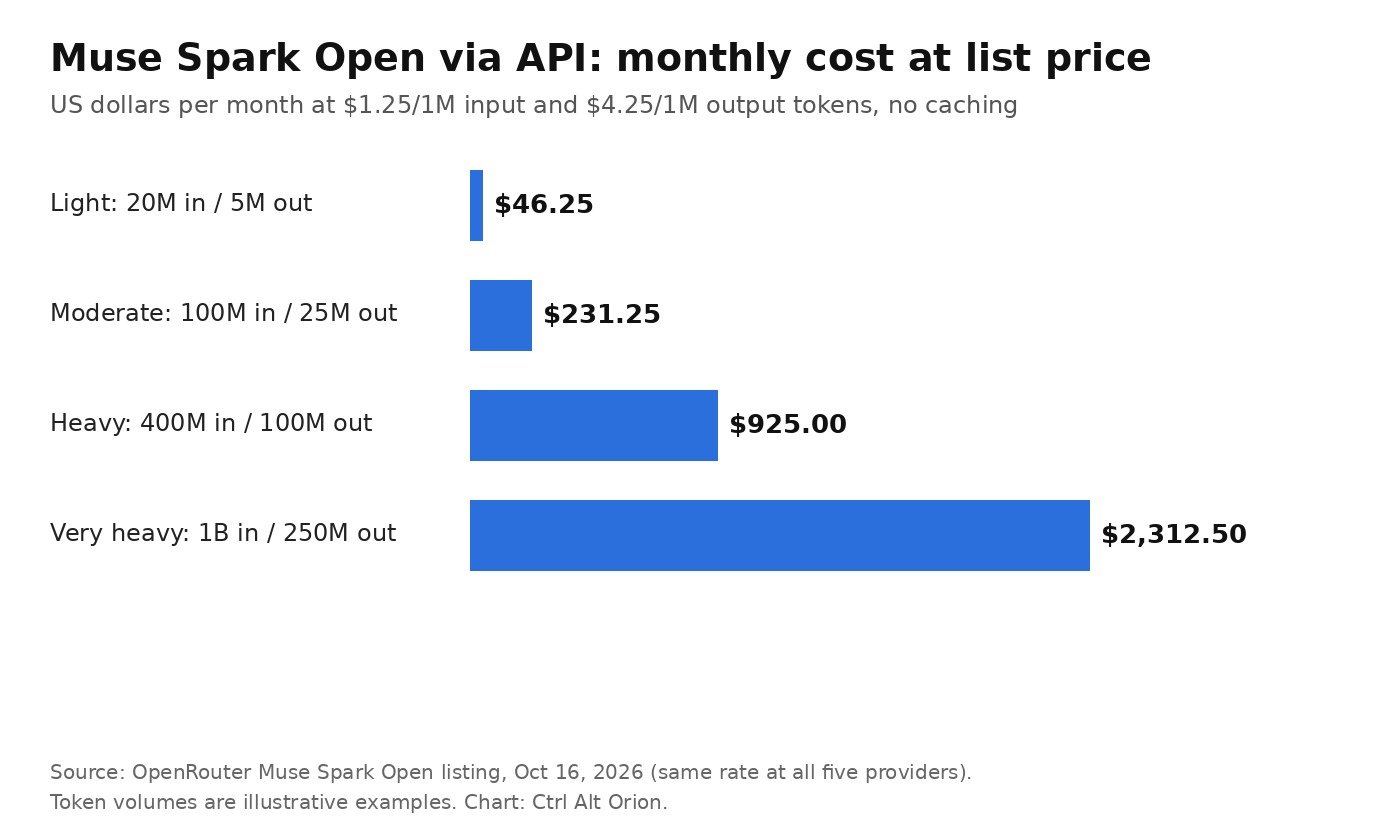 Even heavy use stays in the hundreds of dollars a month at list price. Chart: Ctrl Alt Orion, from OpenRouter’s Muse Spark Open listing on October 16, 2026. Token volumes are illustrative.
The workloads in the chart are examples, not measurements. Your real number depends on how much your tools send. One thing to know about this model: Meta’s default reasoning effort is “xhigh,” and Meta recommends high or xhigh for coding and agentic tasks. More reasoning means more output tokens, and output is the expensive side at $4.25 per million. If you can use “low” or “medium” for simple jobs, your bill drops.
Caching helps too. Agent tools resend the same long context over and over, and four of the five providers list cache reads at $0.15 per million, well under the $1.25 input price. OpenRouter notes that the price customers actually pay is often below list for this reason.
When the API is cheaper
The break-even is plain division: H ÷ your monthly API bill = months to pay off the hardware.
Using the chart’s example workloads, every $10,000 of hardware takes:
- about 216 months to pay back at $46.25 a month (light use),
- about 43 months at $231.25 a month (moderate),
- about 11 months at $925 a month (heavy),
- about 4.3 months at $2,312.50 a month (very heavy).
That’s before electricity, your setup time, and the fact that a busy Mac pair serves fewer people at once than a provider’s cluster. It also assumes prices stay where they are. Hosted prices for open-weight models have a habit of falling as more providers compete, which pushes your break-even further out. We made that argument at more length in your API bill has an expiration date.
Plug in Apple’s real price when it posts. For two top-memory Mac Studios, H will be a multiple of $10,000, so multiply the months above accordingly.
For most small shops the answer is the API. If you’re spending tens or low hundreds of dollars a month on coding assistants or document work, it would take years to earn back a pair of 512GB Mac Studios. The API also gives you the full 1M context and BF16-quality serving without you managing four hours of Thunderbolt cabling and SSH keys.
When two Mac Studios make sense
There are real cases for the local route, and most of them aren’t about price.
Data that can’t leave the building. If client contracts, health records or legal files mean you can’t send text to a third-party API at all, local is the only way to use this model. Meta’s model card is explicit that the weights run on your own system. Keep the license’s usage policy in mind: it restricts collecting or inferring sensitive information about people “unless you have obtained the right to do so in accordance with applicable law.”
Very heavy, steady token use. If your monthly API bill is already in the thousands and stays there, the payback math above starts to work in months rather than years. That’s usually a team running agents all day, not a shop asking a few questions.
You’d buy the Macs anyway. A video studio or dev shop already planning top-configuration Mac Studios for Final Cut, DaVinci Resolve or Xcode builds gets the model as a bonus. Meta’s own demo drove DaVinci Resolve with it.
Offline or air-gapped work. Once the weights are on disk, the model doesn’t need the internet.
When it doesn’t make sense: you want it for one person’s occasional coding help, you don’t have someone comfortable with SSH and command-line servers, or you’d need to buy the Macs only for this. A smaller model on one machine is often the better fit. Our always-on local agent with a 30B model piece covers what a single box can do without a terabyte of memory.
What the Muse Model License allows
Meta says the weights are released “under the Muse Model License with limited commercial terms, which allow many developers to use the model for free.” Here’s what the license text on Hugging Face actually says:
Broad permissions. You can use, copy, modify (including fine-tune), create derivatives, distill, merge, publish, distribute, sublicense and sell copies, free of charge, subject to the conditions.
Attribution is mandatory. You must “prominently display ‘Built with Muse Spark Open’” in the user interface of each product or service that uses the model or a derivative, or in its documentation, website or settings menu. “Derivatives” include models trained or distilled using the model’s outputs. If you build a customer-facing chatbot on it, the label has to appear somewhere.
The $20 million clause is about selling model access. If you or your affiliates offer AI models to third parties via API or similar (“Model as a Service”) and your combined gross revenue exceeds $20 million in any 12-month period, you must notify Meta and sign a separate agreement before offering Muse Spark Open that way. The license says this doesn’t apply to internal use, research, commercial work that isn’t Model as a Service, or using the model to power features of your own product. A small shop using it internally, or inside its own app, isn’t affected by this clause.
Meta claims no ownership of outputs.
No warranty. The model is provided “as is,” and you’re solely responsible for the safety and use of any derivatives.
Usage policy. Exhibit A prohibits a long list of uses, including unlicensed professional practice (financial, legal, medical), malware, spam, fake reviews, impersonation, and representing model output as human-generated. It also says Muse Spark Open “is not intended for individuals under the age of 18,” which matters if you deploy it where kids might use it.
The license text on Hugging Face sits behind an access form and is numbered from section 2. We’re describing what’s shown there. Read the full license yourself before you ship a product on it. This is not legal advice.
The practical path for a small shop
- Start on the API. Pick a provider from the OpenRouter list, or go through OpenRouter for automatic failover. The list price is the same everywhere we checked.
- Measure your real token use for a month, and watch reasoning effort and cache hits.
- Do the division once Apple’s M5 Ultra 512GB price is live. If the payback is measured in years, stay on the API.
- Buy hardware only for a reason the API can’t cover: data rules, constant heavy use, or Macs you were buying anyway.
- Add the “Built with Muse Spark Open” label to anything customer-facing.
If your office needs a sensible Mac for everyday work rather than a terabyte AI cluster, our Mac mini M6 back-office buying guide is the more relevant read.
FAQ
What is Muse Spark Open?
Muse Spark Open is Meta’s open-weight AI model released on October 15, 2026. It’s a Mixture-of-Experts model with 816B total and 42B active parameters, a 1M-token context window, and text, image, video and audio input. Meta built it for coding and agentic work.
Can Muse Spark Open run on one Mac Studio?
No. Meta’s model card says the NVFP4 version needs at least 700GB of memory. Meta supports two M5 Ultra Mac Studios with 512GB each or four with 256GB each, linked directly over Thunderbolt 5 and running MLX.
Where can I download the Muse Spark Open weights?
Meta publishes the weights on Hugging Face under meta-models, in BF16 and NVFP4 versions. Meta says they’re also available through Amazon SageMaker AI, Google Cloud Model Garden and Microsoft Foundry Models. Hugging Face asks you to accept the license first.
How much does the Muse Spark Open API cost?
On October 16, 2026, OpenRouter listed $1.25 per million input tokens and $4.25 per million output tokens, with cache reads at $0.15 per million, across Modal, Together, Nebius, Fireworks and Baseten.
Is Muse Spark Open free for commercial use?
Mostly, with conditions. You must display “Built with Muse Spark Open,” follow the usage policy, and, if you sell AI model access via API and your group’s revenue tops $20 million a year, sign a separate agreement with Meta. Internal use and features in your own product don’t trigger that clause.
How fast is Muse Spark Open on Mac Studio?
Meta hasn’t published tokens-per-second figures for either Mac setup. Its cookbook says only that four Macs serve faster than two. Treat any speed claim you see without a source as unverified.
Sources
6 refs- Introducing Muse Spark Open, The Most Capable US Open-Weight Model to Date — Meta AI Research, October 15, 2026research.meta.ai
- Muse-Spark-Open-816B-A42B model card and Muse Model License — Meta on Hugging Face, October 15, 2026huggingface.co
- Hardware platforms: Muse Spark Open — Meta developer docs, accessed October 16, 2026dev.meta.ai
- Muse Spark Open on Mac — Meta developer docs, accessed October 16, 2026dev.meta.ai
- Mac Studio technical specifications — Apple, accessed October 16, 2026apple.com
- Meta: Muse Spark Open, API pricing and providers — OpenRouter, accessed October 16, 2026openrouter.ai
comments
loading comments…
No comments yet. Start the thread.