
Most small shops that try to extract invoice data with AI end up doing the same thing: paste the invoice into a chatbot or LLM API, ask for JSON, then write code to check that the JSON is valid and the numbers make sense. Cloudflare Clairic, launched October 19 as a preview on Workers AI, takes a different approach. You send the invoice text and a list of typed fields, and it sends back values: an invoice number, a due date, a total. Each one comes with a confidence score and a probability that the value isn’t in the document at all.
It costs $0.10 per million input tokens, with no charge for output, because it doesn’t generate any. Here’s what Clairic does, a walkthrough built on Cloudflare’s own invoice example, and the preview limits that should shape how you use it.
Note (October 21, 2026): Clairic is a preview, and Cloudflare calls the current endpoint “an early checkpoint.” All code, parameters and responses below are copied from Cloudflare’s docs as of today. Check the model page before you build on it.
What Clairic is
Cloudflare calls Clairic an extraction model, the first in what it describes as a new class of “System One” models. Cloudflare’s blog credits the System One label to TypeSafe, which introduced the Jev decision model, and to Daniel Kahneman’s Thinking, Fast and Slow: a System One model should be fast and precise, while System Two models, like LLMs, do deliberate reasoning.
The practical difference is in how answers come back. An LLM writes text one token at a time, and you parse that text into a structure. Clairic, per the changelog, “does not generate tokens. It reads your input in one pass and decodes each answer under the rules of its type, so every answer is a valid value of the type you asked for, or null when the input does not determine it.”
Cloudflare’s blog post positions it next to two other model types:
- Extraction models (Clairic): “What’s the amount? When does it happen? How much will it be?”
- Decision models (Jev, Clef): “Which category is it? Is it legitimate? Which action should we take?”
- LLMs: “Why did it happen? How should we approach it? Can you fix it?”
The extraction-models docs page uses invoices to make the same split: extraction reads the total and due date, a decision model decides whether an invoice needs approval or review, and an LLM summarizes discrepancies between the invoice and a purchase order.
Field types
Per the changelog, you define as many fields as you need, each with a type:
| Type | Returns |
|---|---|
text | An exact span of the input, with its character offsets |
number | A number read or worked out from the input, honoring integer and decimals |
date, time, datetime | Real calendar dates and valid times, in ISO form |
duration | A length of time in the unit you choose |
list | Every matching text, number, or date, in input order |
estimate | A distribution inside your min and max, on your step grid, on a linear or log scale |
forecast | One estimate per future step of a series, up to 64 steps |
“Every scalar answer includes p_null, the probability that the input does not determine the value, and a confidence score.” Estimates and forecasts return a median and an 80% interval (p10 to p90), and you can ask for all 99 percentiles with options.include_quantiles.
There’s no hard limit on the number of fields. The model page says fields “that do not fit next to the state in one 8,192-token pass are split across parallel passes.” The context window is 65,536 tokens, and you can send up to four PNG, JPEG or WebP images with the text (4 MiB each, 8 MiB total; remote URLs aren’t accepted).
Pricing: what an invoice actually costs
The model page lists $0.10 per million input tokens, and the changelog confirms: “Because it generates no tokens, there is no output token charge.”
Cloudflare’s example response shows what counts as input. For the sample invoice below, the usage block reads:
"usage": {"state_tokens": 61, "image_tokens": 0, "schema_tokens": 472, "input_tokens": 655, "output_tokens": 0, "passes": 3}Two things stand out. First, the invoice text was only 61 tokens, while the field definitions (the schema) were 472. For short documents, your schema is most of the bill, so keep instructions short and only ask for fields you’ll use. Second, 655 input tokens at $0.10 per million works out to about $0.0000655 per invoice, or roughly 66 cents for 10,000 invoices like it.
That’s our arithmetic from the published rate and example, not a Cloudflare quote. Real invoices are longer, images add image_tokens, and Workers AI account-level pricing details may apply. Check the Workers AI pricing page for your plan. Still, at this rate, extraction cost is unlikely to be what decides whether the project is worth doing.
If you’ve been routing every extraction call to a frontier LLM, this is a good time to revisit that. Our two-tier model router guide covers how to send cheap, well-defined jobs to a small model and keep the expensive one for hard cases.
Walkthrough: a small-shop invoice
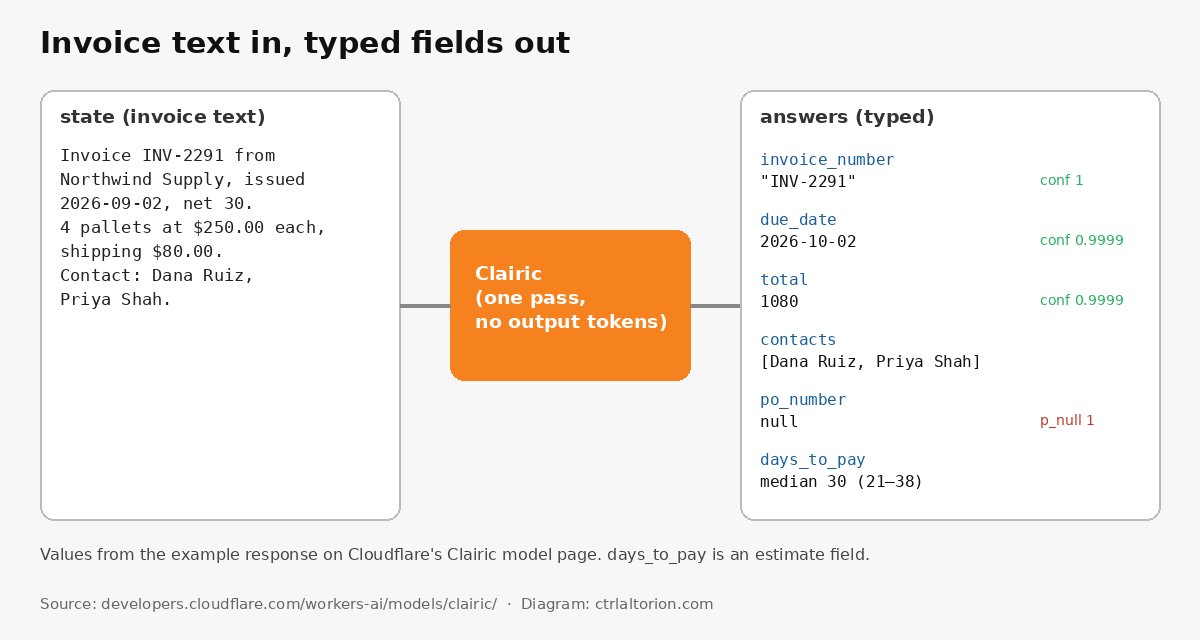
The request
This is Cloudflare’s own Worker example from the Clairic model page, copied as published. The invoice is one line of text: a supplier invoice for four pallets plus shipping, net 30.
export interface Env {
	AI: Ai;
}

export default {
	async fetch(request, env): Promise<Response> {
		const response = await env.AI.run("@cf/cloudflare/clairic", {
			model: "clairic",
			state: "Invoice INV-2291 from Northwind Supply, issued 2026-09-02, net 30. 4 pallets at $250.00 each, shipping $80.00. Contact: Dana Ruiz, Priya Shah.",
			fields: {
				invoice_number: { type: "text" },
				due_date: {
					type: "date",
					instructions: "Issue date plus the net payment days",
				},
				total: {
					type: "number",
					decimals: 2,
					unit: "USD",
					instructions: "Amount due including shipping",
				},
				contacts: { type: "list", items: "text" },
				po_number: { type: "text", instructions: "Purchase order number" },
				days_to_pay: {
					type: "estimate",
					min: 0,
					max: 120,
					step: 1,
					instructions: "Days after issue until this invoice is paid",
				},
			},
		});

		return Response.json(response);
	},
} satisfies ExportedHandler<Env>;
The request has three parts:
model: The model page lists it as required, with the value"clairic"(or the full model ID).state: The text to read. If you have an image instead of text, the model page saysstatemust be non-empty “unless images are sent.”fields: A map of field names to typed specs. Each spec has atypeand can addinstructions, plus type-specific settings likedecimals,unit,items,min,maxandstep.
The model page also documents an optional reference_date (an ISO date that “anchors dates written without a year”) and an options object. Those are the documented top-level parameters. We haven’t added any others.
The response
Here’s Cloudflare’s published response for that request:
{
  "model": "clairic",
  "answers": {
    "invoice_number": {"type": "text", "p_null": 3.8e-10, "span": [8, 16], "guess": "INV-2291", "confidence": 1, "value": "INV-2291"},
    "due_date": {"type": "date", "p_null": 1.9e-08, "guess": "2026-10-02", "confidence": 0.9999, "value": "2026-10-02"},
    "total": {"type": "number", "p_null": 2.3e-08, "guess": 1080, "confidence": 0.9999, "value": 1080},
    "contacts": {"type": "list", "value": ["Dana Ruiz", "Priya Shah"], "spans": [[120, 129], [131, 141]], "confidence": 0.9999},
    "po_number": {"type": "text", "p_null": 1, "span": [8, 16], "guess": "INV-2291", "confidence": 0.9995, "value": null},
    "days_to_pay": {"type": "estimate", "value": 30, "mean": 29.535, "median": 30, "p10": 21, "p90": 38, "p_below": 5.9e-06, "p_above": 1.2e-05}
  },
  "truncated": false,
  "usage": {"state_tokens": 61, "image_tokens": 0, "schema_tokens": 472, "input_tokens": 655, "output_tokens": 0, "passes": 3}
}
Reading it field by field:
invoice_numberis"INV-2291", withspan: [8, 16], the character offsets in the input. You can highlight exactly where it came from in a review screen.due_dateis2026-10-02. That’s computed, not copied: September 2 plus 30 days.totalis1080. Also computed: 4 × $250 + $80. It’s a two-step calculation, which Cloudflare says is in the reliable range.contactscomes back as a list with a span for each name.po_numberis the important one. The invoice has no PO number, sovalueisnullandp_nullis1. Notice theguessfield still says"INV-2291". That’s what the model would have picked if forced. Readvalue, neverguess, for anything you act on.days_to_payis an estimate: a median of 30 days with an 80% interval of 21 to 38. Cloudflare says estimates work best when the input has evidence, such as payment history. With one invoice and no history, treat this as decoration, not a forecast.
The preview’s limits, and how to work around them
Cloudflare is unusually direct about what the current checkpoint can’t do. Here are the limits from the changelog and blog, and what each one means for invoice work.
Don’t trust long arithmetic: do the math in code
From the changelog: “One- and two-step calculations, such as totals, differences, conversions, and date arithmetic, are reliable. Long chains of dependent steps and aggregations across many table rows are not yet. Extract the inputs with Clairic and do the math in code.”
A real invoice with 20 line items, a discount, and tax on some lines but not others is exactly the “long chain” Cloudflare warns about. The safe pattern:
- Have Clairic extract what’s printed: the issue date, the payment terms, the printed total, and the individual amounts.
- Compute the due date and the sum in your own code.
- Compare your sum with the printed total. If they don’t match, send the invoice to a human.
The issued date field appears in Cloudflare’s changelog version of the same example (issued: { type: "date" }), so you can request the raw issue date and the computed due_date side by side and check one against the other.
Here’s what the code-side check looks like, using only values from the response:
const a = response.answers;

// Do the date math yourself instead of trusting a long chain
const issued = new Date(a.issued.value);          // from an `issued: { type: "date" }` field
const netDays = 30;                                // or extract it as a number field
const myDue = new Date(issued);
myDue.setUTCDate(myDue.getUTCDate() + netDays);

const dueMatches = myDue.toISOString().slice(0, 10) === a.due_date.value;
The same idea applies to totals: extract the line amounts, add them up in code, and compare with what Clairic reports.
Use confidence and p_null to route to review
The changelog’s own words: “Every answer is well formed, not necessarily correct. Use confidence, p_null, and the intervals to decide what to automate and what to send to review.” The extraction-models docs add: “Before consequential or irreversible actions, check results against other evidence or require human review.”
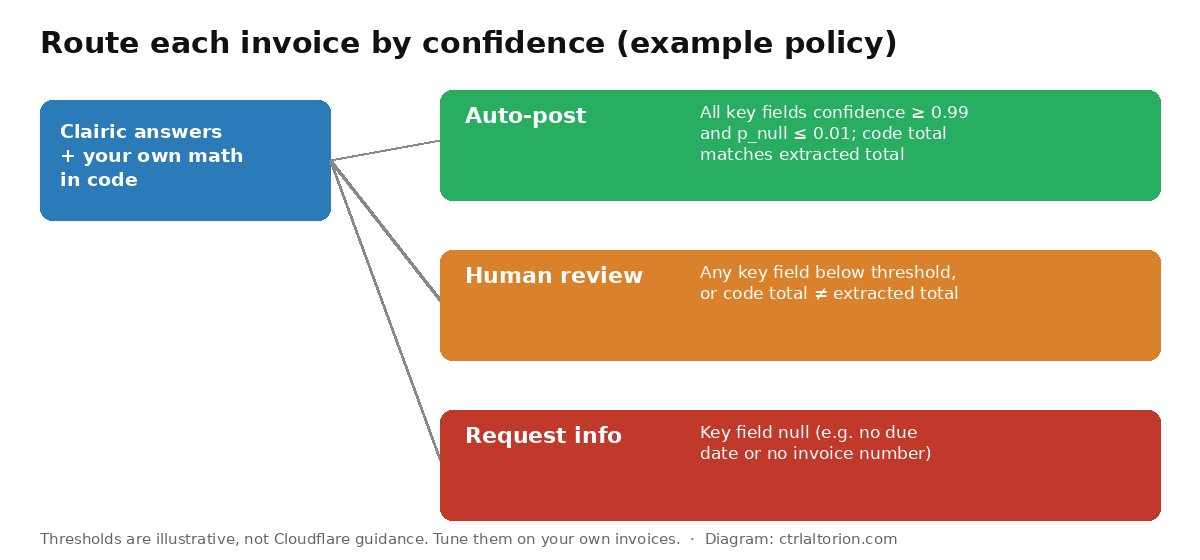
A simple routing policy for a small shop might look like this:
- Auto-post: every key field (invoice number, total, due date) has high confidence and low
p_null, and your code-computed total matches. - Human review: any key field falls below your threshold, or the totals disagree.
- Ask the supplier: a required field comes back
null.
Cloudflare doesn’t publish recommended thresholds, and the ones in our diagram are illustrative. Start strict and loosen them as you build a track record on your own invoices. The receipt example in Cloudflare’s blog shows why: on a photographed, angled receipt, the order number came back with confidence around 0.78 and the purchase time around 0.83, while the item quantity scored about 0.9997. Low scores show up exactly where a human would also squint.
Watch dates without a year
From the changelog: “Dates without a year are resolved from context. If a field depends on the current date, set reference_date or add a line such as Today: 2026-10-19 to the state.” If you want “days overdue,” give Clairic today’s date explicitly. The extraction-models docs make the same point: “State which date to use rather than assuming the model knows when the request runs.”
Estimates and forecasts are basic
Cloudflare says estimates “need evidence,” calibration “can run narrow on unfamiliar data,” and forecasting “is basic… It does not replace a time-series model trained on your data.” For invoice processing, stick to extraction and simple computation. Treat days_to_pay style estimates as experimental until you have payment history to feed them.
It’s a preview
The model page’s terms say Cloudflare may stop providing it and makes no guarantees about “continued availability.” Cloudflare says it intends to release open weights “soon,” but there’s no date. Build so you can swap the extraction step out, and don’t make Clairic the only path an invoice can take through your system. We made the general case for that in your API bill has an expiration date.
Workers AI structured output: Clairic vs an LLM with a JSON schema
If you already use Workers AI structured output with an LLM, here’s how the trade-off looks, based on Cloudflare’s description:
- Shape guarantee. Clairic’s answers are always a value of the declared type or
null. With an LLM, Cloudflare’s blog notes that “strings must be parsed and checked.” - Traceability. Text answers come back as spans with character offsets, so you can show where a value came from. LLM output doesn’t point back to the source.
- Cost model. Clairic charges only input tokens. An LLM charges input and output, plus reasoning tokens if it reasons.
- Missing values. Clairic returns
nullwith ap_nullscore. LLMs tend to fill gaps with something plausible. - Speed. Cloudflare’s blog reports Clairic took 0.46 seconds for the extraction step in its demo pipeline, against 16.1 seconds for GLM-5.3 doing the same step. That’s one vendor test on one example, so treat it as indicative.
Where an LLM still wins: anything open-ended. Summarizing a dispute, drafting a reply to a supplier, or explaining a discrepancy are LLM jobs. Cloudflare’s own demo chains the three types: Clairic extracts, Clef decides, and an LLM writes the reply.
Where this fits in a small-shop invoice flow
A realistic setup for a shop handling a few hundred supplier invoices a month:
- Intake. Invoices arrive by email or upload. Convert PDFs to text, or send page images (up to four per request).
- Extract. A Worker calls Clairic for invoice number, supplier, issue date, terms, line amounts, printed total and due date.
- Check in code. Recompute due date and total. Compare with the extracted values.
- Route. Auto-post, review or request info, per your confidence policy.
- Record. Write the values, plus the confidence scores and spans, to your accounting system or a spreadsheet. Keep the scores; they’re your audit trail.
If you’re building invoice automation from scratch, our guide to automating invoices covers the surrounding workflow: intake, approvals and payment.
Our take
Clairic is a sensible tool for a common, boring job. Typed values, source spans, explicit nulls and input-only pricing solve real annoyances with LLM-based extraction. At $0.10 per million input tokens, cost is close to irrelevant for a small shop’s invoice volume. The catch is the one Cloudflare states plainly: every answer is well formed, not necessarily correct. Use Clairic to read the invoice, use your own code to do the math, and use the confidence scores to decide what a person checks. Done that way, it’s a cheap way to stop retyping invoice totals.
FAQ
What is Cloudflare Clairic?
Clairic is an extraction model on Workers AI, available as a preview since October 19, 2026. You send text (and optionally up to four images) plus a set of typed fields, and it returns one typed value per field, with confidence scores and a probability that the value is missing.
How much does Clairic cost?
Cloudflare lists $0.10 per million input tokens. There’s no output token charge, because Clairic doesn’t generate tokens. Your field definitions count as input, so long schemas cost more than short ones.
Can Clairic calculate invoice totals?
It can handle one- and two-step calculations, such as adding shipping to a subtotal, which Cloudflare calls reliable. Long chains of calculations and sums across many table rows aren’t reliable yet. Cloudflare recommends extracting the inputs with Clairic and doing the math in code.
What do confidence and p_null mean?
confidence is a score for the returned answer. p_null is the probability that the input doesn’t contain or determine the value. When the input lacks a value, Clairic returns null. The guess field shows what it would have picked, but you should act on value.
Does Clairic work with scanned invoices?
It accepts up to four PNG, JPEG or WebP images per request. Cloudflare’s blog shows it reading a photographed receipt, with lower confidence on the harder-to-read fields. Remote image URLs aren’t accepted; send the image data in the request.
Is Clairic open source?
Not yet. Cloudflare says it intends to release the model with open weights “soon,” but it hasn’t given a date. For now it’s a hosted preview on Workers AI.
Sources
4 refs- Cloudflare Changelog, “Introducing Clairic: an extraction model for typed values, now on Workers AI” (October 19, 2026): https://developers.cloudflare.com/changelog/post/2026-10-19-clairic-workers-ai/developers.cloudflare.com
- Cloudflare Blog, “Introducing Clairic, a new System One class of extraction models” by Alex Reneau, Michelle Chen and Kevin Flansburg (October 19, 2026): https://blog.cloudflare.com/clairic-extraction-model/blog.cloudflare.com
- Cloudflare Docs, Clairic model page: https://developers.cloudflare.com/workers-ai/models/clairic/developers.cloudflare.com
- Cloudflare Docs, “Extraction models” (updated October 19, 2026): https://developers.cloudflare.com/workers-ai/concepts/extraction-models/developers.cloudflare.com
comments
loading comments…
No comments yet. Start the thread.