Header image: a dark GNOME Terminal at a Bash prompt — the environment the cf CLI now lives in. Photo: The GNOME Project / Wikimedia Commons, GPL.
 A terminal is about to become the front door to your whole Cloudflare account. Photo: The GNOME Project / Wikimedia Commons, GPL.
On September 28, Cloudflare shipped cf — a new command-line tool that is meant to replace Wrangler as the way you touch the platform. Not “replace” in the marketing sense of “there’s a new thing you might like.” Replace in the sense that Wrangler now has a published exit: when the open beta ends, Cloudflare will ship one final major version of Wrangler “that directs you and your agent to use cf,” and then 18 months of maintenance support before the lights go out.
Note: This broke on September 28, 2026 — two weeks old as of October 12. cf is in open beta; the 18-month clock on Wrangler starts when the beta ends, not today.
If you run a small shop, this is one of those migrations you can do in an afternoon and then never think about again — if you do it in the right order. Do it in the wrong order, specifically if you run cf deploy in a Wrangler project that hasn’t been migrated, cf will happily write its own configuration and ship a Worker that ignores your bindings. That’s not a hypothetical warning from the docs’ fine print; it’s the single line in Cloudflare’s own migration guide that would ruin your week if you skipped it. So this piece is the full walkthrough: what cf actually is, how to install it alongside Wrangler, how to migrate a real project, the commands that haven’t moved yet, and the free error monitoring you should turn on while you’re already elbow-deep in the config file.
What cf actually is (and what it doesn’t do to your Wrangler install)
The first thing to understand is that cf is not an alias or a re-skin. Wrangler grew up as the Workers CLI, and over the years it accumulated around 280 commands covering Workers and its adjacent products. cf is a different animal: it’s generated — programmatically, from the schemas that describe the entire Cloudflare API — which gets it to more than 2,900 commands covering zones, DNS, storage, security settings, Workers, and everything else. That last part is quietly a big deal for anyone who manages a real zone: the WAF and proxy settings we’ve told small shops to check hostname-by-hostname — like the preproduction server that leaked a dataset because only the main site had bot protection — are now one CLI command away instead of one dashboard expedition. Cloudflare’s API has over 3,500 operations, and cf’s generated surface means most of them are now typed, searchable, and scriptable from one binary. The machinery that generates it, a pipeline Cloudflare calls Forge, was open-sourced at the same time.
The part that should make a four-person shop sit up: cf delegates. Where a Worker still needs Wrangler’s bundler — esbuild-based projects, Rust Workers, Python Workers — cf hands off to Wrangler under the hood rather than replacing it. Your existing toolchain isn’t thrown out; it’s wrapped. The new-project defaults change (more on Vite below), but a migrated project that keeps the Wrangler bundler is still, under the covers, a Wrangler project. That’s why “install cf and keep Wrangler” is a supported, documented state rather than a phase you’re supposed to grow out of.
The other framing worth internalizing is why now. The launch post is remarkably candid about the driver: agents. In March 2026, agents were responsible for a quarter of Wrangler use, up from single-digit percentages the year prior. The week before the launch post, agent usage hit 48% — nearly half of all Wrangler invocations were a coding agent typing commands, not a human. Wrangler’s hand-built command surface was never designed for that, and it showed: agents guess at flags, miss commands that don’t exist, and hallucinate syntax. cf’s answer is to make the CLI searchable — cf cli search "create a DNS record" returns up to five matching commands as JSON, locally, no credentials needed — and to make JSON the default output format everywhere, so an agent (or a shell script, which is the same thing in worse handwriting) can consume what comes back without scraping prose.
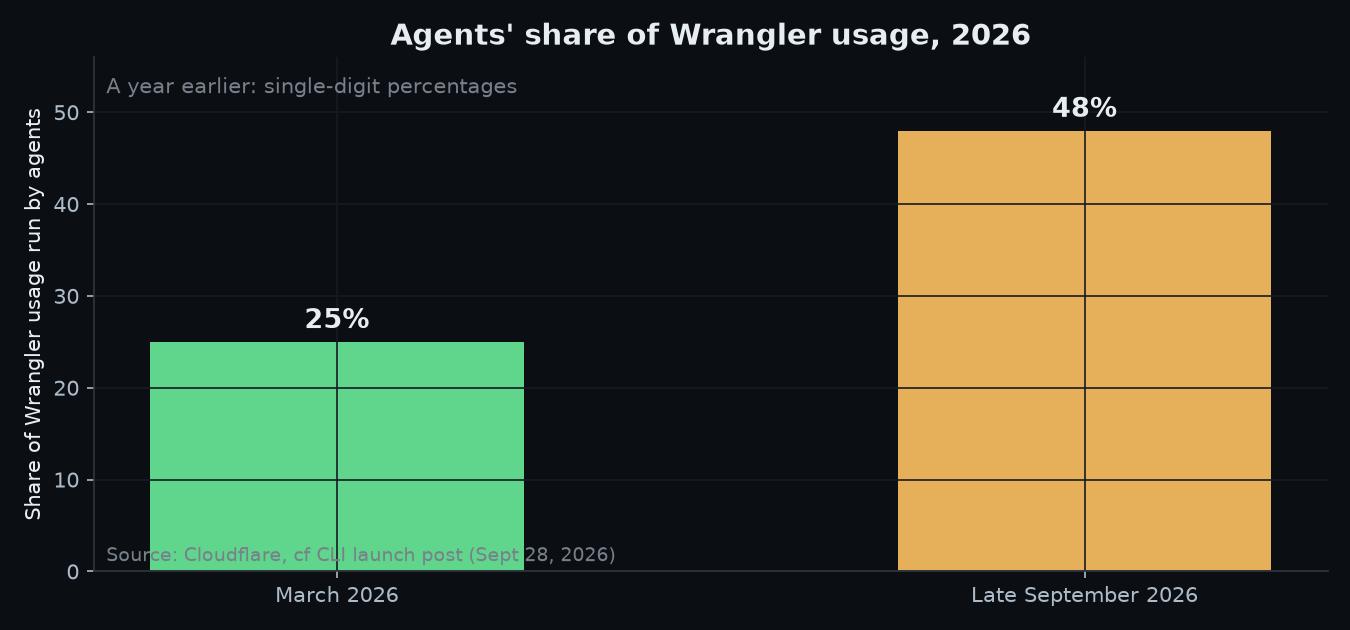 Half the traffic on your deploy tool was never human. Chart: Ctrl Alt Orion, from Cloudflare’s launch post.
Three more platform-level changes ride along with cf, and one of them will affect you on day one:
cloudflare.config.tsis the new config format — TypeScript, “the new configuration format for the whole of Cloudflare, starting with Workers.” Yourwrangler.tomlis not renamed; it’s superseded. Cloudflare says some internal Wrangler configuration files have been condensed by 40% by moving to programmatic config, and if you’ve ever hand-maintained a 400-line TOML with four environments, you can feel which direction that wind blows.- Vite becomes the default for new projects. Migrating ones can keep the Wrangler bundler — this is a choice cf asks you about at migration time, not a mandate.
- JSON is the default interface for command output, which sounds minor until the first time you pipe
cf zones listintojqand it just works.
cf is open source (Apache-2.0/MIT), and bug reports go to the GitHub repo like any other tool. For a small shop, that matters less philosophically than practically: when your deploy tool eats something, you want the issue tracker to be public.
Install it without touching your Wrangler session
The install is one line, and it does not uninstall, overwrite, or shadow Wrangler:
npm install --global cf(yarn global add cf, pnpm add --global cf, and bun add --global cf all work too.) There’s no brew formula and no standalone binary yet — it’s an npm package — and the package installs two commands that run the same CLI: cf and cloudflare. If some other tool on your PATH already owns cf, use cloudflare instead. That’s the whole collision strategy.
Requirements worth writing down:
- Node.js 22.18 or later. If you’re on the LTS that shipped with your last laptop, check before you assume.
- Bun is not supported as the runtime for commands that load
cloudflare.config.ts— they fail. Bun installs the package fine; it just can’t run the config-loading half. Don’t build your CI image on Bun for this. - A Cloudflare account, and that’s it. No Wrangler removal, no cleanup.
Then log in — and here’s the gotcha that will bite every experienced Wrangler user on day one: cf keeps its own credentials and does not reuse a Wrangler login. You will type cf auth login, think “I’m already logged in, this will be instant,” and be wrong. The docs say it plainly: “Sign in once, even if you already use Wrangler.” Also note: cf does not support the Global API Key, only API tokens.
cf auth login
cf auth whoami
cf auth login prints a link and a one-time code and opens the browser for you; --no-browser exists for SSH sessions, and --force re-runs the flow when you need to switch accounts. On a headless box, cf auth whoami confirms you’re actually authenticated before you find out mid-deploy.
Two more auth patterns that small shops actually need:
Profiles, for the “my dev account and the client’s account” problem. If you touch more than one Cloudflare account — your own, a client’s, a staging tenant — profiles keep the tokens separate without re-login dances:
cf auth create work
cf auth activate work
cf auth list
Every command takes --profile <NAME> if you want to be explicit, which you should be in anything that runs unattended.
CI, where there’s no browser. Export the two variables and cf skips the interactive flow:
export CLOUDFLARE_API_TOKEN=<API_TOKEN>
export CLOUDFLARE_ACCOUNT_ID=<ACCOUNT_ID>
That’s the same pattern your Wrangler CI already uses, so your secrets manager doesn’t need new entries — just a new job that consumes them.
A first deploy: cf init, the 5173 port, and cf deploy
The fastest way to feel the shape of cf is to build something new with it:
cf init my-workerIt asks which package manager you use, creates the project, installs dependencies, and generates types for your bindings. (cf init my-worker --package-manager npm skips the question; --no-install skips the install.) What lands on disk is recognizably different from a Wrangler scaffold:
my-worker/
├── cloudflare.config.ts
├── vite.config.ts
├── src/index.ts
├── package.json
├── tsconfig.json
└── .cloudflare/types/index.d.ts
The package.json lists cf and the Cloudflare Vite plugin — and not Wrangler. That’s the visual tell that this is a cf project, not a Wrangler project with a new hat.
cf devopens a dev server at http://localhost:5173/ — the Vite default port — and this is where your muscle memory betrays you. Wrangler served on 8787. Wrangler Pages served on 8788. cf serves on 5173, because in a Vite project cf dev runs the framework’s own server, and the port belongs to server.port in vite.config.ts, not to a --port flag. If your team’s muscle memory (or your test scripts, or your browser bookmarks) point at 8787, budget ten minutes for the retraining.
For an existing app, cf init . detects the framework and configures the project in place. Two honest caveats from Cloudflare’s own docs: detection is not a build guarantee — and specifically, “Astro 6 and later does not build with cf during the beta.” This site, for what it’s worth, runs Astro 5, which is inside the supported lane — but that sentence is exactly why you check your own stack before you plan the move.
Deploying is the part cf wants to make boring:
cf deploybuilds the project, validates the Build Output, resolves your credentials and account, uploads a new Worker Version, and deploys it. The flags you’ll actually use: --message "Fix header parsing" --tag v1.2.0 (deploy annotations your future self will thank you for), --dry-run (builds and validates with zero API requests and no credentials — put it in CI as a smoke test), and --prebuilt for the CI pattern where one job builds and another deploys:
cf build                      # writes Build Output to .cloudflare/output/v0/
cf deploy --prebuilt --mode production
Note that word mode. Wrangler’s --env is now --mode/-m in cf — cf dev --mode staging — and your fingers will type the wrong one for a month. The docs are unambiguous that environments converted by migration come across as modes, so it’s a vocabulary change, not a semantic one.
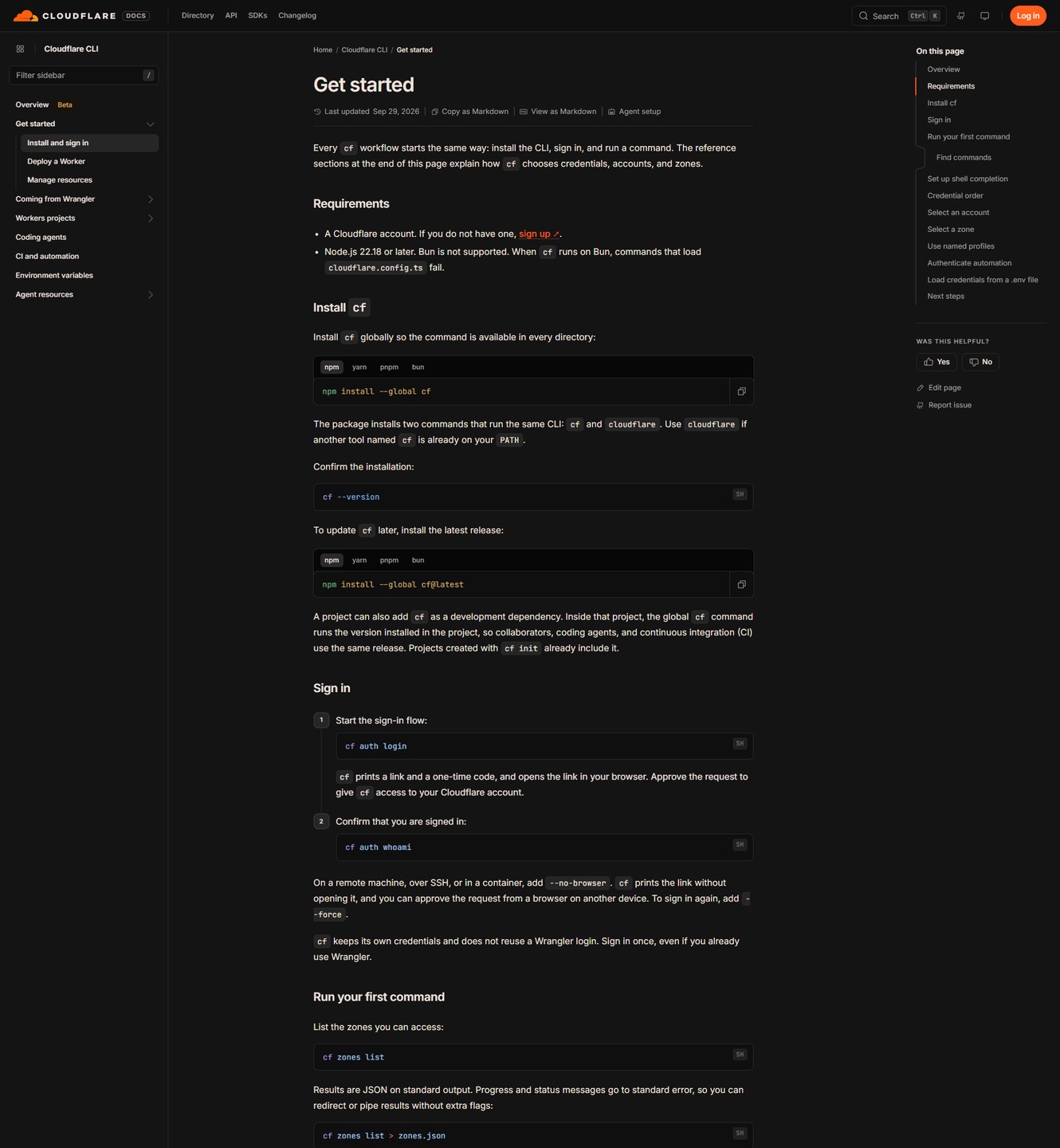 The get-started page the commands above come from. Image: Cloudflare (developers.cloudflare.com).
Migrating a real Wrangler project: cf migrate, the dry-run, and the TODO guardrails
This is the section you came for, so let’s use a real project instead of a toy. Back in August we walked through building a stateless MCP server on Cloudflare Workers — an invoice-lookup tool a bookkeeper’s AI assistant could call, deployed with wrangler deploy and configured with a wrangler.toml holding one D1 binding and a bearer-token check. That’s about as representative as a small-shop Worker gets: one entry point, one database binding, a scheduled cleanup cron, three environments. Here’s what moving it to cf looks like, exactly.
Pre-flight, in order:
- Clean worktree, or no migration.
cf migraterefuses to run on a dirty Git checkout unless you pass--force. Don’t pass--force. The guardrail exists because the tool is about to write a new configuration file next to your old one. - Wrangler 4.136.0 or later in the project. If your lockfile is older, bump it first. (Yes, that’s a Wrangler version number inside the cf migration guide — the wrapping relationship again.)
- Dry-run first, always:
cf migrate --dry-runThat prints what the migration would do without writing anything. Then the real thing:
cf migrateMechanically, here’s what it does, per the migration guide: it reads the Wrangler configuration file (wrangler.json, wrangler.jsonc, or wrangler.toml — exactly one, in the current directory, if you don’t pass a path), converts bindings, routes, triggers, and environments, writes cloudflare.config.ts beside the old file, and adds cf to the project as a development dependency. It never overwrites files. Anything it can’t resolve becomes an inline TODO in the generated config, and the tool blocks with a genuinely good error message — Error: Migration incomplete. Resolve every cf migrate TODO in 'cloudflare.config.ts'. — until you’ve handled every one. For our invoice worker, the D1 binding, the cron trigger, and all three environments converted cleanly; the only TODO left was the keep_vars flag, which cf made me express as an explicit field instead of an inherited quirk. That’s a good trade: migrations that force you to look at your own defaults once beat migrations that guess.
The one decision you can’t skip: the bundler. cf migrate asks whether to use the vite or wrangler bundler. The guide’s answer for existing projects is the one to take: keep the Wrangler bundler “unless the project already uses the Cloudflare Vite plugin.” You do not need to adopt Vite to migrate. Migrating and re-bundling are two separate projects, and doing them in the same commit means you can’t tell which one broke the deploy.
Validate before you trust it:
cf build
cf deploy --dry-run
cf deploy
cf build writes Build Output to .cloudflare/output/v0/ without uploading anything (no credentials needed — it’s a pure local check). cf deploy --dry-run validates the output and resolves the config against your account without shipping. Then, and only then, cf deploy.
And now the warning, verbatim from Cloudflare’s docs, because it’s the one line in this whole piece that can burn a production system: “Do not run cf dev, cf build, or cf deploy in a Wrangler project, including from CI, until you have run cf migrate.” The reason is structural: cf’s automatic configuration “does not read Wrangler configuration files.” Run it in an unmigrated project and it will write its own config — which will not contain your bindings. A Worker deployed without its D1 binding doesn’t fail loudly at deploy time; it fails at 2pm on Friday when the first request touches the database. If you take one sentence from this piece into your deployment runbook, take that one.
The commands that haven’t moved yet (and the ones that never will)
cf is not a finished replacement for Wrangler, and Cloudflare is honest about the gaps. The two you’ll hit immediately:
| What you want | Wrangler (still works) | cf |
|---|---|---|
| Live production logs | npx wrangler tail <WORKER_NAME> | not yet supported — keep Wrangler |
| Set a single secret | wrangler secret put <NAME> | not yet supported — keep Wrangler |
| Run a D1 query | wrangler d1 execute my-database --remote --command "SELECT 1" | cf d1 query <DATABASE_ID> --sql "SELECT 1" |
| Environments | --env staging | --mode staging |
| Local dev port | 8787 (Workers) / 8788 (Pages) | 5173 (Vite projects) |
| Pages deploy | npx wrangler pages deploy <DIR> | n/a — see the Pages section below |
Note the subtle one in that table: Wrangler’s D1 commands accept the database name; cf takes the ID. It’s a small paper cut, and the reference docs are where you’ll check the mapping for anything more exotic.
The commands that don’t exist in either and never did are the ones agents used to invent. That’s what cf cli search is for:
cf cli search "create a DNS record"
cf schema d1 create
cf d1 create --name my-database --dry-run
The first returns up to five matching commands as JSON. The second dumps the full schema for a command so you can see its arguments before you run it. The third previews an operation without executing it. Teach your coding agent those three commands and it stops guessing at your infrastructure — which, given that agents are now half of all CLI traffic on this platform, is the actual design brief for this whole tool.
One more piece of housekeeping worth doing on install day:
cf complete zsh # also: bash, fish, powershellTurn on Issues while you’re in the config file anyway
You’re going to be elbow-deep in cloudflare.config.ts the day you migrate anyway, so do this in the same sitting. Issues is Cloudflare’s built-in error monitoring for Workers, shipped the same week as cf, and it’s the feature your shop will feel before any CLI ergonomics do.
What it does: detects production failures — uncaught exceptions, failed invocations, HTTP 5xx responses, console.error() output, and log lines carrying stack traces — and groups related failures into a single issue. No SDK, no wrapper, no OpenTelemetry plumbing: it’s built into the Workers runtime. It even flags runaway alarm conditions and code writing large volumes of logs inside loops. It processes new traffic only, so it won’t backfill your history; occurrence details are kept for seven days (issues stay listed after their occurrences expire), and issues don’t auto-resolve — you mark them Active, Resolved, or Ignored, which is the correct amount of ceremony for a four-person team.
Pricing: “free to use during the beta period.” Post-beta pricing isn’t published yet, so treat that as a term that could change, and set a reminder to check when the beta ends.
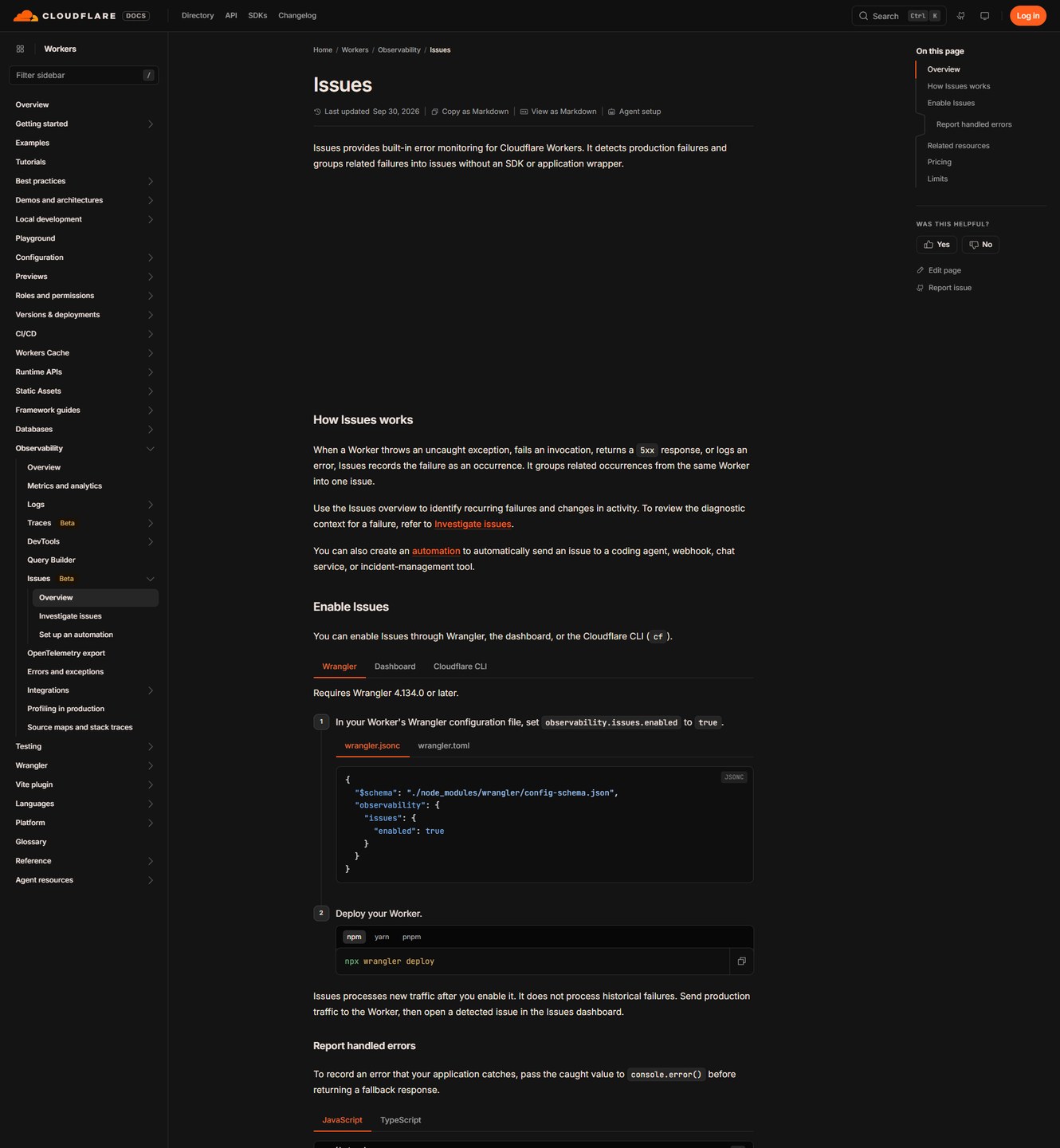
In a cf project it’s three lines in the config you just migrated:
import { defineConfig } from "cf/config";
import * as entrypoint from "./src/index.ts" with { type: "cf-worker" };

export default defineConfig({
  worker: {
    name: "example-worker",
    entrypoint,
    compatibilityDate: "<COMPATIBILITY_DATE>",
    observability: {
      issues: {
        enabled: true,
      },
    },
  },
});
(If you’re still on the Wrangler side, the same flag is "observability": { "issues": { "enabled": true } } in wrangler.jsonc, and it needs Wrangler 4.134.0 or later.)
The gotcha that belongs in your runbook: enabling Issues in the dashboard is not enough if you deploy with Wrangler. The docs warn that the next wrangler deploy turns Issues back off unless the config file also carries the flag. Config wins. That’s healthy long-term — your monitoring shouldn’t be a setting someone clicked in a UI once and nobody can find again — but it will silently disable itself on you if you flip the toggle without touching the file.
Where Issues earns its keep for a small shop is the automation layer. Triggers are either an occurrence threshold (fires once when an issue’s count crosses a line you set) or recurrence after inactivity (fires when a resolved issue comes back). Destinations are where it gets 2026: Claude Code, Cursor, and Devin are first-class targets — an issue can be delivered to your coding agent as a prompt, with the error, stack trace, logs, and the Worker version attached — alongside plain webhooks (with optional secrets or mutual TLS), chat, and incident-management tools. Delivery retries up to three times; the run history sticks around for 30 days; you get 50 automations per account, which is a number no four-person shop will ever approach.
 Issues groups your 5xx storm into one entry with the evidence attached. Image: Cloudflare (developers.cloudflare.com).
And cf can read Issues too, which closes the loop for agent-driven ops:
cf observability issues list --order-by count --order desc --per-page 1
cf observability issues occurrences <ISSUE_ID> --per-page 1
So the full pipeline for an unattended shop is: production throws a 5xx → Issues groups it → the automation delivers the prompt to your coding agent → the agent lists the occurrences with cf observability issues occurrences, reads the stack trace and Worker version, fixes the code, and deploys with cf deploy --message "fix: …". Cloudflare’s own Workflows team says it found two real bugs — a migration stuck in a retry loop, and a deletion process that never completed — within a day of turning Issues on. That’s the honest scale of the win: not a dashboard you watch, a bug-discovery loop that runs while you’re doing something else.
One last code-level note: handled errors aren’t detected by default — only uncaught ones. If your Worker catches an exception and returns a friendly fallback, pass the caught value to console.error() before you return it, or Issues will never see it.
If your site deploys from Git (like this one), the CLI question answers itself
Now the section half of you actually need, because there’s a whole class of Cloudflare sites that should read this piece and then do nothing. This site — the one you’re reading — builds and deploys from a Git integration: push to main, Cloudflare builds, the site goes live. If that’s your setup too, here’s the honest answer: cf does not deploy Pages, and Git-connected deployments never touch a local CLI anyway. There is no cf pages deploy. Your current pipeline has no local step for cf to replace.
What has changed under you is the platform’s posture. Cloudflare’s own Pages documentation now opens with a banner — literally, “Are you sure you want to use Pages?” — directing new projects to Workers, and there’s a first-party migration guide for moving a Pages site to Workers with static assets. The pitch is continuity: static-asset requests stay free, Functions invocations price the same as Workers, and wrangler pages dev/wrangler pages deploy become wrangler dev/wrangler deploy (ports shift from 8788 to 8787). The one structural difference worth checking before you get excited: Workers “does not support any domain whose nameservers are not managed by Cloudflare.” If your site’s DNS lives elsewhere, that’s not a nuance — it’s a hard stop.
So the decision tree for a Pages shop, as of today:
- Deploying by Git push, happy, no local build step: do nothing. Nothing here affects you yet. The migration guide will still be there next quarter.
- Direct-upload Pages (wrangler pages deploy from CI): you’re the actual audience for the Pages→Workers guide — especially if you run the growing-app kind of site that already put Cloudflare in front of the origin. Migrate the project to Workers static assets first, then that Worker to cf when the beta’s rough edges sand down.
- New project: start it as a Worker with static assets.
cf init .in your static site’s directory does the whole dance — static sites “still don’t require a configuration file to start, and deploying them is as simple as runningcf deploy” per the launch post. That’s the one place cf genuinely changes today’s behavior for a content site.
The first-person footnote, because this piece promised hands-on: this site is exactly that first case, plus an Astro version one step below the beta’s known cutoff. Our plan is to let the beta finish, then make one deliberate afternoon of it — migrate, turn on Issues, and delete nothing.
When you should not migrate this week
The honest counterweight, in the house style:
- It’s a beta. “Commands, configuration, and Build Output can change before the stable release.” Betas are for trying, not for betting the quarter on. Put cf on your laptop, not in your production CI, until stable.
- Your stack may be pinned out. “Astro 6 and later does not build with
cfduring the beta” — if that’s your framework version, you’re explicitly excluded for now. There is no workaround worth inventing. - Don’t migrate mid-project. A migration commit should contain exactly one thing: the migration. The clean-Git-worktree requirement isn’t bureaucracy; it’s so you can bisect when something’s off.
- Keep Wrangler installed. You still need it for
wrangler tailandwrangler secret put, and the two CLIs are designed to coexist. There is no prize for removing it early. - Do one thing at a time. Migrating to cf, switching bundlers, and moving Pages→Workers are three separate projects. If your migration plan contains all three in one PR, you will not be able to tell which one broke when something breaks. Something always breaks.
And when you do migrate, put the line Cloudflare recommends into your AGENTS.md (or CLAUDE.md, which is what this repo calls it):
When interacting with Cloudflare, use the
cfCLI unless the project has a Wrangler configuration file.
That one sentence is what keeps your coding agent from re-teaching itself Wrangler flags every session — which, given that agents are now half the CLI traffic on this platform, is the quiet point of the whole release.
Sources
8 refs- Introducing cf: the agentic CLI for the entire Cloudflare API — Cloudflare Blog, September 28, 2026: open-beta launch; agent usage at 25% in March 2026 and 48% the week of publication; ~280 Wrangler operations vs 2,900+ generated cf commands against a 3,000+ operation API; Wrangler delegation for esbuild/Rust/Python Workers;
cloudflare.config.ts; Vite default; JSON default; the Wrangler final-version and 18-month maintenance commitment; static-sitecf deploy; the 40% config-size anecdote.blog.cloudflare.com - Detect and send production issues straight to your agent — Cloudflare Blog, September 30, 2026: Issues open beta; detection scope (exceptions, 5xx, error logs, alarm/loop conditions); no SDK; enable steps; automation triggers and destinations (Claude Code, Cursor, Devin, webhooks); the Workflows team’s two-bugs-in-a-day result; the
cf observability issues listand…occurrencescommands from the post’s copy-prompt.blog.cloudflare.com - Introducing Forge: the open source pipeline for generating SDKs, CLIs, docs, and more — Cloudflare Blog, September 28, 2026: Forge Apache 2.0 open-sourcing; it already generates the cf CLI; CI preview builds; the “you should own your SDKs, CLIs, and docs” positioning.blog.cloudflare.com
- Cloudflare CLI docs — Cloudflare Developers: beta status, 2,900+ commands, install variants,
cloudflare.config.tsscope, dev/build/deploy delegation, and the get-started page for requirements (Node 22.18+, Bun caveat),cf auth login/whoami, profiles, CI tokens, shell completion, and the dualcf/cloudflarebinaries.developers.cloudflare.com - First Worker with cf — Cloudflare Developers:
cf initfile tree, port 5173,--package-manager/--no-install,cf init .framework detection, and the Astro 6 beta-build caveat.developers.cloudflare.com - cf for Wrangler users + migration guide + command reference — Cloudflare Developers: the “do not run cf dev/build/deploy in a Wrangler project” warning;
cf migratemechanics,--bundlerchoice, clean-worktree and Wrangler 4.136.0+ requirements, the TODO error; the Wrangler-to-cf command and config-field mapping;wrangler tailand single-secrets still requiring Wrangler.developers.cloudflare.com - Issues (Workers observability) — Cloudflare Developers: enable config for both
cloudflare.config.tsandwrangler.jsonc(Wrangler 4.134.0+), the dashboard-vs-deploy gotcha, free-during-beta pricing, 7-day occurrence retention, limits (50 automations, threshold 1, 1-hour-to-365-day recurrence, 30-day run history), and theconsole.error()pattern for recording handled errors.developers.cloudflare.com - Cloudflare Pages docs + Migrate from Pages to Workers — Cloudflare Developers: the “Are you sure you want to use Pages?” banner; the Pages→Workers migration guide for command swaps, port changes, pricing continuity, and the non-Cloudflare-nameservers custom-domain limitation.developers.cloudflare.com
comments
loading comments…
No comments yet. Start the thread.