
If your business website runs on WordPress, WooCommerce, Magento, Drupal or almost any shared hosting plan, it probably runs on PHP. On October 21, the PHP project fixed two critical flaws, nicknamed PHP2Shell, that can let an attacker run their own code on a web server without logging in. The fixed releases are PHP 8.5.12, 8.4.27, 8.3.36 and 8.2.35. PHP 8.1 and older don’t get an official fix.
The US Cybersecurity and Infrastructure Security Agency (CISA) told organizations to “immediately patch.” The EU’s cybersecurity service, CERT-EU, said proof-of-concept exploit code has begun to circulate.
You don’t need to understand memory corruption to protect your site. You need to know which PHP version you’re on, who’s responsible for updating it, and what to do if the answer is “8.1” or “I don’t know.” This guide covers all three.
What happened
Here’s what the official sources say, in order.
The flaws. There are two vulnerabilities, tracked as CVE-2026-109618 and CVE-2026-109619. CISA’s alert says they “allow for unauthenticated remote code execution in PHP and affect all PHP installations serving web requests.” “Unauthenticated” means the attacker doesn’t need a password or an account on your site. “Remote code execution” means they can make your server run commands of their choosing.
The severity. CERT-EU’s advisory gives each flaw a CVSS score of 9.2 out of 10. The PHP project’s own GitHub advisory for CVE-2026-109618 also lists 9.2 (“Critical”). Before release, posts on social media claimed a score of 10.0. The PHP Foundation says that number was wrong.
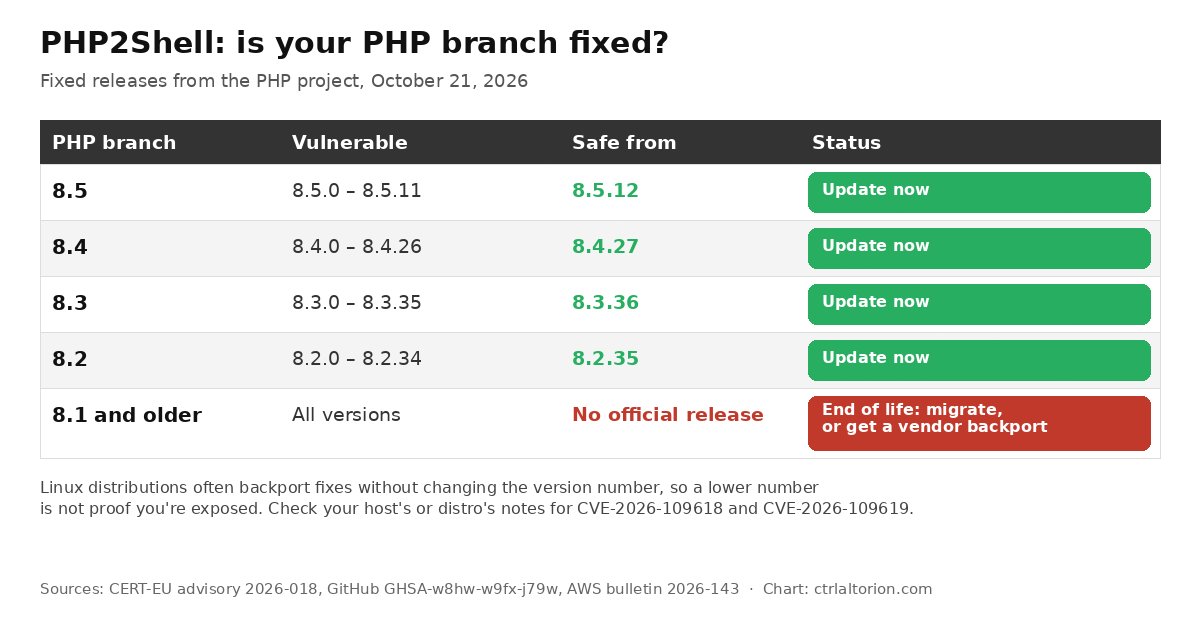
The fix. The PHP project released 8.5.12, 8.4.27, 8.3.36 and 8.2.35 on October 21. Each one is the first fixed release on its branch. AWS’s security bulletin spells out the affected ranges: 8.5.0–8.5.11, 8.4.0–8.4.26, 8.3.0–8.3.35 and 8.2.0–8.2.34.
Older versions. AWS lists PHP 5.4 through 8.1 as “end-of-life,” with “no planned fix,” and says “migration to a supported branch is required.” CERT-EU adds a nuance covered below: some Linux distributions and long-term-support vendors provide backported fixes, and the PHP security team published “minimal source backports” for 7.4, 8.0 and 8.1 for people who build PHP themselves. For a typical small business on a hosting plan, that changes little. If you’re on 8.1 or older, you’re relying on your host to have a backport, or you need to upgrade.
Exploitation status. The sources differ here, and the difference matters:
- CISA (October 21): “CISA has not observed exploitation of these vulnerabilities as of the time of publication.”
- CERT-EU (October 21): “initial proofs of concept (PoCs) have begun to circulate. This raises the likelihood that attackers are already exploiting the vulnerabilities.”
- Cloudflare (October 21): after the CVE IDs leaked before release, “we observed attack traffic targeting our customers,” including attackers changing their payloads to get around its rules.
The PHP Foundation says its security team checked the PoCs that appeared after the leak “but did not identify any functional exploits at the time of release.” It’s a fast-moving situation. Treat it as if exploitation has started or soon will.
The leak. The PHP Foundation’s post explains why disclosure was messy. On October 20, the two CVE IDs began circulating online. A security firm that reported the bugs “mistakenly published a video” of its proof of concept, which was deleted but copied. Separately, the Foundation says a vendor, Chainguard, published fixed builds more than six hours before the coordinated release. The project moved the release up a day, from October 22 to October 21.
Why this matters for a small business site
Most security alerts that reach small businesses are about a plugin, a theme or a specific app. This one is different. Cloudflare’s blog puts it plainly: “These flaws are in the PHP runtime, so updating website code or a plugin(s) alone does not fix these vulnerabilities. Administrators need to update the PHP software running their applications.”
In practice:
- Updating WordPress doesn’t fix it. Neither does updating WooCommerce, your theme or your plugins. PHP is the engine underneath all of them.
- You may not be the one who can fix it. On shared or managed hosting, your host controls the PHP build. Your job is to confirm they’ve updated it.
- The attack doesn’t depend on your site’s code. The PHP project’s advisory says that on Apache with mod_php, a common shared-hosting setup, the problem “happens entirely before any application-specific code begins execution.” CERT-EU says the PHP team considers mod_php “the highest-risk setup.” Other setups (PHP-FPM, FrankenPHP, LiteSpeed, php-cgi) are also listed as at risk.
Cloudflare notes PHP underpins “widely used platforms such as WordPress and Magento.” If you run an online store, a booking site or a lead-capture form on any of these, this alert applies to you until you’ve confirmed otherwise.
If you followed our coverage of the WordPress page-template LFI flaw or the StyleSmuggler Magento zero-day, the pattern is familiar. The difference is the layer: those were application bugs, and this is the engine they all run on.
How to check your PHP version
There are four ways to check, from easiest to most technical. You only need one that works for you.
In WordPress: Site Health
WordPress has a built-in diagnostics page. According to WordPress’s documentation, “Site Health screen is located in your dashboard under Tools > Site Health > Info.”
- Log in to your WordPress dashboard as an administrator.
- Go to Tools > Site Health, then click the Info tab.
- Expand the Server section. Look for the PHP version line.
If it says 8.2.35, 8.3.36, 8.4.27, 8.5.12 or higher on the same branch, the PHP project’s fix is in. If it shows a lower number on a supported branch, read the note on distribution backports below before panicking, then contact your host.
In cPanel: MultiPHP Manager
Many shared hosts use cPanel. Its MultiPHP Manager interface lists each of your domains and, per cPanel’s documentation, “the PHP version that the domain currently uses.” It’s usually under the Software section of cPanel.
One caution: your host can hide this interface, and the version shown is often a branch label (for example “PHP 8.3”) rather than the exact patch release. If you can’t see the exact number, use Site Health or ask your host.
Over SSH: php -v
If you have SSH access to a VPS or dedicated server, run:
php -vThe first line shows the version. Two catches:
- The command line can use a different PHP than your website. Servers often have several versions installed, and
php -vreports the command-line one. Confirm which version your web server actually uses, through your control panel or a temporaryphpinfo()page you delete right after. - Distribution packages may be patched without the version changing. The patching checklist published with Cloudflare’s blog post warns that distribution packages (Debian, Ubuntu, Red Hat and others) “often backport fixes WITHOUT bumping the upstream version, so
php -valone isn’t enough.” It suggests checking the package changelog for the CVE IDs. On Debian or Ubuntu, that’sapt changelog <package> | grep -E "CVE-2026-10961[89]". On Red Hat-family systems, it’srpm -q --changelog <package> | grep -E "CVE-2026-10961[89]".
If you use the volunteer-run rpms.remirepo.net repository, CERT-EU says it “will not have updates on release day,” and the PHP team urges switching to distribution packages or building from source.
From outside: checking a website you don’t control
Sometimes you want to check a site without logging in, such as a vendor’s portal or a site an agency built for you. Some servers announce their PHP version in an HTTP response header called X-Powered-By. You can see it with:
curl -sI https://example.com | grep -i x-powered-byThis is a weak signal. Many hosts hide the header, which is good security practice. It may also show a distribution’s version number that has a backported fix. Use it to decide whom to ask, not to conclude a site is safe or unsafe.
What to ask your host
If you’re on shared, managed or reseller hosting, your host is responsible for PHP. Don’t ask “are we affected?” A vague question gets a vague answer. Ask these instead:
- “Which PHP version does my site run, exactly, including the patch number?”
- “Has the PHP build on my server been updated for CVE-2026-109618 and CVE-2026-109619? If it’s a distribution package, which package version includes the fix?”
- “Have all PHP workers been restarted since the update?” The checklist published with Cloudflare’s post says to “Restart EVERY PHP worker,” because processes started before the update keep running the old code.
- “If my site is on PHP 8.1 or older, do you provide a backported fix, and when can I move to 8.2 or later?”
- “Is a web application firewall in front of my site, and does it include rules for php2shell?”
Get the answers in writing, in a support ticket or email. If your host can’t answer question 2 clearly within a day or two, that tells you something about the host.
If you’re stuck on PHP 8.1 or older
This is the hardest case, and it’s common among older small-business sites. Some plugins or custom code were never updated for newer PHP, so the site stayed on 7.4 or 8.1.
What the sources say:
- CISA: Organizations that “continue to use PHP 8.1 or earlier unsupported versions, should take PHP-based systems offline until they can be patched or updated.”
- CERT-EU: “Some distributions and LTS vendors provide backported fixes, so contact your vendor or upgrade to a supported version.”
- AWS: For end-of-life runtimes 5.4–8.1, apply interim configuration controls “where effective,” restart workers, and “begin migration to a supported, fixed PHP branch immediately. No fix is available for CVE-2026-109618 on end-of-life branches.”
The AWS line and the CERT-EU note on source backports for 7.4, 8.0 and 8.1 don’t fully match. The source backports are aimed at people who compile PHP themselves. For a typical small business, the practical options are:
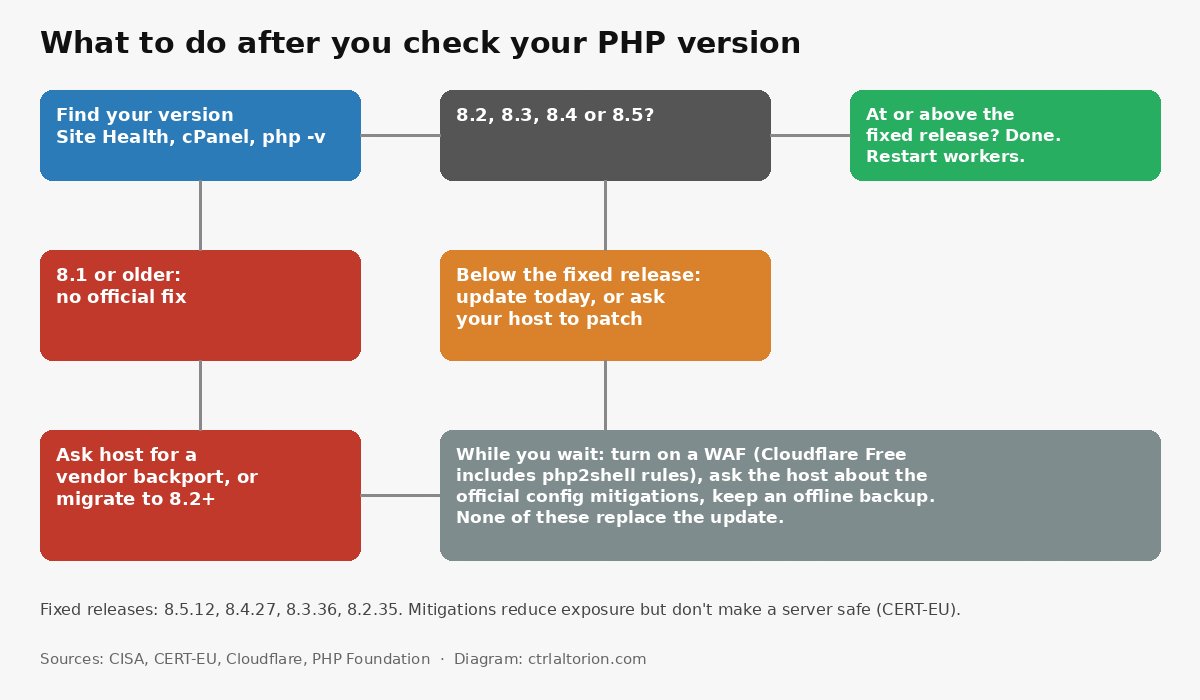
- Ask your host whether your PHP build has a vendor backport covering both CVEs. Some commercial hosts and long-term-support vendors provide these. Get it confirmed in writing.
- Move to PHP 8.2 or later. On cPanel, MultiPHP Manager lets you switch a domain’s version. Test on a staging copy first if your host offers one, because old plugins can break.
- If neither is possible soon, take the site offline or put it in maintenance mode. This is CISA’s advice, not ours. It’s painful, but for a brochure site it’s often a few days of lost traffic against the risk of a compromised server.
Our view: if your site is stuck on 8.1 because of one abandoned plugin, this is the moment to replace that plugin. Upgrading PHP costs some effort now. Recovering a hacked server costs far more.
A WAF as a stopgap
A web application firewall (WAF) sits between visitors and your server and blocks requests that look like attacks. CISA says “a web application firewall may provide some protection until systems are updated or patched.” Every source is clear that it’s a stopgap, not a fix.
Cloudflare said it deployed php2shell protections about nine hours before public disclosure, and that customers “using our free or paid WAF were protected by default.” It describes:
- Managed rules on all plans, including Free. Free customers get new rules in the Cloudflare Managed Free Ruleset, and Cloudflare says they “don’t have to take any actions to enable the protection.” Pro, Business and Enterprise customers should “review your Managed Ruleset deployment to confirm it’s deployed block mode.”
- Coverage. Cloudflare says the flaws “affect all web servers running PHP 5.4 or later,” and its rules apply in front of any of them.
- Full transaction detection. This is a new WAF capability that looks at both the request and your server’s response, and can “block the origin response before it reaches the requester.” Cloudflare says the php2shell protections are “the first managed detections we have released using this capability,” deployed in a Managed Response Firewall Default ruleset for all plans, including Free.
Cloudflare still says customers “should patch their PHP repos even with WAF protections.”
AWS WAF users get compensating controls in AWS’s bulletin: the SizeRestrictions_BODY rule from the Core rule set, a custom rule for CVE-2026-109619, and version 2.3 of the AWS WAF PHP managed rule group, which AWS says adds protection for CVE-2026-109619.
If your site isn’t behind any WAF, putting it behind one is a reasonable step this week, especially if you’re waiting on your host. It’s not a reason to delay the update.
Server configuration mitigations
If you or your developer manage the server directly, CERT-EU and the PHP project’s advisory list temporary configuration changes. They include setting memory_limit=-1 in a way applications can’t override, lowering post_max_size, and setting session.upload_progress.enabled=0, with a restart of every worker. CERT-EU is explicit that “only an update fully fixes these vulnerabilities. The measures below reduce exposure to specific attack paths but do not make an installation safe.”
These settings have side effects. Removing the PHP memory limit, for example, shifts the job of capping memory to the server or container. They’re a job for whoever runs your server, not a quick edit for a site owner. If that’s you, follow the CERT-EU advisory line by line rather than a summary.
After you patch: look for trouble
Because exploit code was circulating before many sites could update, it’s worth a quick check even after patching. CISA advises monitoring “for suspicious activity, including PHP worker processes launching shells or downloading tools.” The checklist published with Cloudflare’s post suggests looking at:
- PHP and web-server error logs for crashes or “Allowed memory size exhausted” errors, especially around unusually large form posts or uploads.
- Recently modified or unexpected files in your website folders, which can indicate a web shell.
- New scheduled tasks (cron jobs) or unexpected outbound connections from the web server.
If you find something, don’t delete it. Preserve evidence and bring in your host or a security professional. This is also when a clean, offline backup matters. Our guide to an offline backup drive for store compromise recovery covers how to keep one that an attacker on your server can’t reach.
A short checklist
- Today: Find your exact PHP version (Site Health, cPanel or
php -v). - Today: If you’re below 8.5.12, 8.4.27, 8.3.36 or 8.2.35, update or open a ticket with your host using the questions above.
- Today: If your site is behind Cloudflare, confirm the WAF is on. On paid plans, make sure the Managed Ruleset is in block mode.
- This week: If you’re on 8.1 or older, get a written answer on backports, or plan the move to 8.2+.
- This week: Check logs and recent file changes, and confirm you have a recent backup stored off the server.
FAQ
What is PHP2Shell?
PHP2Shell (also written “php2shell”) is the nickname for two critical vulnerabilities in PHP, CVE-2026-109618 and CVE-2026-109619, fixed on October 21, 2026. CISA says they allow unauthenticated remote code execution and affect all PHP installations serving web requests.
Which PHP versions are safe?
The first fixed releases are PHP 8.5.12, 8.4.27, 8.3.36 and 8.2.35. Anything earlier on those branches is affected. Linux distribution packages may include the fix under a lower version number, so check your host’s or distribution’s notes for the CVE IDs.
Does updating WordPress fix PHP2Shell?
No. The flaws are in PHP itself, not in WordPress, plugins or themes. Cloudflare’s advisory says updating website code or plugins “alone does not fix these vulnerabilities.” PHP must be updated on the server, usually by your host.
I’m on PHP 8.1. Is there a patch?
PHP 8.1 and older are end-of-life and don’t get an official release. CERT-EU says some distributions and long-term-support vendors provide backported fixes, and the PHP team published minimal source backports for 7.4, 8.0 and 8.1. For most hosted sites, ask your host for a confirmed backport or move to PHP 8.2 or later.
Is PHP2Shell being exploited?
CISA said it had not observed exploitation as of its October 21 alert. CERT-EU said proof-of-concept code was circulating, which raises the likelihood of attacks. Cloudflare said it saw attack traffic targeting its customers. Treat it as urgent.
Will a web application firewall protect my site?
It can help as a stopgap. Cloudflare says its free and paid WAF customers are protected by default by new managed rules, and AWS published WAF rules too. Every source says a WAF does not replace updating PHP.
Sources
5 refs- CISA, “Critical Vulnerabilities in PHP Require Immediate Patching” (October 21, 2026): https://www.cisa.gov/news-events/alerts/2026/10/21/critical-vulnerabilities-php-require-immediate-patchingcisa.gov
- CERT-EU, Security Advisory 2026-018, “Critical Vulnerabilities in PHP” (October 21, 2026): https://www.cert.europa.eu/publications/security-advisories/2026-018/cert.europa.eu
- PHP project, GitHub security advisory GHSA-w8hw-w9fx-j79w, “RCE via OOM corruption” (October 21, 2026): https://github.com/php/php-src/security/advisories/GHSA-w8hw-w9fx-j79wgithub.com
- The PHP Foundation, “Today’s PHP Security Release, and How We’re Strengthening PHP Security” (October 21, 2026): https://thephp.foundation/blog/2026/10/21/todays-php-security-release-and-how-were-strengthening-php-security/thephp.foundation
- Cloudflare Blog, “Cloudflare deploys protections against php2shell vulnerability” by Daniele Molteni, Dan Jones and Kuber Nandwani (October 21, 2026): https://blog.cloudflare.com/php-vulnerabilities-waf-protection/blog.cloudflare.com
comments
loading comments…
No comments yet. Start the thread.