
The ConnectWise breach is not a story about one software company having a bad week. On October 21, 2026, Microsoft said a China-state aligned group it tracks as Storm-0940 was behind the compromise of ConnectWise Cloud Backup, the Microsoft 365 backup service formerly known as SkyKick. Microsoft also said the group used an open-source agentic AI penetration testing framework called ARTEX to run its attacks at what it calls machine speed, and that after the unauthorized access the actor tried to sign in to more than 2,250 Microsoft 365 tenants.
If your business uses a managed service provider (MSP) for IT, this matters even if you have never heard the name ConnectWise. Backup tools like this get deep, trusted access to your email, files and directory. When the vendor’s credentials are stolen, the attacker doesn’t need your password. They come in through a door you already opened.
Below is what the sources actually say, what is still unknown, and a practical checklist you can bring to your MSP this week.
What happened, in plain terms
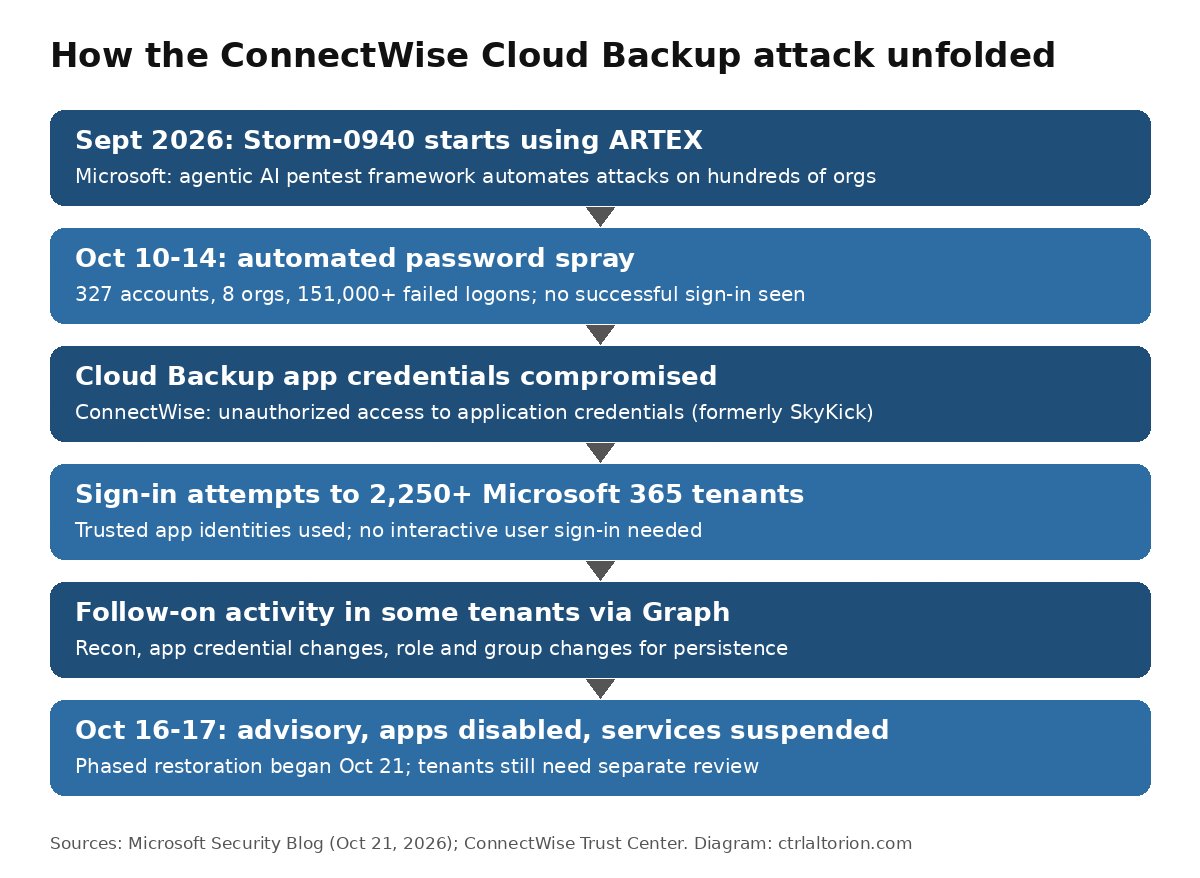
Here is the sequence as Microsoft and ConnectWise describe it. These are the reported facts. My interpretation comes later and is labeled.
The actor. Microsoft describes Storm-0940 as “a China-state aligned actor (with no known industry aliases) that has been active since 2021 and targets organizations across multiple industries for data theft.” Historically it has gotten in through password spraying and by exploiting internet-facing applications. In cloud environments, Microsoft says, it has kept access by adding credentials to existing OAuth applications, then used those apps to read and exfiltrate email and other data through Microsoft Graph.
The tool. Microsoft says that “as early as September 2026,” Storm-0940 used ARTEX to automate attacks against hundreds of organizations in sectors including aerospace and defense, energy, financial services, government, legal, manufacturing, semiconductors and technology.
The warm-up. Between October 10 and 14, Microsoft says, Storm-0940 infrastructure at 144.172.64[.]99 ran an automated password-spray campaign against 327 accounts across eight organizations. Microsoft counted more than 151,000 failed logons, peaking on October 11 at 2,900 failures per minute. It also says no successful authentication, token issuance, Graph call or directory change came out of that spray.
The ConnectWise compromise. On October 15, public reports of the ConnectWise Cloud Backup compromise began to appear, with indicators matching the same 144.172.64.x range, according to Microsoft. ConnectWise published its first advisory on October 16 at 17:47 UTC. The company says it “identified unauthorized access to application credentials associated with Cloud Backup, formerly SkyKick.” GovInfoSecurity, citing Huntress, reported that the attacker reached customers’ Microsoft 365 environments through a stolen API secret in the backup software.
The fan-out. Microsoft says that after the unauthorized access, “Storm-0940 used ARTEX to attempt to sign-in to more than 2,250 tenants.” Because the attacker held the identities of ConnectWise’s own cloud applications, it could authenticate “through applications that had already been granted access,” with no interactive user sign-in required.
Follow-on activity. In some tenants, Microsoft says, the AI agents went past signing in. They used Microsoft Graph and directory operations for reconnaissance, changed application credentials to set up persistence, and made “changes involving identities, groups, and privileged roles.” Microsoft’s detection list includes an alert for an application that “assigned itself to a high privilege role,” including a self-assigned Global Administrator role.
ConnectWise’s response. ConnectWise says that at 07:00 UTC on October 17 it disabled seven ConnectWise application identities and revoked the certificates used for the affected connections. It also suspended Cloud Backup, and as a precaution took SaaS Security and Cloud Management offline because they integrate with Cloud Backup. It reset all accounts and credentials in the affected environment on October 19 and began phased restoration on October 21. In its October 23 update, it said it expects to finish testing and security validation of the restored environment “by the end of this weekend,” with backup-restore access first and full re-enrollment after that.
What ARTEX is, and why the AI part matters
Microsoft calls ARTEX “an open-source penetration testing framework that can use any AI model to automate a variety of offensive security workflows.” It describes it as a multi-agent system written in Go with a Next.js frontend, where “LLM-driven agents… run an autonomous penetration test from reconnaissance through data exfiltration with little needed human interaction.” As the agents work, they build a graph of the assets and vulnerabilities they find.
Penetration testing itself is legitimate, as Reuters noted. What Microsoft is flagging is how much speed an attacker gains when AI agents drive the tool. In Microsoft’s words, agents “can work around the clock, on weekends, and on holidays and attempt multiple breach paths simultaneously.” In several ARTEX-driven attacks, the company says, the time from first targeting to privileged access was less than three hours.
Microsoft also notes that this much automated activity “may generate alerts,” but “the speed of the activity allows very little time for Defenders to respond to those alerts.” It adds that it has seen threat actors in several regions using ARTEX, not only Storm-0940.
My interpretation: for a small business, the takeaway isn’t “AI hackers are unstoppable.” It’s that the window between “an alert fired” and “the attacker has admin rights” may now be shorter than your MSP’s normal ticket response time. Controls that work without a human in the loop matter more than they used to. Least-privilege app permissions, alerting on new app credentials and role assignments, and vendor connections you can switch off quickly are all examples.
Why a backup tool is such a big target
Microsoft frames this as a supply chain compromise “of a multi-tenant application.” Put simply, one app is installed in thousands of customers’ Microsoft 365 tenants, and each tenant has granted it permissions. To back up mailboxes and files, a backup app needs broad read access, often across the whole organization.
Microsoft’s own wording is the clearest explanation of the risk: the incident highlights “how a compromised third-party application with high privileges could provide access beyond its originally intended purpose.”
ConnectWise put it from the MSP side in its October 21 update: “MSPs are in the middle of that chain. They are targets in their own right, and they are also a path into every client they serve.”
My interpretation: this is the same pattern as the vendor-risk problems I covered in the IDScan driver’s license breach and the SonicWall SMA1000 remote-access flaw. Your security includes every tool you’ve granted standing access, whether or not you chose it yourself.
What we don’t know yet
It’s easy to overstate this incident, so here is what the sources do not say:
- How many tenants were actually breached. The 2,250+ figure is sign-in attempts, per Microsoft. CyberScoop reported that “Microsoft did not say how many customers were compromised.” Microsoft says only that it found “multiple customer environments” with follow-on activity, and separately that Storm-0940 “achieved privileged cloud persistence at many organizations” across its wider campaign.
- Whether your data was taken. Microsoft is explicit: “the presence of an affected application or successful threat actor authentication does not necessarily indicate that customer data was accessed or exfiltrated.”
- Exactly how ConnectWise’s credentials were first stolen. ConnectWise said on October 20 that it was still working with outside specialists “to determine how the unauthorized access first occurred and its full scope.” The stolen-API-secret detail comes from Huntress, as reported by GovInfoSecurity, not from a final ConnectWise root-cause report.
- Whether stored backups were touched. ConnectWise says existing archives “remain encrypted, isolated and preserved, with no indication of compromise.” That’s the vendor’s own assessment. ConnectWise also stresses that this finding says nothing about whether your live Microsoft 365 tenant was affected.
China’s embassy in Washington, quoted by Reuters, said China “opposes and fights hacking activities in accordance with the law” and opposes “smears and attacks against China under the excuse of cybersecurity issues.” The attribution comes from Microsoft. ConnectWise said it “appears” correct based on the evidence available to it.
Is ConnectWise safe to use?
An honest answer has three parts.
What ConnectWise says (fact, vendor claim): It has “no indication that other ConnectWise products, services or offerings are impacted by this incident.” The suspended services are Cloud Backup, SaaS Security and Cloud Management. ConnectWise also says that since mitigations began on October 17 at 05:00 UTC, it has “not observed successful threat activity in the environments we monitor.” Microsoft separately says the ARTEX activity “did not result from a compromise of or a vulnerability in Microsoft corporate systems, products, or services.”
What remains open (fact): The root-cause investigation was still under way as of ConnectWise’s latest updates. Cloud Backup restoration was still in progress on October 23. And ConnectWise itself says its containment “do[es] not remove unauthorized access that may already have been established within individual customer tenants.”
My interpretation: “Is ConnectWise safe?” is the wrong question for a small business owner. The useful question is “Is my Microsoft 365 tenant clean?” Even a perfectly fixed ConnectWise wouldn’t remove a backdoor credential an attacker added to your tenant on October 15. Microsoft warns that those changes “can remain active as a backdoor even after the original compromised application is” remediated. So:
- If your MSP uses other ConnectWise tools (PSA, RMM, ScreenConnect), there’s currently no public evidence they’re affected. That’s not the same as a guarantee. Ask your MSP how it’s monitoring them.
- If your MSP used Cloud Backup / SkyKick for your tenant, assume your tenant needs a review until someone qualified has actually done one.
- Whether to keep using ConnectWise long term is a fair business decision to make after the root-cause findings are published. I wouldn’t make it in the middle of the incident.
The small business / MSP client checklist
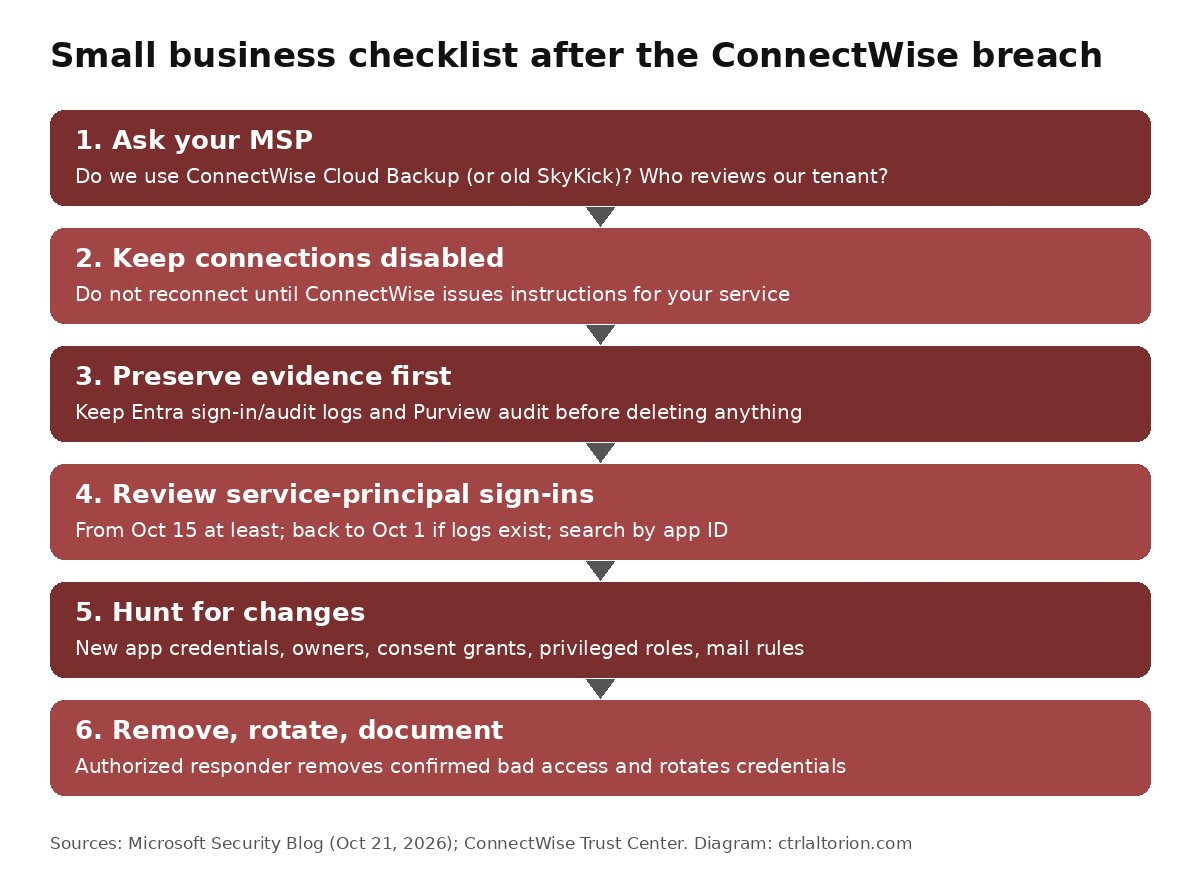
These steps come from Microsoft’s mitigation guidance and ConnectWise’s advisories. Where I’ve simplified, the source wording is in quotes. Most small businesses won’t do the log work themselves. The aim is to know what to ask for and to confirm it was done.
1. Ask your MSP whether you use ConnectWise Cloud Backup
Ask directly, in writing: “Is our Microsoft 365 tenant, or was it ever, connected to ConnectWise Cloud Backup or SkyKick?” Microsoft says to review “every Microsoft 365 tenant where the affected applications are currently or were previously installed or authorized, even if the integration is no longer in use.” ConnectWise specifically calls out “environments with dormant SkyKick connections.”
Also ask who is responsible for reviewing your tenant. ConnectWise says that if services came through “a reseller, distributor, or marketplace,” the guidance needs to reach “the administrator responsible for each customer tenant.” If no one owns that job, the review won’t happen.
2. Keep the affected connections disabled
Both companies say the same thing. Microsoft: “Keep affected ConnectWise application connections disabled until ConnectWise provides formal restoration instructions.” ConnectWise: “Keep affected application connections disabled until ConnectWise provides instructions that apply to your service.” Don’t let anyone reconnect early just to get backups running again.
3. Preserve evidence before cleanup
This is the step most likely to get skipped. Microsoft says: “Do not delete enterprise applications as the first response. Preserve configuration and evidence before making irreversible changes.” It lists Microsoft Entra sign-in and audit records, Microsoft Purview Audit records, SIEM data and any Graph telemetry you already collect. It also adds a balance: “Do not delay urgent containment while waiting for exports.”
4. Review service-principal sign-ins from October 15 onward, and earlier if you can
A service principal is the identity an app uses inside your tenant. Microsoft’s guidance: “Review activity starting from at least October 15, 2026. Where records are available, extend service-principal sign-in review to October 1.” It also says to:
- Search “by application ID rather than display name,” since display names can be misleading.
- Review successful and failed sign-ins separately.
- Look for activity from unfamiliar sources and not “limit review to the published IPs.” Microsoft’s indicators include 144.172.64[.]60, 144.172.64[.]99 and 144.172.64[.]128.
Microsoft’s hunting queries list these Cloud Backup-related application IDs: 506e08f9-6e9a-4da4-942b-a099a03644ae (ConnectWise Cloud Backup), 24205314-2b89-4e07-a2a4-579e898a5640 (ConnectWise - MS Teams) and 0de14c77-b9b0-4137-9360-34878a929827 (ConnectWise - MS Graph). Note that Microsoft’s text refers to “all four application IDs listed in this profile,” while ConnectWise says it disabled seven application identities listed in its own technical guide. Use ConnectWise’s technical investigation and remediation guide as the full list.
5. Check for unexpected app credential and privilege changes
Microsoft says to review Entra audit records for:
- application or service-principal credential additions
- new applications, service principals or owners
- app-role assignments and consent grants
- privileged role assignments
- changes to users, groups, authentication methods or Conditional Access
It also recommends checking Microsoft 365 audit records for “unusual mail or file access, downloads, forwarding, inbox or transport rules, delegated mailbox permissions.” Mail forwarding rules are a classic quiet way to keep reading someone’s email.
6. Have an authorized responder remove what’s confirmed, then rotate
Microsoft’s order is deliberate: “Preserve evidence, then have an appropriately authorized responder remove confirmed unauthorized credentials, grants, owners, assignments, and identities.” On confirmed suspicious activity, “revoke unnecessary permissions and rotate credentials.” Afterward, “verify that vendor credential rotation and any tenant-level remediation eliminated remaining unauthorized access.”
7. Follow ConnectWise’s containment and restoration guidance
ConnectWise publishes updates on its Trust Center advisories page, including a technical investigation and remediation guide and a series of technical webinars. It says suspicious activity should be reported to SecurityPartnerSupport@ConnectWise.com. ConnectWise’s own caveat is worth repeating to your MSP: completing its steps “does not guarantee that a tenant is unaffected or that all unauthorized access has been eliminated.”
8. Plan for the backup gap
While Cloud Backup is suspended, ConnectWise says scheduled backups aren’t running and restores aren’t available. Microsoft tells organizations to “assess the operational effect on backup and restore workflows.” My suggestion: ask your MSP what’s protecting your mailboxes and files right now. If the answer is “nothing until restoration,” decide whether a temporary second copy is worth the cost. I’ve written more on layered backups in my small business data security guide.
Longer-term lessons (interpretation)
- Audit app permissions quarterly. Microsoft recommends you “apply least privilege to multi-tenant application permissions and consent grants.” Remove admin-consented apps nobody uses.
- Alert on new app credentials and privileged role assignments. Both are rare in a small tenant and were central to this attack.
- Agree on vendor shutdown in your MSP contract: who can disable a connection, how fast, and who tells you. The same applies to any automated agent holding keys, as in the OpenAI agent Medicare portal piece.
Microsoft executive Igor Tsyganskiy wrote on LinkedIn, as quoted by CyberScoop, that “since early October, a wave of AI-driven cyberattacks has been ongoing,” calling the ConnectWise attack “one of many.”
A note on conflicting numbers
Coverage of this incident doesn’t line up perfectly, so here is what differs:
- “2,250 tenants at 2,900 sign-in attempts per minute.” CyberScoop and GovInfoSecurity both quote Microsoft as saying ARTEX reached or attempted “more than 2,250 tenants at 2,900 sign-in attempts per minute.” The version of Microsoft’s blog I read on October 22 says only “attempt to sign-in to more than 2,250 tenants.” It ties the 2,900-per-minute figure to failed logons during the October 10–14 password spray. The blog may have been edited after the reporters quoted it. I’ve used Microsoft’s current wording.
- Length of the spray. CyberScoop calls it a “four-day stretch,” while GovInfoSecurity says “five-day.” Microsoft’s dates, October 10 through 14, cover five calendar days.
- Number of app identities. Microsoft’s guidance mentions four application IDs, and its queries list three. ConnectWise says it disabled seven.
FAQ
What is the ConnectWise breach?
It’s the compromise of application credentials for ConnectWise Cloud Backup, formerly SkyKick, a Microsoft 365 backup service sold mainly through MSPs. ConnectWise disclosed it on October 16, 2026. Microsoft attributed it on October 21 to Storm-0940, a China-state aligned group.
What is Storm-0940?
Microsoft’s name for a China-state aligned actor active since 2021 that targets many industries for data theft. Microsoft says it has no known industry aliases. It usually gets in through password spraying and internet-facing apps, then keeps access by adding credentials to OAuth apps.
What is ARTEX?
An open-source penetration testing framework that, according to Microsoft, uses LLM-driven agents with any AI model to run attacks from reconnaissance through data exfiltration with little human input. Microsoft says actors in multiple regions are using it.
Were 2,250 businesses hacked?
Not necessarily. Microsoft says Storm-0940 attempted to sign in to more than 2,250 tenants. It hasn’t said how many were compromised. It found follow-on activity in “multiple” environments and says a successful sign-in doesn’t by itself mean data was taken.
Is ConnectWise safe to keep using?
ConnectWise says it has no indication that products beyond Cloud Backup, SaaS Security and Cloud Management are affected, and its root-cause investigation was still ongoing at last update. The more urgent question is whether your own Microsoft 365 tenant has leftover backdoors. ConnectWise’s fixes can’t remove those.
What should I ask my MSP today?
Whether your tenant ever used Cloud Backup or SkyKick, and who is reviewing it. Confirm they kept connections disabled and preserved logs before cleanup. Ask whether they reviewed service-principal sign-ins from at least October 15 and checked for new app credentials, privileged roles and mail rules. And ask what is backing up your data during the outage.
Sources
5 refs- Microsoft Security Blog, “AI-driven, large-scale nation-state campaign using ARTEX enables supply chain compromise,” October 21, 2026: https://www.microsoft.com/en-us/security/blog/2026/10/21/storm-0940-uses-artex-agentic-ai-connectwise-supply-chain-compromise/microsoft.com
- ConnectWise Trust Center, Advisories (Cloud Backup service interruption, updates through October 23, 2026): https://www.connectwise.com/company/trust/advisoriesconnectwise.com
- CyberScoop, Matt Kapko, “Microsoft pins ConnectWise supply-chain attack to China-state aligned threat group,” October 21, 2026: https://cyberscoop.com/microsoft-attributes-connectwise-supply-chain-attack-china-storm-0940/cyberscoop.com
- GovInfoSecurity, Tiffany Wang, “China-Aligned Hackers Used Agentic AI to Target ConnectWise,” October 22, 2026: https://www.govinfosecurity.com/china-aligned-hackers-used-agentic-ai-to-target-connectwise-a-33184govinfosecurity.com
- Reuters via Investing.com, “Chinese-linked hackers compromise ConnectWise, target hundreds in global attack, Microsoft says,” October 21, 2026: https://www.investing.com/news/stock-market-news/chineselinked-hackers-compromise-connectwise-target-hundreds-in-global-attack-microsoft-says-4964230investing.com
comments
loading comments…
No comments yet. Start the thread.