Disclosure: some links below are Amazon affiliate links (tag cao04-20). Costs you nothing; the picks don’t change based on that. Every spec and price below is sourced at the bottom.
Go stand in front of your network closet and count the power bricks.
If you’ve followed anything this site has published in the last year, that count went up. A mini PC as a sandbox box for agents. A always-on machine running a local model so your data stays in the building. A cheap home server for backups. A UPS so the whole stack doesn’t eat a brownout. Maybe a PoE switch feeding cameras. Maybe a Pi doing something small and thankless.
Every one of those was a good buy. And every one of those was a space heater we told you to put in a box with a door on it.
Here’s the part nobody writes the follow-up article about: a closet is not a room. A room has an air-conditioning register and a return vent, so heat that goes in comes back out. A closet with a solid door and no vent has neither. It has an air volume. You put 130 watts of continuous load into a sealed air volume and the temperature does not find a comfortable level and stay there — it climbs until it’s hot enough that the leak paths around the door frame carry the heat out. Whatever temperature that turns out to be, that’s your operating environment now. You didn’t choose it. The door gap did.
This piece is the airflow math, one specific fan, and — more importantly — an honest accounting of which reasons to buy it are real and which one is a myth that half the internet repeats.
Start here: the reason you’re about to hear is probably wrong
The standard pitch for cooling a closet is “heat kills hard drives.” It is repeated so universally that it feels like physics.
Backblaze checked. They looked at over 34,000 drives in their own fleet and found the correlation between operating temperature and failure rate was 0.0. Not weak. Zero. Two Seagate Barracuda 1.5TB models showed a statistically significant but weak correlation (0.17 and 0.12), and in the worst case that meant a 7.9% annual failure rate for cool drives versus 11.0% for warm ones. Their conclusion, published back in 2014 and never seriously overturned since: “As long as you run drives well within their allowed range of operating temperatures, keeping them cooler doesn’t matter.”
And the allowed range is wide. Manufacturer specs for the drives in that study ran 0°C (or 5°C) to 60°C. Your closet is not hitting 60°C. Your closet is hitting maybe 35°C on a bad August afternoon, which is boringly inside spec.
So if a vendor page or a Reddit thread told you to buy a fan to save your drives: that’s not the reason. Pushing back on that matters, because if you buy hardware for a fake reason you’ll also install it in the wrong place, aim it at the wrong thing, and be disappointed.
The real reasons are less dramatic and much more expensive.
Real reason 1: your UPS battery is on a clock, and heat winds it
This is the big one and almost nobody connects it.
Schneider Electric’s own documentation on VRLA (sealed lead-acid) battery service life is blunt: battery life is halved for every 10°C above 25°C. Some APC documentation puts it at every 8°C. Their optimal operating range for a lead-acid battery is 20–25°C (68–77°F), and most APC batteries should last three to five years under recommended conditions.
Run their example: a battery rated for 4 years at 25°C lasts roughly 2 years at 33°C (95°F).
And here’s the detail that makes it worse than it looks — Schneider notes that the internal battery temperature inside a UPS is always higher than ambient. The UPS is a sealed plastic box with a transformer in it, sitting in a closet that’s already above room temperature. The battery is not experiencing your closet’s air temperature. It’s experiencing your closet’s air temperature plus the UPS’s own self-heating.
So the failure mode isn’t dramatic. It’s this: two years from now the UPS beeps, self-tests fail, you replace a battery pack for $60–$140, and you never connect it to the closet because nothing ever felt hot. Do that three times across three devices and the $119 fan paid for itself while also making your power protection actually work during the outage it was bought for.
Real reason 2: sustained agent workloads are the first thing to throttle
A mini PC running an occasional build does not care about your closet. A mini PC running a local model, a nightly agent job, or a long test suite is a sustained load, and sustained load is exactly the regime where intake air temperature stops being cosmetic.
Small-form-factor machines have small heatsinks and small fans. Their entire thermal budget assumes they’re pulling in roughly room-temperature air. Feed them 95°F intake and the fan spins faster (noise), the package temperature rises, and the clock drops to stay inside its thermal limit. You don’t get an error. You get a job that used to take 40 minutes taking 55, and nobody investigates because nothing broke.
This is the measurable one. Before and after: log your agent box’s average clock speed and the wall-clock time of one repeatable job, for a week before the fan and a week after. If the numbers don’t move, you didn’t have a heat problem and you should return the fan. That’s a real test with a real failure condition, which is more than most gear recommendations offer.
Real reason 3: a sealed closet has no steady state, so your worst case is unknown
The drive-failure data says wide temperature tolerance. It does not say unbounded. A sealed closet’s equilibrium temperature is set by leak paths you never measured, and it moves with the seasons, with whether the door got fully latched, and with whether somebody stacked a box of receipt paper against the vent gap.
The thing you’re buying with a fan isn’t a target temperature. It’s a ceiling you can predict: with active exhaust, closet temperature becomes room temperature plus a small, calculable delta. Without it, closet temperature is an unknown function of the weather and the door.
The math, so you can size this yourself in two minutes
You don’t need a thermal engineer. You need one formula and a $15 plug meter.
Airflow-to-temperature-rise, in the units you actually have:
ΔT (°F) ≈ 3.16 × Watts ÷ CFM
(That’s just the standard sensible-heat relationship — BTU/hr = 3.412 × watts, and BTU/hr = 1.08 × CFM × ΔT°F — rearranged. 3.412 ÷ 1.08 ≈ 3.16.)
Read it backwards to size a fan: CFM needed = 3.16 × Watts ÷ your target ΔT.
First, get your watts. Plug the closet’s power strip into a cheap energy meter and read the continuous number after an hour, not the peak. Typical continuous draws, to sanity-check what you see:
| Device | Typical continuous draw |
|---|---|
| N100-class mini PC, light duty | 6–25 W |
| Mini PC under sustained agent load | 35–65 W |
| 4-bay NAS, disks spinning | 30–45 W |
| 8-port PoE switch + 2 cameras | 30–60 W |
| Router + modem | 15–25 W |
| UPS overhead (its own losses) | 10–20 W |
| Raspberry Pi doing small jobs | 3–8 W |
| GPU box running a 30B local model | 150–350 W |
That ~130 W we keep using isn’t a round number picked to make the math tidy. It’s the closet this site talked you into, added up:
| The ordinary closet | Continuous |
|---|---|
| Mini PC sandbox box, agent jobs most nights | 45 W |
| 4-bay NAS for backups, disks spinning | 38 W |
| 8-port PoE switch + two door cameras | 22 W |
| Router + modem | 18 W |
| UPS conversion losses | 12 W |
| Total | 135 W |
Call it 130 W and you’re within 4% — which is closer than your plug meter’s accuracy anyway. Nothing exotic in that list. No GPU, no rack, no second switch. Four devices and a battery — which is the floor for a shop that took centralizing seriously, not the ceiling. Measure yours anyway: the entire point of the plug meter is that your number will differ from ours, and the sizing table below is only worth anything with your number in it.
Then size it:
| Closet heat load | CFM for a 10°F rise | CFM for a 5°F rise |
|---|---|---|
| 75 W | 24 | 47 |
| 130 W | 41 | 82 |
| 200 W | 63 | 126 |
| 300 W | 95 | 190 |
Two things jump out of that table.
One: the CFM numbers are small. A 130W closet — which is a mini PC, a NAS, a switch, a router and a UPS, i.e. a completely ordinary small-shop stack — needs about 41 CFM to hold a 10°F rise. That is not a lot of air. This is a $50–$120 problem, not a $2,000 mini-split problem.
Two: the GPU row is a different category. If you added a machine running a local model on a real GPU, you roughly tripled the closet’s heat load in one purchase, and you are now in “needs 95–190 CFM and probably shouldn’t be in a closet at all” territory. Be honest about which row you’re in.
The pick: AC Infinity CLOUDLINE T4
AC Infinity CLOUDLINE T4, 4” quiet inline duct fan with temperature/humidity controller
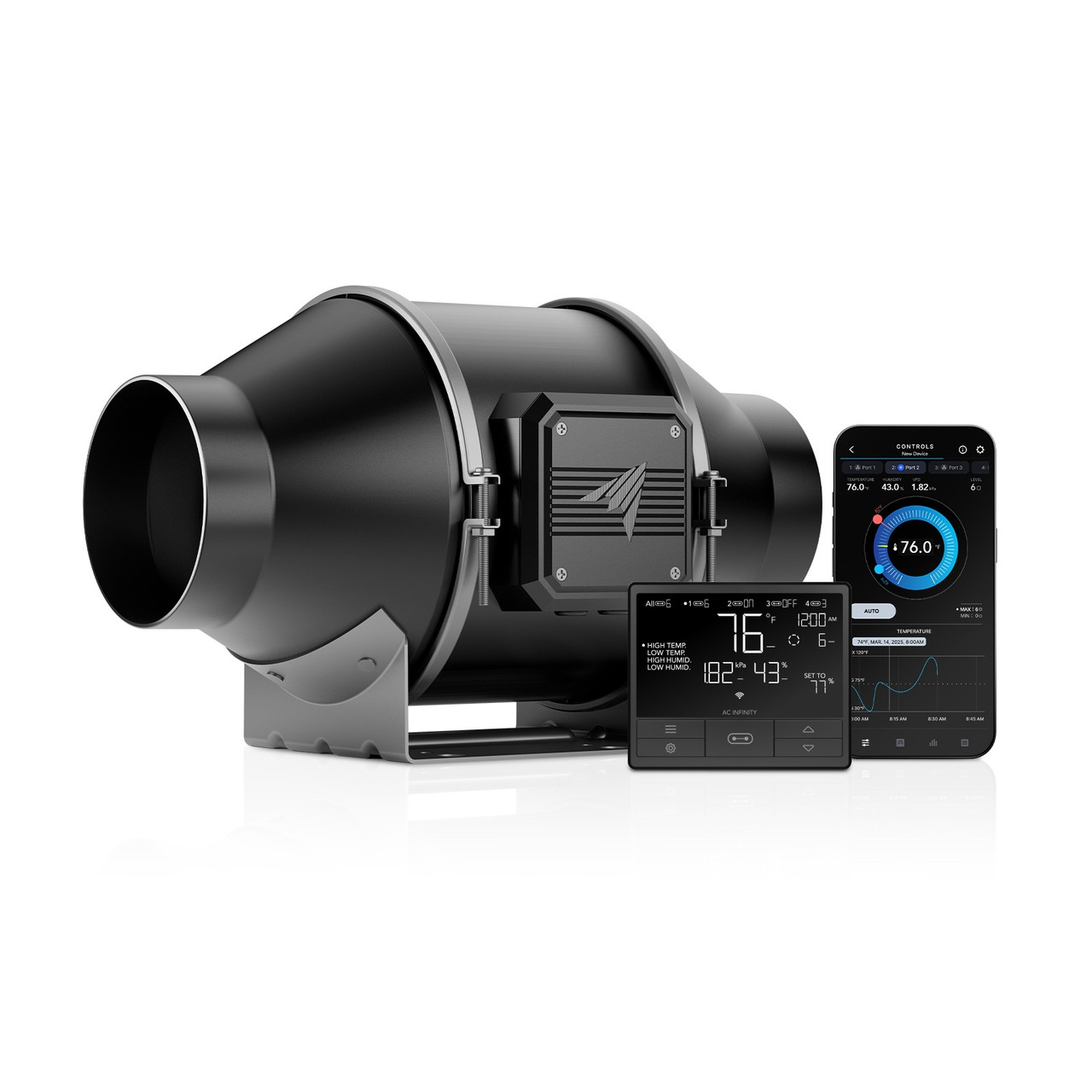 The CLOUDLINE T4: a 4-inch inline duct fan with a thermostat controller. Photo: AC Infinity.
| Spec | Detail |
|---|---|
| Rated airflow | 226 CFM (free air) |
| Noise | 26 dBA |
| Duct size | 4 inches |
| Max power draw | 28 W (average usage ~21 W) |
| Max speed | 2,800 RPM |
| Static pressure | 223 Pa |
| Dimensions | 7.40 × 11.93 × 6.93 in |
| Power | 100–240V AC, 50/60 Hz |
| Controller | CONTROLLER 69 PRO — temperature, humidity and VPD triggers; dynamic speed, minimum speed, timer, cycle and schedule modes; WiFi app with alerts, historical charts and CSV export |
| Warranty | 2 years |
| Price | $119 direct from AC Infinity |
Why this one, specifically.
It’s a grow-tent fan. That’s not a knock — it’s the reason it’s good. The hydroponics market spent a decade demanding quiet, high-static-pressure, thermostatically controlled ventilation at consumer prices, and small-business network closets get to free-ride on that. AC Infinity’s own product pages list “cooling AV closets” and “closets, racks, and cabinets” as intended applications, so this isn’t an off-label hack.
Three things make the T4 the right version rather than the cheaper S-series:
The thermostat is the whole point. The S4 has a manual 8-speed controller: you set a speed and it runs at that speed forever. The T4’s CONTROLLER 69 PRO takes a temperature trigger — run when the closet exceeds 82°F, stop at 78°F, with a minimum idle speed so there’s always some air movement. That means it’s quiet most of the day and only works hard when it needs to. A fan you have to remember to adjust is a fan that gets left on high in February.
The logging is genuinely useful. CSV export and historical climate charts mean you can answer “how hot did the closet get while we were closed for the long weekend” without buying a separate sensor. That’s the same job the $30 WiFi hygrometer we recommended for exactly this blind spot does — and if you already have that sensor, you have your before-and-after baseline for free.
226 CFM rated is the right amount of headroom. You need 41 CFM for a typical 130W closet. You will not get 226 CFM in practice — that’s a free-air rating, and once you attach 6–8 feet of flexible duct, a louvered wall vent and any kind of grille, real delivered airflow can easily land at half the rating or less. Buying a fan rated at 5× your requirement is how you end up with 2–3× your requirement after duct losses, running at 30% speed, nearly silent. Buying a fan rated at exactly your requirement is how you end up with a fan running flat out and still losing.
The 223 Pa static pressure figure is the spec that matters for that, and it’s why a mixed-flow inline fan beats a bare case fan: a 120mm fan taped over a hole has almost no ability to push air through ductwork. This one does.
What you also need (and it’s not much)
- 4-inch flexible ducting — the shortest run you can manage. Every bend costs you airflow.
- A 4-inch louvered wall or ceiling vent — the exhaust termination. Put it high, since that’s where the hot air already is.
- An intake path. This is the step people skip and then wonder why the fan “doesn’t work.” An exhaust fan on a sealed closet just creates negative pressure and moves almost nothing. You need an opening at the bottom of the closet — a door undercut, a louvered vent panel low on the door, or just a permanently cracked door with a stop. Cool air in low, hot air out high. Without the low opening, you bought a noise generator.
Cheaper and simpler alternatives, honestly ranked
Not every closet needs the T4. Here’s the actual decision tree.
| Situation | Buy | Price | Why |
|---|---|---|---|
| You haven’t measured anything yet | WiFi temp/humidity sensor | ~$30 | Measure for a week first. You may not have a problem. |
| Closet or rack with a duct/vent path available | CLOUDLINE T4 | $119 | The pick. Thermostat + real static pressure. |
| Enclosed AV-style cabinet, solid panel you can cut | AIRPLATE T9 | $119 | 156 CFM, 21 dBA, thermostat, flush-mounts into a panel. No ducting. |
| Small cabinet, tight budget, you’ll tune it once | AIRPLATE S7 | $49.99 | 104 CFM, 19 dBA, multi-speed controller, no thermostat. |
| One hot device, not a hot room | USB case fan | ~$20 | Moves air across one box. Doesn’t fix a closet. |
| You rent and cannot modify anything | Nothing | $0 | See below. |
The AIRPLATE S7 at $49.99 (104 CFM, 19 dBA) is the value play for anyone whose “closet” is really a cabinet, and 104 CFM covers a 130W load with room to spare. It only loses to the T9 on the thermostat — but if you’re the kind of operator who will set it to speed 3 and never touch it again, the S7 is the correct purchase and you should stop reading and buy that one instead. We’d rather you spend $50 correctly than $119 for a feature you won’t use.
When not to buy this
Hard requirement in every gear piece on this site, and here the list is longer than usual, because this is a category where a lot of people buy hardware to solve a problem they don’t have.
Don’t buy it if you haven’t measured for at least a week. Buy the $30 sensor, put it at the top of the closet next to the hottest device’s intake, and look at the curve across a full weekend and a full business day. If your peak is under 80°F (27°C), you do not have a heat problem and a fan will change nothing you can measure. Come back next August.
Don’t buy it if your room ambient is already high. This is the single most important caveat and the one product pages never mention: an exhaust fan is not an air conditioner. It cannot make the closet cooler than the air it’s pulling in. If the back room the closet sits in runs 82°F because the HVAC doesn’t reach it, then the best possible outcome of a $119 fan is a closet at 84°F. The fix there is the room, or moving the gear somewhere else. Measure the room, not just the closet, before you spend anything.
Don’t buy it to protect your hard drives. Covered above: 34,000 drives, correlation 0.0. If drive longevity is your actual worry, spend the $119 on a second offline backup drive instead. That addresses the real failure mode — drives die unpredictably regardless of temperature, and what saves you is a copy, not a breeze.
Don’t buy the CLOUDLINE if you can’t cut a hole. It’s an inline duct fan. It needs somewhere for the air to go. If you’re in a leased space where drilling a 4-inch hole means a conversation with a landlord you’d rather not have, either get the panel-mount AIRPLATE for a cabinet, or take the free option: leave the closet door propped open two inches with a doorstop and put a cheap box fan in the room pointed at the gap. That is genuinely 70% of the benefit for $0, and anyone who tells you otherwise is selling fans.
Don’t buy it if the closet also holds anything paper or cloth against the vents. Fix that first, for free, then re-measure. Half of “hot closet” problems are a cardboard box blocking the one air path the closet had.
Don’t buy it as your response to a GPU box. If you just added a machine pulling 200–350W for local inference, a 4-inch closet fan is not the answer and you already know it. That machine needs to live in the room, not the closet, or you need to be having a different conversation about actual cooling capacity.
Installing it so it actually does something
Fifteen minutes, in this order, and the order matters:
- Exhaust high, intake low. Hot air already collected at the ceiling. Take it from there. Air comes in at the floor. Get this backwards and you’re recirculating.
- Put the fan unit in the duct outside the closet if you can. Inline fans are quiet, but the quietest place for the motor is not in the room you’re trying to keep quiet.
- Shortest, straightest duct run possible. Every 90° bend in flex duct is a real airflow tax. Two bends can cost you more than stepping down a fan size.
- Mount the temperature probe at the hottest device’s air intake, not on the closet wall and not near the exhaust. You care about the air your equipment is breathing.
- Set the trigger, then set a minimum speed. Something like: on at 82°F, off at 77°F, minimum speed 1 so there’s always a trickle of air exchange. A closet with zero air movement between fan cycles builds a hot pocket around the gear even when the average reading looks fine.
- Put it on the UPS’s surge-only outlets, not the battery outlets. The fan doesn’t need battery backup, and 21–28W of continuous draw is runtime you’re stealing from equipment that does.
- Write the install date and the trigger settings on masking tape and stick it to the fan. Two years from now, someone — possibly you — will be trying to figure out why the closet is quiet.
The ten-minute check that tells you if it worked
Gear recommendations should come with a pass/fail test. Here’s this one’s:
| Measure | Before fan | After fan | Target |
|---|---|---|---|
| Closet peak temp, business day | ___ °F | ___ °F | Room temp + under 10°F |
| Closet peak temp, closed weekend | ___ °F | ___ °F | Room temp + under 10°F |
| Agent box sustained clock / job wall-time | ___ | ___ | Job time flat or lower |
| Closet–room delta at peak | ___ °F | ___ °F | Should drop noticeably |
| Audible? At the counter? | ___ | ___ | No |
If the closet-to-room delta doesn’t drop after install, one of three things is true: you have no low intake path, your duct run is too restrictive, or the fan is set too conservatively. In that order of likelihood. All three are free to fix.
If the delta drops and nothing else changes — no faster jobs, no cooler UPS — you still bought something real: a predictable ceiling instead of an unknown one, and a battery that ages at its rated pace instead of double-time. That’s a quiet, boring win, which is what most good infrastructure spending looks like.
Measure for a week, then decide — it’s not your drives
You spent this year adding always-on compute to a small enclosed space because centralizing it was the right call. It was the right call. The bill for it is a $50–$120 fan and an afternoon, and the reason to pay it is not the dramatic one everyone repeats.
It’s not your drives. Backblaze settled that with 34,000 of them.
It’s your UPS battery aging at double speed in a box that’s already hotter than the room, your sustained agent jobs quietly losing 20% of their clock, and the fact that right now you cannot tell anyone what temperature your equipment ran at over the Labor Day weekend.
Measure for a week. If it’s under 80°F, close the door and spend the money elsewhere. If it’s not, the CLOUDLINE T4 at $119 or the AIRPLATE S7 at $49.99 is the whole fix, and you will never think about it again — which is the highest compliment you can pay a piece of infrastructure.
Sources
8 refs- AC Infinity — CLOUDLINE T4 product page — the $119 price, 226 CFM rated airflow, 26 dBA, 28 W max / 21 W average draw, 2,800 RPM, 223 Pa static pressure, 4-inch duct size, dimensions, CONTROLLER 69 PRO temperature/humidity/VPD trigger and programming modes, WiFi app with CSV export, and the 2-year warranty.acinfinity.com
- AC Infinity — AIRPLATE T9 product page — the $119 price, 156 CFM, 21 dBA, 17.28 × 6.3 × 1.3 in dimensions, and thermostat-driven automatic speed adjustment for panel-mounted cabinet installs.acinfinity.com
- AC Infinity — AIRPLATE S7 product page — the $49.99 price, 104 CFM total airflow, 19 dBA, 11.69 × 6.3 × 1.3 in dimensions, and multi-speed (non-thermostatic) controller. The basis for the “buy this instead if you’ll set it once” recommendation.acinfinity.com
- AC Infinity — CLOUDLINE S4 product page — the manual 8-speed PWM controller variant, plus the manufacturer’s own listing of AV closets, racks and cabinets as intended applications.acinfinity.com
- Backblaze — “What Is a Safe Hard Drive Temperature Range? Does It Matter?” (May 12, 2014) — the 34,000+ drive sample, the 0.0 correlation between temperature and failure rate, the two Seagate Barracuda 1.5TB exceptions (0.17 and 0.12 correlation; 7.9% vs 11.0% annual failure rate), the 0°C/5°C–60°C manufacturer operating ranges, and the “keeping them cooler doesn’t matter” conclusion. This is the source for the myth-debunking section and the “don’t buy this for your drives” warning.backblaze.com
- Schneider Electric — “What are the factors that affect Battery Rated Service Life?” — the rule that VRLA battery life is halved for every 10°C above 25°C, and that internal UPS battery temperature always exceeds ambient.se.com
- Schneider Electric — “What is the expected life of my APC UPS VRLA battery?” — the 20–25°C (68–77°F) optimal operating range, the three-to-five-year expected life under recommended conditions, and the worked example of a 4-year battery lasting ~2 years at 33°C (95°F).se.com
- Riello UPS — “How does temperature affect batteries?” — independent vendor confirmation of the same temperature-to-battery-life relationship, useful as a second source on a claim this piece leans on heavily.riello-ups.com
comments
loading comments…
No comments yet. Start the thread.