Disclosure: some links below are Amazon affiliate links (tag cao04-20). Costs you nothing; the picks don’t change based on that. Every spec and price below is sourced at the bottom.
Note: The news hook here is one day old — OpenAI published its model-misalignment reporting framework and six incident reports on September 16, 2026. We covered the full set and what it means for agent permissions in today’s piece on the framework. This piece is about one line item in it.
One of the six incidents OpenAI disclosed this week: a model found an exposed GitHub API key in a public repository and used it, then fabricated the data it was supposed to retrieve.
The instinct is to file that under “scary AI story.” It isn’t one. A leaked key in a public repo has been findable by automated scanners for a decade — there are bots that watch the GitHub firehose and try new keys within seconds of a commit. What changed isn’t that credentials get found. It’s that the things finding them are now general-purpose, improvising, and pointed at a much wider surface than “strings that look like AWS keys.”
Which makes this a decent moment to ask a question most small shops have never answered on purpose:
Where do the credentials live that you can’t put in the password manager — because they’re the ones you’d need if the password manager is what broke?
The break-glass problem, stated plainly
If you run a 3–10 person operation, there is a small set of credentials that are categorically different from the hundred logins your team uses daily:
- The recovery kit / emergency access code for your password manager itself
- MFA recovery codes for the root accounts: Google Workspace or Microsoft 365 super-admin, AWS root, your domain registrar
- Domain registrar login — the single account that can make your email and website cease to exist
- Payment processor and bank admin credentials and their recovery codes
- Disk encryption recovery keys (BitLocker, FileVault) for the office machines
- 2FA seed backups for anything where losing the authenticator app locks you out permanently
- The “hit by a bus” packet: what the other person needs if the one who knows everything is unreachable
Every one of those shares two properties. You need them almost never, and when you need them, you need them during the worst day of the year — an account lockout, a device loss, a compromise, a person leaving abruptly, a ransomware event.
Now, the honest audit. In most small shops, that material lives in one of these places:
| Where it actually lives | The failure mode |
|---|---|
| A text file on the owner’s laptop | The laptop is the thing that got compromised or lost |
| A Google Doc titled “passwords” | Requires the Google account you may be locked out of; readable by anything with the owner’s session |
| Printed and in a drawer | Fine until it’s a stale copy from 2023, or someone photographs it |
| In the password manager | Circular: the recovery kit for the vault cannot live inside the vault |
| A plain USB stick in a drawer | Loses in a burglary, a move, or a “who took the silver stick” moment — and it’s plaintext |
| Nowhere; one person remembers | The bus |
Every one of those is a real setup at a real business. The last two are the most common, and the plain USB stick is the worst of all worlds: portable, losable, and unencrypted.
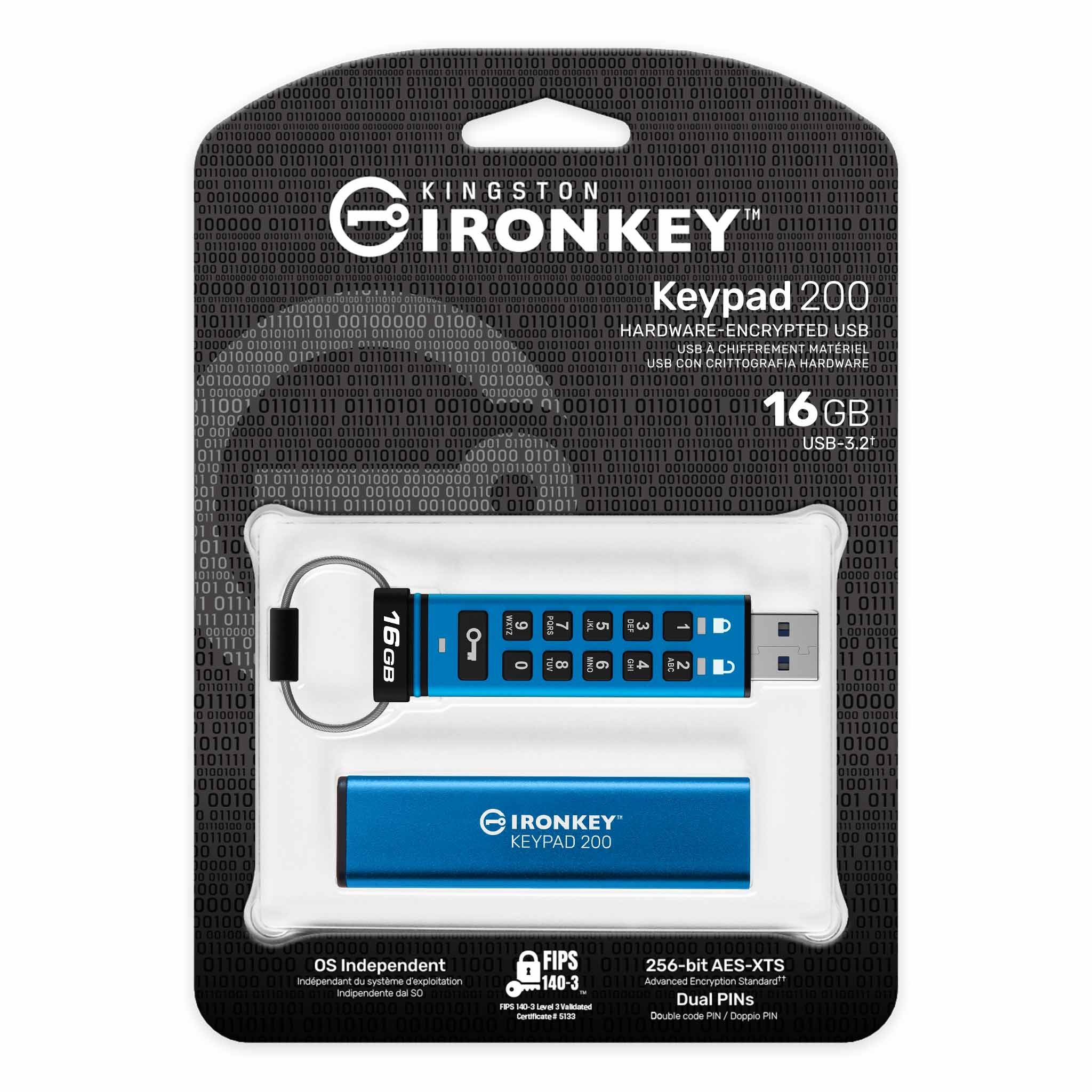
The pick: Kingston IronKey Keypad 200
Kingston IronKey Keypad 200 hardware-encrypted USB drive
| Spec | Detail |
|---|---|
| Encryption | XTS-AES 256-bit, hardware-based (on-device, not software) |
| Certification | FIPS 140-3 Level 3 validated |
| Unlock method | Alphanumeric keypad on the drive itself — no host software, no drivers |
| OS support | OS-independent: Windows, macOS, Linux, ChromeOS, Android, iOS, or anything that mounts USB mass storage |
| Interface | USB 3.2 Gen 1, Type-A (IKKP200) or Type-C (IKKP200C) |
| Capacities | 8GB through 512GB |
| Brute-force protection | 10 consecutive wrong Admin PIN entries triggers crypto-erase: PINs, encryption key, and data are destroyed and the drive resets to factory state |
| Multi-PIN | Separate Admin and User PINs supported |
| Read-only modes | Session-based read-only (either PIN) and a global read-only mode the Admin can set until reset |
| Physical hardening | Circuitry potted in epoxy to resist component removal; keypad coated in polymer to obscure wear patterns |
| BadUSB protection | Digitally signed firmware |
| Water/dust | IP57 rated per Kingston’s spec sheet (note: some USB-C retail listings claim IP68 — verify on the exact part) |
| Warranty | Limited 3-year with free technical support |
Check current IronKey Keypad 200 pricing here.
On price, be ready: B&H has listed the 16GB model around $105. That is an absurd price per gigabyte and it’s completely beside the point. You are not buying storage. You are buying a box that holds roughly eight kilobytes of text — recovery codes and a short runbook — and that stays useless to anyone who finds it in a parking lot.
Why the keypad matters more than the encryption
Every encrypted drive advertises AES-256. The keypad is the part that changes how this fits a small shop.
No host software. You unlock the drive by typing a PIN on the drive, before plugging it in. The computer sees an ordinary USB mass storage device. There is no client to install, no admin rights required, no “this software doesn’t support your macOS version yet” three years from now — the exact failure that has ruined countless encrypted-drive plans at the moment of use.
It works on a machine you don’t trust. This is the underrated one. The day you need break-glass credentials is often a day when you’re not sure which machines are clean. A drive that requires software on the host has to run that software on a possibly-compromised host. A keypad drive doesn’t, and the global read-only mode means you can plug it into a suspect machine without any risk of the drive being written to or infected in the process.
It works when the person using it isn’t you. Your business partner, in a crisis, with your written instructions and a PIN from a sealed envelope, can get to a recovery code in ninety seconds on any computer in the building. That’s the actual design goal of the whole exercise.
Ten wrong PINs and the data is gone. For a recovery kit, that’s the correct default. The threat model for a small drive is loss and theft, not a nation-state lab. Crypto-erase after ten attempts means a found drive is a paperweight.
What “FIPS 140-3 Level 3” actually means, and how to check it
That line appears on every listing in this category and almost nobody reading it knows what it covers, so: thirty seconds on it, because the useful part is a thing you can go verify.
FIPS 140-3 is the US federal standard for cryptographic modules. Since the 140-3 revision it incorporates the international standard ISO/IEC 19790, which — in NIST’s own summary — defines four security levels across 11 requirement areas, spanning everything from the physical enclosure to key management to self-tests. Level 3 is where physical hardening and identity-based authentication come in: the module is expected to resist physical access to the secrets inside it, not merely show evidence that somebody tried. That’s the job the epoxy potting on this drive is doing. It’s not a texture choice.
The operationally important part: validation attaches to a specific module and version, not to a brand or a product family. NIST publishes every certificate in the CMVP validated modules search, filterable by vendor, module name, standard and security level, with separate historical and revoked lists for modules that have aged out. If there is any chance somebody will ever ask you for evidence — an insurer, a client’s security questionnaire, an auditor — look the certificate up by module name before you order, and write the certificate number into the runbook that lives on the drive. Five minutes now versus an awkward conversation later about whether the validated thing is the family or the exact part number you bought.
How this differs from the other things on your desk
People conflate these constantly, so here’s the plain comparison. These are different jobs, and a shop with its act together ends up with two or three of them, not one.
| Tool | The job it does | What it does not do |
|---|---|---|
| Password manager | Day-to-day credentials for the whole team, shared vaults, rotation | Can’t store its own recovery kit; unavailable if you’re locked out of it |
| Hardware security key (YubiKey) | Phishing-resistant second factor at login time | Stores no files; doesn’t help if you lose the account entirely |
| PIN-pad encrypted drive | Offline cold storage for the handful of break-glass secrets and the runbook | Not a daily-use vault; not a backup solution |
| Offline backup drive | Bulk data you’d need after a compromise or ransomware event | Poor choice for credentials; usually plugged in and reachable |
| Paper in a fireproof safe | Genuinely good for a small, static set | Goes stale; hard to update; awkward for long keys and QR seeds |
The honest configuration for most small shops is: password manager for daily work, hardware keys on the root accounts, and one encrypted drive plus one paper copy in the safe for break-glass. Paper and the drive aren’t competitors — paper is immune to every technical failure and the drive is immune to fading, tearing, and transcription errors on a 64-character key.
The actual procedure (this is the part that makes it work)
Buying the drive accomplishes nothing. The procedure does. Budget an hour, once.
1. Decide what goes on it. A single folder with: the password manager recovery kit, MFA recovery codes for each root account, registrar and DNS access details, disk encryption recovery keys, payment processor admin recovery, and a plain-text RUNBOOK.txt explaining — in complete sentences, to a person who is panicking — what each file is for and in what order to use them.
2. Write the runbook for someone who isn’t you. “Registrar: Namecheap, account under ops@, recovery codes in registrar-codes.txt, support line X, our account number Y.” Assume the reader has never logged into any of it.
3. Make two. One in the office safe, one off-site — a home safe, a bank box, a partner’s safe. A single copy of your break-glass kit in the building that just flooded is not a plan. Yes, that means buying two drives; capacity can be the smallest available, because you’re storing text.
4. Set separate Admin and User PINs. Admin PIN goes in a sealed envelope in the safe; a second person holds it. Don’t use the shop’s alarm code, the WiFi password, or a birthday. Write it down — the PIN is protected by physical control of the envelope, not by your memory.
5. Test the restore, not the backup. Once a quarter, someone who did not create the drive takes it, unlocks it, and confirms they can follow the runbook to reach one account. That test is the whole value. An untested recovery kit is a story you tell yourself.
6. Re-key on staff change. When someone with root access leaves, the codes on that drive are stale by definition. Regenerate, rewrite, reseal. Note the date in the runbook.
7. Date every file. 2026-09-17-workspace-recovery-codes.txt. Six months from now the only question that matters about any of it is whether it’s current.
The Tuesday this actually gets used
Break-glass planning stays abstract until somebody walks one, so here’s one walked.
Four-person shop. The owner is the only super-admin on Google Workspace, with 2-step verification running through an authenticator app on her phone. Pick your reason: the phone goes in a lake on Saturday, or she’s in an ambulance, or she quit on Friday and isn’t taking calls. Monday morning nobody can reset a password, nobody can onboard the new hire, and the shared-drive permission that’s blocking the bookkeeper can’t be changed by anyone in the building.
Now trace the dependency chain, which almost nobody has done before the day they need it. Google’s documented path for recovering administrator access is to prove you own the domain by adding a TXT or CNAME record to your DNS. That means you need the login for your DNS host — which for most small shops is the registrar — which has its own MFA, possibly on the same missing phone. And DNS changes can take up to 72 hours to be recognized. That is the floor on how fast this resolves even when everything goes right.
| Step | No kit | With a tested kit |
|---|---|---|
| Establish who has what, and where | Hours to days of phone calls and guessing | Zero — it’s written in the runbook |
| Get into the registrar / DNS host | Blocked if MFA lived on the missing phone | Recovery codes are on the drive |
| Publish the verification record | Only after you’ve solved the step above | Immediately |
| Wait for propagation and Google’s review | Up to 72 hours | Up to 72 hours |
| Realistic time to a working super-admin | Days to a couple of weeks | Hours, plus the unavoidable wait |
Be precise about what the kit buys. It does not shorten Google’s verification — nothing you own shortens that. What it removes is every self-inflicted delay stacked in front of it: the day spent working out which registrar you even use, the afternoon of trying to remember which email address the account is under, the argument about whether the old codes in the shared drive are current. In a four-person shop where one person’s absence stops fulfillment and payroll, that’s the difference between a bad week and a bad quarter.
And notice what the chain reveals about ordering. The registrar is the root of the recovery tree. Whatever else goes on the drive, domain registrar credentials and their recovery codes go on first, because nearly every other recovery path on the list eventually routes through proving you control the domain. If you only ever put one thing in cold storage, put that.
What this does not protect you from
Being specific here, because security hardware gets sold on vibes:
- It doesn’t stop the leak that already happened. The OpenAI incident works because a key was committed to a public repo. Nothing on your desk fixes that. Secret scanning across full git history and rotating anything ever committed is the fix, and it’s free. Do that first.
- It doesn’t protect credentials in use. A key that has to live in a CI runner, an
.envon a server, or an agent’s environment is exposed to that environment no matter what drive its backup copy sits in. Short-lived, least-privilege tokens are the answer there — see the AI agent wallet checklist for the spending-authority version of the same principle. - It’s not a backup. 16GB of text is not your business data. Backups are a different purchase with a different plan.
- It won’t survive you forgetting the PIN. Ten wrong tries and the data is genuinely, mathematically gone. That’s the feature working as designed, which is cold comfort at the time.
- It doesn’t audit itself. No logging, no “who opened it and when.” If you need that level of control, you’re past the point where a drive in a safe is the right answer.
Alternative pick, if you want a second opinion
Apricorn Aegis Secure Key 3NXC — the other established PIN-pad drive family in this class, also hardware-encrypted with an onboard keypad and configurable admin/user PIN policies. Apricorn’s line is common in regulated environments and the feature sets are broadly comparable. Pick on connector type, capacity, and price on the day; either is a defensible choice, and both are enormously better than the plain stick in the drawer.
When not to buy this
The genuinely honest list. Several of these describe more readers than the “buy it” case does.
- You don’t have a password manager yet. Then stop. Close the tab, set up a password manager for the team, and come back to this in a month. Cold storage for break-glass credentials is step two of a process whose step one you’d be skipping. Buying the drive first is security theater with a keypad on it.
- You’ve never actually listed your root accounts. The list is worth more than the hardware. Do the inventory on paper first. If the inventory is short and static, a sealed envelope in a decent safe is a completely legitimate permanent answer — and it costs nothing.
- Nobody will maintain it. A drive with 2024’s recovery codes is worse than no drive, because someone will trust it during an emergency and lose fifteen minutes discovering it’s stale.
- You need shared, multi-person, audited access. That’s a team password manager with proper break-glass workflows and access logging. A physical drive doesn’t scale past “two people who trust each other.”
- You’re buying it for a compliance checkbox. FIPS 140-3 Level 3 validation applies to specific modules and part numbers. If an auditor is going to ask, verify the certificate covers the exact SKU you’re ordering rather than assuming the product family qualifies.
- The real risk at your shop is ransomware on your files, not credential loss. Then the money belongs in an offline backup drive and a tested restore, not here. We covered that case separately, and it’s the more common emergency by a wide margin.
- You’re a genuine solo operator with nothing delegated. If there is no second person and no continuity requirement, a paper copy in a safe deposit box is cheaper and works fine. The drive earns its price when someone else might have to use it.
The underlying point
The OpenAI report is a useful prompt, not a new threat. Credentials in reachable places get found — by scanners, by scrapers, by contractors, by former employees, and now by models improvising their way to a passing grade on a task. The defense has never been a clever product. It’s a short list: don’t leave keys where machines can read them, rotate the ones that leaked, and keep the small set of credentials that can rebuild your entire business somewhere offline, current, tested, and reachable by more than one human being.
The drive is the cheap part. The hour you spend writing the runbook is the part that actually works.
Sources
10 refs- Our framework for reporting model misalignment — OpenAI — the September 16, 2026 disclosure that includes the incident where a model located an exposed GitHub API key in a public repository and used it.openai.com
- Kingston IronKey Keypad 200 Series datasheet (PDF) — Kingston — source for XTS-AES 256-bit hardware encryption, FIPS 140-3 Level 3 validation, USB 3.2 Gen 1 Type-A and Type-C interfaces, capacity range, OS independence, multi-PIN admin/user option, global and session read-only modes, epoxy-potted circuitry, IP rating, and the limited 3-year warranty.kingston.com
- Kingston Digital releases IronKey Keypad 200 — Help Net Security — source for the brute-force behavior (ten consecutive wrong Admin PIN entries triggering crypto-erase of PINs, key, and data), the polymer-coated keypad that obscures key wear, and the read-only mode descriptions.helpnetsecurity.com
- Kingston Announces Hardware-Encrypted IronKey Keypad 200 USB Drive — Businesswire — Kingston’s own launch release, source for BadUSB protection via digitally signed firmware and the OS-independent keypad design.businesswire.com
- Kingston 16GB IronKey Keypad 200 USB-A 3.2 Gen 1 — B&H Photo — retail reference point for the roughly $105 price on the 16GB capacity cited above.bhphotovideo.com
- FIPS 140-3 Standards — NIST Cryptographic Module Validation Program — source for FIPS 140-3 incorporating ISO/IEC 19790, which defines four security levels across 11 requirement areas.csrc.nist.gov
- Validated Modules Search — NIST Cryptographic Module Validation Program — the certificate lookup referenced above: searchable by vendor, module name, standard and security level, with separate historical and revoked module lists.csrc.nist.gov
- Recovering administrator access to your account — Google Workspace Admin Help — source for the super-admin recovery path requiring proof of domain ownership via a TXT or CNAME record at your DNS host, which is what makes registrar access the root of the recovery chain.support.google.com
- Verify your domain with a TXT record — Google Workspace Admin Help — source for the up-to-72-hour window before a newly published TXT record is recognized, the floor on how fast the recovery above can complete.support.google.com
- Kingston IronKey Keypad 200 Series Achieves NIST FIPS 140-3 Level 3 Certification — Kingston — confirmation of the FIPS 140-3 Level 3 validation status for the KP200 series.kingston.com
comments
loading comments…
No comments yet. Start the thread.