Disclosure: some links below are Amazon affiliate links (tag cao04-20). Costs you nothing; the picks don’t change based on that. Every spec and price below is sourced at the bottom.
Note: This site has covered a record-setting Patch Tuesday, a print-server RCE campaign, and a VLAN-segmentation fix in the last few days alone — all of which assume the machine actually finishes applying a fix once it starts. A dirty shutdown mid-write is one of the more common, least-discussed ways a small-office server or back-office machine ends up with a corrupted filesystem, a half-applied patch, or a print-management database that won’t start.
Every piece on this site about patching faster, segmenting networks, or cloning drives before a risky update shares one quiet assumption: the machine stays powered on for the duration. A brief outage, a brownout, or someone bumping a power strip mid-write doesn’t care that you did everything else right. It’s the least interesting failure mode in small-business tech — nobody writes a breathless headline about a battery backup — and it’s also one of the more common causes of a genuinely bad week: a corrupted database, a filesystem that needs an unplanned repair, a server that won’t finish booting.
The pick: CyberPower CP825AVRLCD
CyberPower CP825AVRLCD Intelligent LCD UPS
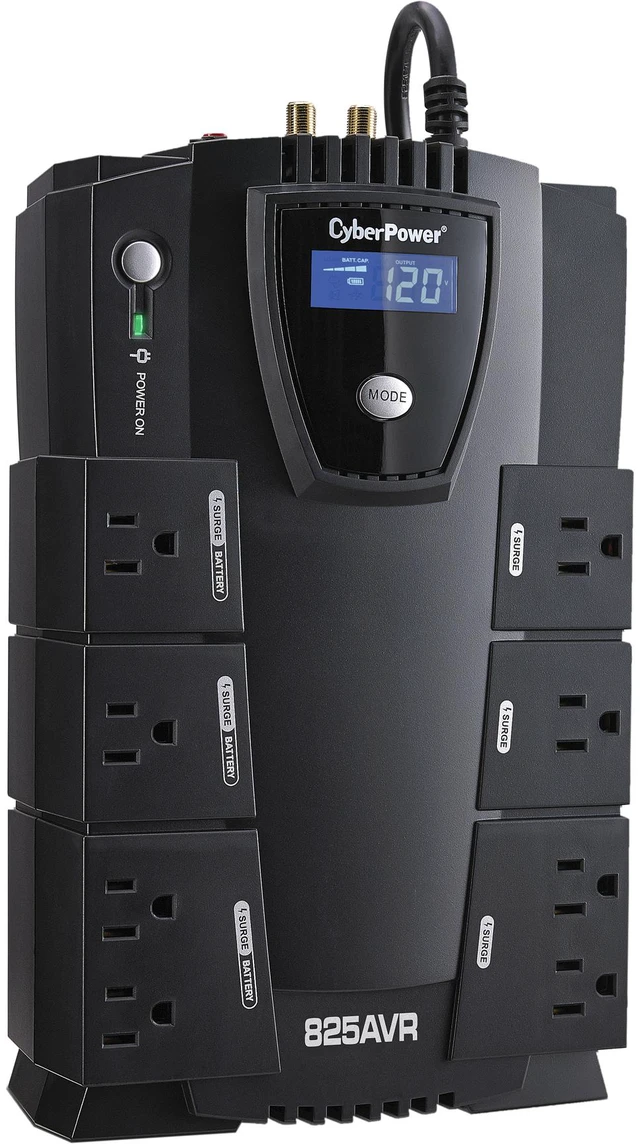 The CP825AVRLCD: 8 outlets, LCD status panel, compact enough for a shelf under a desk or in a server closet. Photo: Newegg product listing.
| Spec | Detail |
|---|---|
| Price | ~$130-140 MSRP |
| Capacity | 825 VA / 450 W |
| Outlets | 8 total — 4 battery-backed + surge protected, 4 surge-protected only |
| Runtime at half load | ~13.5 minutes |
| Runtime at full load | ~1.2 minutes |
| Voltage regulation | Automatic Voltage Regulation (AVR) — corrects minor sags/surges without switching to battery |
| Monitoring | USB port + LCD panel for real-time status; PowerPanel software for scheduled safe shutdown |
| Warranty | 3 years, including battery; $200,000 Connected Equipment Guarantee |
Sources: CyberPower’s official CP825AVRLCD product page.
Check current CP825AVRLCD pricing here.
What this actually protects against — and what it doesn’t
Be precise about what a UPS at this price point is for, because it’s easy to oversell. This is not a way to keep a server running for hours through an extended outage — at full load, you get about a minute and a fifteen seconds, which is enough to finish whatever’s mid-write and shut down cleanly, not enough to keep working through a real blackout. What it actually buys you is exactly that: enough runtime to avoid a dirty shutdown. The difference between a server that loses power mid-write and one that gets a clean, ordered shutdown signal even a minute before the battery dies is the difference between “reboot and continue” and “run a filesystem check, hope the database wasn’t mid-transaction, maybe restore from backup.”
The second, less obvious job this does is AVR — automatic voltage regulation. Most small-office power isn’t a clean, stable 120V; it sags and spikes constantly, especially in older buildings or shared circuits with HVAC or other equipment cycling on and off. A UPS with AVR corrects those minor fluctuations without switching to battery power at all, which matters because unregulated voltage sag is a slow, invisible cause of premature hardware failure in power supplies and drives — the kind of thing that shows up as “this machine has needed three power supplies in four years” with nobody connecting it back to the actual cause.
Which machine actually needs this
Not every device in your shop needs battery backup — a UPS on a point-of-sale terminal that already fails safely and just needs a reboot isn’t the priority. The priority order:
- Whatever server or machine is running a database, print-management platform, or any application mid-write during normal operation — exactly the profile of the PaperCut-style print servers and back-office systems covered elsewhere on this site. A database or filesystem interrupted mid-transaction is the single most common source of “why won’t this thing boot” support calls.
- Your networking gear — router, modem, the switch from the VLAN segmentation piece — if the network drops the instant power blips, everything downstream loses connectivity even if the machines themselves stay up, which defeats a lot of the point of keeping servers powered.
- Whatever machine you’re actively applying a risky update to — a mass patch cycle, a firmware update, anything where an interruption mid-write is a known failure mode, not a rare edge case.
- Everything else — a cash register, a shared front-desk laptop — can reasonably rely on its own battery (if it has one) or just tolerate a hard restart. Don’t try to protect every outlet in the building; that’s a much bigger and more expensive project than this piece is about.
Doing the load math instead of guessing
“825VA is probably enough” is how people end up either overspending on capacity they don’t need or, worse, undersizing a unit that shuts down under load the one time it matters. The actual math is quick and worth doing once, because VA (volt-amps) and watts aren’t quite the same thing, and both numbers matter differently.
Every device with a power supply has a watt rating printed on it or its power brick — add those up for everything you plan to plug into the battery-backed outlets specifically (not the whole office, just what’s actually going on this unit). A typical back-office desktop draws 60-150W under normal load, a small business-class router or modem draws 10-25W each, and an 8-port unmanaged or lightly-managed switch like the one in the VLAN piece draws 5-15W. Add those together and you get your real watt draw; compare that against the unit’s 450W rating, not its 825VA rating, since watts is the number that actually limits what you can safely run.
A concrete example: a desktop at 120W, a router at 15W, a modem at 12W, and an 8-port switch at 8W totals 155W — roughly a third of the CP825AVRLCD’s 450W capacity, comfortably under half load, which is exactly the ~13.5-minute runtime figure in the spec table above. Load matters more than most buyers expect: runtime on any UPS drops sharply, not linearly, as you approach full capacity, because the battery has to discharge faster to sustain the higher draw. That’s the real reason the spec table shows 13.5 minutes at half load but only about 1.2 minutes at full load — it’s not a rounding quirk, it’s how lead-acid battery discharge curves behave under stress.
If your real total comes out above roughly 350-400W once you’ve added up everything you actually want protected, that’s the practical signal to step up to the CP1500PFCLCD in the sizing table below rather than running this unit near its ceiling, where both runtime and battery lifespan suffer.
Line-interactive vs online double-conversion: which one you’re actually buying
Worth naming the UPS topology here, since “UPS” gets used as if it’s one category of product when it’s really three meaningfully different designs. The CP825AVRLCD is a line-interactive UPS — utility power runs through the AVR circuit to your equipment continuously, and the battery/inverter only kicks in when power actually fails or sags outside AVR’s correction range, which happens in a few milliseconds, fast enough that most equipment never notices the switch. That’s different from a cheap standby UPS, which does no voltage correction at all and switches to battery for even minor sags, wearing the battery down faster on power that didn’t actually need correcting. It’s also different from an online double-conversion UPS, which runs everything through the battery and inverter continuously with zero switchover time at all — the gold standard for equipment that genuinely cannot tolerate even a few milliseconds of transfer time, like certain industrial control systems or medical equipment, but meaningfully more expensive and more work to maintain (the battery is under constant load, so it wears faster) than the benefit justifies for a back-office server or print-management box.
For the profile this piece is written for — a server or desktop that needs a clean shutdown window, not zero-millisecond continuity — line-interactive is the right category, not a compromise. Paying for online double-conversion here would be solving a problem (transfer-time sensitivity) that a back-office print server or database box doesn’t actually have.
Setting it up, honestly
Physical setup is genuinely five minutes: plug the UPS into the wall, plug your server (or router, or whatever you’re protecting) into one of the four battery-backed outlets — not the surge-only ones, which don’t provide runtime — and plug the included USB cable into the protected machine if you want automated shutdown behavior. That’s the step people skip and shouldn’t: without the USB connection and CyberPower’s free PowerPanel software installed, the UPS will keep the machine running until the battery physically dies, then cut power exactly as ungracefully as if there were no UPS at all. The battery buys you the time for a clean shutdown; the software is what actually triggers one. Fifteen more minutes to install and configure PowerPanel to shut down cleanly at roughly 20-30% remaining battery, and the whole setup is doing its actual job.
Sizing up: when 825VA isn’t enough
| Model | Price | Capacity | Best fit |
|---|---|---|---|
| CyberPower CP685AVR (budget) | ~$65-75 | 685VA / 390W | A single router + modem, or a low-draw NAS — not enough headroom for a full server |
| CyberPower CP825AVRLCD (this pick) | ~$130-140 | 825VA / 450W | A back-office server, print-management box, or router + switch + one server on shared outlets |
| CyberPower CP1500PFCLCD (upgrade) | ~$220-250 | 1500VA / 1000W, pure sine wave, active-PFC compatible | A server with an active-PFC power supply (most modern servers and higher-end desktops), or multiple devices needing runtime simultaneously |
The jump to the CP1500PFCLCD isn’t just about more runtime — it’s about power quality. This pick’s simulated sine wave output is fine for most standard power supplies, but active power-factor-correction (PFC) power supplies, common in newer servers and higher-end desktop machines, can behave unpredictably or shut down on a simulated sine wave during a battery-power event. If you’re not sure whether your server’s power supply uses active PFC, check the label or spec sheet — if it does, the CP1500PFCLCD’s genuine pure sine wave output is the correct pick, not a nice-to-have upgrade. For a standard back-office desktop or a NAS-style server, the CP825AVRLCD’s simulated sine wave is a non-issue.
Battery life and the maintenance nobody plans for
The three-year warranty on this unit includes the battery specifically, which matters because sealed lead-acid UPS batteries have a real, finite lifespan — typically 3-5 years under normal conditions, shorter in a hot server closet, since heat is the single biggest factor in battery degradation. The unit’s LCD panel and PowerPanel software both flag a battery that’s failing a self-test, which happens automatically on a schedule without needing to remember to check manually. The actual maintenance burden: replace the battery when the unit flags it (CyberPower sells a compatible replacement battery separately, typically for less than half the cost of a new unit), and don’t let “the light’s been blinking for a while” turn into “found out the battery was dead during the actual outage that needed it.” A UPS with a dead battery still passes power through normally under regular conditions — the failure is invisible until the exact moment you need it, which is the worst possible time to discover it.
Quick answers
How many devices can I actually plug into this? Eight outlets total, four battery-backed and four surge-only. A server or primary machine belongs on a battery-backed outlet; a monitor or peripheral that doesn’t need runtime (just surge protection) can go on one of the surge-only outlets, which don’t draw from the limited runtime budget.
Does this protect against a full blackout, or just brief blips? Both, but differently. For a brief blip or brownout, AVR handles it without ever switching to battery. For a full outage, you get roughly 1-13 minutes depending on load — enough for a clean, ordered shutdown, not enough to keep working through an extended blackout. That distinction is the whole point of this piece: it’s insurance against a dirty shutdown, not a way to keep operating without utility power.
Do I need special software, or does it work automatically? It works automatically for basic surge and runtime protection with no software at all — plug in, done. The USB connection and free PowerPanel software add automated, scheduled clean shutdown when the battery hits a low threshold, which is the piece that actually prevents a corrupted filesystem. Skipping the software still gives you surge protection and some runtime; it just means a human has to notice the outage and shut down manually before the battery dies.
Is a UPS actually necessary if my building rarely loses power? The clean-shutdown case for a UPS doesn’t require frequent outages to pay for itself — one dirty shutdown during a rare outage, at the wrong moment (mid-patch, mid-database-write), can cost more in recovery time than the unit costs outright. Frequency of outages affects how often you’ll see it do its job; it doesn’t change what a single bad-timing event would cost without it.
A worked example: the three-machine back office
Say your setup is typical of a small operation: one back-office desktop handling books and inventory, a router/modem combo, and an 8-port switch feeding a couple of networked printers and a POS terminal. Total realistic load for the desktop, router, and switch running through the CP825AVRLCD’s battery-backed outlets: comfortably under half load for this unit’s capacity, which per the runtime table above buys roughly 13 minutes if power drops entirely — plenty of time for PowerPanel to trigger an automatic, clean shutdown of the desktop well before the battery is exhausted, and enough time for the router and switch to simply keep the network up through a brief blip without ever needing to shut down at all.
Total cost: one $130-140 unit, a five-minute physical setup, and fifteen minutes installing PowerPanel and setting the shutdown threshold. Compare that to the realistic alternative: a power blip during a Tuesday afternoon inventory sync corrupts the database file mid-write, and the next morning starts with a support call and a restore-from-backup instead of opening on time. The UPS doesn’t need to prevent every possible outage-related problem to be worth it — it needs to prevent that one specific, recurring failure mode, which it reliably does.
When not to buy this
If your entire operation runs on cloud infrastructure with no local server, printer-management box, or on-prem hardware at all — a fully cloud-based shop with just laptops and a router — a UPS on the router and modem is still worth considering for connectivity continuity, but the core case for this piece (protecting a machine mid-write) doesn’t apply to you the same way.
If you’re expecting this to keep your shop running through an extended outage. At 1-13 minutes of runtime depending on load, this is a clean-shutdown tool, not a backup power source for continued operation. If you need actual extended runtime — an hour or more powering critical equipment through a real outage — you need a larger-capacity UPS or a generator setup, a meaningfully bigger and more expensive project than this one.
If your building already has reliable backup power (a whole-building generator with automatic transfer switching, for instance) covering your server closet specifically, a standalone UPS is redundant for that machine, though it’s still worth confirming the generator’s transfer time doesn’t itself cause a brief gap a small UPS would smooth over.
If you’re protecting a single laptop that already has its own internal battery. A laptop is already its own UPS in the sense that matters here — a power blip doesn’t interrupt it. Spend this budget on the machines that don’t have that built-in protection instead.
One more honest caveat
A UPS is a last line of defense, not a substitute for the actual practices that reduce how often you need it to save you: automatic backups that run on a schedule regardless of power state — ideally to an offline drive that isn’t sitting on the same machine a corruption event or a compromise could take out — a bootable clone taken before a risky mass update (the same drive-cloning discipline this site covers separately, in a companion piece not yet published as of this writing), and patching promptly rather than leaving a machine in a half-updated state longer than necessary, the same discipline this month’s record Patch Tuesday piece argues for directly. This unit shrinks the window in which a power event turns into a real problem. It doesn’t eliminate the other failure modes those practices are built to catch.
Sources
3 refsAll prices and specs accessed September 12, 2026.
- Official specifications, capacity, runtime, and warranty details — CyberPower, CP825AVRLCD official product pagecyberpowersystems.com
- Retailer listing confirming current specifications and pricing range — Newegg, CyberPower CP825AVRLCD product listingnewegg.com
- Manufacturer explanation of line-interactive vs. online double-conversion UPS design, backing the topology comparison above — Eaton, “Choosing the Optimal UPS Topology”eaton.com
Bottom line
A battery backup is the least exciting item this site has recommended, and also one of the cheapest to justify: $130 once, against a machine that’s mid-write during a patch cycle, a print-server database transaction, or a drive clone getting interrupted by nothing more dramatic than a brief brownout. It doesn’t stop an attacker, patch a CVE, or segment a network. It makes sure the fixes that do all of that actually finish applying instead of leaving a machine half-updated and unbootable at the worst possible moment.
See current CP825AVRLCD pricing on Amazon.
One last practical note: this is a buy-it-before-you-need-it purchase, in the most literal sense possible — a UPS ordered the day after a bad power event doesn’t help with the event that already happened. Unlike most of the security and patching advice on this site, there’s no partial credit for reacting quickly after the fact. Either the machine was on battery-backed power when the outage hit, or it wasn’t.
comments
loading comments…
No comments yet. Start the thread.