Don't Take Anyone's Word for What Happened in Your Shop Either. The $130 Camera That Settles It.
OpenAI's math proof and a disputed timeline are stuck in the same place your shop's 'he said, she said' disputes get stuck: no independent record to check. The honest buying guide to a PoE security camera that gives you one — for the register, the loading dock, and the argument you don't want to have from memory.
Disclosure: some links below are Amazon affiliate links (tag cao04-20). Costs you nothing; the picks don’t change based on that. Every spec and price below is sourced at the bottom.
Note: This runs alongside today’s piece on OpenAI’s disputed Navier-Stokes math claim — a story that’s stuck exactly where a lot of real-world disputes get stuck: two credible parties, two different accounts, and no independent, mechanical record either side can point to that settles it cleanly. That piece is about verifying AI vendor claims. This is about the much more mundane version of the same problem: what actually happened at 11:40pm at your loading dock, or who actually said what to your employee at the register, when it’s your word against theirs and nobody wrote it down.
The Navier-Stokes dispute covered in today’s other piece boils down to this: a mathematician says a company pressured him over credit, the company denies the specific characterization, and there’s no recording of the actual conversation — just two competing accounts of what was said. That’s not a math problem. That’s the identical shape of dispute that shows up in small businesses constantly: a customer says an employee was rude, the employee says the customer was the one who escalated it. A delivery says it arrived damaged; the driver says it left the truck fine. An employee says they clocked out and left; inventory says something left with them. Every one of those disputes gets resolved by whoever’s more persuasive, unless somebody has an independent record that doesn’t have an opinion about who’s right.
The pick: Reolink RLC-810A
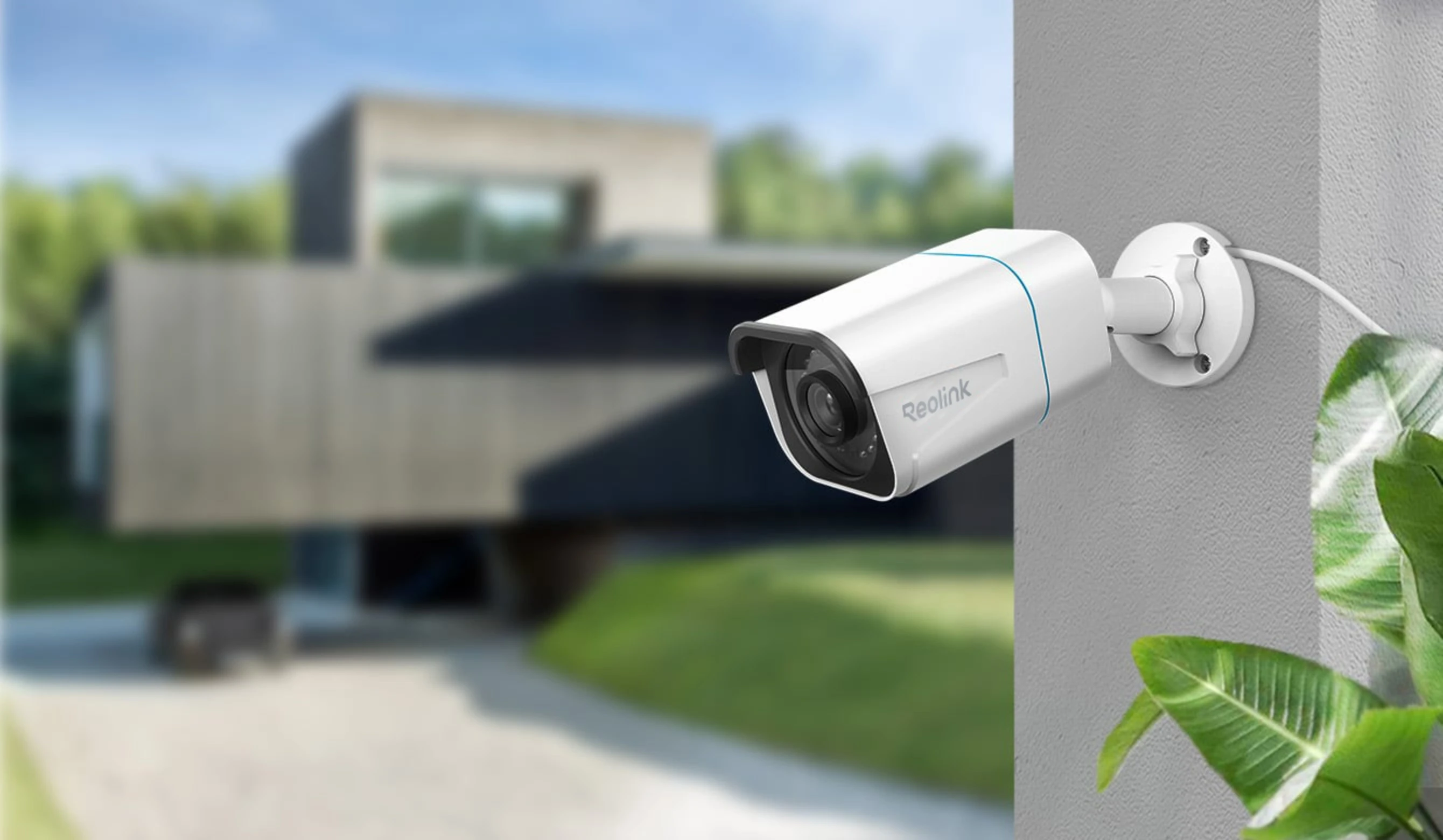 The Reolink RLC-810A: 4K resolution, Power over Ethernet (one cable for power and data), color night vision via built-in spotlight. Photo: Reolink.
| Spec | Detail |
|---|---|
| Resolution | 8MP / 4K (3840×2160), 25fps |
| Power | PoE (802.3af) — one Ethernet cable for power and video, no separate outlet needed at the camera |
| Night vision | Color via built-in spotlight, up to 100ft; 18 IR LEDs for black-and-white fallback |
| Field of view | 101° horizontal (2.8mm fixed lens) |
| Weatherproofing | IP67 — rated for outdoor mounting in rain and dust |
| Storage | microSD (up to 512GB), Reolink NVR, or FTP server — works standalone, no subscription required |
| Detection | Person/vehicle/animal smart detection, reduces false-alert clutter from motion-only triggers |
| Extras | Built-in two-way audio (mic + speaker) |
| Price | ~$90-130 depending on retailer and sale timing |
Sources: Reolink, RLC-810A official product page.
Check current Reolink RLC-810A pricing here.
Why PoE, specifically, and why that’s not a minor detail
The single most common reason a DIY security camera installation fails isn’t the camera — it’s the power. Wi-Fi cameras need a nearby outlet, which means either an ugly extension cord or an installer running new electrical to wherever you actually need the camera pointed, which is usually not wherever the existing outlets happen to be. Power over Ethernet solves this cleanly: one Ethernet cable, run once, carries both data and power to the camera. You need a PoE switch or PoE injector between the camera and your network (most home/small-shop networking gear doesn’t supply PoE natively — budget for this as part of the purchase, not an afterthought), but after that one-time setup, there’s no camera-side power cord, no outlet dependency, and no battery to die at the exact moment you needed footage.
This matters more for a loading dock, a back entrance, or a stockroom than it does for a living room, precisely because those are the locations where you actually want a camera and least likely to have a conveniently placed outlet already there.
What actually gets settled by having this, versus not
Be concrete about what a camera does and doesn’t resolve, because “get cameras for security” undersells the actual use case for a small shop:
- The delivery dispute. A driver claims a package was left in good condition; you find it damaged inside. Timestamped footage of the actual drop-off, from a fixed angle that doesn’t depend on either party’s memory, ends the argument in minutes instead of days of back-and-forth with a carrier’s claims department.
- The employee/customer incident. Someone claims they were treated badly, or that they were shortchanged, or that a promised discount was refused. Footage with audio (this camera has two-way audio built in) settles what was actually said, rather than leaving it as two competing versions of a conversation nobody else witnessed.
- The inventory question. Something’s missing from the stockroom, and there are three plausible explanations — theft, miscount, or a legitimate removal nobody logged. A camera covering the door doesn’t require you to accuse anyone; it just answers the question, the same way an audit trail settles what an unsupervised AI agent actually did instead of requiring anyone’s word for it.
- The insurance claim. A slip-and-fall or a break-in claim moves faster and settles more favorably with footage than with a written statement alone — insurers and their adjusters treat timestamped video as a categorically stronger form of evidence than testimony, for the same reason a court does.
None of this requires treating your own staff or customers as suspects by default. The value of an independent record isn’t that it assumes bad faith — it’s that it removes the need to adjudicate “who’s more believable” at all, for the small number of situations each year where that question actually comes up and actually matters.
Where one camera actually goes, for a small shop
Don’t buy a stack of these and mount them everywhere on day one. Prioritize by where a dispute would actually cost you something if it went the wrong way:
- The point of highest cash or inventory exposure — the register, the safe, the stockroom door. This is where theft disputes and cash-drawer discrepancies actually happen.
- Deliveries and the loading dock. This is the single highest-value placement for most small retail and food-service operations, because delivery disputes are frequent, often expensive, and almost always resolvable instantly with footage.
- The main customer-facing entrance, for the incident-dispute category above — covers both the “what did the customer actually say/do” and “did someone actually enter/leave when they claim” questions.
- Everything else is a “nice to have, not urgent” tier. A single well-placed camera covering your highest-exposure point is more useful than three mediocre-angle cameras covering low-stakes areas.
Budget alternative: Reolink RLC-820A
| Camera | Price | Night vision | Field of view | Best fit |
|---|---|---|---|---|
| RLC-810A (this pick) | ~$90-130 | Color, via spotlight, up to 100ft | 101° (wider) | Anywhere you want color detail after dark, or a wider view of an open area like a loading dock |
| RLC-820A (budget) | ~$55-110 depending on sale | IR only (black-and-white after dark), no spotlight | 87° (narrower) | Areas that already have external lighting (a porch light, a dock light) where color night vision is redundant, or a tighter budget |
The core sensor, resolution, PoE support, and smart detection are identical between the two — you’re paying the price difference specifically for the spotlight and the wider lens. If the spot you’re covering already has decent ambient lighting at night, the 820A does the same underlying job for less. If it’s genuinely dark back there, the 810A’s spotlight is the difference between usable color footage and a grainy black-and-white silhouette exactly when you’re most likely to need clear footage.
What this doesn’t replace
A camera records what happened. It doesn’t prevent what happened, it doesn’t monitor itself in real time unless you’re actually watching a live feed (most small shops aren’t, and that’s fine — the value here is the recorded record, not live surveillance), and it doesn’t substitute for basic physical security like locks, safes, and access control. Pair it with those, don’t treat it as a replacement for them.
It also doesn’t come with cloud storage or a monitoring subscription unless you specifically add one — this pick is deliberately a standalone, subscription-free setup, recording to local microSD or an NVR you already own. If you want cloud backup of footage (useful if someone could physically steal the camera or the storage device after an incident), that’s a separate Reolink subscription or NVR purchase to layer on top, not something this camera includes by default.
A worked example: the $40 delivery dispute that becomes a $400 argument without this
A small café gets a produce delivery every morning before opening. One week, the delivery invoice says six cases of a specific item; the stockroom count says five. The driver insists all six were unloaded and signed for. The manager insists there were only five on the shelf when she checked. Without footage, this becomes a recurring, unresolvable friction point with a supplier the business depends on weekly — the kind of low-grade dispute that damages a relationship slowly over months of “well, last time you said…” rather than blowing up once and getting fixed.
With a camera covering the dock, the actual unload gets checked against the invoice in about ninety seconds: either six cases came off the truck and one went missing after (a stockroom/theft question, different fix) or five came off the truck and the invoice was wrong (a supplier billing question, different fix). Same underlying discrepancy, completely different resolution path — and the only way to know which one you’re actually dealing with is a record of what happened at the door, not a debate about who remembers correctly.
The same logic applies if the dispute happens on the road instead of at your dock. A dashcam for the delivery van solves the mobile version of this exact problem — what actually happened at the intersection, or who backed into what in a parking lot — for the same reason a fixed camera at the loading dock does: a timestamped record beats two people’s memory of the same five seconds.
Setup, honestly: what the PoE step actually involves
The camera itself is close to plug-and-play once power and network reach it. The part that trips people up is the PoE infrastructure, so budget for it as part of the purchase rather than discovering it’s missing after the camera arrives:
- Check whether your existing network switch supplies PoE. Most consumer and small-office switches don’t by default — look for “PoE” or “PoE+” explicitly in the switch’s spec sheet, not just “Ethernet switch.”
- If it doesn’t, buy a PoE injector (a small adapter that sits between your existing non-PoE switch and the camera, injecting power onto the Ethernet run) for a single camera, or a PoE switch if you’re planning to add more cameras later — the switch is the better long-term buy if you expect to expand past one or two cameras.
- Run a single Ethernet cable from the injector/switch to the camera location. This is the physical-labor part of the install — if the run is short and accessible (through an existing wall conduit, along an exposed ceiling), it’s a DIY afternoon project. A long run through finished walls is where hiring an electrician or low-voltage installer starts making sense instead of doing it yourself.
- Set the recording mode — continuous, motion-triggered, or the smart person/vehicle/animal detection this model supports, which cuts down on the false-alert clutter of pure motion detection (a moving shadow, a blowing bag) while still catching what you actually care about.
Total realistic setup time for one camera with existing PoE infrastructure: under an hour. Add a few hours if you need to run new cabling or buy and configure a PoE switch for the first time.
The storage math, worked out
“Depends on the card size and recording mode” is true but not concrete enough to buy against, so here’s the actual math. At 8MP/4K and 25fps with standard H.265 compression, continuous recording runs roughly 4-6GB per hour, depending on scene complexity — a static loading dock with little movement compresses smaller than a busy sidewalk with constant motion. On a 512GB card, that’s roughly 85-125 hours of continuous footage, or about 3.5-5 days, before the oldest footage starts getting overwritten.
Switch to motion/smart-detection-triggered recording instead of continuous, and the math changes dramatically, because the camera is only writing footage when something actually happens in frame rather than 24 hours a day regardless of activity. A loading dock that sees real activity for maybe 2-3 hours a day (deliveries, staff coming and going) instead of 24 might generate 10-15GB a day instead of 100-150GB, which stretches that same 512GB card to roughly a month or more of retained footage. That’s the practical reason smart detection matters beyond just “fewer annoying alerts” — it’s the difference between a camera that holds three or four days of usable history and one that holds a month, on the exact same hardware. If your dispute pattern is “we usually notice something’s wrong within a day or two,” continuous recording on a smaller card is fine. If it’s “we sometimes don’t realize there’s a problem until the following week,” motion-triggered recording on the largest card the camera supports is the only setup that actually has the footage by the time anyone goes looking for it.
NVR and cloud backup, and the real cost of each
The camera’s standalone microSD setup is genuinely fine for a single camera covering one location, but it has one structural weakness worth being honest about: if someone steals the camera itself, or the physical location where the microSD card lives, the footage goes with it. That’s a real risk specifically for the situations where footage matters most — an actual break-in, not just a delivery dispute — since whoever’s motivated enough to break in is also the person motivated to grab or destroy the recording device on the way out.
Two ways to close that gap, with different cost profiles:
- A Reolink NVR (network video recorder) stores footage on a separate device, typically kept somewhere less obvious than the camera itself — a back office, a locked closet, anywhere not visible from the entry point being recorded. This is a one-time hardware cost (Reolink’s NVRs generally run $150-300 depending on channel count and included storage) with no ongoing subscription, and it also solves the “add more cameras later” problem cleanly, since one NVR can typically handle 4-8 camera channels.
- Cloud backup, either through Reolink’s own subscription plans or a self-managed upload to cloud storage you already pay for, adds an ongoing monthly cost but survives even if someone steals both the camera and the NVR. For most small shops, this is worth paying for specifically on the highest-exposure camera (the register, the safe) and skippable on lower-stakes ones (a general area camera where the worst case is losing footage of nothing much happening).
Neither is required to get value from this camera on day one. Both are worth budgeting for as a phase-two purchase once you’ve confirmed the basic setup actually gets used for something.
Audio recording consent, in more detail
The two-way audio point in the “when not to buy” section below deserves more than a one-line warning, because it’s the single most common way a well-intentioned camera purchase turns into a legal problem. U.S. states split roughly into two camps on audio recording consent: one-party-consent states, where only one person in the conversation needs to know it’s being recorded (which usually means you, as the business owner, recording your own premises, are fine), and two-party (or “all-party”) consent states — including California, Florida, Illinois, and several others — where every person being recorded needs to know about it, typically satisfied by clear, visible signage stating that audio is being recorded. Getting this wrong isn’t a minor compliance footnote; several of these states allow for real civil penalties and, in some cases, criminal charges for unlawful audio recording. Video-only recording of public-facing areas is essentially unregulated by comparison in most states, which is exactly why the guidance here is to know which zone the camera covers: a loading dock where the built-in mic mostly picks up truck engines and cardboard boxes is a very different exposure than an employee break room where it’s picking up private conversations nobody agreed to have recorded. When in doubt, post a sign, and check your specific state’s current law rather than assuming a neighboring state’s rule applies to you.
Quick answers
Do I need internet access for this to work? No — recording to a local microSD card or an NVR works fully offline. Internet access only matters if you want remote viewing on your phone or cloud backup of footage, both optional.
How long does footage actually stay on the microSD card before it gets overwritten? Depends on the card size and recording mode. A 512GB card recording only on motion/smart-detection triggers (not continuous 24/7) can hold weeks to months of footage for a single camera; continuous recording fills the same card much faster. If you need footage retained for longer than your card cycles through, pull and archive the specific clip you need as soon as an incident happens, rather than assuming it’ll still be there a month later.
Can I add more cameras later on the same setup? Yes — that’s the reason a PoE switch (rather than a single-camera injector) is the better buy if you think you’ll expand. Each additional camera is just another Ethernet run back to the switch.
When not to buy this
If you’re covering an indoor space with sensitive foot traffic patterns you’re not legally clear to record — check your state and local laws on audio recording specifically, since two-way audio consent laws vary by state and matter more for indoor employee-facing areas than outdoor delivery zones. This camera’s built-in microphone is a feature for a loading dock and a liability question for a break room; know which zone you’re in before you mount it.
If you need enterprise-grade access control or a monitored alarm response, not just a recorded record. This is a “settle the dispute after the fact” tool, not an active-response security system. If you need someone actively watching and responding to break-ins in real time, that’s a monitored alarm service, a different category of purchase entirely.
If you don’t have PoE networking gear and aren’t willing to add it. A PoE switch or injector is a real added cost and setup step if you don’t already have PoE infrastructure — budget for it honestly rather than assuming the camera alone is the whole purchase.
If your business is fully remote with no physical location. This entire category solves a physical-space problem. It has nothing to offer if there’s no storefront, dock, or stockroom to point it at.
Sources
All prices and specs accessed September 9, 2026.
- Official specifications, night vision rating, weatherproofing, and storage options — Reolink, RLC-810A official product page
- RLC-810A vs. RLC-820A feature and price comparison — Nerd Techy, “Reolink RLC-510A vs. RLC-810A – Review and Compare”
- Independent camera review and real-world testing notes — CCTV Info, “Reolink RLC-810A Review 2026: 4K PoE Camera Tested”
Bottom line
The Navier-Stokes dispute in today’s other piece will probably get resolved eventually — mathematicians will check the proof, and enough of the conversation happened in writing that some of the credit question may get sorted out too. Most small-shop disputes don’t get that kind of scrutiny. They get resolved by whoever’s more persistent, unless there’s a fixed, timestamped, independent record that doesn’t care who’s more persuasive. $90-130 and an Ethernet cable is a cheap way to make sure the next one doesn’t come down to memory versus memory.