Your Delivery Van Isn't a Robotaxi. Buy the $230 Camera That Documents What Actually Happened Anyway.
Tesla's Cybercab launched with no steering wheel and an NHTSA audit within a day. Your delivery van or service vehicle still has a driver — but the same liability logic applies: document what happened, don't rely on anyone's word for it, including your own.
Disclosure: some links below are Amazon affiliate links (tag cao04-20). Costs you nothing; the picks don’t change based on that. Every spec and price below is sourced at the bottom.
Note: This runs alongside today’s piece on Tesla’s Cybercab launch and the NHTSA audit that followed it. That story is about a car built with no way for a human to verify what happened in the moment something goes wrong. Most small business vehicles have the opposite problem: a human driver, and no independent record of what actually happened either.
Here’s the scenario that costs small shops real money every year, and it has nothing to do with self-driving cars: your delivery driver gets into a fender-bender, a customer claims your service vehicle hit their mailbox, or a passenger disputes what happened during a ride. Without a recording, it’s your driver’s word against theirs, your insurance company’s adjuster making a judgment call with incomplete information, and — in the worst version — a claim that gets decided against you because you had no evidence and the other party had a convenient story.
A dashcam fixes exactly this problem, for less than most shops spend on a single month of a SaaS tool they don’t fully use. It doesn’t make your driving safer. It makes disputes about what happened resolvable instead of a coin flip.
The pick: Garmin Dash Cam 57
Garmin Dash Cam 57 — 1440p, GPS, Voice Control
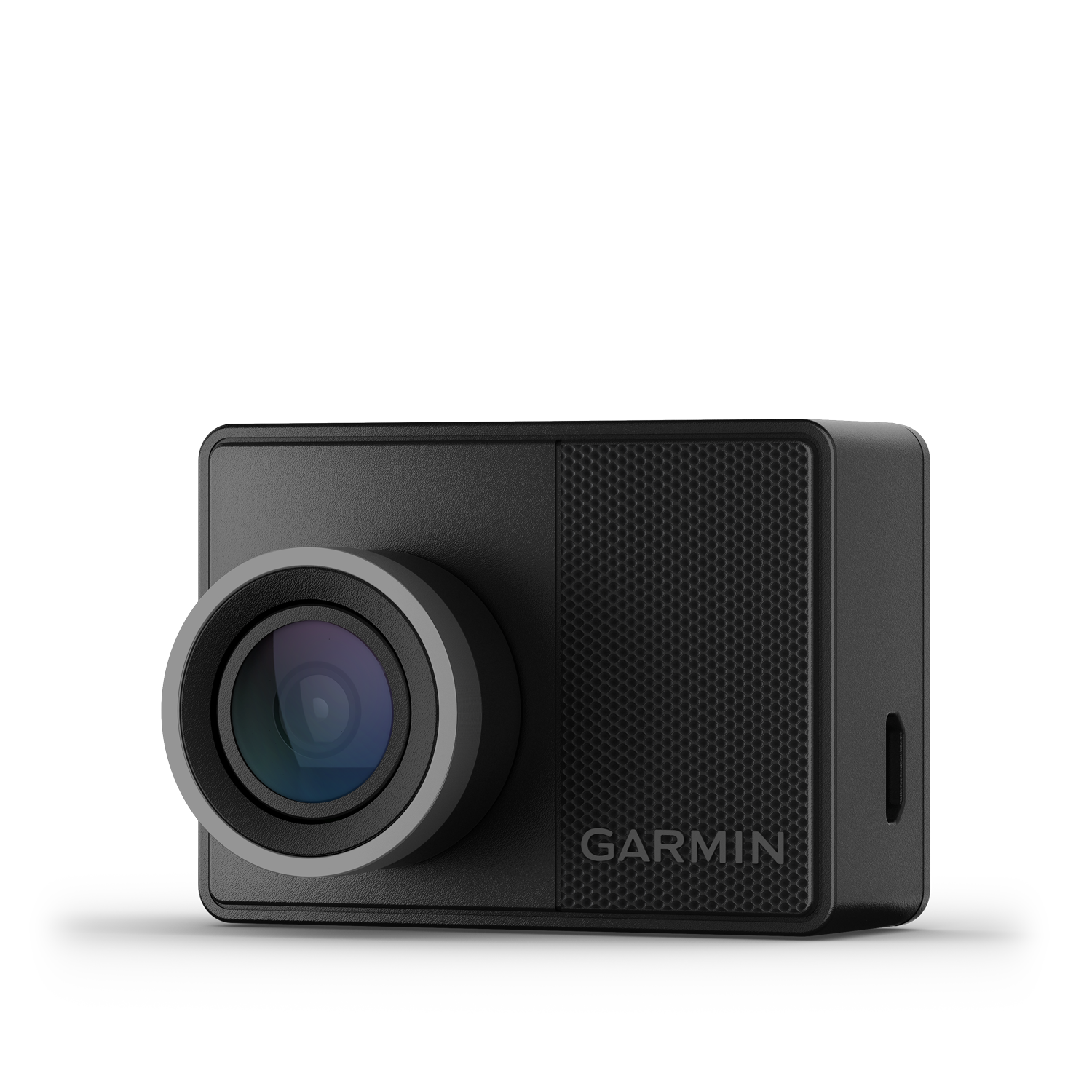 The Garmin Dash Cam 57: palm-sized, mounts behind the rearview mirror, records continuously to a microSD card. Photo: Garmin.
| Spec | Detail |
|---|---|
| Resolution | 1440p (2560×1440) at up to 60fps |
| Field of view | 140° |
| GPS | Built-in, tags location and speed to every clip |
| Controls | Voice control (“OK Garmin, save video”) plus 2” touchscreen |
| Connectivity | Wi-Fi and Bluetooth, syncs to the Garmin Drive app |
| Storage | microSD up to 512GB (not included — budget $15-25 for a card) |
| Price | Around $230 |
Sources: Garmin’s official product page, Tom’s Guide review.
Check current Garmin Dash Cam 57 pricing here.
Why this one and not a $30 no-name camera
Amazon is full of $25-40 dashcams with impressive-looking spec sheets. The gap that actually matters for a business use case is reliability under the two conditions that make a dashcam worth owning in the first place: it has to survive a real impact event without losing the footage, and the footage has to actually be usable — readable license plates, correct timestamps, GPS-tagged location — when you need to hand it to an insurance adjuster or a lawyer months later.
Garmin’s built its reputation on GPS hardware for decades, and the Dash Cam 57 reflects that: location and speed data get embedded directly into every clip, which turns “the other driver says I was speeding” into a five-second lookup instead of an argument. The G-sensor automatically locks and protects footage from the seconds before and after a detected impact, so a crash doesn’t overwrite its own evidence on a loop-recording cycle — a real failure mode on cheaper cameras that just keep recording over the incident clip if you don’t manually save it fast enough.
Upgrade pick: Vantrue N4, if your vehicle carries passengers or cargo you need to document
Vantrue N4 — 3-Channel Dash Cam (Front/Cabin/Rear)
| Spec | Detail |
|---|---|
| Channels | Front (1440p), interior cabin (1440p), rear (1080p) — all simultaneous |
| Night vision | Infrared cabin camera, Sony STARVIS sensors on all three lenses |
| Power | Supercapacitor (not a lithium battery) — survives extreme heat and cold better, common failure point on battery-based cameras |
| Field of view | Front 155°, interior 165°, rear 160° |
| Price | Around $260 |
Source: PCWorld’s hands-on review.
If your business runs anything closer to a rideshare model — a delivery service where drivers interact with customers in the vehicle, a shuttle, a service van where you want a record of what a technician did or didn’t do on the way to a job — the third camera pointed at the cabin is the actual point. It’s the difference between “we have footage of the road” and “we have footage of everything that happened in the vehicle,” which is a materially stronger position in a dispute involving a passenger or a customer interaction, not just another vehicle.
The tradeoff: three simultaneous recording streams eat through microSD storage and card write-cycles faster than a single-channel camera, and the supercapacitor-based design, while more heat/cold-tolerant, means no continuous parking-mode recording without an additional hardwire kit and battery — check current stock and configuration options before ordering if parking-mode recording matters for your use case.
Side by side
| Garmin Dash Cam 57 | Vantrue N4 | |
|---|---|---|
| Channels | 1 (front only) | 3 (front, cabin, rear) |
| Price | ~$230 | ~$260 |
| Best for | Solo-driver delivery, service vehicles, simple liability documentation | Rideshare-style vehicles, passenger disputes, cargo/theft documentation |
| Setup complexity | Lower — single unit, app-guided setup | Higher — three cameras to mount and wire |
| GPS built in | Yes | Check current listing — GPS is sometimes a separate accessory on Vantrue models |
What it actually protects you from, with real numbers
| Scenario | Without dashcam footage | With dashcam footage |
|---|---|---|
| Disputed minor collision, no injuries | Insurance often splits liability or sides with the other party’s account absent contrary evidence | Clear footage typically resolves liability in your favor if your driver wasn’t at fault |
| False claim (“your driver hit my car and left”) | Your word against theirs; claims like this have led to real payouts against small fleets with no way to disprove them | Footage (or the absence of contact) usually ends the claim immediately |
| Employee driving behavior dispute | No record, relies entirely on the employee’s account | Objective record protects both a wrongly-accused employee and the business from a genuinely reckless one |
| Cargo theft or damage in transit | No record of when/how it happened | Cabin or cargo-area footage narrows down the window and party responsible |
A single avoided liability payout — even a modest one, a few thousand dollars for a disputed fender-bender — pays for a fleet’s worth of dashcams outright. This isn’t a “might be nice” purchase; for any vehicle that regularly interacts with the public, it’s closer to insurance you only have to buy once.
A worked scenario: what the footage actually looks like in a dispute
It’s easier to justify the purchase with a specific walkthrough instead of a general claim. Say a two-van landscaping business has a driver making a mid-morning stop, and a parked car’s side mirror gets clipped by the van’s mirror while pulling out of a tight residential street. The car’s owner comes out, sees the damage, and insists the van was going too fast and swerved into the lane. Your driver says the other car was parked too far into the street and there wasn’t room to begin with.
Without footage, this becomes exactly what insurers call a “he-said-she-said” — both parties give recorded statements to their respective adjusters, and liability often gets split 50/50 by default when there’s no independent account, regardless of who was actually at fault. A 50/50 split on a $2,400 mirror-and-panel repair means your policy eats $1,200 and your claims history takes the hit for an incident your driver may not have caused at all.
With a front-facing camera running, the GPS-tagged clip shows the van’s actual speed (well under the residential limit), the position of the parked car relative to the lane, and the exact moment of contact. That clip, handed to your insurer within 24 hours, typically ends the dispute in one exchange instead of a multi-week back-and-forth — either it confirms the other party’s account (in which case you pay what you’d have paid anyway, but faster and with your driver’s record intact) or it confirms your driver’s account and the claim gets redirected or closed. Either outcome is better than the uncertainty of no record at all, and “better than uncertainty” is the actual product you’re buying, not “proof you’re always right.”
Installation realities nobody mentions in the spec sheet
The Garmin Dash Cam 57 ships with a suction or adhesive windshield mount and a 12V power cable meant to run to your vehicle’s accessory outlet or a fuse tap behind the fuse box panel — a 20-30 minute job per vehicle for someone reasonably comfortable with basic 12V wiring, longer if you’re routing the cable cleanly under trim rather than leaving it draped across the dash. Budget an extra $10-15 per vehicle for a proper fuse-tap kit rather than running it straight to the accessory outlet, which usually cuts power when the ignition is off — meaning no parking-mode protection against hit-and-run damage while the vehicle is unattended, which is precisely when a lot of parking-lot dents happen.
The Vantrue N4’s three-camera setup takes meaningfully longer to install correctly — figure 45-60 minutes per vehicle the first time, less once you’ve done a few — because the interior camera needs a clean sightline across the cabin and the rear camera needs a run of cable along the headliner or door frame to the back window. If you’re outfitting more than two or three vehicles, factor in either a half-day of your own time or a modest professional install fee (most mobile audio/12V shops will do this for $40-80 per vehicle) rather than assuming every install goes as smoothly as the manufacturer’s how-to video.
One detail that catches people out: the supercapacitor in the Vantrue N4 that makes it more heat-tolerant also means it typically can’t power true parking-mode motion detection recording without an add-on hardwire kit with its own battery pack, sold separately in most listings. If parking-lot theft or hit-and-run coverage while the vehicle is off matters to your business — a real concern for anyone parking overnight in a shared lot — check the current hardwire kit bundle options before assuming the base unit covers it.
Budget tier: when a $60-90 camera is actually the right call
Not every vehicle in a fleet needs the same camera. If you’re outfitting a mix of primary customer-facing vehicles and rarely-used backup vehicles, it’s reasonable to put the Garmin or Vantrue on the vehicles that see daily public-road use and a simpler budget unit — something like a basic single-channel 1080p camera in the $60-90 range — on a vehicle that mostly sits in the lot as a spare. The honest tradeoff: budget cameras in this range generally lack GPS tagging, have weaker low-light performance, and use less robust G-sensor impact detection, meaning a higher chance the footage that matters gets overwritten before anyone thinks to save it. That’s an acceptable risk on a backup vehicle with minimal road exposure. It’s a bad economy on the van that’s on the road eight hours a day making customer stops, where the odds of actually needing the footage are highest and the cost difference — roughly $150-170 across an entire fleet lifecycle — is trivial next to a single disputed claim.
The insurance angle most small shops don’t ask about
A detail that gets missed: several commercial auto insurers now offer a modest premium discount — typically in the 5-10% range, varying by carrier and state — for fleets that install dashcams, specifically because documented incidents resolve faster and cheaper for the insurer too. That’s not guaranteed money, and it’s worth confirming directly with your broker rather than assuming it applies, but it’s a real conversation to have before you buy: ask “does installing dashcams on our vehicles change our premium or our claims process,” not just “should we get dashcams.” Depending on your fleet size and current premium, that discount alone can meaningfully offset the hardware cost within the first year or two, independent of whether you ever need the footage for an actual dispute.
There’s a second, less obvious insurance benefit: some carriers will expedite or simplify a claim specifically because footage removes the need for a lengthy investigation. A claim that would normally take weeks of back-and-forth between adjusters, witnesses, and your own account can sometimes resolve in days when there’s unambiguous video. For a small shop where a driver being sidelined during a claims investigation has real operational cost — one less delivery vehicle, one less technician on the road — the time saved is worth almost as much as the liability protection itself.
This is the same math covered in the agent liability blast-radius piece: when nobody can cleanly say who’s responsible for an incident, the party without documentation eats the cost and the delay. A dashcam is the cheapest documentation you can buy for a vehicle; an audit trail is the equivalent for software making decisions on your behalf.
The three-year math
| Year 1 | Year 2 | Year 3 | 3-year total | |
|---|---|---|---|---|
| One Garmin Dash Cam 57 (hardware + microSD card) | ~$245 | $0 | $0 | ~$245 |
| Potential insurance discount (5%, on a hypothetical $1,800/yr commercial auto premium) | -$90 | -$90 | -$90 | -$270 |
| Net cost, before any claim protection | ~$155 | -$90 | -$90 | Net negative — the camera can pay for itself on premium savings alone |
That table assumes a fairly typical small commercial auto premium and a middle-of-the-road discount percentage — your numbers will vary, and the discount isn’t universal across carriers. The point isn’t the exact figures; it’s that this is one of the rare small-business hardware purchases where the ongoing savings case can stand on its own, before you even factor in the value of winning a single disputed claim.
Worth noting too: some carriers require the dashcam footage to be presented in its original, unedited format with metadata intact to count toward a discount or a claim — don’t rely on a phone screen-recording of playback as your backup copy. Export clips directly from the SD card or the manufacturer’s app when you need to hand something over.
When not to buy this
If your vehicles never leave a private lot or facility — forklifts, warehouse equipment, anything that doesn’t drive on public roads and doesn’t interact with the public — a dashcam solves a problem you don’t have. Spend the money on facility cameras instead, which are already covered in the desk gear and small-shop hardware pieces on this site.
If you’re not willing to have the “we’re recording, here’s why” conversation with your drivers. A cabin-facing camera especially can feel like surveillance if it’s introduced without context. Be upfront: this protects the driver as much as the business in a false-accusation scenario, and most drivers come around once they understand that framing. If you’re not prepared to have that conversation honestly, skip the cabin camera and stick with a front-facing-only unit.
If your vehicles are already covered by a fleet telematics system that includes dashcam functionality. Some fleet management SaaS platforms bundle camera hardware with GPS tracking and driver scoring. If you’re already paying for one of those, adding a standalone consumer dashcam is redundant — check what your existing system actually captures before buying anything new.
If footage retention and legal admissibility matter more than convenience — for example, if you’re in an industry where dashcam footage regularly ends up in litigation — talk to your insurance broker or attorney about chain-of-custody and retention requirements before relying on a consumer-grade camera’s default settings. Consumer dashcams are built for convenience-grade evidence, not necessarily court-grade evidentiary standards in every jurisdiction.
What to actually do once it’s installed
- Mount it before your next trip, not “when you get around to it.” The entire value proposition is having footage of the incident nobody plans for.
- Buy a high-endurance microSD card rated for continuous dashcam recording, not a standard consumer card — dashcams write and overwrite constantly, and standard cards wear out faster under that pattern than cards specifically rated for it.
- Set a monthly reminder to check that footage is actually saving correctly. A dashcam that’s been silently failing for two months because a card filled up or corrupted is worse than no dashcam, because you’ll assume you have coverage you don’t.
- Tell your drivers it’s there and why, especially if it includes a cabin-facing camera. Surprise surveillance breeds resentment; a camera introduced as “this protects you if a customer makes something up” gets buy-in.
- Know your state’s consent laws for audio recording if the camera captures cabin audio. Several states require two-party consent for audio recording specifically (video is generally treated differently) — check your state’s specific rule before enabling audio capture on a cabin-facing unit.
What to skip
- Skip cameras with no GPS if location/speed data would matter in a dispute. A timestamp alone is weaker evidence than a timestamp plus location and speed.
- Skip the cheapest no-name option if the vehicle interacts with the public regularly. The failure mode that matters — footage that’s unreadable, corrupted, or didn’t actually save — shows up disproportionately on unreviewed budget hardware.
- Skip installing it and never checking that it works. This is the single most common way small shops end up with “we thought we had a dashcam” instead of actual footage when it matters.
Quick answers
Do I need a professional installer? No — both picks here are designed for owner installation, typically mounting to the windshield behind the mirror with an adhesive or suction mount and running a thin cable to a 12V power source or fuse tap. Budget 20-30 minutes per vehicle.
How long does footage actually get retained? Standard loop recording typically retains footage until the card fills up, then overwrites the oldest unprotected clips — usually days to a couple of weeks depending on card size and resolution. Protected clips (from detected impacts, or manually saved) are kept separately until you delete them.
Does this replace dashcam footage my insurance company might already have access to via a telematics device? Not necessarily — telematics devices often capture driving data (speed, braking, location) without video, or with lower-quality video than a dedicated dashcam. Check your specific policy’s telematics program before assuming you’re covered.
What if I only have one vehicle, is this still worth it? Yes — the liability math doesn’t require a fleet. A single disputed incident without footage is exactly as costly to a one-vehicle operation as a ten-vehicle one; the difference is just how many times the exposure repeats.
Bottom line
The Cybercab story is about a vehicle built with no way for a human to intervene, being self-certified safe by the company that profits from saying so. Most small business vehicles have a human at the wheel and no independent record of anything — which is its own liability gap, just a more mundane one. A $230 camera closes it. Buy it before the incident that would have justified it, not after.
See current Garmin Dash Cam 57 pricing on Amazon. Or check the Vantrue N4 if you need cabin and rear coverage too.
Sources
All prices and specs accessed September 6, 2026.
- Garmin Dash Cam 57 official specifications and product images — Garmin product page and Garmin newsroom press assets
- Garmin Dash Cam 57 hands-on review and feature breakdown — Tom’s Guide
- Vantrue N4 specifications and hands-on testing — PCWorld, “Vantrue N4 dash cam review”
- Tesla Cybercab / NHTSA audit context connecting the human-override liability angle — NHTSA press release