Your Magento Backup Lives on the Server the Backdoor Just Rooted. Here's the Drive That Doesn't.
StyleSmuggler proved a Magento server can be backdoored in under an hour — if your only backup lives on that same box, a $270 offline drive fixes that gap.
Disclosure: some links below are Amazon affiliate links (tag cao04-20). Costs you nothing; the picks don’t change based on that. Every spec and price below is sourced at the bottom.
Note: This runs alongside today’s piece on the StyleSmuggler Magento/Adobe Commerce zero-day (CVE-2026-75650, disclosed September 4–7, 2026). That piece covers the vulnerability itself. This one covers a narrower, specific gap: what happens when your only backup lives somewhere the attacker’s backdoor can also reach.
Here’s a question worth answering honestly before you read another word: if your Magento or Adobe Commerce store were backdoored right now — the way StyleSmuggler backdoored stores starting September 4 — where does your most recent clean backup live? If the answer is “on the same server” or “on a NAS that’s permanently connected to that server,” you don’t actually have a backup for this specific failure mode. You have a second copy of the same compromised data, sitting one network hop away from an attacker who already has root.
That’s not a hypothetical edge case. A backdoor with root-equivalent access on your web server can see, read, and write to anything that server can reach — including a network-attached backup target that’s always connected, always mounted, always trusting that server’s connections by default. Ransomware operators specifically hunt for exactly this setup, because encrypting or corrupting the live data and the backup in the same operation is far more damaging than hitting either alone — and a server that’s already fully compromised is the easiest possible position from which to do it.
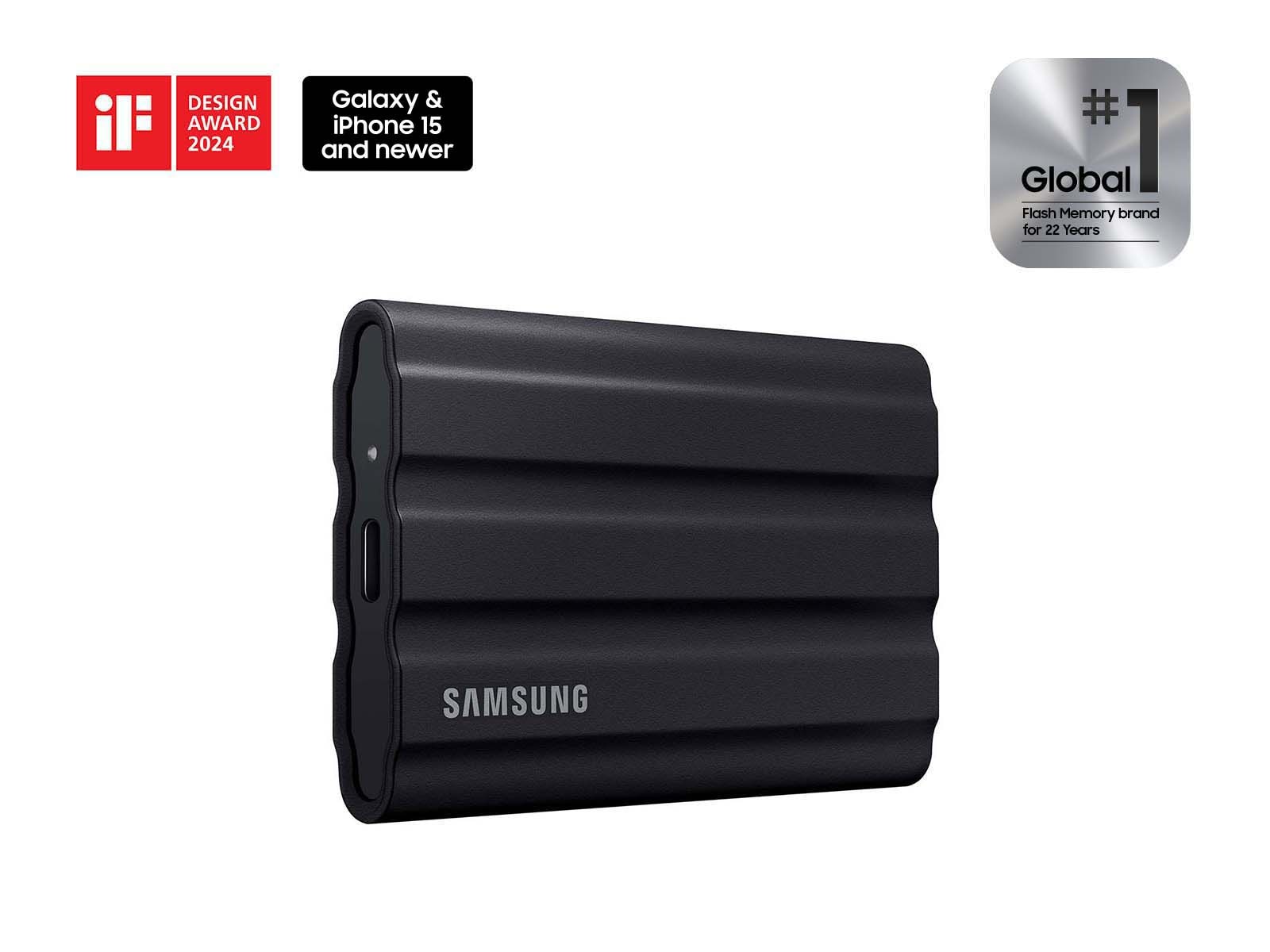
The pick: Samsung T7 Shield
Samsung T7 Shield Portable SSD, 1TB
| Spec | Detail |
|---|---|
| Capacity options | 1TB, 2TB, 4TB |
| Speed | Up to 1,050MB/s read, 1,000MB/s write |
| Interface | USB 3.2 Gen 2 |
| Durability | IP65 rated (dust and water resistant), rated for drops up to 9.8 feet |
| Price (1TB) | Around $270-290 at current list pricing |
| Warranty | 3 years |
Sources: Samsung’s official T7 Shield product page.
Check current Samsung T7 Shield pricing here.
A pricing note worth being upfront about: portable SSD prices are meaningfully elevated right now industry-wide, not specific to this drive — NAND flash contract prices rose sharply through the first half of 2026 and are still climbing, the same shortage covered in more depth in the memory price shock piece. A 1TB drive that would have been $120-150 a year ago is running closer to $270-290 today. That’s real money for a small shop, and it’s worth checking current pricing before assuming last year’s number still applies — but it doesn’t change the underlying math below, because the cost of not having this specific kind of backup is a full store rebuild, not a few hundred dollars.
Why “disconnect it” is the entire point, not a footnote
This is not a NAS recommendation, and it’s not the same advice as the general 3-2-1 home backup server piece or the NAS-vs-SaaS piece. Both of those are good, and if you don’t have any backup system at all, start there. This is a narrower, specific addition: a backup copy that is physically disconnected from your store’s server and network the vast majority of the time, and only connected briefly to receive a new backup, then unplugged again.
The reason this matters specifically for a compromise like StyleSmuggler: a NAS or an always-connected backup target is reachable by anything with network access to it — including a backdoored web server with root access on the same network. An air-gapped drive, disconnected between backup runs, simply isn’t reachable by anything, because there’s no active connection for a backdoor, a worm, or a human attacker exploring the network to use. The backup taken last Tuesday, sitting unplugged in a drawer, cannot be touched by something that compromised your server on Thursday. That property — genuine physical isolation, not just “a separate device” — is what a NAS or continuously-synced cloud target doesn’t fully provide, and it’s the specific thing worth paying for here.
This isn’t a theoretical worry dressed up to sell a drive. Sophos’s 2026 State of Ransomware report — based on surveying over 2,100 IT and security leaders whose organizations had actually been hit — found that attackers specifically target backup repositories in 96% of ransomware attacks, and succeed in compromising them in a majority of those attempts. The same report found organizations that went into an attack with backups the attacker couldn’t reach or corrupt recovered at a median cost of roughly $375,000, versus a median of $3 million for organizations whose backups were also compromised — an 8x difference that has nothing to do with the sophistication of the attack and everything to do with whether there was an untouchable copy of the data to restore from. Attackers going after your backup isn’t an edge case in their playbook. It’s step two, right after establishing access, precisely because it’s what turns “annoying incident” into “existential one.”
The actual routine, not just the hardware
Buying the drive is the easy part. The routine that makes it worth anything:
- Export a full store backup — database dump plus the media/file directories, whatever your platform’s standard backup process produces (Magento/Adobe Commerce have built-in backup tooling; most hosting providers also offer one-click database exports).
- Connect the drive, copy the backup over, verify the copy completed and isn’t corrupted (open the database dump file, confirm it’s not zero bytes or truncated — a startlingly common failure mode with backup routines nobody’s actually tested).
- Disconnect the drive immediately after the copy finishes. Not “later today.” Immediately. This is the step that gets skipped when it’s inconvenient, and it’s the entire value of the exercise.
- Store it somewhere physically separate from the server itself — a different room at minimum, ideally a different location entirely if you want to also cover the “the building has a fire” scenario, which a purely on-site drive doesn’t address.
- Repeat on a schedule that matches how much data loss you can tolerate. For most small stores, weekly is a reasonable floor; if your product catalog or order volume changes daily, consider a rotating two-drive system so you always have last week’s known-good copy even if something goes wrong mid-backup.
A concrete version of that rotation, for a store that wants slightly more safety margin than one drive provides: label two identical drives “A” and “B.” Week one, connect and back up to Drive A, then disconnect and store it. Week two, connect Drive B instead — Drive A stays untouched and disconnected the entire time. Week three, back to Drive A, overwriting the two-week-old backup with a fresh one, while Drive B (now holding last week’s backup) sits disconnected. At any given moment you have two independent, physically separated snapshots from two different weeks, so a single failed or corrupted backup run doesn’t wipe out your only fallback — and if one drive is kept at a second location (a home safe, a manager’s house, a safe deposit box), you’ve also covered the fire/theft/flood scenario a same-building drive can’t. Two 1TB drives at current pricing is a few hundred extra dollars for a meaningfully better worst case than a single drive provides.
A worked comparison: the store that had this, and the one that didn’t
Two versions of the same StyleSmuggler-style compromise. Store A backs up nightly to a NAS that’s permanently mounted and connected to the same network as the web server. The backdoor, once installed, has the same network access the legitimate server processes have — including reaching that NAS. If the attacker (or a secondary payload deployed through the same backdoor) decides to corrupt or encrypt backup data as part of the attack, Store A’s “backup” is compromised in the same operation as the live data. Recovery now depends entirely on whether an offsite or cloud copy exists and is itself clean — which, for a lot of small shops, it doesn’t, because the NAS was the whole backup plan.
Store B has the same NAS setup for day-to-day convenience, but also runs the weekly disconnect-after-use routine above onto a dedicated drive kept in a locked drawer in a different room. When the compromise is discovered, Store B’s worst case is losing up to a week of order and catalog data — annoying, recoverable, quantifiable — restored from a drive that was physically unplugged during the entire window the server was compromised. That’s the entire value proposition of this piece, priced at a few hundred dollars and about ten minutes a week.
Choosing a capacity, honestly
Most small e-commerce stores’ actual backup-critical data — the database (orders, customers, catalog, configuration) — is small, typically megabytes to low gigabytes even for a store with years of order history. Where capacity actually gets used is media: product photos, especially if you’re storing full-resolution originals rather than optimized web versions. 1TB is genuinely plenty for the overwhelming majority of small stores’ database-plus-media backups, with room for several weeks of rotating snapshots before you’d need to prune anything. Size up to 2TB only if your media library is unusually large (thousands of high-resolution product photos, video content) or you want to keep months of rotating snapshots rather than weeks.
Put actual numbers to that instead of taking it on faith: a 150-SKU store with 4 photos per product at 8MB each (a realistic size for uncompressed originals straight off a camera, before any web optimization) works out to roughly 4.8GB of media. Add a database dump that’s grown to a few hundred megabytes after years of order history, and a full backup lands well under 10GB. At that size, a 1TB drive holds well over 100 weekly snapshots before you’d need to delete anything — which in practice means you’ll rotate or replace the drive for capacity reasons roughly never, and the real limiting factor is how many old snapshots you actually want to keep for historical reference, not how much room is left. Stores selling something photo-heavy — furniture, apparel with multiple angles and color variants, anything with lifestyle photography rather than simple product-on-white shots — can multiply that media estimate by 5-10x and still comfortably fit on 1TB for months of rotation.
If IP65 durability doesn’t matter to your setup
| Drive | Interface / speed | Durability | Price (1TB) | Best fit |
|---|---|---|---|---|
| Samsung T7 Shield (this pick) | USB 3.2 Gen 2, ~1,050MB/s read | IP65 rated, 9.8ft drop rated | ~$270-290 | Drive that travels, lives in a bag, or sits somewhere it could get knocked around |
| Samsung T7 (non-Shield) | USB 3.2 Gen 2, similar speed | No IP rating, more compact/lighter | Typically $20-40 less | Drive that stays in a drawer or safe and won’t be handled roughly |
| SanDisk Extreme Portable V2 | USB 3.2 Gen 2, ~890-950MB/s | IP55 rated | Comparable pricing, varies | Longest warranty in the category if that’s the deciding factor |
If the drive is going to live untouched in a locked drawer between weekly backups, the ruggedization the Shield offers is arguably unnecessary spend — the non-Shield T7 or a comparable drive does the job for less. The Shield earns its price if the drive travels between locations (taking it offsite weekly, for instance) where drops and rough handling are a real, not theoretical, risk.
Encrypt it, and actually test a restore
Two habits that turn this from a good idea into a system that actually works when you need it:
Encrypt the drive at rest. A drive holding a full copy of your customer database — names, addresses, order history, and depending on your payment setup, potentially tokenized payment references — is a real liability if it’s ever lost or stolen, separate from the cyberattack scenario this piece is built around. Both Windows (BitLocker To Go) and macOS (FileVault’s external-disk encryption) handle this natively for an external drive with no extra software required, and it adds essentially no friction to the weekly routine once it’s set up the first time.
Actually test a restore, not just a backup. A backup that’s never been restored is a hope, not a plan — the same principle the small-business data security checklist calls out directly. Once a quarter, actually go through the motion of restoring the database dump into a test environment (not your live store) and confirm the data comes back intact and complete. This catches the failure mode that’s more common than people expect: a backup routine that’s been silently producing corrupted or incomplete files for months because nobody checked, discovered only at the exact moment it’s needed most.
Quick answers
Does this replace my regular hosting backup or NAS? No — it’s a narrower addition, not a replacement. Keep whatever regular, convenient backup system you already have for day-to-day “oops, deleted the wrong file” recovery. This is specifically for the scenario where the regular system itself might be compromised alongside the live data.
How is this different from just backing up to the cloud? A cloud backup target is also “always connected” in the sense that matters here — if a compromised server has valid credentials to write to that cloud storage, a sufficiently capable attacker can potentially reach it too, depending on the cloud provider’s own protections (versioning, immutable/write-once storage, and access controls vary a lot by provider). Cloud backup with strong ransomware-resistant versioning is a reasonable alternative or complement, but “it’s in the cloud” isn’t automatically the same guarantee as “it’s physically unplugged.” Genuinely immutable cloud backup tiers exist and are a fine alternative if the physical routine here isn’t realistic for your setup — the property that matters is isolation from an attacker who already has valid credentials on your production system, however you achieve it.
Do I really need to unplug it every time, or can I just leave it connected but not actively syncing? Unplug it. A drive that’s connected but “not actively syncing” is still reachable by anything with access to that USB port or network share — the protection comes from the physical disconnection, not from whether a sync process happens to be idle at the moment of compromise.
What if I forget to reconnect it for the next backup? A recurring calendar reminder, not memory, is the actual fix — the same “make it a system, not a memory” principle that matters for Chrome’s update cadence applies here too. A backup routine that depends on remembering, without an external prompt, reliably degrades within a few months for almost everyone.
Can I just use an old laptop instead of a dedicated drive? Technically yes, and if you have a genuinely spare machine sitting unused, it costs nothing and provides the same core isolation property as long as it’s actually kept powered off and disconnected between backups. In practice this is worse for most small shops for a few concrete reasons: an old laptop is a full computer with its own OS that needs its own security patches to stay trustworthy (an unpatched laptop sitting in a drawer for months is exactly the kind of neglected machine that becomes a liability the one time someone does connect it to a network to update it), it’s bulkier to store securely, and booting a full OS, waiting for it to be ready, then transferring files is meaningfully more friction than plugging in a drive that’s ready to write the instant it connects — friction is exactly what causes routines to quietly stop happening. A dedicated SSD with no OS of its own to maintain is simpler to keep secure and faster to actually use, which is most of why it’s the better default recommendation despite the higher up-front cost than “just use the old laptop in the closet.”
When not to buy this
If you don’t run a self-hosted platform like Magento or Adobe Commerce. If your store runs on Shopify, BigCommerce, or another fully hosted platform, the platform vendor owns infrastructure-level backup and recovery in a way that materially reduces (though doesn’t eliminate) the value of this specific setup. It’s still not a bad idea generally, but it’s a lower priority than for a self-hosted store.
If your hosting provider already includes verified, tested, genuinely offsite backup as part of your plan. Ask them directly whether backups are network-isolated from the production server, not just “in a different folder” — a lot of “backup included” hosting plans still store the backup somewhere reachable from a compromised production account, which doesn’t actually solve the problem this piece is about. If they confirm genuine isolation, you may not need to duplicate the effort yourself.
If you’re not disciplined enough to actually do the disconnect step. Be honest with yourself here — a drive that stays permanently plugged in “for convenience” has quietly become exactly the always-connected backup target this piece argues against, and you’ve spent a few hundred dollars for a drive that provides no more protection than the NAS you already have. If the weekly manual routine genuinely won’t happen, a scheduled cloud backup to a provider with strong ransomware-resistant versioning is a more realistic fit for your actual habits, even if it’s a less airtight guarantee in theory.
If your business genuinely can’t survive losing more than a few hours of data, a weekly manual air-gapped backup isn’t frequent enough on its own — pair it with a more frequent automated (but still genuinely isolated) backup cadence rather than relying on this as your only recovery point.
Sources
All prices and specs accessed September 8, 2026.
- Official specifications, pricing, and durability ratings — Samsung T7 Shield official product page
- Details of the vulnerability and compromise this backup strategy responds to — Sansec, “StyleSmuggler: Magento and Adobe Commerce 0-day RCE (CVE-2026-75650) under active attack”
- Current NAND flash / SSD pricing context — the memory price shock piece’s Q1–Q3 2026 DRAM/NAND contract pricing data, sourced there from TrendForce Q3 2026 forecasts
- General 3-2-1 backup principle this piece narrows into a specific compromise-recovery use case — the cheap home server for file backups piece
- Backup-targeting rate in ransomware attacks and recovery cost differential between compromised and intact backups — Sophos, “The State of Ransomware 2026: Payments Drop as Encryption Climbs”
Bottom line
StyleSmuggler proved a Magento or Adobe Commerce store can go from untouched to fully backdoored in under an hour, with no login required. If your only backup lives somewhere that same backdoor can reach — the server itself, or an always-connected NAS on the same network — you don’t have a backup for this specific failure mode, you have a second copy of the same risk. A dedicated drive, disconnected between weekly backup runs, closes that gap for a few hundred dollars and about ten minutes a week. It’s not glamorous. It’s the difference between “restore from last Tuesday” and “rebuild the store from nothing.”