Small Business Data Security: A Practical Checklist
Enhance your small business data security with these five crucial steps to protect against breaches and safeguard your sensitive information.

Start with these five high-impact controls to cut most small-business breach risk today: enable multi-factor authentication (MFA) on every account with financial or customer-data access, enforce unique strong passwords through a password manager, verify that automatic updates are running on all devices and software, set up daily or weekly backups and test a restore, and remove access credentials for any former employee immediately. The FBI reported over $2.7 billion in losses from business email compromise in 2024 alone. This figure reflects the direct cost of weak credentials and unmonitored accounts at businesses that thought they were too small to be targeted. You are not too small. Let’s do this properly.
- Enable MFA on all accounts — a compromised password alone cannot open the door if a second factor is required.
- Use a password manager — unique, complex credentials per account eliminate credential-stuffing attacks.
- Turn on automatic updates — unpatched software is the most common entry point for ransomware.
- Run and test backups — a backup you have never restored is not a backup; it is a hope.
- Change default router passwords and enable WPA2 or WPA3 — factory defaults are publicly documented and trivially exploited.
- Remove former-employee access the same day they leave — lingering credentials are a silent open door.
- Train staff to recognize phishing — the SBA identifies employee mistakes as a leading cause of small-business breaches, and one click on a malicious link can hand attackers full network access.
Pro Tip: Prioritize accounts that touch your bank, payment processor, or payroll system first. The blast radius of a compromised financial account is immediate and often irreversible within hours.
Key Takeaways
MFA, tested backups, and timely patching together address the majority of common small-business breach vectors, and all three can be implemented at zero or near-zero cost within the first seven days.
| Point | Details |
|---|---|
| MFA is your highest-ROI control | Enable it on financial, email, and admin accounts first; most platforms offer it free. |
| Backups only count if you test them | Run a full restore at least quarterly; an untested backup is not a recovery plan. |
| Employee behavior drives most breaches | The SBA identifies staff mistakes as a leading cause; phishing training is non-negotiable. |
| Free government resources cover most needs | CISA scans, NIST quick-start, and FTC checklists replace most paid tools for early-stage programs. |
| Ctrlaltorion automates the repeatable work | Custom backup pipelines, access-review dashboards, and workflow automations keep security running without manual effort. |
Table of Contents
- 1. How to inventory your assets, classify your data, and assess initial risk
- 2. Protective controls that stop the most common breaches
- 3. How to detect a breach before it becomes a disaster
- 4. How to respond and recover when something goes wrong
- 5. Your 30/60/90-day plan to raise data security on a small budget
- 6. Where to get free and low-cost help from trusted U.S. authorities
- 7. Why one-time fixes always fail and continuous risk management always wins
- Custom software can reduce your data-security risk from day one
- Sources
1. How to inventory your assets, classify your data, and assess initial risk
Before you can protect anything, you need to know what you have. Most small businesses skip this step and end up spending money securing low-value assets while leaving crown-jewel data exposed. The NIST Cybersecurity Framework 2.0 calls this the Identify function, and it is the foundation every other control builds on.
Build a minimal asset inventory
Your inventory does not need to be a 50-column spreadsheet. It needs to answer three questions for every asset: what is it, who controls it, and how sensitive is the data it holds or accesses? Work through these categories:
- Hardware: laptops, desktops, servers, mobile devices, routers, printers, external drives
- Software and SaaS: accounting tools, CRM, email platform, e-commerce backend, cloud storage
- Data stores: customer records, financial files, payroll data, payment credentials, contracts
- Accounts: admin accounts, shared logins, API keys, OAuth tokens, vendor portals
A compact working table for your inventory looks like this:
Fill this in for every asset you can name in 30 minutes. Gaps in the table are themselves a finding.
Classify data by sensitivity
Not all data carries the same risk. For a small business, sensitive data typically falls into four buckets:
- Financial records: bank account numbers, tax filings, payment card data
- Customer PII: names, addresses, Social Security numbers, email addresses, purchase history
- Payroll and HR data: employee compensation, benefits, identification documents
- Credentials and secrets: passwords, API keys, OAuth tokens, encryption keys
Anything in those four categories is “High” sensitivity. Everything else is Medium or Low. The FTC recommends encrypting sensitive data, enabling MFA, and maintaining regular backups as baseline controls for all high-sensitivity assets.
Quick risk prioritization
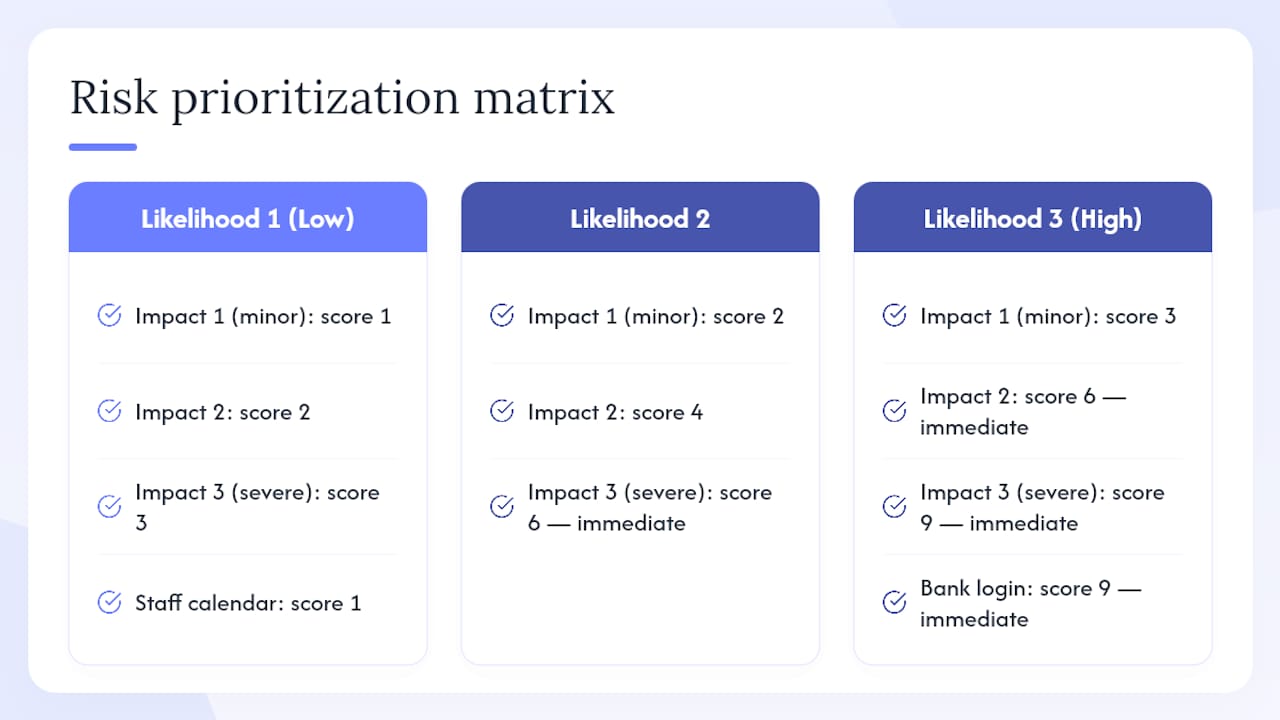
Score each asset by multiplying two factors: likelihood of being targeted (1 = low, 3 = high) and impact if compromised (1 = minor, 3 = severe). Any asset scoring 6 or 9 goes on your immediate action list. Your bank login scores a 9. Your internal staff calendar scores a 1. That scoring discipline keeps you from treating everything as equally urgent, which is how security programs stall.
The data security checklist framework from the U.S. Department of Education covers policy, personnel security, inventory, patch management, and disposal — all of which apply directly to small-business programs and are worth adapting as a governance baseline.
Pro Tip: Your crown-jewel assets are the accounts that access your bank, payment processor, payroll system, and customer database. Lock those down before anything else. Everything else can wait a day.
2. Protective controls that stop the most common breaches
This is where most of the work lives. The FTC’s cybersecurity guidance for small businesses frames protection as a continuous process, not a one-time project. The controls below are organized by priority so you know exactly where to start.
Priority 1: MFA and identity hygiene
MFA is the single highest-ROI control available to a small business. Enable it on every account that matters — email, cloud storage, banking, payroll, and your domain registrar. Most platforms support authenticator apps (such as Google Authenticator or Microsoft Authenticator) at no cost. SMS-based MFA is better than nothing but is vulnerable to SIM-swapping; push notifications or TOTP apps are preferable.
Alongside MFA, deploy a password manager across your team. Every account gets a unique, randomly generated password. No shared credentials. No “Password1!” recycled across five platforms. This single change eliminates the credential-stuffing attacks that account for a large share of small-business account takeovers.
For role-based access control, apply least privilege: each person gets access only to what their job requires, nothing more. An accounts-payable clerk does not need admin rights to your CRM. A sales rep does not need access to payroll files. Audit these permissions quarterly and remove access the same day an employee leaves.
Priority 2: Backups and tested restores
A backup that has never been restored is not a recovery plan. Run automated backups daily for critical data, weekly for everything else. Follow the 3-2-1 rule: three copies of data, on two different media types, with one copy stored offsite or in a separate cloud account. Test a full restore at least once per quarter. Time how long it takes. That number is your actual recovery time objective, and it will surprise you.
Priority 3: Patching and endpoint protection
Unpatched software is the most reliably exploited attack surface in small-business environments. Enable automatic updates on every operating system, browser, and application. For Windows devices, Windows Update handles the OS; for macOS, System Preferences handles it. Do not defer updates for more than 72 hours on internet-facing systems.
Endpoint protection (antivirus/EDR) is table stakes. Most modern operating systems include built-in protection (Windows Defender, for example), but verify it is active and reporting.
Full protective controls checklist
Technical controls:
- Enable full-disk encryption on all laptops and desktops (BitLocker on Windows, FileVault on macOS) — data at rest is a primary attacker target, and encryption renders stolen hardware useless without the key
- Use secure key management: never hard-code encryption keys in application code; use platform key stores or a dedicated secrets manager, as OWASP’s cryptographic storage guidance explicitly warns against reversible password storage and embedded keys
- Change default router credentials immediately; enable WPA2 or WPA3 on all Wi-Fi networks; create a separate guest network for visitors and IoT devices
- Use a VPN for any remote access to internal systems or when staff connect from public Wi-Fi
- Isolate your payment and POS systems on a dedicated network segment, separate from general office traffic
- Apply mobile device management (MDM) rules for any phone or tablet used for business: require a PIN or biometric lock, enable remote wipe, and prohibit storing sensitive data on personal devices without encryption
Process controls:
- Conduct phishing-awareness training at least twice per year; simulated phishing tests (many free tools exist) reveal which staff need additional coaching
- Establish a written acceptable-use policy covering passwords, device use, and data handling
- Implement a secure disposal process: wipe or physically destroy storage media before discarding hardware; a factory reset is not sufficient for drives holding sensitive data
Pro Tip: Enable MFA and encrypted backups on your financial accounts before you do anything else. If ransomware hits tonight, those two controls determine whether you pay a ransom or restore from backup by morning.
3. How to detect a breach before it becomes a disaster
Detection is where most small businesses have the widest gap. You cannot respond to an incident you do not know about. The good news: basic detection does not require a security operations center or expensive tooling.
Common indicators of compromise to watch for
- Unexpected account lockouts or password-reset emails you did not request
- Login alerts from unfamiliar locations or devices (most email and cloud platforms send these by default — make sure they are enabled)
- Antivirus or endpoint alerts that fire and then go quiet without resolution
- Sluggish systems, especially at night when no one is working
- Unusual file modifications, new admin accounts, or scheduled tasks you did not create
- Bounce-back emails from addresses your domain did not send to (a sign of email spoofing or account compromise)
- Unexpected charges on bank or payment accounts
Low-cost detection checklist
- Enable login alerts on all critical accounts — email, cloud storage, banking, payroll. Most platforms offer this at no cost in account security settings.
- Turn on audit logging in your cloud platforms (Google Workspace, Microsoft 365, AWS, etc.). Log admin-console events, permission changes, and file-sharing activity. Retain logs for at least 90 days.
- Monitor admin accounts specifically — set up email or SMS alerts for any new admin user created, any MFA method changed, or any bulk file download.
- Run free vulnerability scans — CISA offers free scanning and testing services that reveal open ports, unpatched services, and misconfigurations before an attacker finds them. Use these before buying any commercial scanner.
- Check your domain’s email authentication records (SPF, DKIM, DMARC) using free online tools. Missing or misconfigured records allow attackers to spoof your domain in phishing emails targeting your customers or partners.
- Review active user sessions monthly — most SaaS platforms show active sessions and connected apps. Revoke anything unfamiliar.
Prioritizing what to act on
A small team cannot chase every alert. Triage by account type: admin-console events and financial-account alerts are always Priority 1. Failed login spikes on staff email accounts are Priority 2. Everything else can be reviewed in a weekly log-review session that takes 15 minutes once the habit is established.
Pro Tip: Before spending a dollar on commercial monitoring tools, request a free CISA cyber hygiene scan. These scans often surface the exact misconfigurations attackers exploit first, and the remediation list they generate is a ready-made to-do list.
4. How to respond and recover when something goes wrong
Every small business will face an incident eventually. The question is whether you have a plan or you are improvising at 11 PM with your accountant on the phone. The response sequence is: detect → contain → assess → recover → notify. Here is how to run each step.
Incident response checklist
- Isolate the affected system immediately. Disconnect it from the network (unplug the ethernet cable or disable Wi-Fi). Do not turn it off — forensic evidence lives in memory and running processes.
- Change credentials on all potentially affected accounts from a clean, unaffected device. Start with email, then banking and payroll, then everything else in your asset inventory.
- Preserve evidence. Take screenshots of unusual activity, note timestamps, and do not delete logs or emails. If law enforcement or your insurer gets involved, this documentation matters.
- Assess the scope. What data was accessed or exfiltrated? Which systems were touched? Your asset inventory (from Section 1) is your map here.
- Restore from your most recent tested backup. This is why you test restores before an incident, not during one.
- Notify affected parties. U.S. breach-notification laws vary by state, but most require notifying affected individuals within 30–60 days of discovering a breach involving personal data. Check your state’s specific statute and consult legal counsel if customer PII was exposed.
- File a report with the IC3 (Internet Crime Complaint Center) if you were defrauded or if ransomware was involved. Also notify your bank and payment processor immediately — they can often freeze fraudulent transactions if contacted quickly.
- Contact CISA if the incident involves critical infrastructure or if you need technical assistance. CISA provides free incident-response support to small businesses.
- Review your cyber insurance policy. Many policies require notification within 24–72 hours of discovering an incident. Missing that window can void your coverage.
Who to call and when
- Bank/payment processor: immediately, if financial accounts were touched
- IC3 (ic3.gov): within 24 hours of confirmed fraud or ransomware
- CISA (cisa.gov): for technical assistance or if critical systems are affected
- State attorney general’s office: for breach-notification guidance specific to your state
- Legal counsel: if customer PII was exposed or if you face regulatory obligations
Pro Tip: Run a tabletop exercise once a year. Gather your key staff, pick a scenario (“ransomware hit our file server at 9 PM on a Friday”), and walk through the response steps. The gaps you find in a 45-minute tabletop are far cheaper to fix than the gaps you find during a real incident.
5. Your 30/60/90-day plan to raise data security on a small budget
The controls above are only useful if you execute them. This plan maps the work across 90 days with realistic time and cost estimates so you can budget and sequence the effort.
Days 1–7: Stop the bleeding
These are the highest-impact actions with the lowest effort. No excuses for skipping any of them.
- Enable MFA on all financial, email, and admin accounts (estimated effort: 1–4 hours for a team of five; cost: $0 for most platforms, up to $3/user/month for advanced MFA add-ons)
- Deploy a password manager and require unique passwords for all business accounts (estimated effort: 2–4 hours setup; cost: $0–$5/user/month depending on the tool)
- Verify automatic updates are enabled on all devices and critical software (estimated effort: 1–2 hours; cost: $0)
- Change default router and Wi-Fi passwords; enable WPA2 or WPA3 (estimated effort: 30 minutes; cost: $0)
- Remove access for any former employees identified in your account audit (estimated effort: 1–2 hours; cost: $0)
Days 8–30: Build the foundation
- Complete your asset inventory and data-classification table (estimated effort: 3–6 hours; cost: $0)
- Enable full-disk encryption on all laptops and desktops (estimated effort: 1 hour per device; cost: $0 for built-in OS tools)
- Set up automated backups for critical data and test a full restore (estimated effort: 2–4 hours; cost: $0–$50/month for cloud backup services)
- Enable audit logging and login alerts on all cloud platforms (estimated effort: 1–2 hours; cost: $0)
- Request a free CISA vulnerability scan and review the results (estimated effort: 1 hour to request; cost: $0)
- Schedule your first phishing-awareness training session (estimated effort: 2 hours to run; cost: $0 using free resources from CISA or the FTC)
Days 31–60: Harden and formalize
- Implement role-based access control across all platforms — audit who has admin rights and reduce to least privilege (estimated effort: 3–5 hours; cost: $0)
- Configure a VPN for remote access to internal systems (estimated effort: 2–4 hours; cost: $5–$15/user/month for a business VPN)
- Isolate your POS or payment systems on a separate network segment (estimated effort: 1–3 hours with IT help; cost: $0–$100 for a managed switch or additional router)
- Draft a one-page acceptable-use policy and distribute it to staff (estimated effort: 2 hours; cost: $0)
- Set up a secure disposal process for old hardware and storage media (estimated effort: 1 hour to document; cost: $0–$30 for a USB drive eraser tool)
Days 61–90: Sustain and improve
- Run a tabletop incident-response exercise (estimated effort: 1–2 hours; cost: $0)
- Conduct a second phishing simulation to measure improvement
- Review and update your asset inventory for any new hardware, software, or accounts added in the past 90 days
- Verify backup restore success rate and patch compliance across all devices
- Evaluate whether a managed service provider or security consultant is warranted for ongoing monitoring
Checkpoint metrics
- MFA coverage: target 100% on all High-sensitivity accounts by Day 7
- Backup restore test: at least one successful full restore by Day 30
- Patch compliance: 100% of devices running current OS and browser versions by Day 30
- Asset inventory completion: all assets documented and classified by Day 30
- Staff training: all staff completed phishing awareness training by Day 60
6. Where to get free and low-cost help from trusted U.S. authorities
You do not need to figure this out alone. Several U.S. government agencies publish free, authoritative resources specifically for small businesses — and some offer free scanning services that commercial vendors charge hundreds of dollars for.
CISA (Cybersecurity and Infrastructure Security Agency): Free vulnerability scanning, toolkits, and checklists tailored for small businesses. Start here before buying any commercial tool. CISA’s free cyber hygiene scanning program actively tests your internet-facing systems and returns a prioritized remediation report.
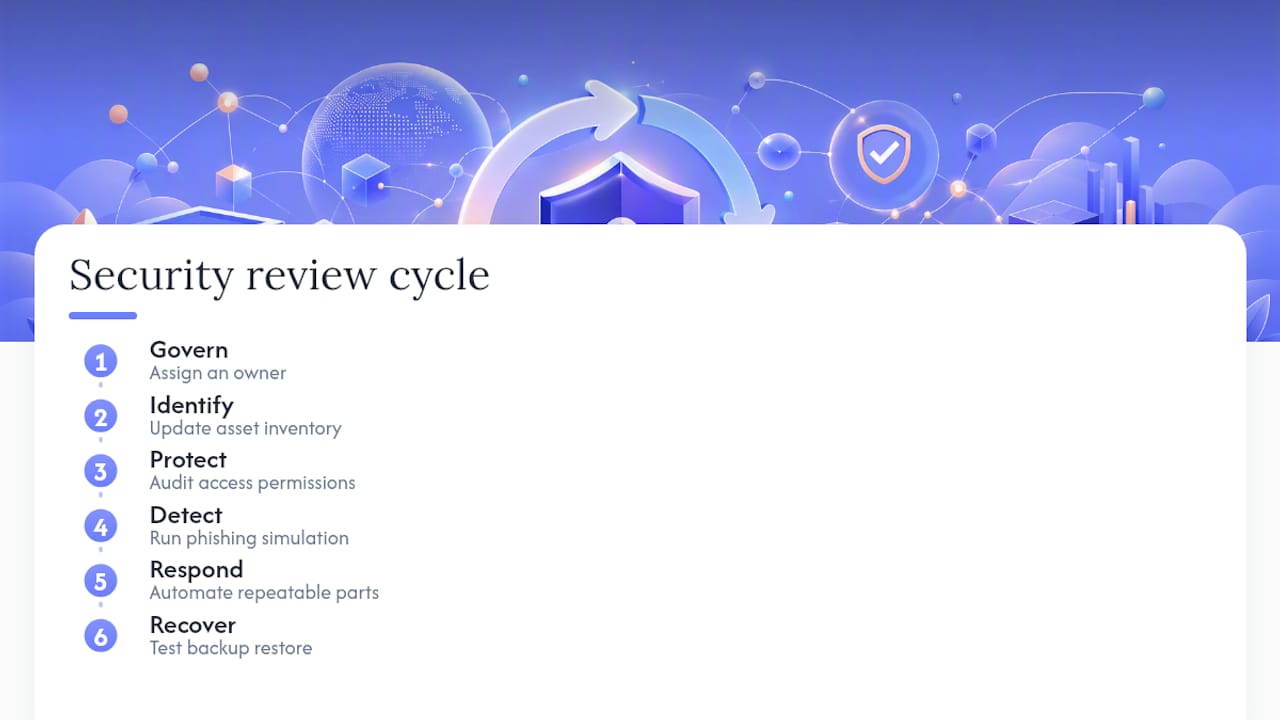
NIST Cybersecurity Framework 2.0 Small Business Quick-Start Guide: The authoritative framework for organizing your security program. The quick-start guide includes small-business implementation examples mapped to the six CSF functions (Govern, Identify, Protect, Detect, Respond, Recover). Free to download.
FTC Small Business Cybersecurity: Practical, plain-language guidance on encryption, MFA, backups, and employee training. The FTC also publishes breach-response guidance and sample security plans. Free.
SBA Cybersecurity Guidance: Covers the human side of security — training, policy, and process controls — with links to additional resources. Free.
FCC Small Business Cybersecurity: The FCC provides a customizable cybersecurity planning tool and checklist that walks you through creating a written security plan. Free.
IC3 (Internet Crime Complaint Center): The FBI-operated portal for reporting internet crimes. File here if you are defrauded, hit by ransomware, or targeted by business email compromise. Reports feed into federal law-enforcement investigations.
Tool categories to evaluate (without vendor promotion)
- Password managers: look for business-tier plans with admin consoles, audit logs, and team sharing controls
- Managed backup services: prioritize solutions that support automated scheduling, versioning, and offsite or cross-region storage
- Endpoint protection: verify your existing OS-native tools are active before purchasing third-party options
- Vulnerability scanners: use CISA’s free service first; consider commercial options only if your environment includes custom applications or complex network segments
When to hire outside help
Consider a paid consultant or managed security service provider (MSSP) when: you handle regulated data (HIPAA, PCI-DSS, state privacy laws); your team has no one with IT experience; or you have completed the 90-day plan and want continuous monitoring. Red flags when choosing help: any provider who cannot explain their methodology in plain language, who proposes a multi-year lock-in contract before assessing your environment, or who cannot provide references from businesses of similar size.
Pro Tip: Run the free CISA scan and download the NIST quick-start guide before your first vendor conversation. Walking in with a remediation report and a framework reference changes the dynamic entirely — you are a buyer who knows what they need, not a prospect to be upsold.
7. Why one-time fixes always fail and continuous risk management always wins
Here is the uncomfortable truth about small business information security: the businesses that get breached are rarely the ones that never tried. They are the ones that tried once, checked the box, and moved on. They bought the antivirus subscription in 2022, set up MFA on their email account, and considered the job done. Then a new employee joined, got admin rights because it was easier, and two years later that account was the entry point for a ransomware attack.
Security is not a project. It is a posture. The NIST CSF’s six functions — Govern, Identify, Protect, Detect, Respond, Recover — are not a checklist you complete once. They are a cycle you run continuously, at whatever cadence your business can sustain. For most small businesses, that means a quarterly review: update the asset inventory, audit access permissions, test a backup restore, run a phishing simulation, and check patch compliance. That is four hours per quarter. The cost of skipping it is not four hours — it is the average cost of a breach, which for small businesses can mean weeks of downtime and permanent reputational damage.
The other thing most guides get wrong: they treat security as purely a technical problem. The SBA is right that employee behavior is the leading breach vector, and no firewall fixes a staff member who clicks a phishing link or reuses a password across personal and business accounts. The highest-leverage investment for most small businesses is not a new tool — it is a 90-minute training session and a one-page policy that people actually read.
What Ctrlaltorion sees repeatedly in client engagements: the businesses that reduce their security risk fastest are the ones that automate the repeatable parts (backup scheduling, patch deployment, access-review reminders) and build those automations into their existing workflows rather than treating them as separate security tasks. When the process is invisible, it actually runs. When it requires manual effort every time, it eventually stops running.
Set a quarterly security review date on your calendar right now. Assign one person to own it — ideally whoever manages your IT or operations. That single act of ownership does more for your security posture than any tool you could buy.
Custom software can reduce your data-security risk from day one
Most small businesses are not short on security knowledge after reading a guide like this. They are short on time and implementation capacity. Knowing you need automated backups, access-review workflows, and a monitoring dashboard is different from having them running reliably in your environment.
Ctrlaltorion builds exactly this kind of infrastructure for small businesses: automated backup pipelines, custom dashboards that surface access anomalies and patch status, and workflow automations that handle the repeatable security tasks your team currently does manually (or skips). The engagement model is project-based, scoped to your actual environment, and sized for small-business budgets — not enterprise retainers. If you have completed the 30-day checklist above and want to automate what remains, or if you need a technical partner to implement the controls from scratch, reach out to Ctrlaltorion for a scoped consultation. No long-term contract required to start.
Sources
These are the authoritative references behind this guide. Each entry notes what it provides and when to use it.
- Secure your business | CISA
- NIST Cybersecurity Framework 2.0: Small Business Quick-Start Guide
- Cybersecurity for Small Business | Federal Trade Commission
- Strengthen your cybersecurity | U.S. Small Business Administration
- What is Data at Rest | Security & Encryption Explained | Imperva
- Cryptographic Storage - OWASP Cheat Sheet Series
- Data Security Checklist | Protecting Student Privacy