
Header image: A shop counter, a laptop, and a chat window one paste away. Photo: Anna Tarazevich / Pexels.
Note: Check Point’s September figures were reported October 9, 2026 (Digitalisation World), building on its September 14 Threat Intelligence Report. Current as of October 11.
Somebody on your staff pasted something into a chatbot this week. Probably from their phone, probably between customers, definitely without asking you first. It felt private — a little text window that nobody else in the shop can see. It isn’t private, and for the first time the telemetry is specific enough to stop guessing about it: in September, one in 39 GenAI prompts in the enterprise carried a high risk of leaking sensitive information.
If you’ve been quietly wondering whether ChatGPT is safe for customer data while your staff are already using it to answer customer emails, this is the piece that answers the question with numbers instead of vibes. The short version: the leak is almost never an attack. It’s a tired employee pasting too much context into a window that feels private and isn’t. And the shop-sized fix costs nothing — two written lines about what never gets pasted, plus one clean account rule that takes an afternoon to set up.

Working the counter with a chat window one paste away. Photo: Anna Tarazevich / Pexels.
The numbers, translated from enterprise to your shop
Check Point’s September telemetry, as reported by Digitalisation World on October 9, is the clearest picture yet of what people actually type into these tools:
- 1 in 39 prompts carried a high risk of leaking sensitive information. Not one in a thousand. One in 39.
- 89% of organizations using GenAI were affected. This is not a handful of careless outliers; it’s nearly everyone who uses the tools at all.
- A further 14% of prompts contained potentially sensitive information — lower-grade, but the same habit, one rung down the ladder.
- The average user ran 131 prompts in the month. That isn’t “the intern experimenting on a Tuesday.” That is daily work, embedded in daily work.
- Organizations averaged eight different AI tools. In a 3-10 person shop, translate that as: everyone uses whatever app is already on their phone, nobody chose the same one, and no one person can name all of them.
The month-over-month direction matters as much as the level. Check Point’s September 14 Threat Intelligence Report put August at 106 prompts per user and 86% of organizations affected. September is higher on both counts — more people, pasting more often, with a slightly worse hit rate. The annual view is starker still: Check Point’s annual AI security report found the high-risk rate roughly doubled over the past year, from about 1 in 50 prompts to about 1 in 25, with organizations averaging 10 AI apps a month and 87–93% of them seeing at least one high-risk interaction every single month.
Now run that against a 4-person shop. Say two of your people use a chatbot daily — rewriting product descriptions, drafting customer replies, summarizing supplier emails. Even pasting just a handful of times a week between them, they cross the 39-prompt line within a couple of months, and the one-in-39 rate does the rest. This is not a “someday” risk like ransomware stories usually are. It’s a schedule. A small shop where two people use a chatbot daily will hit a high-risk paste within a couple of months, not in some bad-luck year.
And here is the most important sentence in Check Point’s entire dataset: most of this exposure comes from employees sharing more context than they realize in ordinary, approved use — not from attacks. Read that again, because it rewrites the threat model. The thing people imagine is somebody hacking the AI provider, or a shady app scraping prompts. The actual thing, at scale, is your best employee at 4:45 on a Friday, pasting the whole customer record into a chat window because editing it down felt like more work than just selecting all.
That’s why the fix isn’t a purchase. You can’t buy a product that makes people paste less context. You can write a rule that tells them what never goes in the window, and you can control which window they use.
One more thing the eight-tools number tells you: if your shop has already gone past chatbots — wiring AI into your ordering system, letting an agent touch data through an API key — that’s a different leak surface with its own warning signs. We cover the API and agent side separately in the usage-flags companion piece. This piece is about the typing-in-a-box problem, which is the one almost every shop has today whether it sanctioned the tools or not.
What’s actually in those prompts
“Sensitive information” sounds like a compliance word until you see the category split. Then it reads like a transcript of a normal week at the counter. Here is what Check Point’s September telemetry found in the prompts, as a share of organizations where each type showed up:
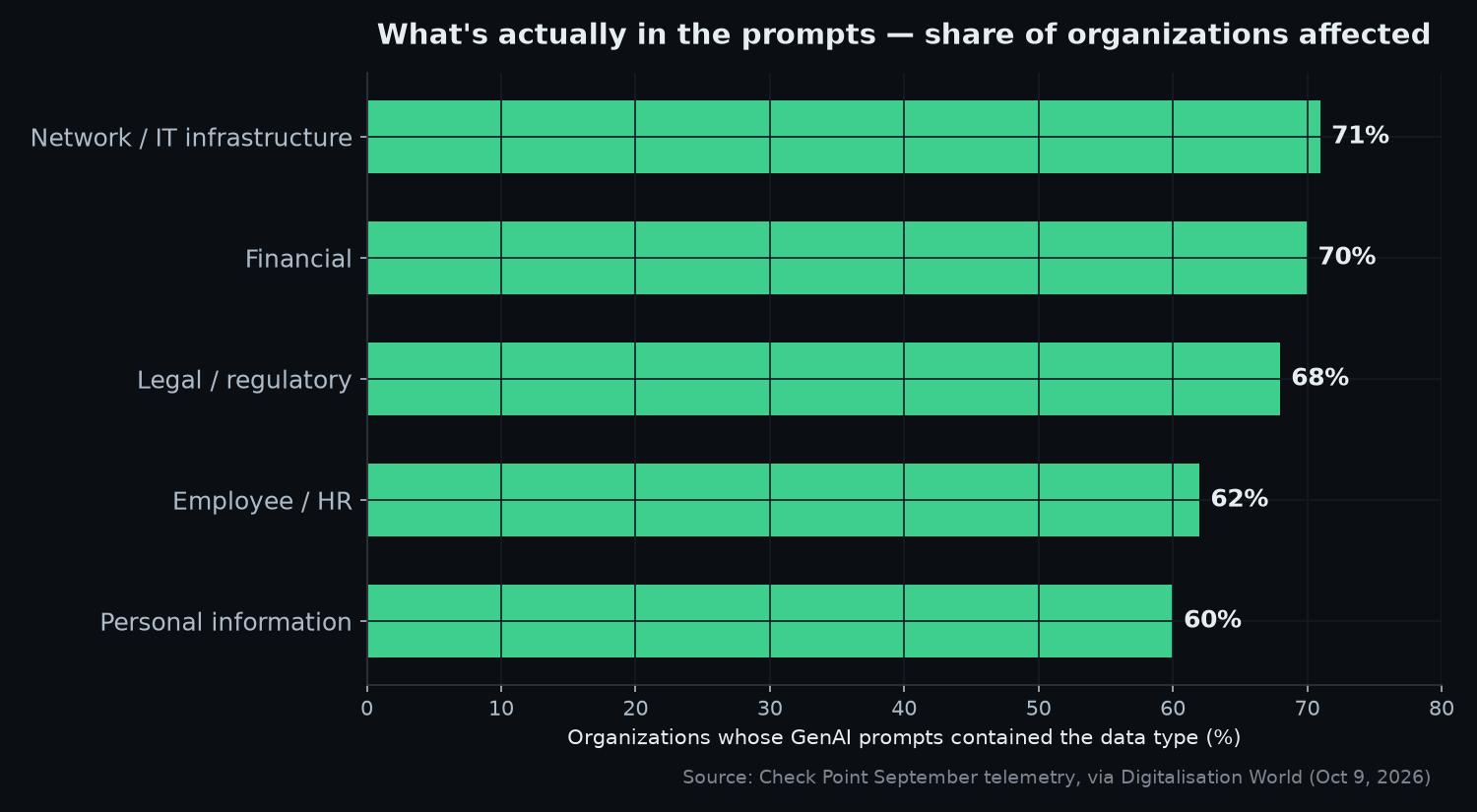
What Check Point found in enterprise GenAI prompts, by share of organizations affected. Chart: Ctrl Alt Orion, from Check Point September telemetry via Digitalisation World.
Now translate each category into shop reality, because the enterprise labels hide how ordinary every one of these is:
Network and IT infrastructure — 71% of organizations. At a small shop, this is the screenshot of the router’s admin page that somebody pasted to ask “why does the Wi-Fi keep dropping at the back of the store,” with the network name, the password field, and the port-forwarding rules all in frame. It’s the NAS share names. It’s the error log with your internal IP addresses and hostnames in it. Nobody thinks of a router page as sensitive data. It is a map of your back-office door, and it’s the single most-pasted category of all.
Financial — 70%. The invoice you pasted in for a rewrite. The bank statement someone screenshotted to ask which fees are worth arguing down. The gross-revenue figure typed in to get help with a pricing question. Financial data shows up constantly because money questions are exactly the questions people bring to these tools, and the document with the answer in it is sitting right there on the same screen.
Legal and regulatory — 68%. The lease clause you didn’t understand. The supplier contract pasted in to ask “is this normal?” The draft terms of service for the website. Small shops don’t have general counsel, so the chatbot is the cheapest lawyer the back room has ever had — and contracts are exactly the kind of long document that’s hard to describe without pasting whole, which is why this category needs a different answer than “redact harder.” More on that below.
Employee and HR — 62%. The staff schedule with everyone’s names on it, pasted to ask “can you make this fairer?” The write-up someone wanted reworded so it sounded less harsh. Pay is a special case that gets its own line in the rule below; names and schedules belong to line one.
Personal information — 60%. The customer’s address on the disputed order. The email list pasted in for help segmenting a promo. The phone number included in a delivery question because it was in the same sentence. This is the category most likely to end with you explaining yourself to an actual customer, because it’s the category with a human being attached to every entry.
The same reporting carries the reason all of this matters more in 2026 than it would have two years ago: UK attacks jumped 50%, 80 extortion groups are active, and Akira alone accounts for 5% of the activity. That backdrop is why a leaked prompt is worse now than the identical leak in 2024 — not because the chatbot got less safe, but because there are more buyers for whatever leaks. The text you pasted didn’t get more dangerous. The world it landed in did.
The two-line rule: the cheapest guardrail that works
The enterprise answer to prompt leaks is a data-loss-prevention platform: per-seat pricing, a policy console, dashboards, an administrator whose job includes the dashboards. A 4-person shop is not buying a console. A 4-person shop writes two lines and sticks them where the pasting happens — the whiteboard above the packing table, the note taped to the register, the pinned message in the staff chat.
Here is the rule, written out in full, so you can copy it onto the whiteboard without rewriting anything:
1. Never paste customer names, card numbers, addresses, IDs, or passwords — describe them instead. (“A customer’s card was declined twice on a $214 order.”)
2. Anything with a login, a server config, or a staff member’s pay in it stays out of any chatbot. Full stop.

The two-line rule, where it belongs — written down where the pasting happens. Photo: Micah Eleazar / Pexels.
Line one works because the useful answer survives the redaction. “Help me write a firm response to a disputed charge for a $214 order” produces a response that is exactly as useful as the version containing the customer’s name and the last four digits of her card — because the model never needed those to write the response. It needed the shape of the situation. The dollar amount carries the tone. The word “disputed” carries the structure. The name and the card number contribute nothing to the writing task; they end up in the prompt only because selecting the whole document was faster than describing it.
There’s a reason the rule says describe instead of delete. Deleting is error-prone. People try to black out the obvious bits and miss the second page, the footer, the email signature, the customer’s phone number three lines down, the thing visible in the corner of the screenshot. Redaction by hand is a test you can fail without knowing you took it. Describing starts from zero sensitive material — there is nothing left in the paste to miss, because you never put it in.
So the habit to teach your people is one sentence: paste the shape of the problem, not the document.
The worked example: one disputed $214 charge
Here’s what actually gets typed at 4:45 on a Friday, pasting first and thinking never. The bad version:
“Help me write a response to a chargeback. Customer Jane Doe, 214 Maple Street, Columbus OH, email janedoe83@example.com, is disputing the $214 charge on her Capital One Visa ending 4419 for order #10438 — says the package never arrived. Tracking shows it was delivered to her address on 9/14. Her phone number is 555-0199 if we want to call her. Make it firm but professional.”
Count what went into that window: a full name, a home address, an email address, a phone number, the card network, the last four digits of the card, the order number, and the delivery confirmation — a complete customer record, typed into a consumer chat window, from somebody’s phone, on a personal account the shop has no say over. It took fifteen seconds to paste. It would take years to fully un-leak.
Now walk it line by line, because every single item fails the two-line test in a different way:
| Line in the bad prompt | What it actually is | What the safe version says instead |
|---|---|---|
| ”Customer Jane Doe” | Personal information | ”A customer" |
| "214 Maple Street, Columbus OH” | Personal information | ”her address” (never typed) |
| “janedoe83@example.com” | Personal information | Nothing — not needed |
| ”555-0199” | Personal information | Nothing — not needed |
| ”Capital One Visa ending 4419” | Financial data | ”the card" |
| "order #10438” | Internal reference | ”the order" |
| "delivered to her address on 9/14” | Delivery fact | Keep the fact, lose the address: “delivered in mid-September with carrier confirmation" |
| "$214 charge,” “disputed,” “never arrived” | The actual problem | Keep all three — this is the shape |
The safe paste-in, using only what the task needs:
“Help me write a firm but professional response to a chargeback. A customer is disputing a $214 charge on the grounds that the package never arrived. Our records show it was delivered in mid-September and we have carrier confirmation on file. Draft the structure and the tone — I’ll fill in the customer and order details myself.”
Notice what survived and what died. The $214 survived, because the amount is what makes the response firm. “Disputed” survived, because it defines the document. “Never arrived” and “delivered” survived, because they’re the two facts the argument hangs on. The name, the address, the email, the phone, the card details, and the order number all died — and the response is not one word worse. It’s arguably better: you get the skeleton back, you paste the customer’s details into your own reply inside your own system, where you control what happens to them. The model got the shape of the problem. Your customer’s record never left the building.
One honest boundary to the two-line rule: it covers everything that can be described. It does not cover the things that must go in whole — the 14-page contract you need summarized, the code snippet, the server log you can’t paraphrase. When redaction genuinely isn’t possible, the answer isn’t better redacting discipline, it’s a different destination: the local-AI route, running a model on hardware you own so the text never leaves the shop at all. That’s a bigger project than a whiteboard, which is exactly why the two-line rule comes first — it cuts the volume of sensitive material down to the few cases that truly need the heavier tool.
The account hygiene that matters more than the policy
Here’s the quiet way the two-line rule fails: you write it, everyone agrees with it, and then every paste still goes into the free personal chatbot account your strongest employee already had before she worked for you. That account is the actual leak surface in a small shop, for three reasons.
First, it’s already signed in on her phone — the same phone she texts customers from, the same keyboard, with no friction at all between “texting a customer” and “asking an AI about a customer.” Second, it’s governed by a consumer agreement written for individuals, which typically lets the provider use what people type to improve the product — the shop has no contract with anyone here, no agreement about how anything is handled, because from the provider’s point of view your shop isn’t a party at all. Third, it survives after she leaves. You can revoke every login you know about on her last day, and that account — with every prompt she ever pasted — walks out the door with her.
The fix is one account that belongs to the shop:
- Pick the one tool the shop actually uses and set up one account on the business tier, under the owner’s email, paid by the shop.
- The owner holds the login. Staff use it on the shop’s devices, or signed in deliberately on their own where that’s the practical answer. One login the owner controls beats four logins nobody controls — you know where every paste goes, and there’s exactly one place to enforce the two-line rule.
- Rotate the password whenever staff changes. Same instinct as the POS login: a departing employee shouldn’t carry the shop’s AI account history out the door any more than they should carry the register key.
- That’s it. No console, no per-seat policy platform, no administrator. The point isn’t a managed deployment — it’s making sure the window people paste into is one the shop owns instead of one it inherited.
What this doesn’t cover: screenshots and phone cameras are the same leak through a different door. People photograph an invoice and paste the image, or type the prompt on the phone where the two lines on the whiteboard aren’t in view. So put the rule where the pasting actually happens — a pinned message in the staff chat, a note on the phone’s lock screen if you have to. The working test: if your staff would be uncomfortable with a stranger photographing it, it doesn’t go in the prompt box either.
And the chat window isn’t the only door worth thinking about. If a pasted screenshot ever does get someone curious about your back office, the network it describes should not be wide open — our secure Wi-Fi setup guide for small business guest networks covers the other side of that wall.

Hands on the keyboard, phone on the desk — where the prompts actually happen. Photo: Cytonn Photography / Pexels.
For stakes context, kept deliberately short because you don’t need fear to act on a one-in-39 number: IBM’s UK study puts AI-driven attacks up 56% globally at an average cost of roughly $6 million per breach — an enterprise figure your shop will never write a check for, but the direction of travel is the point. 22% of UK organizations reported attacks that were AI-generated, and 61% plan to increase security spend. When the attack side is industrializing, the defense side doesn’t have to be expensive — it has to exist. The two-line rule and one clean account are the version of “exist” that fits a small shop’s budget, which is to say: free.
When this doesn’t apply
Honesty about the edges, because a rule that pretends to cover everything covers nothing:
If literally nobody on staff uses a chatbot for work, there’s nothing to police yet. Write the two lines anyway. The rule costs nothing while it’s hypothetical, and the first hire who grew up with these tools will not ask permission before pasting — the numbers on sanctioned-versed-unsanctioned use make clear that “ordinary approved use” is where the exposure lives, and your shop’s first exposure will arrive the same way. A whiteboard rule written before the habit exists beats a policy written after the first leak.
If your shop already runs a sanctioned AI tool with enterprise-grade data-loss prevention, then this piece is a supplement, not a replacement — your console already catches what the two-line rule catches. But be honest about which shop you are: most 3-10 person operations are not that shop, and “we have DLP” usually turns out to mean “we have a spreadsheet.”
If the work is genuinely sensitive end-to-end — health, legal, financial services — a two-line rule is the floor, not the ceiling. Compliance obligations apply to the underlying data no matter whose chat window it nearly went into, and those obligations were written by people with enforcement powers. Check those first; the whiteboard comes second.
And the standing caveat: a paste rule is not technical security. It reduces the most common leak path — the ordinary over-shared prompt — and it does nothing about a compromised account, a malicious browser extension, or a tool that was never trustworthy to begin with. Those are different problems with different fixes, and our small business data security checklist is where those live. Do both; don’t confuse them.
The enterprise version of this problem is a procurement project with a steering committee. Yours is two lines on a whiteboard and one account that belongs to the shop instead of to whoever signed up first. Ten minutes, zero dollars, and September’s numbers say you’re already pasting. Write the lines this week — before the next 4:45 Friday does the writing for you.
Sources
4 refs- One in 39 AI prompts risks data leak as UK attacks jump 50% — Digitalisation World: the September 1-in-39 figure, 89% of organizations affected, 14% potentially sensitive, 131 prompts per user, 8 AI tools per organization, the 71/70/68/62/60 category split, UK attacks up 50%, 80 extortion groups, Akira at 5%.digitalisationworld.com
- 14th September Threat Intelligence Report — Check Point Research: the August trend line — 106 prompts per user, 86% of organizations affected.research.checkpoint.com
- “AI has crossed from assistant to operator” — Check Point press release: the annual backdrop — high-risk prompts roughly doubled (~1 in 50 to ~1 in 25), 10 AI apps per organization per month, 87–93% seeing at least one high-risk interaction monthly, and the “ordinary approved use” finding.checkpoint.com
- More than one in five malicious UK breaches are AI-generated — IBM UK newsroom: AI-driven attacks up 56% globally, ~$6M average cost per breach, 22% of UK organizations reporting AI-generated attacks, 61% planning increased security spend.uk.newsroom.ibm.com
comments
loading comments…
No comments yet. Start the thread.