An Attacker Got Domain Admin Through a Print Server in 7 Minutes. The $35 Switch That Keeps That Server From Reaching Anything Else.
This week's PaperCut AI-agent attack campaign spread fast because the print server sat on the same flat network as everything else. A $35 managed switch with VLAN support puts it on its own island — the honest buying guide.
Disclosure: some links below are Amazon affiliate links (tag cao04-20). Costs you nothing; the picks don’t change based on that. Every spec and price below is sourced at the bottom.
Note: This runs alongside today’s piece on the PaperCut AI-agent attack campaign — hundreds of AI agents compromising 440 print servers at 395 organizations, with one victim reaching domain admin in 7 minutes. That piece’s actual point: the speed of the initial break-in matters less than how far it can travel once it’s in. This is the cheap, boring fix for the “how far it can travel” part.
Here’s the detail buried in this week’s PaperCut story that matters more than the exploit itself: at 12 of the 395 compromised organizations, the attacker reached full domain administrator access — meaning the entire network’s credential store, not just the print server. That jump doesn’t happen because print servers are secretly powerful. It happens because most small networks are flat: one switch, one subnet, everything talking to everything, and a compromised print server sitting on the exact same network segment as the back-office desktop, the POS terminal, and the domain controller. A print-quota tracker and your payroll system have no business being one hop apart. On most small-business networks, they are.
The pick: TP-Link TL-SG108E Easy Smart Switch
TP-Link TL-SG108E Easy Smart Switch
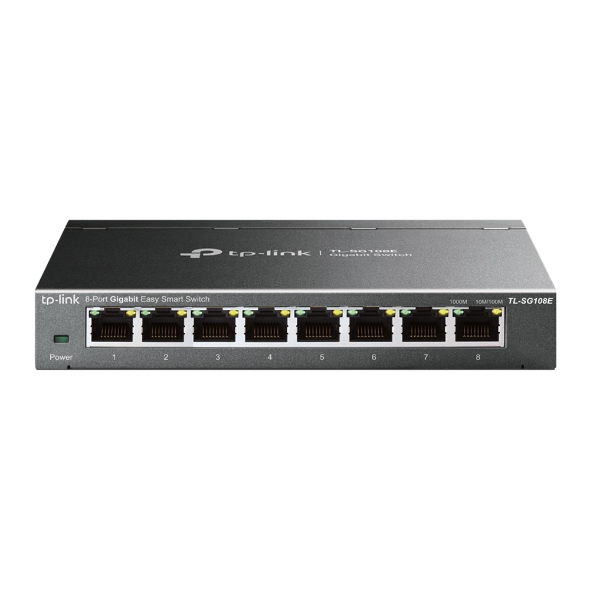 The TL-SG108E: looks like an unmanaged dumb switch, has real VLAN tagging underneath. Photo: TP-Link.
| Spec | Detail |
|---|---|
| Price | ~$30-40 |
| Ports | 8x Gigabit Ethernet, metal housing, shielded |
| VLAN support | Port-based, 802.1Q tag-based, and MTU VLAN |
| Management | Web-based GUI on the local network — no cloud account, no subscription |
| Extra features | QoS (port and tag-based), IGMP snooping, loop prevention, port mirroring, cable diagnostics |
| Switching capacity | 16 Gbps / 11.9 Mpps |
| Warranty | Limited lifetime |
Sources: TP-Link’s official TL-SG108E product page.
Check current TL-SG108E pricing here.
What “VLAN” actually buys you, in plain terms
A VLAN (virtual local area network) is a way to split one physical switch into multiple logically separate networks without running separate cables or buying separate hardware. Plug the print server into port 5, tag it into “VLAN 20,” and it can no longer see or be reached by whatever’s plugged into a port tagged for “VLAN 10” — the POS terminal, the back-office desktop, the domain controller — even though they’re all physically connected to the exact same $35 box. If an attacker compromises the print server, VLAN separation is the difference between “they got a print server” and “they got a print server, and now they’re seven minutes from your domain admin,” because the second half of that sentence requires a network path that a properly configured VLAN simply doesn’t provide.
This is not the same thing as a firewall, and it’s worth being precise about that distinction rather than overselling it. A VLAN controls which devices can talk to each other at the network layer; it doesn’t inspect traffic, block specific attacks, or replace endpoint security on the print server itself. What it does is contain the blast radius — the print server can still get compromised through its own vulnerabilities (like the PaperCut CVEs covered in the companion piece), but a properly segmented network means that compromise doesn’t automatically become a domain-wide one.
Setting this up, honestly
This is the part most segmentation guides gloss over: a genuinely correct VLAN setup that also handles inter-VLAN routing for the traffic that legitimately needs to cross (the print server does need to receive print jobs from client machines, for instance) requires a router or Layer 3 switch capable of routing between VLANs, with firewall rules controlling exactly what’s allowed to cross. The TL-SG108E, on its own, is a Layer 2 switch — it can put devices into separate VLANs, but it doesn’t route between them by itself. Depending on your existing router, you may need it to handle the routing side, or you may want to keep it simple.
The honest, achievable version for most small shops without a network engineer on staff: use port-based VLANs to fully isolate the print server (or any single vulnerable device) onto its own VLAN with no inter-VLAN routing configured at all, and have client machines print directly to it via a static route or a small always-on device on that same isolated VLAN acting as a print gateway. That’s a more restrictive setup than a “properly” routed multi-VLAN network, but it’s dramatically simpler to get right, and for a single high-risk device like a print server, full isolation is usually exactly what you want anyway — there’s rarely a legitimate reason for the print server to reach the rest of your network at all, only for client machines to reach it.
If that’s more networking than you want to take on solo, this is a genuinely reasonable thing to pay a local IT contractor two or three hours to set up once, correctly, rather than getting halfway through a VLAN config and leaving an inter-VLAN routing rule too permissive — a half-finished VLAN setup can create a false sense of security that’s arguably worse than no segmentation at all, because you stop worrying about a risk that’s still actually present.
The actual steps, for the full-isolation version
If you’re doing this yourself, the full-isolation setup (print server on its own VLAN, no routing to anything else) breaks down into a short, concrete sequence rather than an abstract “configure VLANs” instruction:
- Log into the switch’s web GUI on the local network (default IP is printed on the bottom of the unit, typically something in the 192.168.0.x range) and set an admin password if you haven’t already — an unmanaged-feeling switch with default credentials defeats the point of this exercise.
- Create a second 802.1Q VLAN (say, VLAN 20) alongside the default VLAN 1 that everything currently sits on.
- Assign the print server’s port as “untagged” member of VLAN 20 only, and remove it from VLAN 1’s untagged membership — this is the step people most often skip, leaving the port a member of both VLANs and defeating the isolation.
- Leave every other port (the POS terminal, back-office desktop, uplink to the router) as untagged members of VLAN 1, unchanged.
- Set the switch’s own management VLAN to whichever VLAN you’ll actually be managing it from later — getting this wrong is the classic way people lock themselves out of the GUI after saving (see the reset-button answer below).
- Save, then physically test: confirm a client machine on VLAN 1 can no longer ping the print server’s IP, and confirm print jobs still reach it through whatever path you set up (direct static route, or a small gateway device sharing VLAN 20 with the printer).
That’s genuinely the whole process for the simple, fully-isolated version — no routing rules, no firewall policy to write, because there’s nothing crossing between the VLANs to write a policy for. The complexity in most guides comes from also trying to allow some controlled traffic across, which is the harder, Layer-3 problem addressed further down.
A worked example: the four-printer copy shop
Take the same four-location copy shop from the companion piece, each with a PaperCut server and a handful of networked printers on a single flat network per location. The $35-per-location fix: one TL-SG108E per site, print server and printers on their own VLAN, POS and back-office machines on a separate VLAN, no routing between the two configured unless a specific, deliberate reason requires it (and if one does, a specific firewall rule for that one path only — not open routing).
Total hardware cost across four locations: about $140, plus setup time. Compare that to the alternative highlighted in the companion piece: a compromised print server reaching domain admin in minutes because nothing stood between it and the rest of the network. This is one of the rare security fixes that’s genuinely cheap, doesn’t require ongoing subscription costs, and meaningfully changes the worst-case outcome of a future compromise rather than just making the current one less likely.
Budget and bigger-network alternatives
| Switch | Price | Ports | Best fit |
|---|---|---|---|
| TP-Link TL-SG105E (budget) | ~$20-25 | 5x Gigabit | A single print server or one other device to isolate, minimal port count needed |
| TP-Link TL-SG108E (this pick) | ~$30-40 | 8x Gigabit | Small shop with a print server plus a few other devices worth separating (a camera, an IoT device, a guest network drop) |
| TP-Link TL-SG1024DE (bigger) | ~$90-110 | 24x Gigabit | Multi-location or larger single-site setup with enough devices that 8 ports isn’t enough headroom |
All three run the same core VLAN feature set — port-based, 802.1Q tag-based, and MTU VLAN — so the choice between them is really just “how many ports do I need,” not a capability tradeoff. The 5-port TL-SG105E is the right call if you’re isolating exactly one device (just the print server) and don’t need spare ports; the 8-port pick in this piece leaves room to also isolate a security camera, a guest Wi-Fi access point, or any other device you’d rather not have on the main network, without buying a second switch later.
How this compares to a managed-ecosystem router instead
A different, legitimate path to the same outcome is skipping the standalone switch entirely and replacing your router with something VLAN-aware from the start — a Ubiquiti UniFi Dream Machine or Dream Router, or a pfSense/OPNsense box. It’s worth being honest about the actual tradeoff between the two approaches rather than assuming one is simply “better”:
| Approach | Upfront cost | Setup complexity | What you gain over the switch-only approach |
|---|---|---|---|
| TL-SG108E added to existing router | ~$35 | Low — VLAN tagging only, isolation-focused | Nothing extra; cheapest path to isolating one or two devices |
| UniFi Dream Machine (or similar) replacing your router | ~$200-380 | Moderate — GUI-driven VLAN + firewall rules across the whole network | Built-in inter-VLAN firewall rules, unified management of Wi-Fi + wired VLANs, easier to add controlled cross-VLAN traffic later |
| pfSense/OPNsense box | ~$150-400 (hardware) | High — full firewall rule authoring, steeper learning curve | Maximum control, but genuinely requires networking knowledge or a contractor relationship to maintain |
The honest read: if your only goal is “get the print server off the flat network,” the $35 switch is not a compromise version of the UniFi or pfSense path — it’s the right-sized tool for that specific job, and replacing your whole router to isolate one device is solving a bigger problem than you have. The router-replacement options earn their cost when you also want VLAN-aware Wi-Fi (a segmented guest network, for instance), centralized traffic visibility, or you expect to need controlled inter-VLAN routing for more than one device down the line. Buying the $380 router to isolate a single print server is over-engineering; trying to segment six device types with a single $35 unmanaged-feeling switch and no Layer 3 routing is under-engineering. Match the tool to how many trust boundaries you actually have, not to what looks impressive in a network diagram.
If you actually need full inter-VLAN routing
Everything above assumes the simplest, safest configuration: full isolation, no routing between VLANs. If your setup genuinely requires controlled traffic between VLANs — say, a specific back-office application needs to query the print server’s database directly, rather than just sending print jobs to it — a Layer 2-only switch like the TL-SG108E can define the VLANs, but it can’t route between them or enforce firewall rules on that traffic. That job belongs to a Layer 3-capable device: either a business router with VLAN-aware routing and firewall rules (many pfSense or OPNsense-based setups, or higher-end consumer mesh systems with VLAN support), or a Layer 3 managed switch designed for exactly this. That’s a meaningfully bigger project — router-level firewall rules, not just switch port tagging — and if you’re at the point of needing it, it’s worth the two-to-three-hour contractor visit mentioned above rather than assembling it piecemeal from guides.
Quick answers
Do I need to replace my existing switch, or can I add this alongside it? You can add it alongside an existing unmanaged switch — plug the TL-SG108E into your router or main switch, then move the print server (and anything else you’re isolating) onto ports on the new switch. You don’t need to rewire your entire network at once; segmentation can be rolled out one device at a time.
Does this slow down my network? No — VLAN tagging and switching happen at line rate on this hardware (16 Gbps switching capacity, well above what an 8-port Gigabit switch’s ports can collectively saturate in a small-shop setting). There’s no meaningful performance cost to enabling VLANs on a switch built for it.
Can I configure this from my phone, or do I need a specific computer? The web-based management GUI works from any device on the same local network with a browser — laptop, desktop, or a phone on the same Wi-Fi network, no app or cloud account required. That’s also worth flagging as a security note: management access is local-network-only by default, which is itself a reasonable protection against remote attackers reaching the switch’s own configuration.
What happens if I misconfigure a VLAN and lock myself out of managing the switch? The TL-SG108E has a physical reset button that restores factory defaults, so a bad configuration is recoverable — you’ll lose your VLAN setup and need to redo it, but you won’t be permanently locked out of the hardware.
Beyond print servers: the same $35 fix applies elsewhere
While this piece is framed around the PaperCut campaign, the underlying pattern — a single internet-facing or third-party device sitting on a flat network with full reach to everything else — shows up constantly in small-business setups that have nothing to do with printing. A security camera system’s NVR (like the PoE setup covered in this site’s camera buying guide, often running its own web-based admin panel, frequently left on default or weak credentials), a smart-plug or IoT hub, a guest Wi-Fi network sharing a switch with the business network — the exact flat-network problem this site’s guest Wi-Fi piece walks through fixing — a point-of-sale terminal that connects to a payment processor’s cloud — all of these are devices with either a documented history of vulnerabilities or an inherent trust boundary (a guest network, in particular, should never share a broadcast domain with anything business-critical). The same one switch, same VLAN logic, same “isolate first, route only if truly necessary” principle applies to any of them. If you’re already buying this for the print server, it’s worth doing a quick inventory of what else on your network fits that same profile — a device other people (customers, vendors, delivery drivers on guest Wi-Fi) can reach, or a device running vendor software with its own patch cadence you don’t control.
When not to buy this
If your network already has proper VLAN segmentation through a more capable business router, a UniFi or similar managed setup, or an existing network engineer’s configuration, adding this switch doesn’t add anything — you already have the capability this piece is describing.
If you’re a true single-machine solo operator with no separate print server, POS terminal, or additional networked devices to actually segment from each other, there’s nothing here to isolate. This is a fix for networks with multiple distinct trust levels of device on them, not a general-purpose upgrade for every setup.
If you don’t have the time or in-house comfort to configure VLANs correctly, and can’t budget for a contractor to do it once, buying this switch and never configuring the VLAN features leaves you with a slightly nicer unmanaged switch for $35 more than a genuinely unmanaged one would cost — not a security improvement. The value here is entirely in the configuration, not the hardware sitting in the box.
If your print server or other high-risk device needs frequent, complex, legitimate access to other network resources (not just receiving print jobs, but actively integrating with several other business systems), full isolation may not be practical, and you’re better served by a proper firewall-routed multi-VLAN setup from the start — which is a bigger project than this piece covers, but the right one for that situation.
One more honest caveat
Network segmentation is a real, meaningful improvement — it is not a substitute for patching the underlying vulnerability, and it’s worth being direct about why. A properly isolated print server can still be fully compromised on its own; VLAN separation limits what an attacker does after that compromise, it doesn’t prevent the compromise itself. Anyone reading this piece without also reading the companion piece on the actual PaperCut vulnerability and confirming their patch level is solving half the problem. Segmentation buys you a much better worst case. Patching is still what keeps the worst case from happening at all.
Sources
All prices and specs accessed September 12, 2026.
- Official specifications, VLAN capabilities, and switching capacity — TP-Link, TL-SG108E official product page
- Context on the specific attack this piece is responding to — GreyNoise, “Agents Gone Wild: An AI-Orchestrated Global Campaign Against PaperCut NG/MF”
- Federal guidance on why segmentation limits lateral movement after a compromise — CISA, “Layering Network Security Through Segmentation”
Bottom line
A $35 switch doesn’t stop an attacker from exploiting a vulnerable print server — nothing here replaces patching, which is still the actual fix for the underlying flaw. What it does is answer the question that turned this week’s PaperCut incident from “one compromised server” into “domain admin in seven minutes” at a dozen real organizations: what else can that server reach once something goes wrong with it? For most small networks today, the honest answer is “everything.” For $35 and an afternoon, it doesn’t have to be.
See current TL-SG108E pricing on Amazon.
One last practical note: buy this before the next incident, not during one. Configuring VLANs calmly on a Tuesday afternoon, with time to test that client machines can still reach the print server and confirm nothing broke, is a completely different task than trying to segment a network mid-breach while also handling password resets, vendor calls, and a very bad day. The whole value of this piece is doing the boring work now, while it’s boring.