Header image: a card payment terminal with a printed receipt on a café counter. Photo: Cemrecan Yurtman / Pexels.
This article is general information for small business owners, not legal advice. If a large amount is at stake, talk to a lawyer.
Note: Square account frozen this week? The FTC investigation news broke on October 8, 2026, one day old as of October 9, 2026. Square’s General Terms quoted below take effect for all sellers on October 10, 2026. Check the live pages before you act, because both can change.
You find out on a Tuesday. The payout that normally lands overnight isn’t there. The Square Dashboard shows a banner, or an email says your account has been deactivated, and the money from last week’s sales is sitting somewhere you can’t reach. Rent, payroll and the supplier invoice don’t care.
You’re not the only one, and as of this week a federal regulator is asking questions about it. Here’s what’s known about the FTC probe, what Square’s terms let it do with your money, how the appeal works, and how to keep a second way to take cards so one frozen account doesn’t close your shop.
The news: the FTC is investigating Block over frozen Square accounts
The Federal Trade Commission is investigating Block Inc., the parent company of Square and Cash App, over whether it violated consumer protection laws by failing to adequately help customers whose accounts were frozen or deactivated. Bloomberg first reported it, and the probe came out in court filings made public late Wednesday, October 7, 2026 (Yahoo Finance/Quartz).
This is an investigation. It is not a finding that Block did anything wrong, and nothing has been decided.
What’s been reported so far:
- More than 1,500 complaints. The complaints allege Square froze or deactivated payment processing accounts without notice or remedy and blocked transfers to external bank accounts, according to Seeking Alpha.
- Up to $2.5 million. Per Bloomberg’s account of the FTC petition, consumers alleged frozen or deactivated accounts left them unable to reach funds totaling up to $2.5 million since 2022 (Yahoo Finance/Quartz).
- Verification didn’t always help, the filings allege. According to the filings, customers say they got no meaningful assistance even after completing identity and bank account verification.
- A January demand for records. On January 22, 2026, the FTC issued a civil investigative demand (CID), a type of administrative subpoena, to Block, with a response due February 23, 2026. The new filing asks a court to enforce that demand (Seeking Alpha).
- Where it’s filed. The case is FTC v. Block, 26-mc-80299, in the U.S. District Court for the Northern District of California in Oakland. Large portions of the court documents remain redacted (Yahoo Finance/Quartz).
Block’s response, as quoted in the report: “We have been working in good faith with FTC staff to address the production of responses to the agency’s handful of remaining requests,” and “We remain committed to working constructively with the commission to bring about the closure of this matter.”
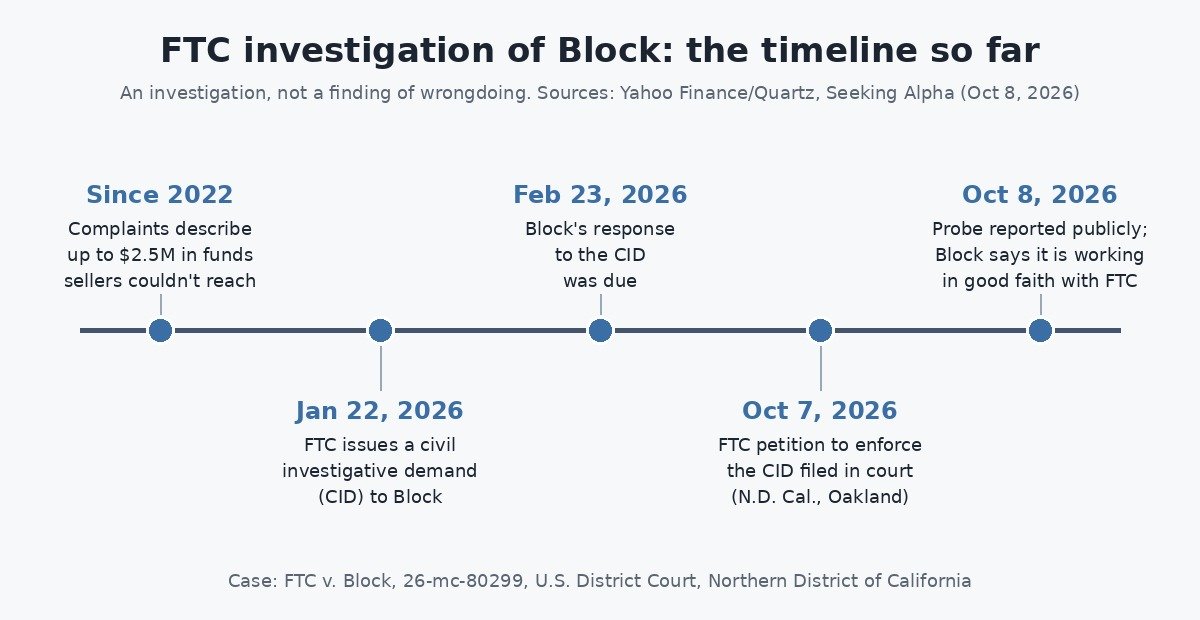 The FTC probe so far, from the CID to this week’s court filing. Graphic: Ctrl Alt Orion.
What this means for your frozen account today: nothing automatic. An FTC investigation doesn’t release anyone’s funds. Your money still moves through Square’s own process. Keep a paper trail anyway.
Square account frozen, suspended or deactivated: which one do you have?
“Square froze my account” can mean four different things. Read the exact wording of the email and Dashboard banner first.
| What you see | What it usually means | Where the details live | First move |
|---|---|---|---|
| A percentage of card sales set aside, released on a schedule | Reserve (Square uses a “rolling reserve”) | Reserve Dashboard, in the Balance section of Square Dashboard | Note the rate and release dates; keep selling if the terms work for you |
| Transfers paused, with a request for documents | Account review / information request | Settings > Account & Settings > Information requests | Answer every question and upload documents fast |
| Payouts stopped after a verification notice | Identity or business re-verification (KYC/KYB) | Dashboard notifications; email and SMS | Complete the verification before the deadline |
| ”Your account has been deactivated” | Deactivation | The deactivation email, Dashboard banner or in-app notice | Check whether the notice says you’re eligible to appeal |
Sources for the table: Square Support Center articles on reserves, information requests, identity verification, and deactivation appeals.
The first three are fixable while you keep running. Deactivation shuts down your card reader.
Why is Square holding my money?
Square’s reserves article says reserves exist so merchants can cover chargebacks, and that reserved funds “still belong to you and are only used if you are unable to cover a chargeback.” It lists the factors Square considers:
- Prepayment. You take money before you deliver the goods or service: deposits, pre-orders, custom work.
- Chargeback rates in your industry. Square names home contracting and repair, professional services, travel and tourism, and custom-made products such as furniture as more prone to disputes.
- Your own chargeback rate, especially if you don’t have funds on hand to cover disputes.
- Sporadic processing. Swings in transaction size, payment method, or how many payments you take in a period.
- Being new to Square, with no processing history.
Transfers may also be suspended during an account review if Square’s system notices “unusual activity” (Square Support Center). And Square says federal law requires periodic re-verification of your identity and business details; miss the deadline and payments, withdrawals or the whole account can be restricted (Square Support Center).
In shop terms: a big week after a quiet month, a first large ticket on a new account, deposits taken weeks before the job, or a verification email that went to spam.
What Square’s terms say about held funds and how long they can be held
This is the section to read slowly. The Square Payment Terms (last updated July 30, 2026) are the contract, and they give Square wide room.
Holds during investigations (Section 12, Availability of Proceeds). Square “may defer payout or restrict access to your Proceeds, temporarily or indefinitely, if we need to conduct an investigation or resolve any pending dispute,” including suspected fraud, unauthorized transactions, or “other activity that may present risk.” It can also hold funds to comply with law, a court order, or a government request.
Reserves (Section 14). Square may withhold funds by suspending or delaying payouts, or require a reserve, “for any reason related to your use of the Services.” The amount is what Square reasonably determines will cover potential losses, and it can be raised, reduced or removed “at any time” at Square’s discretion. You grant Square a security interest in reserve funds, and Square can debit the reserve or your linked bank account “without prior notice to you” to collect amounts you owe.
Chargebacks (Sections 19 and 21). If Square believes a chargeback is likely, it can withhold that amount until the customer’s dispute window expires or it decides one won’t happen. Excessive chargebacks can mean new fees, a reserve, delayed payouts, or suspension.
Information requests (Section 9). Square can ask for supplier invoices, government ID, a business license, or to inspect your location. Refusing can get your account suspended or terminated.
Termination (Section 37). Square “may terminate your use of the Payment Services at any time for any reason.” Termination doesn’t cancel what you owe for fees and chargebacks. The General Terms (Section 12) add that Square will “take reasonable steps” to notify you by email or the next time you try to access your account.
Closure (Section 38). If your account closes, funds Square holds for you, less fees, are paid out on your payout schedule, but if an investigation is pending, Square may hold them. “If you are later determined to be entitled to some or all of the funds, we will release those funds to you.”
So how long can Square hold your money?
The honest answer: the terms don’t set one maximum. The investigation hold can be “temporarily or indefinitely.” For reserves, Square says each reserve has a duration period that controls how long funds are held before release, and your Reserve Dashboard shows the amount and date of upcoming releases. Accounts with reserves are reviewed “after a minimum of six months,” proactively, without you asking (Square Support Center).
Ignore day counts quoted on forums. The number that applies to you is the one in your notice or Reserve Dashboard; if you don’t have it in writing, ask.
One more clause that matters right now. Square’s statements are available on its website for up to one year of account activity, and the terms make you responsible for keeping your own records (Payment Terms, Section 13). If your access gets cut, so does your history. Export it while you still can.
How the official Square appeal works
Square has a self-service appeal for deactivated accounts, but only if your deactivation notice says you’re eligible. Per Square’s appeal article:
- Check the deactivation email. If you’re eligible, it includes the link to the appeal form.
- Sign in to Square Dashboard or open the Square POS app, then click the link in the notification banner, the email, or the in-app notification.
- Fill in the form with accurate business details, including a description of your products or services, any documentation that supports your appeal, and how you’ve addressed the concern named in the notice, if one is named.
- Submit. You’ll get a confirmation email. Square says appeals are “typically reviewed within 48 hours.”
There are three outcomes:
- Approved: your account is reactivated, held funds are released, and you can take payments immediately.
- Denied: an email explains the decision and the impact on held funds. The deactivation stays.
- More information needed: a follow-up email asks for documents. Square says to respond promptly to avoid delays.
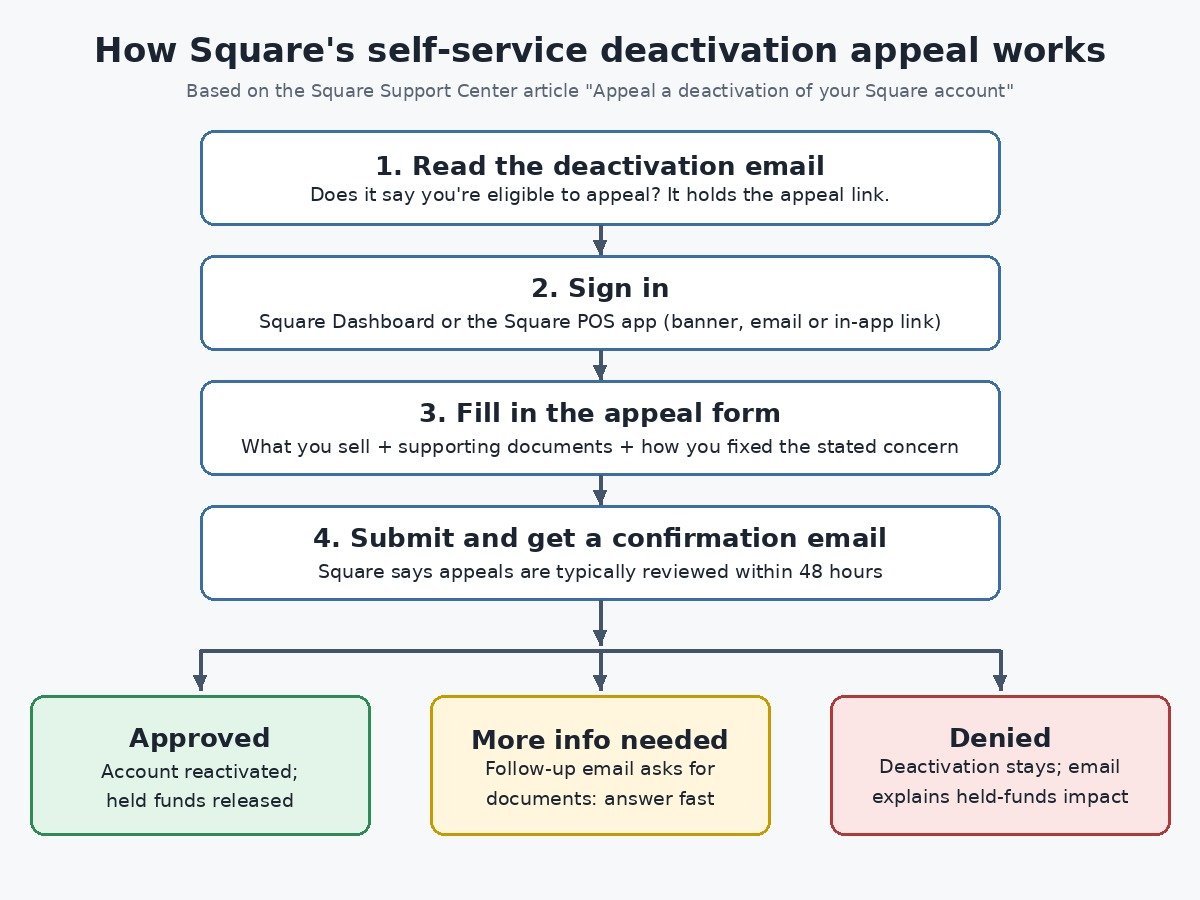 Square’s appeal path, step by step, from its Support Center article. Graphic: Ctrl Alt Orion.
You need access to the account’s email address to get the link and the decision, so make sure it’s one somebody actually checks. If you’re not eligible to appeal, Square’s article doesn’t describe another path; that’s when the contact and escalation steps below matter.
Documents to prepare before you contact Square
Don’t start a chat empty-handed. Pull together a folder with:
- Identity and ownership: a current government-issued photo ID for the account owner, and your business license or registration. Square’s terms name ID and a business license among things it may request.
- Proof you’re a real supplier and seller: supplier invoices for the inventory you sold. These are also named in the terms.
- Proof customers got what they paid for: receipts, signed work orders, delivery confirmations, tracking numbers, photos of completed jobs. For prepaid or deposit work, the contract or quote showing dates.
- An explanation of anything unusual: one paragraph on the sales spike or the big ticket.
- Your refund policy and a statement for the linked bank account.
- Everything Square sent you: the notice, banner screenshots with dates, and case or ticket numbers.
Keep answers consistent with your signup details; if the business changed, say so.
 The transactions behind a hold are the ones you can document: keep receipts and invoices you can hand over within an hour. Photo: Kampus Production / Pexels.
How to contact Square
Per Square’s support article:
- Who can call: only account owners or authorized representatives. Contact Square from the email address or phone number on the account so support can find it faster.
- Phone: 1-855-700-6000. Square says phone support isn’t guaranteed for all sellers, availability varies by subscription, and there’s a callback option if the wait is long.
- Chat: through Support Assistant in Square Dashboard, the Support Center, or the Square POS app (≡ More > Support). Square says the assistant responds first and routes you to a live agent when one is available. Live chat agents work Monday to Friday, 6 a.m. to 6 p.m. Pacific Time (9 a.m. to 9 p.m. ET).
- Information requests: if Square asked for documents, answer through Settings > Account & Settings > Information requests in Square Dashboard. Square says it reviews answers within 1 to 2 business days and that you can edit your submission until review starts (Square Support Center).
Watch for scams. A frozen account makes you the perfect phishing target. Square says real verification requests come by email from noreply@messaging.squareup.com, a Dashboard notification, or SMS (Square Support Center). The safest habit is to ignore links and sign in to the Dashboard yourself.
Keep a log of every call and chat: date, agent, case number, what was said. Ask for the reason, the amount held and the release date, and save transcripts.
Escalation options if the normal process stalls
Square’s formal dispute process
Before any arbitration or small claims case, Square’s General Terms (Section 22) require a written, signed Notice mailed to Block, Inc., Attn: Arbitration Agreement, 1955 Broadway, Suite 600, Oakland, CA 94612. It must include your account details, the facts of your claim, and the relief you want with a good-faith dollar amount. Then both sides get 60 days to try to resolve it informally, including a phone or video conference. After that, either side can choose small claims court or individual arbitration.
Three more points from the same terms: claims generally must start within one year after the cause of action accrues (Section 24), class actions are waived, and liability is capped at the greater of three months of fees or $500 (Section 19). This is where a lawyer earns their fee.
CFPB complaint
The Consumer Financial Protection Bureau takes complaints online at consumerfinance.gov/complaint. Read its list carefully: it covers consumer products such as checking and savings accounts, prepaid cards, and “money transfers, virtual currency, and money services.” Merchant card processing isn’t on the list. That makes the CFPB most relevant if your problem involves Cash App or a Square Checking account, less so for a pure Square payments hold.
If you file, the CFPB says most companies respond within 15 days and you generally can’t submit a second complaint about the same problem, so attach everything (up to 50 pages) the first time.
Your state attorney general
State attorneys general handle consumer protection complaints. USAGov keeps a directory of state attorneys general where you can find yours. Your AG’s own site will say whether it takes complaints from businesses as well as consumers, so check before you file.
What about the FTC itself?
The investigation isn’t a claims process, and nothing published so far asks sellers to do anything. Ignore anyone offering to “recover” your Square funds through the FTC case for a fee.
Square alternatives for small business: keep a second processor ready
Having a second processor approved before you need it is the practical fix—here are three backups a small shop can set up ahead of time, with in-person rates taken from each provider’s official US pricing page, checked October 9, 2026.
-
Stripe Terminal — In-person domestic cards: 2.7% + 5¢ per successful transaction. Readers listed from $59 (Stripe Reader M2) up to $299 (S700/S710); no monthly software fee on standard pricing. Good if you already sell online with Stripe and want one account for web and counter.
-
PayPal Zettle (PayPal Point of Sale) — Card-present: 2.29% + $0.09. Official page shows no monthly or setup fees; standard PayPal card reader $79. A light backup if you already run PayPal Business and mainly need a phone or countertop reader.
-
Shopify POS — In-person with Shopify Payments: 2.6% + 10¢ on Basic ($39/month), 2.5% + 10¢ on Grow ($105/month), 2.4% + 10¢ on Advanced ($399/month). POS Pro adds $89/month per location (billed yearly). Good if you already sell online with Shopify and want shared inventory and checkout.
If Square is your only way to take cards, a deactivation stops your sales, not just your payouts. A backup is cheap insurance:
- Open a second merchant account before you need it. Approval and underwriting take time, and you don’t want to apply on the day you’re frozen. Pick a processor that works with your industry.
- Make sure the hardware is ready. A backup reader that’s paired, charged and tested. If you plan to run the backup on a spare tablet, our guide to budget tablets for POS and kiosk use covers what holds up at a counter.
- Keep payouts in a separate bank account if you can. Square’s terms let it debit your linked bank account to cover amounts owed, so the account Square links to shouldn’t be the one that pays rent.
- Know your exit path. If you leave Square, it says it can migrate saved customer cards on file to another PCI DSS Level 1 processor. The account owner has to call Square Support to verify ownership first, and the export can take up to two weeks. You can export your customer directory from Customers > Customer directory > Directory > Import / Export (Square Support Center).
- Use cheaper rails when it fits. Square says reserves apply only to card payments, not ACH bank transfers (Square Support Center). For big invoices, bank transfer can keep money out of a reserve.
When not to bother: if you’re a hobby seller taking a handful of payments a month, a second merchant account is overkill. Cash, a check, or an invoice paid by bank transfer covers the gap. The backup matters once card sales are a meaningful share of your weekly revenue.
If you’re weighing a move off Square entirely, our Square vs Shopify vs building it yourself cost breakdown runs the numbers.
Frequently asked questions
Why did Square freeze my account without warning?
Square’s Payment Terms let it delay payouts or restrict access to funds during an investigation of suspected fraud, unauthorized transactions, disputes, or “other activity that may present risk,” and to terminate service “at any time for any reason.” For reserves specifically, Square says it notifies you by email and in the Dashboard before the reserve takes effect.
How long can Square hold my money?
There’s no single maximum in the terms. Investigation holds can be “temporarily or indefinitely.” Reserves have a duration period shown in your Reserve Dashboard, and Square says it reviews reserved accounts after a minimum of six months.
Will the FTC investigation get my money back?
Not directly. It’s an investigation, not a finding of wrongdoing, and it isn’t a claims process. Work Square’s appeal and support channels for your funds.
Can I file a CFPB complaint about Square?
The CFPB’s complaint list covers consumer products such as checking accounts, prepaid cards and money services. Merchant card processing isn’t listed, so it fits best for Cash App or Square Checking problems.
Why is Square holding my funds?
Usually a reserve, an account review, or a missed verification. Square’s reserves article lists prepayment, chargeback rates in your industry, your own chargeback rate, sporadic processing, and being new to Square as factors. Transfers may also be suspended during a review if Square notices “unusual activity,” and missing a re-verification deadline can restrict payments, withdrawals or the whole account.
Is my Square account suspended or deactivated?
Read the exact wording of the email and Dashboard banner. A reserve, an information request, and a verification hold are fixable while you keep running. “Your account has been deactivated” is a deactivation, which shuts down your card reader.
How do I appeal a Square deactivation?
Only if your deactivation notice says you’re eligible. The email includes the link to the appeal form. Sign in to Square Dashboard or the POS app, complete the form, and submit it. Square says appeals are “typically reviewed within 48 hours,” and the outcome is approved, denied, or a request for more information.
How do I contact Square about a frozen account?
Contact Square from the email address or phone number on the account. Phone support is 1-855-700-6000, though Square says it isn’t guaranteed for all sellers. Chat goes through Support Assistant, with live agents Monday to Friday, 6 a.m. to 6 p.m. Pacific Time. If Square asked for documents, answer under Information requests; Square says it reviews answers within 1 to 2 business days.
What should a small business set up as a Square alternative?
A second merchant account, opened before you need it, with a processor that works with your industry, plus a backup reader that’s paired, charged and tested. Keep payouts in a separate bank account if you can. If you leave Square, it says it can migrate saved cards on file to another PCI DSS Level 1 processor, which can take up to two weeks.
The bottom line
A Square freeze is usually a reserve, a review or a missed verification, and those get fixed by answering fast with real documents. A deactivation is harder: appeal if you’re eligible, keep a written log, and use Square’s formal Notice process if you get nowhere. The FTC investigation, and the more than 1,500 complaints behind it, mean you’re not alone, but it won’t release your money for you. The fix that actually protects your shop is boring: a second processor, set up and tested before anything goes wrong. It’s the same lesson as not relying on Facebook for every customer: don’t let one platform hold your whole business.
This article is general information, not legal advice.
Sources
6 refs- FTC investigating Block over frozen Square, Cash App accounts — Yahoo Finance (Quartz, citing Bloomberg): court filings made public October 7, 2026; FTC request to compel documents; up to $2.5 million in funds since 2022; customers who had completed verification; case number and court; Block’s statement.finance.yahoo.com
- FTC probes Block after complaints of frozen accounts — Seeking Alpha: more than 1,500 complaints; civil investigative demand issued January 22, 2026, with a response due February 23, 2026; the filing seeks to enforce the CID.seekingalpha.com
- Square legal terms: Square Payment Terms (last updated July 30, 2026) for holds, reserves, chargebacks, information requests, termination, closure and record-keeping; Square General Terms of Service (effective for all sellers October 10, 2026) for termination notice, the pre-filing Notice, arbitration, small claims, the one-year limit and the liability cap.squareup.com
- Square Support Center: Appeal a deactivation of your Square account, Manage payment reserves, Manage information requests, Verify your identity and business information, Get support at Square, Export card on file data to third party payment processors.squareup.com
- Submit a complaint — Consumer Financial Protection Bureau: products covered, typical 15-day company response, one complaint per problem, 50-page attachment limit.consumerfinance.gov
- State attorneys general — USAGov: directory to find your state attorney general.usa.gov
comments
loading comments…
No comments yet. Start the thread.