Anthropic Wants Your Coding Agent Running for Days Unattended. Buy the $20 Kill Switch First.
Claude Fable 5.1 is built for multi-day autonomous coding sessions. A $20 smart plug with remote power control is the cheapest, dumbest, most reliable way to make sure a runaway session can be killed from your phone in five seconds instead of requiring you to walk to the box.
Disclosure: some links below are Amazon affiliate links (tag cao04-20). Costs you nothing; the picks don’t change based on that. Every spec and price below is sourced at the bottom.
Note: This runs alongside today’s piece on Claude Fable 5.1’s launch, which is explicitly built to run “multi-hour jobs across many tools inside agent harnesses” and multi-day autonomous coding sessions. If you’re going to actually use that capability, the least glamorous, most important accessory you can buy for it costs about as much as lunch.
Here’s the question that doesn’t get asked before someone turns an AI coding agent loose on a multi-day task: how do you actually stop it if it goes sideways at 2am and nobody’s awake to see it?
Software kill switches — a config flag, an API call to cancel a job, a “stop” button in a dashboard — all assume the thing you’re trying to stop is still capable of receiving and honoring that instruction. That’s usually true. It’s not always true, and “usually” is a bad bet for the one scenario where you actually need the switch to work: a loop that’s stuck, a process that’s not responding to its own control channel, or a session that’s doing something you want to physically stop right now, not politely ask to wind down.
A $20 smart plug with remote power control solves this in the dumbest, most reliable way possible: it cuts electricity to the box the agent is running on. No process to hang up on, no API to fail to respond, no dependency on the very system you’re trying to stop. It’s a physical kill switch for a software problem, and it’s the cheapest insurance policy on this entire site.
The pick: TP-Link Kasa KP125M
TP-Link Kasa KP125M Smart Plug with Energy Monitoring (2-Pack)
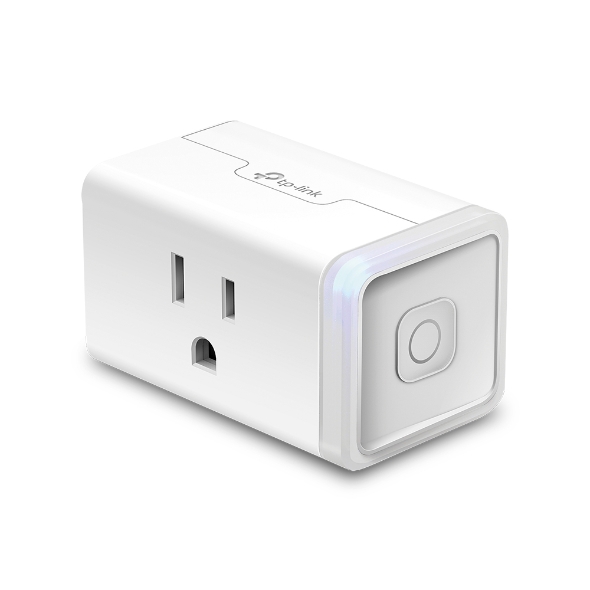 The Kasa KP125M: slim enough not to block adjacent outlets, with real-time power monitoring built in. Photo: TP-Link.
| Spec | Detail |
|---|---|
| Max load | 15A / 1800W |
| Connectivity | 2.4GHz Wi-Fi, Matter-certified |
| Control | Kasa Smart app (remote, from anywhere), plus Alexa/Google/Apple Home voice control |
| Energy monitoring | Real-time and historical power draw, per-outlet |
| Scheduling | Timers, schedules, “Away Mode” randomized on/off |
| Price | Around $40 for a 2-pack (~$20/plug) |
Sources: TP-Link’s official press release for the KP125M, BGR’s hands-on review.
Check current Kasa KP125M pricing here.
Buy the 2-pack even if you only have one box to protect right now. The moment you have a second machine worth remotely power-cycling — the sandbox box for computer-use agents covered in an earlier piece, a home server, anything you’d want to kill power to without walking over — you’ll be glad you already own the second plug.
Why this specific feature matters: energy monitoring as a free anomaly detector
The KP125M’s headline feature for smart-home use is energy monitoring — tracking real-time and historical power draw per outlet. For an AI-agent kill switch, that’s not a nice-to-have, it’s a second, independent signal that something’s wrong.
A machine running a long agentic coding session has a power draw signature: CPU load spikes when the agent’s actively generating or executing, and drops when it’s idle waiting on a network call. If you glance at the Kasa app’s power history and see a box that’s supposed to be running a multi-day job sitting at flat idle wattage for six hours, that’s a free, out-of-band signal that the session stalled — without needing to remote into the machine, check logs, or trust the agent’s own status reporting to tell you the truth about its own state. You’re not relying on the system under test to accurately report its own health, which is exactly the blind spot a purely software-based monitoring approach has.
Upgrade pick: Shelly Plus Plug US, if you don’t want a cloud dependency in the loop
Shelly Plus Plug US — Local API Smart Plug
| Spec | Detail |
|---|---|
| Max load | 15A |
| Connectivity | Wi-Fi + Bluetooth (for setup), local network control via Home Assistant or direct API |
| Cloud dependency | Optional — works entirely on your local network without Shelly’s cloud service if configured for local control |
| Automation | Supports webhooks, scripting, and MQTT for local automation |
| Price | Roughly $20-25 |
Source: Shelly’s official product documentation.
Search for the Shelly Plus Plug US on Amazon here.
The honest reason to consider this instead: a kill switch that depends on a cloud service to receive your “turn off” command has a failure mode of its own — if the vendor’s cloud is down, or your internet connection is the actual problem, a cloud-dependent smart plug might not be reachable exactly when you need it most. The Shelly’s local-API option means you can trigger it from a script or a device on your own network without any dependency on an outside service being up. The tradeoff is setup complexity — Home Assistant or a bit of scripting knowledge gets you the local-only workflow; straight out of the box without that, it behaves similarly to the Kasa.
Side by side
| Kasa KP125M | Shelly Plus Plug US | |
|---|---|---|
| Setup difficulty | Lower — app-guided, works in minutes | Higher if using local API — otherwise similar to Kasa |
| Cloud dependency | Required for remote app control | Optional — can run fully local |
| Energy monitoring | Yes, in-app | Yes, plus exposed via local API for custom automation |
| Best for | Most small shops — simple, reliable, fast setup | Security-conscious builders comfortable with Home Assistant or scripting |
Either is a legitimate pick. Buy the Kasa if you want this working today with zero technical overhead. Buy the Shelly if “my kill switch depends on someone else’s cloud service” is a dependency you specifically want to eliminate.
The setup that actually matters: don’t put the whole machine’s fate behind one plug
A smart plug kill switch is only as good as what’s plugged into it, and there’s a real way to get this wrong: plugging your primary development machine — the one with your actual work, your email, your everything — into the same outlet you’re using to kill an agent session. If you cut power to that outlet, you don’t just stop the agent, you crash your own work.
The setup that actually makes sense:
- Dedicate the smart plug to the agent’s box specifically — ideally the isolated sandbox machine covered in the computer-use agent piece, not a shared outlet or power strip with anything else important on it.
- Label it in the app clearly — “Agent Box — Sandbox,” not “Plug 2.” The two seconds this saves you at 2am, half-asleep, deciding which switch to hit, is the entire point.
- Test the kill switch once, on purpose, before you need it. Start a real (harmless) long-running task, cut power via the app, and confirm the machine actually goes down cleanly enough to restart without corruption. Finding out your kill switch also corrupts your disk is a bad discovery to make during an actual emergency.
- Set up a low-power alert if the app supports it, so an unexpectedly quiet box flags itself instead of requiring you to remember to check.
- Keep the plug on the same network segment as the box it’s protecting, not a separate one, so a network segmentation issue doesn’t also take out your ability to reach the kill switch.
A worked scenario: the 2am notification
Here’s the specific failure mode this actually solves, walked through in order, because “runaway agent” is abstract until it’s a phone buzzing at 2am. A 3-person dev shop kicks off a multi-day migration job on a Friday evening, planning to check in Saturday morning. The agent harness has a spend-cap alert wired to a phone notification — good practice, covered elsewhere on this site — and at 2:14am it fires: the session has burned through 80% of its weekly budget in six hours instead of the expected three days.
The founder, awake because the notification woke them, has three options. Option one: SSH into the box and try to figure out what’s looping, which takes real cognitive effort at 2am and assumes the box is still responsive enough to accept the SSH connection at all — not guaranteed if the runaway process has pegged the CPU or exhausted memory. Option two: ignore it until morning and hope the spend cap itself stops the bleeding — except spend caps on some providers apply at the next billing check, not instantly, meaning “the cap will catch it” can still mean another $40-80 of spend before it actually does. Option three: open the Kasa app, tap the box’s plug off, and go back to sleep, resuming the investigation at a reasonable hour with the meter no longer running.
Option three is the one that actually gets used at 2am, because it requires zero technical judgment in a half-awake state. That’s the actual value of a physical kill switch over a software one — not that it’s more powerful, but that it’s simple enough to execute correctly when you’re not at your best, which is exactly when these incidents tend to happen.
Scaling this past one box
Most of this piece assumes a single agent box, but the setup extends cleanly once a shop is running more than one. The Kasa app supports multiple plugs under one account with individual naming and grouping, so a shop running two or three sandboxed machines — one for a coding agent, one for a computer-use agent, one as a general-purpose test box — can manage all of them from a single dashboard rather than juggling separate apps or logins per device. The discipline that matters here is the same labeling advice from earlier, just scaled up: “Agent Box — Migration Job,” “Agent Box — Nightly Scraper,” “Sandbox — Computer Use,” not “Plug 3.” A shop with four unlabeled plugs in one app is one tired mistake away from killing power to the wrong machine, which is its own kind of incident.
If you’re running enough boxes that this starts to feel like real infrastructure rather than a hobby setup, it’s worth graduating to a networked PDU (power distribution unit) designed for rack use — but that’s a $150+ jump in cost and complexity that most 3-10 person shops don’t need yet. The two-pack of $20 plugs covers the actual use case for the vast majority of readers here; treat the PDU as the thing you buy once you’ve outgrown this, not a first purchase.
Battery backup is the inverse problem, and it’s worth naming
There’s a related failure mode this piece hasn’t addressed yet: what happens if the power goes out on its own, with no runaway session in sight, and takes down a legitimate multi-day job that was running fine? A smart plug kill switch does nothing to prevent that — it only helps you cut power deliberately, not keep it running through an outage. If the box running your multi-day agent job is on the same circuit as anything prone to tripping a breaker, or your area gets occasional outages, a basic UPS (uninterruptible power supply) in the $60-100 range for a mini PC’s modest power draw is the complementary purchase, not a replacement for the smart plug. The two solve opposite problems: the plug stops power on purpose, the UPS keeps power going by accident-proofing against the thing you didn’t cause. A shop serious enough about unattended agent runs to buy a kill switch should have both, in that order — the plug is the cheaper, more urgent fix for the failure mode that’s actually happened to people; the UPS is the next upgrade once the box’s uptime itself becomes valuable enough to protect.
The math that makes this an easy call
This is not a purchase that needs a spreadsheet to justify, but it’s worth being explicit about why anyway, because “$20” sounds too small to matter and that’s exactly the point.
| Cost | |
|---|---|
| Kasa KP125M 2-pack | ~$40 |
| One hour of a runaway agent session burning through API credits before anyone notices | Could easily run $10-50+ depending on the model and task, per the Fable 5.1 pricing breakdown |
| One overnight (8-hour) runaway session, worst case | Potentially $100s, depending on call volume and whether the loop is doing anything expensive per call |
| Cost of the anxiety of not having a kill switch and finding out the hard way | Free, but expensive in the way that matters at 2am |
The smart plug doesn’t prevent a session from going wrong in the first place — nothing here claims to. It just guarantees that when you notice something’s wrong, “fix it” is a five-second action from your phone instead of a drive to the office or a frantic SSH session into a machine that might not even be responding to SSH anymore, which is often exactly the scenario where you need a hard stop most.
What this doesn’t replace
Worth being direct about the limits here, because a $20 accessory can start to feel like a complete safety story if you’re not careful. This is one layer, not the whole plan:
- It doesn’t replace monitoring. A kill switch is useless if you never notice there’s something to kill. Pair it with the periodic check-in habit covered in the sandbox box piece — reviewing what the agent’s actually done on a schedule, not just when something looks obviously wrong.
- It doesn’t replace spend caps. Set a hard budget ceiling in your API provider’s dashboard regardless of whether you also have a physical kill switch. The plug stops the electricity; it doesn’t stop a bill that’s already been incurred in the minutes before you noticed.
- It doesn’t replace network isolation. If the agent’s box has broad network access to your other systems, cutting its power stops that specific box, but doesn’t undo anything it already did to reach further into your network before you pulled the plug. The sandbox isolation setup and the blast-radius checklist for agent credentials are the pieces that actually address blast radius; this is the piece that addresses “how do I stop it right now.”
When not to buy this
If you’re not running anything unattended for more than an hour or two, this solves a problem you don’t have yet. A supervised session where you’re at the keyboard the whole time doesn’t need a remote power kill — you can just stop it yourself.
If your “agent box” is actually a cloud VM or a hosted service, a smart plug does nothing for you — there’s no physical outlet to control. Use the provider’s own kill/cancel mechanisms instead, and make sure you know where those are before you need them, not during.
If you need the kill switch to work when your home or office internet is down, the cloud-dependent Kasa option won’t help — go with the Shelly’s local-only configuration, or accept that a full internet outage means you’re walking over to unplug it manually regardless of which smart plug you bought.
If graceful shutdown matters more than immediate stop. Cutting power is a hard stop, not a clean shutdown — it’s the equivalent of pulling the plug, because that’s literally what it does. For a long-running coding session, that’s usually fine (most agent harnesses checkpoint or commit work incrementally), but if your setup holds a lot of unsaved state in memory, a software-level “stop and save” command you trigger first is safer than power-cutting as your only option. Keep both available; use the plug as the backup, not the first resort.
What to skip
- Skip a plug with no app-based remote control — a smart plug you can only control via a physical button on the plug itself defeats the entire purpose, which is killing power without being physically present.
- Skip daisy-chaining multiple important devices behind one plug. One box, one plug, one clear label — mixing devices behind a shared kill switch means every kill decision affects more than you intended.
- Skip relying on energy monitoring alone as your only anomaly signal. It’s a useful free extra, not a substitute for actually checking on a long-running session periodically.
Quick answers
Will cutting power damage the machine or corrupt data? Modern SSDs and mini PCs generally tolerate a hard power cut without physical damage, but any work that wasn’t saved or committed at the moment of the cut is lost — this is a hard stop, not a graceful shutdown. Test your specific setup’s tolerance for this before relying on it in a real emergency.
Does this work for a laptop, or only a desktop/mini PC? It works for anything plugged into AC power, but a laptop with a charged battery will keep running on battery after the outlet loses power — which defeats the purpose. This is really a fix for desktop and mini PC setups, not battery-powered devices.
Can I automate the kill switch to trigger itself, not just remote-control it manually? With the Shelly’s local API, yes — you can script a condition (a monitoring check, a timeout) that triggers the plug automatically. The Kasa’s automation is more limited to schedules and simple triggers rather than custom conditional logic.
Is this actually necessary, or is it overkill for a small shop? For a single supervised session, it’s overkill. For the specific use case Anthropic is now selling — multi-day, unattended, minimal-check-in agentic coding — it’s a $20 answer to a question worth having answered before the first time you actually need it, not during.
Bottom line
The capability Anthropic shipped this week — agents that run for days with minimal supervision — is genuinely useful and genuinely a new kind of risk exposure for a small shop that’s never run anything unattended for that long before. A software-only stop mechanism is fine until the one time it isn’t reachable. A $20 smart plug that cuts power at the outlet doesn’t care what state the software is in. Buy it before you need it, plug in the box you’re actually going to leave running, and test it once on purpose so the first time you use it for real isn’t also the first time you’re finding out whether it works.
See current Kasa KP125M pricing on Amazon. Or check the Shelly Plus Plug US if you want local-only control.
Sources
All prices and specs accessed September 6, 2026.
- Claude Fable 5.1’s multi-day autonomous agent capability, cited for context — Anthropic, “Introducing Claude Fable 5.1 and Claude Mythos 5.1”
- Kasa KP125M official specifications and press announcement — TP-Link press release
- Kasa KP125M hands-on review and feature testing — BGR, “TP-Link Kasa KP125M Smart Plug Review”
- Shelly Plus Plug US local API and specifications — Shelly official documentation