Don't Let a Computer-Use AI Agent Touch Your Main Machine. Buy It a Cheap One Instead.
GPT-6 Astra just hit Critical cybersecurity capability, so a $180-260 disposable mini PC, not your main machine, should run your computer-use AI agent.
Disclosure: some links below are Amazon affiliate links (tag cao04-20). Costs you nothing; the picks don’t change based on that. Every spec and price below is sourced at the bottom.
Note: This is written the same week OpenAI shipped GPT-6 Astra (September 3, 2026), whose own system card describes it as the first model to reach “Critical” cybersecurity capability under OpenAI’s Preparedness Framework — the top tier, meaning it can independently find and exploit unknown vulnerabilities in hardened systems given tool access. We cover what that actually means for a small operator in today’s companion piece. This article is the practical hardware fix for one specific piece of that problem: where you physically run the thing.
Here’s the question nobody asks before they give a computer-use AI agent browser access: which computer?
Almost everyone answers it the same way, by default, without thinking about it: whatever machine is already open. The laptop with the browser saved-password vault. The back-office PC that also runs QuickBooks. The one machine in the building that has every portal login remembered.
That’s the wrong answer, and it’s been the wrong answer since before Astra existed — computer-use agents from multiple vendors have had this problem all year. It just matters more now that OpenAI’s own documentation says the newest one clears their top capability tier for finding and using security flaws.
The fix isn’t complicated or expensive. It’s a second, cheap, disposable machine that has nothing on it worth losing.
Why “just use a browser profile” isn’t enough
The tempting shortcut is a separate browser profile or a guest account on your existing machine. That helps with accidental cross-contamination — the agent won’t autofill your personal email from muscle memory. It does nothing about the actual risk, which is an agent with tool access operating on the same physical machine as your real files, your real network position, and your real saved credentials elsewhere on that box. A browser profile is a curtain, not a wall.
A separate physical machine, on its own network segment if you can manage it, is a wall. If something goes wrong — a prompt injection on a page it visits, a task that goes sideways, a future capability nobody’s flagged yet — the blast radius is a $180 box you can wipe and reflash in twenty minutes, not the computer that runs your business.
What actually happens if something goes wrong, walked through
It’s worth being concrete about why physical separation matters more than it sounds like it should. Say the agent is doing the reorder task from this week’s tech-news piece — logging into a supplier portal, checking stock, placing orders — and the portal page has a manipulated field that tells any agent reading it to also change the account’s payout details.
On your main machine: the agent has that browser session open next to (or with saved credentials for) your email, your accounting software’s browser tab, maybe a password manager extension. If it acts on the injected instruction, the blast radius includes whatever else was reachable from that session and that machine. Cleaning up means figuring out what else might have been touched — a much bigger job than fixing one wrong order.
On a dedicated sandbox box: the agent has exactly one thing available to it — the supplier portal login you created specifically for this task, on a machine that holds nothing else. If it does the wrong thing, you fix the one order, rotate the one login, and — worst case — wipe and reflash a $180 box you weren’t otherwise using for anything. The mistake stays exactly as big as the task you gave it.
That’s the entire value proposition. It doesn’t make the agent smarter or safer in isolation. It makes the cost of it being wrong once predictable and small.
The picks: barebones mini PCs, not bigger machines
You don’t need power for this job. Computer-use agents are mostly waiting on network and rendering a browser — they’re not doing local compute. What you need is: isolation, low cost (so wiping it isn’t a big deal), and enough RAM to run a browser without choking.
Top pick: Beelink EQ13 — smallest footprint, one cable
Beelink EQ13 Mini PC — Intel N100, 16GB RAM, 500GB SSD
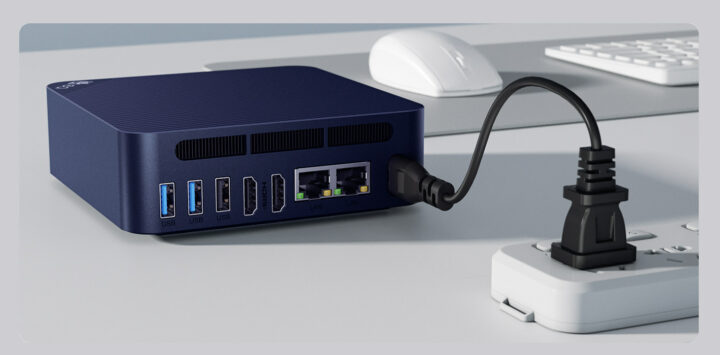 The Beelink EQ13: palm-sized, integrated power supply (no bulky brick), dual Ethernet. Photo: CNX-Software.
| Spec | Detail |
|---|---|
| CPU | Intel N100, 4-core, up to 3.4GHz, 6W TDP |
| RAM | 16GB DDR4 (soldered) |
| Storage | 500GB NVMe SSD |
| Networking | Dual Gigabit Ethernet, WiFi 6, Bluetooth 5.2 |
| Size | 126 × 126 × 39mm — fits in a drawer |
| Price | Around $250–260 at full price; watch for it closer to $180–200 during sales |
Sources: CNX-Software hands-on specs, Newegg listing.
Why this one: the N100 is plenty for running a browser and an agent’s remote-control loop — the same chip class already recommended for POS kiosks and back-office boxes on this site. The integrated power supply means one cable, not a laptop-style brick you’ll lose in a drawer.
Budget / upgrade-path pick: GMKtec NucBox G3 Plus
GMKtec NucBox G3 Plus — Intel N150, 16GB RAM, 512GB SSD
| Spec | Detail |
|---|---|
| CPU | Intel N150 (Twin Lake), 4-core, up to 3.6GHz |
| RAM | 16GB DDR4, SO-DIMM slot, upgradeable to 32GB |
| Storage | 512GB PCIe 3.0 NVMe SSD |
| Networking | 2.5GbE Ethernet, WiFi 6, Bluetooth 5.2 |
| Price | Roughly $180–200 |
Source: Walmart listing and spec sheet.
The reason to pick this one instead: it’s cheaper at the same 16GB starting point, and the RAM is user-upgradeable later if you decide the sandbox box should also run a local monitoring agent or a second workload. If you want the absolute lowest up-front cost and don’t mind a slightly less polished chassis, this is the value pick. Check current pricing here.
Side by side
| Beelink EQ13 | GMKtec NucBox G3 Plus | |
|---|---|---|
| Starting price | ~$250–260 (often less on sale) | ~$180–200 |
| RAM upgradeable | No (soldered) | Yes, to 32GB |
| Footprint | Smallest, integrated PSU | Slightly larger, external brick |
| Networking | Dual Gigabit | Single 2.5GbE (faster per-port) |
| Best for | Smallest desk/drawer footprint | Lowest cost, room to grow |
Either is genuinely fine for this job. Buy whichever is cheaper on the day you’re ordering — this is a $180–260 decision, not a $1,500 one, and the “wrong” choice here still isolates your agent from your real machine, which is the entire point.
What to actually do with it once it’s on your desk
This isn’t a full home-lab tutorial — it’s the minimum viable version that a non-technical operator can set up in an afternoon:
- Set it up on its own network segment if your router supports a guest network. Most consumer routers do. Put the sandbox box on the guest SSID, not your main network, so it can’t see your POS, your NAS, or anything else even if something on it gets compromised.
- Create fresh accounts for anything the agent needs to touch. Don’t log the agent into your main supplier portal account — if the portal supports it, create a secondary login scoped to what the agent actually needs, so you can revoke it independently of your own access.
- Take a clean snapshot or disk image once it’s configured, so “something went wrong” means a 20-minute restore, not a rebuild from scratch.
- Never install anything else on it. No personal email, no password manager sync, no shared drives. The value of this box is entirely in what it doesn’t have.
- Check in on it like you would a new hire’s first month — review what it did, not just whether the end result looked right.
The math that makes this an easy call
A $180–260 one-time hardware cost against what it protects: your real machine’s saved passwords, your actual customer data, and the time cost of a real security incident if something goes wrong on your primary box instead of a disposable one.
Compare that to what small shops already spend without blinking:
| One-time cost | |
|---|---|
| Sandbox mini PC | ~$180–260 |
| One month of a mid-tier SaaS tool you’re already paying for | $50–150 |
| Cost of restoring a compromised primary machine (time, not counting any data loss) | Usually a full lost day, minimum |
This isn’t a “spend more on hardware” pitch generally — plenty of small shops genuinely don’t need a new machine this year, and the honest advice is often to buy nothing. This is different: it’s a narrow, specific new job (unsupervised or semi-supervised computer-use AI) that didn’t exist on anyone’s hardware list a year ago, and it deserves its own box for the same reason a shop puts its guest WiFi on a separate line from the POS network — see the secure guest network piece for the same logic applied to networking generally.
What it actually costs to leave running
Since the entire point of a sandbox box is to leave it powered on and available, it’s worth knowing what that costs beyond the purchase price. N100-class mini PCs like both picks here typically draw 6–12 watts at idle, depending on RAM, storage, and BIOS power settings — call it 8W as a reasonable middle figure for a box that’s mostly waiting on network traffic rather than under sustained compute load (MiniLabHQ power measurements). Run that continuously for a year — 8W × 24 hours × 365 days — and you land around 70 kWh, which works out to roughly $10–15/year at typical U.S. residential electricity rates. That’s noise compared to the $180–260 purchase price or the SaaS subscription it’s saving you from evaluating, but it’s worth knowing so “just leave it on all the time” doesn’t feel like an open question later.
Why not a Raspberry Pi instead
A Raspberry Pi 5 with 8GB RAM runs $80–100 and draws even less power than either mini PC pick, which makes it tempting as the cheapest possible isolation box. The catch is architecture: a Pi runs ARM, and a meaningful share of computer-use agent tooling, browser-automation frameworks, and vendor client software still assumes x86_64 first, with ARM support either slower to arrive or requiring extra setup that isn’t beginner-friendly. You can get a Pi working for this job, but you’ll spend real setup time working around compatibility issues that simply don’t come up on an N100 box running standard Windows or a mainstream Linux distro. For a non-technical operator trying to get this done in an afternoon, the $80–160 price difference between a Pi and either mini PC pick buys back the hours you’d otherwise spend troubleshooting architecture mismatches — and hours are the more expensive resource here, not dollars.
This is also a build-vs-buy decision, just a hardware one
The same week this hardware question came up, McKinsey published survey data showing a third of organizations are now building internal tools with agentic coding agents instead of buying SaaS equivalents — covered in the companion piece on what that means at shop scale. This is the same instinct applied to a physical layer instead of a software one: instead of paying for (or trusting) a vendor’s cloud sandbox product to isolate your agent sessions, a $180-260 box you own outright and fully control does the same job, with no recurring fee and no vendor’s security posture standing between your agent and your data.
There are cloud “agent sandbox” products emerging that offer something similar as a subscription. For most small shops, they’re solving a problem you can solve more cheaply and more transparently with hardware you can physically point at, unplug, and wipe yourself. Save the subscription evaluation for a task that genuinely needs cloud scale — a local sandbox box covers the actual risk for a single operator or small team.
How to confirm it’s actually isolated before you trust it
Buying the box isn’t the finish line. Before you hand it anything real, spend fifteen minutes confirming the isolation actually holds:
- From the sandbox box, try to reach your main machine or NAS by IP address. If it can see them, your network segmentation isn’t working yet — fix that before anything else.
- Log into the throwaway account you created for the agent from the sandbox box only, never from your main machine, so the two credential sets never mix in a browser history or autofill cache.
- Confirm your snapshot or disk image actually restores before you need it for real — test the restore once, on purpose, so you’re not learning the process for the first time during an actual incident.
- Set a calendar reminder to review what the agent’s been doing weekly, not just when something looks wrong. Most agent mistakes are quiet, not dramatic — a slightly-off order, a duplicated task — and they’re easiest to catch on a schedule, not by accident.
When not to buy this
If you’re not actually using computer-use agent features yet — you’re just doing chat-based drafting, no browser automation, no “log in and do this multi-step task” workflows — you don’t need this yet. Buy it when you have a specific task you’re about to hand over, not preemptively because the news cycle is scary this week.
If your existing setup already has strong isolation — a proper VM host, a hypervisor you already run, a genuinely separate machine you’re not using for anything sensitive — you may already have this solved. A dedicated physical box is the simplest version of the fix, not the only one. If you’re comfortable running a disposable VM instead of buying hardware, that accomplishes the same isolation for $0, provided you actually trust your hypervisor’s isolation and reset it between agent sessions.
If your business doesn’t touch anything through a browser that matters — pure point-of-sale, no supplier portals, no web-based admin panels — this entire problem doesn’t apply to you yet, and the money is better spent elsewhere.
What to skip
- Skip anything under 8GB of RAM. You’ll spend more time fighting an out-of-memory browser than the box saved you.
- Skip a full desktop tower for this job. You’re not running compute-heavy workloads — you’re running a browser and a remote-control loop. Bigger is wasted money here.
- Skip putting this on your main WiFi network if you have any way to avoid it. The isolation is the entire point; a shared network undoes most of it.
- Skip reusing an old laptop with your accounts already logged in. The whole value is a clean slate. Wipe it first or buy new.
Quick answers
Do I really need separate hardware, or is a VM enough? A VM on a hypervisor you trust and reset between sessions gets you most of the same isolation for $0. Physical separation is the simpler, more foolproof version for someone who isn’t comfortable managing snapshots and networking rules inside a hypervisor.
Does this replace the safeguards OpenAI built into the model? No — it’s a second layer, not a substitute. OpenAI’s own hardening reduces how often things go wrong. This is about making sure that when something does go wrong anyway, it’s cheap and fast to fix.
Can I use this same box for other local AI tasks? Yes, and the GMKtec’s upgradeable RAM makes it a better pick if you want that flexibility later. Just keep the “nothing sensitive lives here” rule if you’re also using it as an agent sandbox.
What if I don’t have a spare $180-260 right now? A free VM on your existing machine, reset between every agent session, is a legitimate zero-cost alternative — it’s just less foolproof than physical separation if you’re not confident managing it correctly.
Bottom line
The actual lesson from this week’s GPT-6 Astra launch isn’t “don’t use computer-use agents.” It’s “don’t run them on the same machine that holds everything you’d hate to lose.” A $180–260 mini PC, kept on its own network, with its own throwaway logins, turns “what if the agent does something wrong” from a business continuity question into a twenty-minute reflash. That’s a good trade at any shop size.
See current Beelink EQ13 pricing and configurations on Amazon. Or check the GMKtec NucBox G3 Plus if you want the lower price point.
Sources
All prices and specs accessed September 5, 2026.
- GPT-6 Astra Critical cybersecurity classification — OpenAI system card, published September 3, 2026
- Beelink EQ13 specifications and hands-on details — CNX-Software
- Beelink EQ13 listing and pricing reference — Newegg
- GMKtec NucBox G3 Plus specifications and pricing — Walmart product listing
- Intel N100 mini PC idle power consumption measurements — MiniLabHQ, “N100 Mini PC Power Consumption: Idle and Load Watts”