Disclosure: some links below are Amazon affiliate links (tag cao04-20). Costs you nothing; the picks don’t change based on that. Every spec and price below is sourced at the bottom.
Note: This runs alongside today’s piece on the actively-exploited SonicWall SMA1000 vulnerability chain. That story is about a maximum-severity bug in a closed, vendor-patched VPN appliance sitting unpatched on real networks for weeks. This piece is about the other model entirely: hardware you own, running firewall/VPN software you control the update schedule for.
Here’s the uncomfortable structural fact underneath this month’s SonicWall story: when you buy a closed-appliance VPN gateway, you’re not just buying hardware — you’re buying a bet that the vendor finds and patches the next critical vulnerability faster than attackers find it first. SonicWall’s SMA1000 line just demonstrated, with a CVSS 10.0 pre-auth bug that CISA gave federal agencies three days to patch, that the bet doesn’t always land on schedule. That’s not unique to SonicWall — it’s structural to any closed appliance where you’re dependent entirely on the vendor’s disclosure timeline and your own attentiveness to catching it.
There’s a different model, and it’s been sitting in the small-business/prosumer networking space for years without much mainstream attention: buy a small, fanless mini appliance built specifically to run open-source firewall software — pfSense or OPNsense — and own the entire patch cycle yourself. You’re not waiting for a vendor advisory to tell you a critical bug existed for two weeks before you found out. You’re running the same open-source software tens of thousands of other networks run, patched on a schedule you control, with a community and two well-established open-source projects finding and fixing bugs in public.
The pick: Protectli Vault FW4B
Protectli Vault FW4B — 4-Port Firewall Micro Appliance
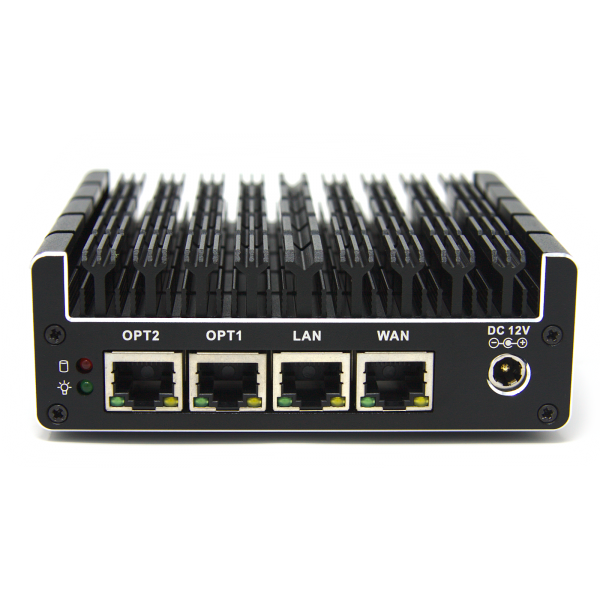 The Protectli Vault FW4B: a fanless, aluminum-cased micro appliance built specifically to run pfSense, OPNsense, or other firewall/router distributions. Photo: Protectli.
| Spec | Detail |
|---|---|
| CPU | Intel Celeron J3160, quad-core, 1.6GHz (turbo to 2.24GHz), AES-NI hardware encryption support |
| Network ports | 4x Intel Gigabit Ethernet (RJ-45) |
| RAM | Up to 8GB DDR3L-1600 (SO-DIMM, upgradeable) |
| Storage | mSATA SSD, up to 1TB, plus optional internal 2.5” SATA SSD bay |
| Power draw | Max 20W — runs on a small external power brick, no meaningful electricity cost |
| Build | Fanless, all-aluminum enclosure (the case itself is the heat sink) — no moving parts to fail |
| Additional I/O | 2x USB 3.2 Gen 1, 2x HDMI, 1x serial console port |
| Dimensions | 4.5 x 4.3 x 1.5 in |
| Price | Around $239 (8GB RAM / 120GB SSD configuration) |
| Warranty | 2-year standard |
Sources: Protectli’s official FW4B product page.
Check current Protectli Vault FW4B pricing here.
What you’re actually buying, and what you’re not
Be clear-eyed about this up front: the FW4B ships barebones. It is not a firewall out of the box. You get a fanless mini PC with four network ports, and you install pfSense or OPNsense (both free, open-source) yourself — a process that takes most people comfortable with basic networking concepts somewhere between 30 minutes and two hours the first time, following either project’s well-documented installation guide. That’s the entire tradeoff of this category: you’re trading “vendor handles setup and updates” for “you control setup and updates,” and that trade only makes sense if you’re actually willing to do the second half.
Once it’s running, the appliance does the same core job as an enterprise VPN gateway: routes traffic, runs a firewall, and — if you configure it, which both pfSense and OPNsense support natively — terminates a WireGuard or OpenVPN remote-access VPN for employees connecting from outside the office. The functional job is identical to what a SonicWall SMA appliance does. The difference is who’s responsible for finding and closing the next critical bug, and on whose timeline.
Why this over a closed commercial appliance, specifically after this month
The SonicWall SMA1000 story isn’t really about SonicWall being a bad vendor — it’s about the structural reality of any closed remote-access appliance: you find out about vulnerabilities when the vendor tells you, patch when the vendor ships a fix, and hope the gap between “actively exploited” and “you actually applied the patch” stays short. pfSense and OPNsense run on the same basic bet, but with a meaningfully different shape: vulnerabilities get disclosed and patched through a public, well-scrutinized open-source process with a large enough user base (both projects power a substantial share of small-business and prosumer firewalls worldwide) that critical bugs tend to get found and patched fast, and — this is the part that actually matters for a small shop — you’re the one who decides when to apply the update, rather than discovering two weeks after the fact that your appliance had a CVSS 10.0 hole in it the whole time.
That’s not automatically safer in every scenario — a self-managed firewall is only as secure as the person managing it, and “I’ll patch it eventually” is exactly as real a risk here as it is with a closed appliance nobody’s watching. The difference is that the responsibility is explicit and yours, rather than implicit and someone else’s until it very publicly isn’t.
What it doesn’t do out of the box
This is the section that matters most for setting expectations correctly. The FW4B, straight out of the box, is a mini PC with four Ethernet ports and nothing installed. It does not do:
- Firewall/router functionality — you install pfSense or OPNsense yourself; neither comes pre-loaded.
- VPN configuration — WireGuard or OpenVPN server setup is a configuration task inside pfSense/OPNsense, not a plug-and-play feature.
- Vendor support for the software layer — Protectli sells and supports the hardware; the pfSense and OPNsense communities (and, for pfSense, Netgate’s paid support tiers) support the software.
- Automatic updates — both pfSense and OPNsense support one-click update mechanisms once configured, but nobody applies them for you on a schedule; that’s on you, the same way it would be on your MSP for a closed appliance, except now it’s unambiguously your job.
If any of those gaps sound like more setup than your shop wants to take on, that’s a legitimate reason to stick with a managed, vendor-supported appliance or your MSP’s recommendation instead — see the “when not to buy” section below.
A worked comparison: what you’re actually trading
| Closed appliance (e.g., SonicWall SMA) | Protectli Vault FW4B + pfSense/OPNsense | |
|---|---|---|
| Setup complexity | Lower — vendor-configured, often set up by an MSP | Higher — self-install OS, configure firewall rules and VPN manually |
| Ongoing patch responsibility | Vendor ships fixes; you (or your MSP) apply them on the vendor’s schedule | You apply updates on your own schedule, from the open-source project’s release cycle |
| Support | Vendor/MSP support contract, often included | Community support (free) or a paid support tier through Netgate for pfSense Plus |
| Upfront cost | Often higher, frequently bundled with subscription licensing | ~$239 one-time hardware cost, software is free |
| Ongoing cost | License/subscription renewals, common on enterprise VPN appliances | None required — optional paid support tiers exist if wanted |
| Best fit | Shops that want a fully managed, hands-off solution and are willing to pay for that | Shops with someone reasonably comfortable with networking who wants direct control and no license fees |
Neither column is objectively better — they’re different tradeoffs for different risk tolerances and different levels of in-house technical comfort.
A worked example: the 6-person dev shop replacing an aging VPN router
A six-person software consultancy has been running a consumer-grade router’s built-in VPN feature for remote access since the company started — a setup that technically works but has no real firewall rule granularity, no logging worth reviewing, and no clear patch cadence beyond whatever the router vendor pushes automatically (or doesn’t). After the SonicWall story circulates in a team Slack channel, the founder decides the “whatever the router does by default” approach isn’t a real security posture.
The swap: order the FW4B (~$239), install pfSense (free, roughly a weekend project including learning the interface), configure WireGuard for remote access with each employee getting their own key pair, and set up basic firewall rules segmenting the office network from a separate guest/IoT VLAN — the same segmentation principle covered in this site’s VLAN switch piece, just implemented at the router/firewall level instead of a downstream managed switch. Total cost: $239 hardware, zero ongoing license fees, and one weekend of setup time for someone on the team who already has some networking background. The tradeoff they accepted explicitly: nobody’s calling a vendor support line if something breaks — they’re checking the pfSense forums or documentation, the same way any self-hosted open-source tool works.
Realistic setup timeline
Budget more time than the “30 minutes” some enthusiast reviews suggest if this is your first time. A realistic first-time timeline: 30-60 minutes to install pfSense or OPNsense from a bootable USB drive (both projects provide step-by-step installer guides), another 1-2 hours to configure basic firewall rules and get internet routing working correctly, and another 1-3 hours to set up and test a WireGuard VPN tunnel for remote access, depending on how many client devices need configuring. Total realistic first attempt: a half-day to a full day for someone comfortable with basic networking concepts (subnets, routing, port forwarding) but new to pfSense/OPNsense specifically. That drops significantly on a second or third deployment once you’re familiar with the interface.
How fast is it, actually?
Spec sheets tell you the CPU has AES-NI; they don’t tell you what that means for a real remote-access VPN under load. The Celeron J3160 is a low-power quad-core chip from Intel’s Braswell generation — not fast by modern standards, but AES-NI hardware acceleration matters more for VPN throughput than raw clock speed does, because it offloads the actual encryption/decryption work from the CPU cores instead of doing it in software. Protectli’s own published VPN performance testing, and community benchmarking on the same hardware, put realistic WireGuard throughput on the FW4B in the range of several hundred Mbps up toward the high 500s-600 Mbps ballpark, depending on pfSense/OPNsense version and configuration — OpenVPN and IPSec typically land somewhat lower, since WireGuard’s simpler cryptographic design is easier to push through the same hardware.
Put that next to what it needs to actually do: most small shops don’t have a business internet connection anywhere near 500-600 Mbps of upload bandwidth in the first place, and remote-access VPN throughput is bounded by whichever is slower — your internet connection or the appliance. In practice, for a 5-20 person shop with a handful of remote employees connecting at once, the FW4B’s ceiling isn’t the bottleneck; your ISP’s upload speed almost always is. The exception is a shop running its own beefy fiber connection with real bandwidth to spare and a genuine need to push a lot of concurrent VPN traffic — site-to-site VPN between two offices, for instance — where it’s worth checking Protectli’s own published numbers for your specific use case before assuming the FW4B has headroom to spare.
An alternative if you want the open ecosystem without doing your own install
If the “you install everything yourself” tradeoff above is the part giving you pause, there’s a middle option worth knowing about before you either buy the FW4B or give up on the whole self-hosted category: the Netgate 1100, sold directly by Netgate (the company that maintains pfSense). It ships with pfSense+ pre-installed, includes a lifetime “TAC Lite” tier of official technical support, and runs on an ARM Cortex-A53 chip rather than the FW4B’s x86 Celeron. That last part is the real tradeoff: the ARM chip caps VPN throughput meaningfully lower than the FW4B’s AES-NI-accelerated x86 chip — OpenVPN tops out around 150 Mbps and WireGuard stays under 300 Mbps on the 1100, against several hundred more on the FW4B — while general firewall/routing throughput (non-VPN traffic) stays close to gigabit on both.
The honest framing: the Netgate 1100 trades some VPN ceiling for a pre-installed OS and an actual support line, which is a completely reasonable trade for a shop that wants the license-fee-free, vendor-lock-in-free part of the open-source pitch without the install-it-yourself part. The FW4B trades that convenience for more headroom and a lower price. Neither is the “wrong” pick — it depends on whether the setup time in the earlier timeline section, or the lower VPN ceiling, is the tradeoff you’d rather not make.
When not to buy this
If you don’t have anyone on staff or on retainer comfortable with basic firewall/networking configuration. This is the single biggest disqualifier. A misconfigured self-hosted firewall — rules left too permissive, a VPN set up with weak defaults, an admin interface accidentally exposed to the internet — can be worse than a properly-configured commercial appliance. If nobody in your shop wants to own this, a managed appliance or MSP-supported solution is the right call, full stop.
If you’re already happy with your current SonicWall, Fortinet, or other commercial appliance and it’s actually being patched promptly. This isn’t “commercial appliances are bad” — it’s “know what you’re actually trading if you switch.” A well-maintained commercial appliance with a responsive MSP is a perfectly reasonable choice; this piece is for the shop that just realized nobody’s actually watching the patch cycle on their current setup.
If you need vendor phone support for compliance or contractual reasons. Some industries and some cyber-insurance policies require a supported, named-vendor security appliance as part of compliance. Check your policy and any regulatory requirements before switching to a self-managed open-source solution — this is a real disqualifier in regulated industries, not a minor inconvenience.
If your remote-access needs are genuinely simple — one or two people occasionally connecting, no site-to-site VPN, no complex rule sets — a much simpler consumer router with built-in VPN, or a cloud-based Zero Trust access service, may solve the actual problem with less setup overhead than a full pfSense/OPNsense deployment. If your actual pain point is a flat Wi-Fi network rather than remote access specifically, this site’s guest-network segmentation piece is the more targeted fix.
What to actually do once it’s set up
- Turn on automatic security update notifications in pfSense/OPNsense’s dashboard, and check for them on a set schedule (weekly is reasonable) rather than “whenever you remember.”
- Don’t expose the admin interface to the internet. Configure remote administration access only over the VPN itself, never as a directly internet-facing login page — this is the single most common self-inflicted vulnerability in DIY firewall setups.
- Use WireGuard over OpenVPN for new deployments if given the choice — it’s simpler to configure correctly and has a smaller attack surface, though OpenVPN remains a solid, widely-supported option if you have specific compatibility needs.
- Back up your configuration after initial setup and after any significant rule changes — both pfSense and OPNsense support exporting a full config backup, and restoring from a known-good backup is dramatically faster than rebuilding rules from memory after a hardware failure.
- Join the pfSense or OPNsense community forum or subreddit before you need it, not after something breaks — both have active, responsive communities that are genuinely useful for a first-time setup question.
Quick answers
Do I need to know how to code to set this up? No — pfSense and OPNsense are both configured through a web-based admin interface, not the command line, for the vast majority of setup tasks (firewall rules, VPN configuration, network interfaces). Comfort with basic networking concepts (what a subnet is, what a firewall rule does) matters more than coding ability.
Which should I pick, pfSense or OPNsense? Both are mature, free, open-source, and capable of everything described in this piece. pfSense has a larger installed base and more third-party tutorials; OPNsense has a somewhat more modern interface and a development model some users prefer for transparency reasons. Either is a reasonable choice — the FW4B runs both equally well, and switching between them later is possible but means starting configuration over.
Can this replace my existing WiFi router too? Not directly — the FW4B is a wired appliance with no built-in WiFi radio. It replaces the routing/firewall/VPN function, and you’d keep (or add) a separate WiFi access point connected to one of its LAN ports, configured in access-point-only mode rather than as a second router. This is actually a feature, not a limitation: separating routing/firewall duties from WiFi radio duties is a more robust architecture than a single consumer router trying to do both.
What happens if the hardware fails? Because your firewall rules and VPN configuration live in a backed-up config file (see the backup recommendation above), recovery is buying a replacement unit — this one or a comparable mini PC — and restoring the saved configuration, typically a 15-30 minute process rather than rebuilding every rule from scratch. This is a meaningful advantage over losing a closed appliance’s proprietary configuration to a hardware failure with no accessible backup.
Sources
All prices and specs accessed September 14, 2026.
- Protectli Vault FW4B official specifications, pricing, and product image — Protectli’s official product page
- Protectli’s own WireGuard/OpenVPN/IPSec throughput testing across its appliance lineup, including the FW4B — Protectli Knowledge Base, “VPN Performance Results (Wireguard, IPSec, OpenVPN)”
- Netgate 1100 specifications, pre-installed pfSense+, TAC Lite support tier, and ARM-vs-x86 VPN throughput comparison — Zenarmor, “Best pfSense Hardware for Home/SOHO/Business”
- SonicWall SMA1000 vulnerability context connecting the closed-appliance patch-timeline risk — Rapid7, “Critical SonicWall SMA1000 Vulnerabilities CVE-2026-83548, CVE-2026-83549 Exploited in the Wild”
- CISA KEV catalog addition and 3-day federal remediation deadline — SOCRadar, “SonicWall CVE-2026-83548 Leads to CISA Alert”
See current Protectli Vault FW4B pricing on Amazon.
Bottom line
A closed VPN appliance is a bet that the vendor patches faster than attackers exploit. That bet just failed publicly, with a CVSS 10.0 bug and a three-day federal patch window most small shops never saw. The Protectli Vault FW4B isn’t a drop-in replacement for a managed appliance — it requires someone willing to configure and maintain open-source firewall software themselves. But for a shop with that person already on staff, $239 buys hardware that puts the patch cycle entirely in your own hands, on a public, well-scrutinized open-source project’s timeline instead of a single vendor’s.