
Legacy system modernization is the structured program to move mission-critical, monolithic, or otherwise unmaintainable systems toward modern architectures that reduce total cost of ownership, restore delivery velocity, and position your stack for cloud readiness and AI integration. IBM frames it as the process of moving inefficient legacy systems toward modern architectures to reduce friction and increase agility. The decision to start is rarely about preference. It is about operational reality.
Act now if you recognize any of these conditions in your environment:
- Frequent outages or degraded performance that your team can no longer explain from first principles
- Change lead times measured in weeks for what should be a two-hour fix, because no one fully understands the blast radius of a code change
- Maintenance spend consuming more than half your IT budget, leaving almost nothing for new capability
- Regulatory or security exposure from unsupported frameworks, unpatched dependencies, or encryption standards that no longer meet compliance requirements
- Inability to integrate with modern APIs, data platforms, or AI services because the system predates REST, JSON, or any standard interface contract
If two or more of those apply, you are not managing technical debt. You are carrying operational risk that compounds every quarter you wait.
Table of Contents
- What actually counts as a legacy system?
- Why modernizing legacy systems pays off
- Technical and organizational risks you need to plan for
- Which modernization strategy fits your situation?
- How to modernize a legacy application: a step-by-step process
- Which target architecture should you aim for?
- Tools and automation that accelerate modernization
- A practical checklist to reduce risk and speed results
- Security, compliance, and governance during modernization
- Key Takeaways
- What clients consistently underestimate about modernization
- Ctrlaltorion can run your modernization program end-to-end
- Useful sources and further reading
What actually counts as a legacy system?
The word “legacy” gets applied loosely, so let’s be precise. A legacy system is any application where the cost and risk of change consistently outpaces the value it delivers, usually because the underlying technology is unsupported, the architecture is tightly coupled, or the business logic is undocumented and embedded in ways that make modification dangerous.
The archetypes you will encounter most often:
Mainframe and COBOL applications. Batch-processing workloads running on IBM z-series hardware, often handling core banking, insurance claims, or government benefit calculations. The logic is correct and battle-tested. The problem is that the engineers who wrote it are retiring faster than new ones are being trained, and the operational cost per transaction is hard to justify against cloud alternatives.
Monolithic Java or .NET applications. A single deployable artifact containing the entire application. Every release is a full-system deployment. A bug in the billing module can take down the reporting module. These are the most common modernization candidates in mid-market enterprises today.
Older ERP modules and bespoke client-server apps. Think Oracle E-Business Suite on an aging version, or a custom Visual Basic application that runs the warehouse floor and was last touched in 2009. The business logic is real and valuable. The delivery mechanism is not.
Outdated database engines and schema designs. SQL Server 2008, Oracle 9i, or a MySQL instance with a schema that has grown organically for fifteen years with no referential integrity and column names like flag2 and temp_val. Data migration from these systems is usually the hardest part of any modernization program.
Bespoke integrations and nightly batch jobs. The overnight ETL that feeds the data warehouse, the FTP-based file exchange with a partner, the cron job that reconciles accounts. These are often invisible until they break, and they break at the worst possible times.
A quick way to identify candidates in your estate: look for systems where the deployment runbook is longer than ten pages, where only one or two people understand the full flow, or where monitoring is absent and the first sign of failure is a user complaint. Those are your highest-priority targets. A CMU/SEI survey of modernization approaches catalogs techniques from screen scraping and database gateways to full replication, which gives you a useful taxonomy for mapping what you already have against what intervention each system actually needs.
Why modernizing legacy systems pays off
The business case for upgrading legacy systems is not primarily a technology argument. It is a financial and competitive one, and the benefits map cleanly to the stakeholders who need to approve the budget.
For the CFO: Total cost of ownership drops when you eliminate expensive vendor support contracts for end-of-life software, reduce the specialist contractor rates that COBOL and legacy Oracle skills command, and move from capital-intensive on-premises infrastructure to consumption-based cloud pricing. Maintenance spend that currently crowds out new development gets redirected to capability.
For the CTO and engineering leadership: Deployment frequency increases when you break a monolith into independently deployable services. Mean time to recover drops when you have proper observability, automated rollback, and infrastructure-as-code rather than a manual runbook. Time-to-market for new features shrinks from weeks to days.
For the CISO: Every unsupported framework is an unpatched attack surface. Modernizing gives you the opportunity to introduce secrets management (Vault, AWS Secrets Manager), enforce least-privilege IAM, add dependency vulnerability scanning to your CI/CD pipeline, and bring encryption standards up to current requirements. The attack surface shrinks as the system becomes more observable and auditable.
For product and operations teams: A modernized system typically exposes clean APIs that downstream teams can consume without reverse-engineering undocumented behavior. Data that was locked in a proprietary schema becomes accessible to analytics pipelines and, increasingly, to AI and machine learning workloads that require structured, queryable data at scale.
The benefits compound. A system that deploys faster, costs less to run, and exposes clean interfaces becomes a platform for growth rather than a ceiling on it.
Technical and organizational risks you need to plan for
Modernization programs fail more often from underestimated complexity than from bad intentions. The risks fall into two categories: technical and organizational. Both need explicit mitigation in your plan.
Technical risks
Undocumented business logic is the single most dangerous risk. Logic that was never written down, that lives in a stored procedure, a batch job, or a developer’s memory, will surface as a production defect after go-live if you do not extract and document it first. Characterization tests (tests that document what the system actually does, not what it was supposed to do) are your primary defense here.
Brittle dependency graphs mean that a change in one module causes failures in three others that no one expected. Static analysis tools can map declared dependencies, but runtime tracing during a realistic load test will reveal the actual call graph, which is almost always more complex.
Data quality and schema drift compound during migration. A column that was supposed to hold a date has been storing free-text strings for years. A foreign key constraint was never enforced. These issues are invisible until you try to move the data, and they can double the migration timeline if discovered late.
Fragile or absent test coverage means you have no way to validate parity between the old and new implementations. Writing characterization tests before you start migrating is not optional. It is the migration contract.
Organizational risks
Stakeholder alignment breaks down when the business sees a multi-quarter program with no visible output. Change fatigue sets in when teams are asked to run the old system and build the new one simultaneously. Skills gaps appear when the modernization requires cloud architecture expertise, Kubernetes operations, or data engineering that your current team does not have.
The mitigation for organizational risk is a communication cadence: monthly steering updates tied to business outcomes (not technical milestones), a clear pilot that delivers visible value early, and an honest skills assessment before the program starts so you can plan for training or contractor augmentation. A systematic review of cloud migration approaches found that many migration frameworks fail to address quality and maintainability after go-live, which means the organizational risk does not end at cutover. Build post-migration quality reviews into your governance calendar.
Which modernization strategy fits your situation?
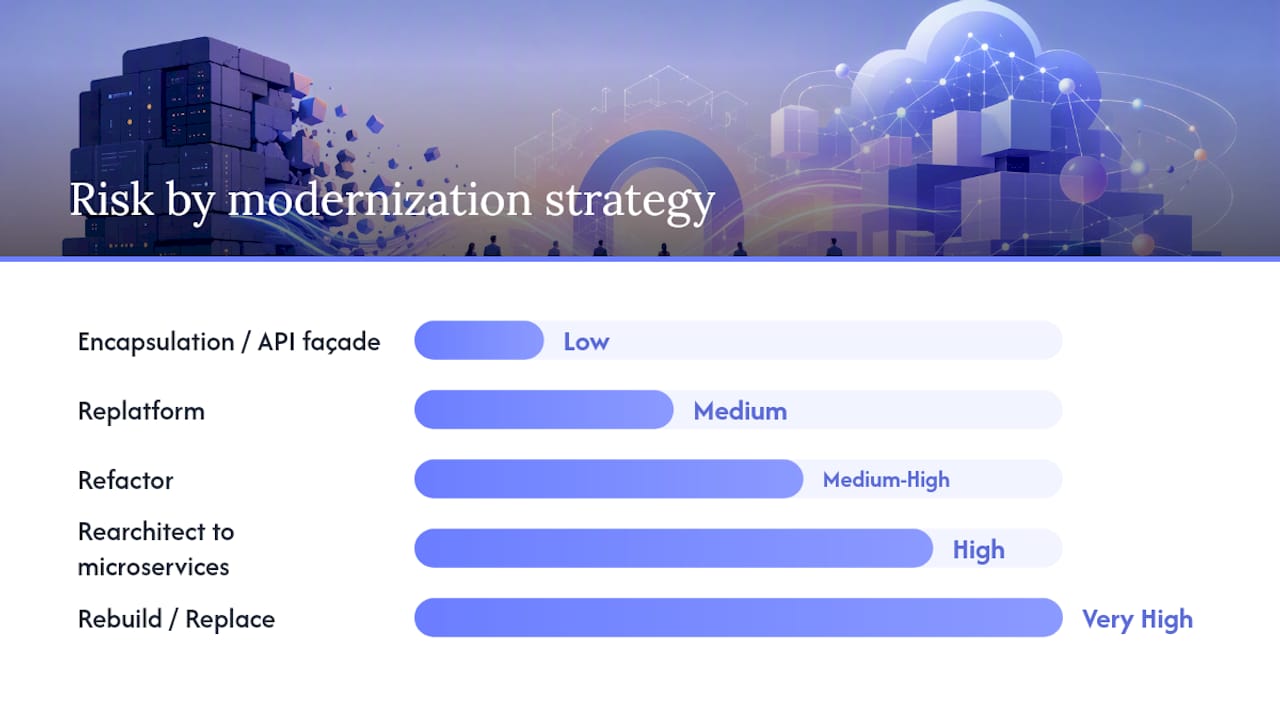
There is no universal answer. The right strategy depends on your risk appetite, budget, timeline, and how much of the existing system’s architecture is worth preserving. Hyland’s guidance on modernization tradeoffs frames this well: lift-and-shift gets you running in the cloud quickly but often transfers technical debt intact, while rearchitecting unlocks cloud-native benefits at higher upfront cost.
| Strategy | Risk / Difficulty | Cost Profile | Timeline | Business Impact / ROI | Skills Required | Cloud Readiness |
|---|---|---|---|---|---|---|
| Encapsulation / API façade | Low | Low upfront, low ongoing | A few weeks | Moderate: unlocks integration without touching core | API design, middleware | Partial |
| Rehost (lift-and-shift) | Low | Low upfront, similar ongoing | Several weeks | Low short-term; debt transfers | Cloud ops basics | Basic (IaaS) |
| Replatform | Medium | Medium upfront, lower ongoing | Several weeks | Medium: managed services reduce ops burden | Cloud platform skills | Moderate (PaaS) |
| Refactor | Medium-High | High upfront, lower ongoing | Several months | High: improved velocity and maintainability | Software architecture | High |
| Rearchitect to microservices | High | High upfront, variable ongoing | Many months | Very high long-term; slower payback | Distributed systems, DevOps | Cloud-native |
| Rebuild / Replace | Very High | Highest upfront | More than a year | Highest ceiling; highest execution risk | Full-stack, domain expertise | Cloud-native |
A few decision rules that hold up in practice: if the system’s core logic is sound but the interface is the problem, start with encapsulation. If you need to reduce infrastructure cost quickly without a long program, rehosting buys time. If the architecture is the bottleneck and you have the runway, refactoring or rearchitecting delivers compounding returns. Rebuilding from scratch is almost always slower and more expensive than teams estimate, so treat it as a last resort.
Pro Tip: GitHub Copilot modernization runs a three-stage agent workflow (assessment, planning, execution) that produces repository artifacts including plan.md and tasks.md. For .NET refactoring and replatforming work specifically, this can compress the assessment and initial execution phases significantly, though it does not replace architectural decisions about service boundaries or data ownership.
How to modernize a legacy application: a step-by-step process
A modernization program that works follows a deliberate sequence. Skipping phases to move faster is how programs end up with a production incident six months in and a rollback that costs more than the original migration. A practical 6-step framework from Modern.Tech recommends auditing by business outcome first, then prioritizing by friction, introducing API or service layers, and treating continuous modernization as an ongoing operational discipline rather than a one-time project.
- Discovery and dependency mapping (weeks 1–4) — Inventory every system, integration, and data store. Run static analysis to map declared dependencies, then trace a small set of critical user flows end-to-end at runtime. Static diagrams almost always miss the actual call graph. Deliverable: a dependency map and a prioritized list of modernization candidates.
Roles that need to be in the room: a CIO-level sponsor who owns the business case, a product owner who prioritizes by business outcome, solution architects who own the target design, SRE and ops engineers who own the runbooks and monitoring, a QA lead who owns the characterization test suite, and a data engineer if the program involves significant data migration. AI-assisted migration techniques can accelerate steps 1 and 2 substantially, particularly for extracting business rules and generating the initial characterization test suite.
Which target architecture should you aim for?
The target architecture question is separate from the migration strategy question, and conflating them is a common source of scope creep. Your migration strategy (rehost, replatform, refactor) describes how you move. Your target architecture describes where you land.
Lift-and-shift to IaaS (AWS EC2, Azure VMs) is the fastest path to cloud. You reduce data center cost and gain cloud operational tooling, but the application architecture does not change. Technical debt transfers. Use this when you need to exit a data center on a fixed timeline and plan a second modernization pass later.
Replatform to managed PaaS (AWS Elastic Beanstalk, Azure App Service, Google Cloud Run) gives you managed runtime, auto-scaling, and reduced operational overhead without a full rearchitecture. A good fit for applications that are structurally sound but operationally expensive to run on bare VMs.
Cloud-native microservices decompose the monolith into independently deployable services with their own data stores, deployed on Kubernetes or a serverless runtime. This is the highest-value target for systems where deployment coupling is the primary bottleneck. The ScienceDirect review of migration approaches found that microservices are the most commonly targeted pattern for cloud migration, but also that many migration frameworks fail to address post-migration quality. Build quality gates into your CI/CD pipeline from day one, not as an afterthought.
Serverless (AWS Lambda, Azure Functions) fits event-driven workloads, batch processing, and API backends with spiky or unpredictable traffic. The cost model (pay per invocation) can be dramatically cheaper than always-on compute for the right workload. Cold start latency and observability complexity are the tradeoffs to evaluate.
The honest advice: most programs benefit from a hybrid target. Migrate stable, low-change modules with a replatform. Rearchitect the high-velocity, high-coupling modules where the deployment bottleneck is most painful. Do not rearchitect everything just because you can.
Tools and automation that accelerate modernization
Automation does not replace architectural judgment. It compresses the time and cost of the work that does not require it, freeing your architects and engineers for the decisions that do. Deloitte’s analysis of AI-enabled modernization identifies three approaches: rethinking processes with AI, reengineering the digital core, and reimagining business capabilities with AI agents. Across all three, AI is an accelerator, not a substitute for strategy.
Tool classes and concrete examples worth investigating:
- AI-assisted code analysis and refactoring: GitHub Copilot modernization implements a three-stage agent workflow (assessment, planning, execution) that automates upgrade tasks and produces traceable repository artifacts. Best suited for .NET migration and replatforming work.
- Automated characterization test generation: — AI tools can analyze existing code and generate tests that document current behavior, giving you a migration contract before you change anything. This is one of the highest-leverage uses of AI in a modernization program.
- Platform-assisted modernization: MongoDB AMP combines agentic AI, a structured methodology, and expert engineering delivery, with vendor-reported acceleration of up to 3x on some projects. Treat vendor claims as directional evidence and validate against your own scope.
The caveat that matters: no tool can tell you where to draw service boundaries, how to handle data ownership across microservices, or whether a given piece of business logic belongs in the new system at all. Those are architectural decisions that require domain knowledge and human judgment.
A practical checklist to reduce risk and speed results
The difference between a modernization program that delivers and one that stalls is usually discipline on a short list of practices. Work through this before you start:
- Define business outcomes first — “Modernize the billing system” is not an outcome. “Reduce billing cycle time from 5 days to same-day and eliminate the $400K annual Oracle support contract” is.
Pro Tip: Modernize the UI or API façade first. It delivers visible value to stakeholders quickly, builds organizational confidence in the program, and creates a clean interface contract that constrains the backend migration scope. Modern.Tech’s 6-step framework explicitly recommends modernizing the user layer early for exactly this reason.
Security, compliance, and governance during modernization
Modernization creates a window of elevated risk. You are running two systems simultaneously, moving data between environments, and changing access patterns, all while maintaining production availability. Treat security and governance as first-class program requirements, not a post-migration audit.
Compliance and data governance
Data residency requirements (HIPAA, SOC 2, state privacy laws) must be mapped to your target cloud regions before you move a byte of regulated data. Encryption in transit (TLS 1.2 minimum, TLS 1.3 preferred) and at rest (AES-256) are table stakes. Audit logging for forensics, including who accessed what data and when, needs to be designed into the new system, not retrofitted.
Governance checkpoints
Run an architectural review gate before each phase of execution. Define release criteria that include security scan results, performance benchmarks, and compliance validation, not just functional test pass rates. Maintain living runbooks and rollback criteria throughout the program. When the program ends, the runbooks become the operational documentation for the new system.
Key Takeaways
Legacy system modernization succeeds when you lead with business outcomes, map dependencies before writing code, validate parity with characterization tests, and execute in increments with a defined rollback strategy at every phase.
| Point | Details |
|---|---|
| Start with outcomes, not technology | Define the business case (TCO reduction, deployment velocity, compliance) before selecting a strategy. |
| Map dependencies before migrating | Static analysis plus runtime tracing reveals the actual blast radius of every change. |
| Characterization tests are the migration contract | Write tests that document current production behavior before touching any code. |
| Match strategy to risk appetite | Encapsulation and replatforming carry lower risk; rearchitecting to microservices delivers higher long-term ROI at higher upfront cost. |
| Ctrlaltorion delivers end-to-end | From discovery audit to phased rollout and decommission, Ctrlaltorion handles the full modernization program for small-business clients. |
What clients consistently underestimate about modernization
The surprises that derail modernization programs are almost never technical in the way teams expect. Nobody walks in thinking the database schema will be clean. Everyone expects some undocumented code. What actually catches programs off-guard is the density of embedded business logic in places no one thought to look: a stored procedure that applies a discount rule that was negotiated with a single enterprise customer in 2011 and never documented, a batch job that silently corrects data quality issues that the upstream system has been producing for years, an integration that works only because two systems share a bug that both sides have come to depend on.
The second surprise is data. Teams routinely underestimate data migration effort by a factor of two or three. The schema looks manageable until you run a profiling pass and discover that 15% of the date columns contain strings, that a critical foreign key has never been enforced, and that the production database has three times the volume of the staging environment everyone has been testing against.
The practical advice that actually helps: during discovery, trace five to ten critical user flows end-to-end, from the UI or API entry point all the way to the database write and any downstream notifications or integrations. Do this in a production-like environment with real data. You will find things that no architecture diagram shows. Buy down risk with a pilot before committing to a full program timeline. A four-to-eight-week pilot on a real module, with a real rollback test, will tell you more about the actual complexity of your estate than any amount of upfront analysis.
Ctrlaltorion can run your modernization program end-to-end
Spending months untangling a legacy system while keeping production running is one of the hardest operational challenges in software. Ctrlaltorion cuts that burden significantly: instead of assembling a team, running a discovery, and managing a migration program yourself, you get a single team that handles the full sequence from dependency mapping through phased rollout and decommission.
The engagement starts with a focused discovery audit (typically 3–4 weeks) that delivers a dependency map, a risk register, and a phased migration plan with rollback criteria. You get a concrete picture of what you are dealing with and a realistic program estimate before committing to full execution. For small businesses and growing teams that cannot afford a six-month program that stalls at phase two, that upfront clarity is the difference between a program that ships and one that gets canceled.
Ctrlaltorion’s work spans custom app development, workflow automation, data pipelines, and dashboard infrastructure, which means the modernization program does not end at migration. The new system gets built to the same standard as the rest of your stack. Start with a discovery audit and get a clear picture of your modernization path within a month.
Useful sources and further reading
The sources below informed this article. Each covers a distinct aspect of modernization, from canonical definitions to practitioner techniques and cloud architecture tradeoffs.
| Source | Type | What It Covers |
|---|---|---|
| IBM: What is Legacy Application Modernization? | Vendor / canonical | Vendor-agnostic definitions and common modernization approaches; useful for grounding the domain |
| Deloitte Insights: Three ways to approach legacy tech modernization with AI | Analyst | AI as a modernization accelerator; three strategic approaches; limits of automation |
| Microsoft Docs: GitHub Copilot modernization | Vendor / practitioner | Three-stage agent workflow for .NET upgrades; repository artifact traceability |
| SEI/CMU: A Survey of Legacy System Modernization Approaches | Academic | Taxonomy of historical and current modernization techniques |
| ScienceDirect: Legacy systems to cloud migration | Academic | Microservices as migration target; post-migration quality gaps in current frameworks |
| Modern.Tech: 6 Steps to Modernize a Legacy System | Practitioner | Business-outcome-first 6-step framework; API façade and strangler fig guidance |
| MongoDB AMP: Modernize Legacy Apps | Vendor | Platform-assisted modernization with agentic AI; vendor-reported acceleration claims |
| Atticus Li: How to Migrate Legacy Code With AI | Practitioner | AI-assisted business rule extraction, characterization tests, incremental validation |
| Hyland: How & When to Modernize Legacy Systems | Vendor / practitioner | Lift-and-shift vs. rearchitecting tradeoffs; cloud-native ROI considerations |
comments
loading comments…
No comments yet. Start the thread.