Before You Install a Stranger's MCP Server, Give It Its Own Network. The $120 Router That Does That.
Tenable and OpenAI just built an enterprise security checkpoint for community AI agents and MCP servers — most small shops won't have access to it. A dedicated travel router with real guest-network isolation is the $120 version of the same idea: keep anything you haven't fully vetted off the network your real business runs on.
Disclosure: some links below are Amazon affiliate links (tag cao04-20). Costs you nothing; the picks don’t change based on that. Every spec and price below is sourced at the bottom.
Note: This runs alongside today’s piece on Tenable and OpenAI’s new AI Inspector for community AI agents and MCP servers. That tool is enterprise security infrastructure most small shops won’t have access to. This is the $120 version of the same instinct: don’t let something you haven’t fully vetted sit on the same network as everything that actually matters.
Here’s the question that doesn’t get asked before someone installs a community MCP server that connects to a client billing system, a shared drive, or a business email account: what else is on the same network as the machine you just installed it on? For most small shops, the honest answer is “everything” — the laptop with client files, the printer, the point-of-sale system, the founder’s phone, all sitting on one flat home or office Wi-Fi network with no meaningful separation between them.
That’s fine right up until the thing you installed turns out to have more access than it needed, or does something with that access nobody intended. Tenable and OpenAI’s new AI Inspector is one answer to “how do I know this component is safe” — but it’s an enterprise tool most readers here won’t have. A dedicated travel router, plugged in and used specifically as an isolated network for anything you haven’t fully vetted, is a $120 answer to a narrower but more actionable question: even if this thing turns out to be bad, what can it actually reach?
The pick: GL.iNet Slate AX (GL-AXT1800)
GL.iNet Slate AX (GL-AXT1800) Wi-Fi 6 Travel Router
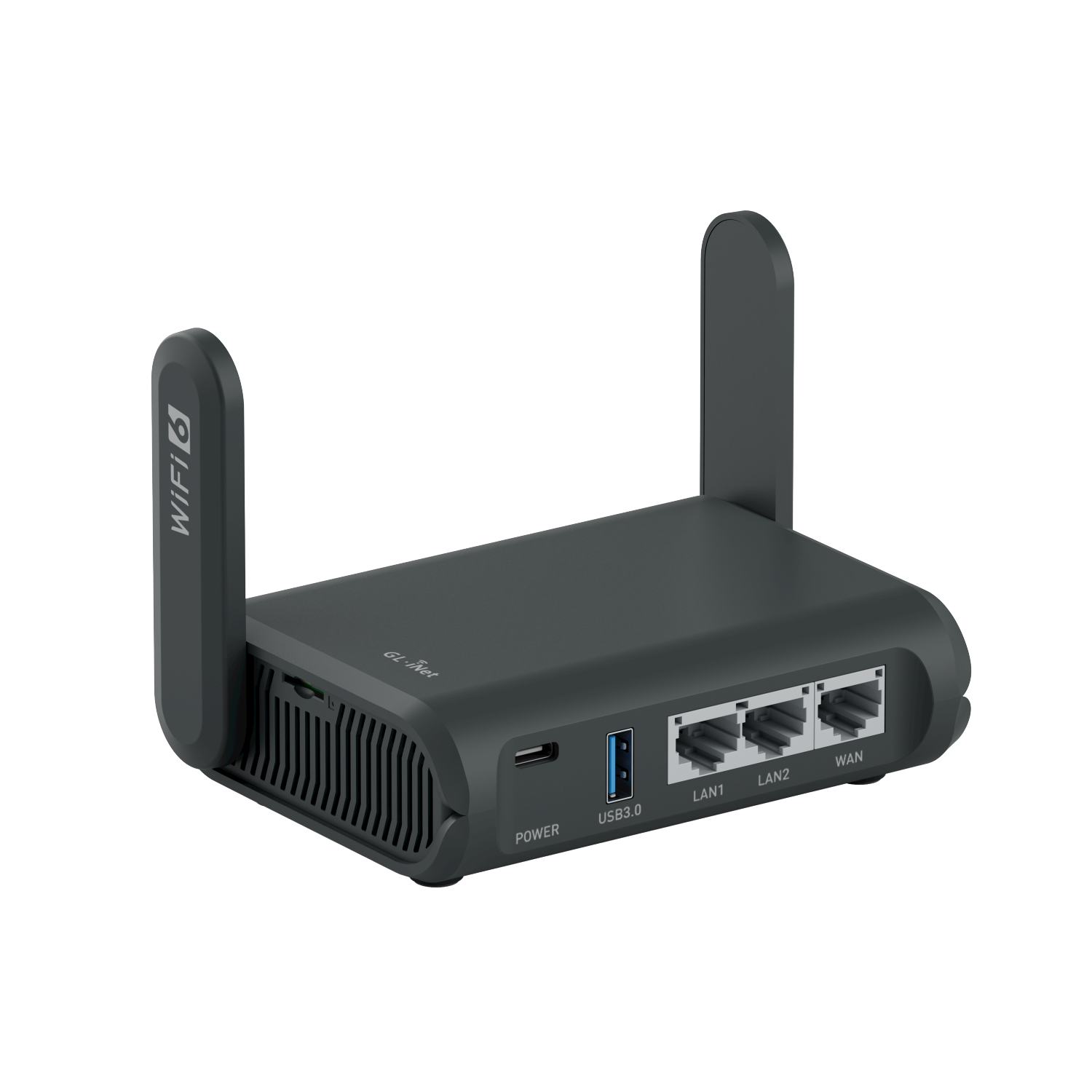 The Slate AX: pocket-sized, runs OpenWrt out of the box, and includes a real isolated guest network — not a marketing checkbox. Photo: GL.iNet.
| Spec | Detail |
|---|---|
| CPU | IPQ6000 1.2GHz quad-core |
| Wi-Fi | Wi-Fi 6 (802.11ax), up to 1800Mbps combined (600 + 1200), supports up to 120 connected devices |
| Ports | 1× WAN gigabit, 2× LAN gigabit, 1× USB 3.0, USB-C power |
| OS | OpenWrt 23.05 — full access to the underlying Linux router OS, not a locked-down consumer firmware |
| Guest network | Isolated subnet with AP isolation — devices on it cannot reach the main network |
| VPN | OpenVPN and WireGuard, client and server modes |
| Size / weight | 125 × 82 × 36mm, 245g — fits in a jacket pocket |
| Price | Around $100–120 |
Sources: GL.iNet’s official Slate AX product page, GL.iNet’s official guest-network documentation.
Check current Slate AX pricing here.
Worth being precise about one thing up front, since GL.iNet’s own documentation is precise about it too: this router’s isolation feature is a guest network with AP isolation — a genuinely separate subnet that can’t see the main network — not full VLAN tagging with per-port assignment. For the use case this piece is about (giving an untrusted MCP server, agent skill, or sandbox box its own network with no path back to your real systems), guest-network isolation is exactly the right tool. If you need enterprise-grade multi-VLAN segmentation across a whole office, that’s a different, more expensive setup — see the honest comparison further down.
Why a second router beats “just use the guest network on your main router”
Most modern home and small-office routers already ship with a guest network toggle, and the honest first question is why that isn’t enough. Two reasons, both practical rather than theoretical:
Most consumer router guest networks are an afterthought, not a real security boundary. Plenty of them isolate guest Wi-Fi from the LAN but still route guest traffic through the same firewall, DNS, and sometimes the same DHCP server as the main network — with configuration options buried three menus deep or simply not exposed at all. A dedicated router running actual OpenWrt gives you real control over what the isolated network can and can’t do, instead of trusting a manufacturer’s guest-mode implementation you can’t fully audit.
A physically separate router means a physically separate decision. If the box running your MCP servers, agent skills, or sandbox environment plugs into a different router entirely — not a toggle on the same one — there’s no configuration drift risk where someone “temporarily” disables guest isolation to debug something and forgets to re-enable it. The isolation is structural, not a setting that can silently get changed.
Setting it up for the actual use case
The setup that matters here is specific, not generic “buy a router and plug it in”:
- Plug the Slate AX’s WAN port into your existing internet connection — it sits downstream of your main router, getting internet access but not sharing a network with anything else in the building.
- Connect the machine running your MCP servers, agent skills, or sandbox box to the Slate AX directly, via its LAN port or its own Wi-Fi network — not your main office SSID.
- Leave it as the only thing on that network. The value of this setup collapses the moment something important — a work laptop, a POS terminal, a shared drive — also connects to the isolated router for convenience. One box, one router, same discipline as the smart-plug kill-switch piece’s “don’t share the outlet” advice.
- Use the router’s built-in DNS-over-HTTPS and AdGuard Home features to add a layer of outbound filtering — not a substitute for actually vetting what you install, but a second, independent check on what the isolated machine is trying to reach. AdGuard Home’s query log is worth actually looking at once a week rather than installing and forgetting: an isolated MCP-server machine that’s suddenly making DNS lookups to domains you don’t recognize is exactly the kind of undisclosed outbound call the worked example above describes, and the query log is the plain-English record of it — no packet analysis required.
- Label it clearly and physically, the same advice as the kill-switch piece: a sticky note that says “isolated / untrusted network only” prevents the well-intentioned mistake of plugging something important into it six months from now when nobody remembers why it exists.
What this actually buys you, concretely
Go back to the worked MCP-server example from the Tenable piece — the billing-integration MCP server that requested write access it didn’t need and made an undisclosed logging call. On a flat network, that undisclosed outbound call reaches whatever else is on the same network without any additional resistance. On an isolated router, that same call still happens, but it has nothing else on the network to reach — no shared drive, no other machine, no path back to the systems that actually matter. The bad behavior didn’t get prevented; its consequences got contained. That’s the entire value proposition of network isolation, and it’s worth being honest that containment, not prevention, is what you’re buying.
The cost math, briefly
This isn’t a purchase that needs a spreadsheet, but it’s worth being explicit about the comparison anyway. A single client-data exposure incident at a small shop — the kind that triggers a breach notification requirement, a client relationship review, or just the unpaid hours spent figuring out what actually got touched — routinely costs more in time alone than this router costs in dollars, even before factoring in any direct financial loss or reputational damage. The router doesn’t prevent that incident. It changes the ceiling on how bad it can get if one happens anyway, for about the cost of a nice dinner out. That’s the actual trade being made here, not “will something bad happen” but “if it does, how far does it reach.”
Comparison: this vs. the “real” segmented office network
| GL.iNet Slate AX (this pick) | Full segmented office network | |
|---|---|---|
| Cost | ~$100–120, one box | $300–600+ (managed AP, VPN router, PoE switch — covered in the guest-network piece) |
| Setup time | Under an hour | An afternoon, plus ongoing management |
| Isolation type | Guest-network subnet with AP isolation | True VLANs with per-port assignment across multiple devices |
| Best for | One or a few machines running untrusted agent tooling | Whole-office segmentation — separate customer Wi-Fi, IoT, staff, and server networks |
| Portability | Fits in a bag, works anywhere with an ethernet or Wi-Fi uplink | Fixed office infrastructure |
If you’ve already read the mesh-vs-extender piece or the secure guest-network setup piece and built out real VLAN infrastructure for your office, you likely already have a place to put an isolated agent network — use it, and skip buying a second router. This pick is for the much more common case: a shop that has one flat network and one or two machines specifically running agent tooling that deserves better isolation than “same Wi-Fi as everything else.”
Scaling past one isolated machine
Most of this piece assumes one machine running the tooling you don’t fully trust yet, but the setup extends cleanly if that grows. The Slate AX supports up to 120 connected devices on its guest network, so a shop running two or three sandboxed machines — one testing MCP servers, one running a computer-use agent, one as a general experimentation box — can put all of them behind the same isolated router rather than needing one per machine. The discipline that matters at this scale is the same as with a single machine: nothing on that network should be something you’d be upset to lose access to or have exposed, because the whole point of the setup is that everything behind it is expendable from the perspective of your real business systems.
If you cross the point where you’re running enough agent tooling that a single travel router’s guest network starts to feel like real infrastructure rather than a stopgap — five or more machines, or genuine need to separate categories of untrusted tooling from each other, not just from your main network — that’s the signal to graduate to the full VLAN setup in the comparison table above. The Slate AX is the right first purchase for almost every small shop asking this question for the first time; it’s not meant to be the permanent answer once “agent tooling” becomes a meaningful fraction of what the business actually runs.
Firmware, chipset, and the alternative worth knowing about
One honest trade-off that doesn’t show up in the spec sheet: the Slate AX runs on a Qualcomm QCA chipset, on an OpenWrt build sitting on a fairly old 4.4 QSDK kernel under the hood. That chipset is unlikely to get mainline OpenWrt master support anytime soon, if ever — GL.iNet maintains its own fork and pushes its own updates, which works fine day to day, but it means you’re depending on GL.iNet’s release cadence specifically, not the broader OpenWrt community’s, for security patches over the life of the device. That’s a reasonable bet for a $100–120 router doing one job, but it’s worth knowing rather than discovering three years in.
GL.iNet’s sibling model, the Beryl AX (GL-MT3000), is the router to consider if that long-term-support question matters more to you than raw throughput: it runs a Mediatek chipset that’s likely to pick up proper mainline OpenWrt support faster, meaning a longer realistic security-update runway. The trade-off runs the other way on hardware — the Beryl AX has one fewer LAN port and a less powerful processor, so it’s noticeably slower if you’re pushing a lot of traffic through a VPN tunnel on top of the isolation setup. For the specific use case in this piece — one isolated machine running agent tooling, not a VPN gateway pushing heavy throughput — either router does the job; the Slate AX’s extra LAN port and faster CPU matter more if you’re also using it as your travel VPN router day to day, and matter less if it’s staying plugged into a wall as a dedicated isolation box.
Whichever model you buy, do the same thing before putting anything real behind it: flash it to the latest firmware before first use, not after. A router that’s been sitting in a warehouse or on a shelf since manufacture is routinely a version or two behind out of the box, and a failed firmware flash is a minor annoyance on your home network before deployment — it’s a much bigger problem if you only discover the router needs an update after it’s already the thing standing between an untrusted MCP server and your real systems.
The honest limits of this fix
A separate router doesn’t vet the component for you. It contains the blast radius if something goes wrong; it does nothing to catch the problem in the first place. Pair it with the manual three-layer check from the Tenable/OpenAI piece — permission scope, independent code read, publisher track record — rather than treating network isolation as a substitute for actually looking at what you’re installing.
It doesn’t stop something malicious from reaching the open internet. Isolation here means separated from your other devices, not cut off from the internet entirely — a compromised component can still exfiltrate data outward unless you specifically configure outbound filtering (the AdGuard Home / DNS filtering step above helps, but isn’t a hard block).
It’s one box’s worth of protection, not a network policy. If your shop is running agent tooling across five different machines, a single travel router isolating one of them still leaves the other four exposed. Scale to a real segmented network (the comparison table above) once you’re past a couple of machines needing this.
When not to buy this
If you already have a real segmented network with VLANs and a managed switch. You have the infrastructure already — put the agent machine on its own VLAN instead of buying redundant hardware.
If nothing you’re running touches credentials, customer data, or write access to real systems. A component that only does local math or text formatting doesn’t need network isolation because there’s nothing sensitive nearby for it to reach. Save the setup effort for tooling that actually touches something that matters.
If you need true multi-VLAN, multi-port segmentation across a whole office, not just one isolated machine. This router does one job well — a single isolated network — not full office-wide segmentation. Go with the Omada/UniFi setup from the guest-network piece instead.
If the extra $100–120 isn’t in the budget yet and the alternative is doing nothing at all, at minimum enable and actually verify your existing router’s guest-network toggle, confirm it truly isolates traffic (test it — don’t assume), and treat that as the interim version until you can do better.
Quick answers
Can I use this as my only router, or does it need to sit behind my main one? It can work standalone with its own internet connection (it has a full WAN port), but the setup described here — downstream of your main router, isolating one specific machine — is the configuration that actually solves the problem this piece is about.
Does this replace antivirus or endpoint security on the machine itself? No. Network isolation contains what a compromised or malicious component can reach; it does nothing to prevent the compromise itself. Keep normal endpoint security regardless.
Is OpenWrt hard to configure for someone without networking experience? GL.iNet’s own web interface covers the guest-network and basic setup without needing to touch OpenWrt’s more advanced command-line tools directly — the setup steps above are achievable without deep networking knowledge. Going further (custom firewall rules, VPN configuration) does benefit from some comfort with the underlying OS.
What if I’m running the agent tooling on a cloud VM instead of a local machine? A physical router does nothing for you there — use the cloud provider’s own VPC/security-group isolation instead, which is the equivalent concept in a hosted environment.
Bottom line
The Tenable/OpenAI Inspector is a real answer to “should I trust this AI component” — for enterprise security teams with the budget for it. A dedicated $100–120 travel router used specifically to isolate anything you haven’t fully vetted is the small-shop answer to a narrower, more achievable question: if it turns out to be bad anyway, what can it actually touch? Buy it before the next MCP server or agent skill you’re excited to try, not after something on your main network turns out to have been reachable the whole time.
See current GL.iNet Slate AX pricing on Amazon.
Sources
All prices and specs accessed September 7, 2026.
- Official specifications, pricing, and product image — GL.iNet Slate AX (GL-AXT1800) product page
- Official guest-network isolation documentation — GL.iNet Router Docs, “Guest Network”
- Confirmation that VLAN tagging (distinct from guest-network isolation) is not a current Slate AX feature — Ant-Like Persistence, “Which GL.iNet routers provide VLAN wifi client isolation?”
- Slate AX vs. Beryl AX chipset, kernel, and long-term OpenWrt support comparison, plus firmware-before-first-use guidance — RMFInsider, “GL.iNet Travel Router Review: Slate AX vs Beryl AX for Secure Hotel Wi-Fi”