
If your website collects an email address, runs Google Analytics, or serves a contact form to anyone in the European Union, GDPR almost certainly applies to you — regardless of where your business is incorporated. The single highest-priority action right now: stop all non-essential tracking scripts from firing until you have valid consent in place. That one change resolves the majority of automated scan failures and immediately reduces your regulatory exposure.
Here are the five things to do first, in order of risk:
- Inventory and block non-essential trackers — audit every script tag, pixel, and third-party widget loading on your site and disable any that aren’t strictly necessary until consent is obtained.
- Verify or create your privacy policy — it must name what you collect, why, the lawful basis, how long you keep it, and who to contact.
- Log and document your processing activities — a simple spreadsheet works for most small sites; the record is what regulators ask for first.
- Review vendor Data Processing Agreements (DPAs) — check that every processor handling EU personal data has a signed DPA in place.
- Implement a consent mechanism that logs consent — not just a banner, but a system that records what the user agreed to, when, and under which version of your policy.
Regulation (EU) 2016/679 sets these obligations. The European Commission’s data protection guidance confirms that scope is determined by whose data you process, not where your servers sit.
Key Takeaways
GDPR website compliance requires blocking non-essential tracking before consent, maintaining signed DPAs with every processor, and documenting your processing decisions so you can demonstrate accountability to regulators.
| Point | Details |
|---|---|
| GDPR applies to U.S. sites | If you process EU residents’ personal data, GDPR applies regardless of where your business is based. |
| Block trackers before consent | Non-essential scripts must not fire until valid, logged consent is obtained — this is the most common technical failure. |
| DPAs are non-negotiable | Every vendor processing EU personal data on your behalf needs a signed Data Processing Agreement. |
| Document everything | A ROPA, consent logs, and DPA evidence are what regulators ask for first in any investigation. |
| Ctrlaltorion implements the technical controls | Cookie gating, consent logging, and vendor DPA remediation are available as scoped engagements for small business websites. |
Table of Contents
- Does GDPR apply to your U.S. website?
- How to make your website GDPR-compliant, step by step
- What does a compliant cookie setup actually look like?
- How do you legally send EU personal data to the U.S.?
- What records do you need, and what happens if there’s a breach?
- Templates and checklist snippets you can use right now
- When should you hire a developer or consultant?
- The tradeoffs most compliance guides won’t tell you about
- Ctrlaltorion handles the technical compliance work for you
- Sources
Does GDPR apply to your U.S. website?
Short answer: if you process personal data of people located in the EU, yes. The European Commission is explicit that GDPR’s territorial scope extends to organizations outside the EU when they target or monitor EU residents.
What counts as personal data on a website?
More than most site owners expect. Under GDPR, personal data includes:
- IP addresses (even dynamic ones, in most EU jurisdictions)
- Cookie identifiers and device fingerprints
- Form submissions containing names, emails, or phone numbers
- Analytics data tied to a user session or device
- Behavioral data collected through pixels or heatmap tools
Processing means anything you do with that data: collecting it, storing it, reading it, sharing it with a vendor, or deleting it.
Two tests that determine applicability
Test 1 — Targeting: Are you actively offering goods or services to EU residents? Accepting EU payment methods, displaying prices in euros, or running EU-targeted ads all point toward yes.
Test 2 — Monitoring: Are you tracking the behavior of EU residents over time? Behavioral analytics, retargeting pixels, and session-recording tools typically qualify.
A U.S. blog with no EU-targeted marketing and only incidental EU visitors sits in a gray zone. A U.S. e-commerce store shipping to Germany does not.
ePrivacy vs. GDPR: the cookie timing distinction
The ePrivacy Directive (the “Cookie Law”) governs the moment of storing or accessing information on a user’s device. It requires prior consent before non-essential cookies fire. GDPR then governs what happens to the personal data those cookies collect. Both apply simultaneously, and the consent standard for cookies must meet GDPR’s bar: freely given, specific, informed, and unambiguous. Pre-ticked boxes and implied consent are invalid under EU case law (Planet49, 2019).
On enforcement: regulators do prioritize complaints and proportionate remediation. For small businesses, the practical risks are often a formal complaint, a corrective order, or reputational damage with EU business partners who ask for compliance evidence before signing contracts.
How to make your website GDPR-compliant, step by step
A practical 8-step remediation approach is well-validated for small organizations. The sequence below adapts that framework with priority ratings and time estimates for small teams.
Step 1: Map your data flows (Priority: High | Time: 2–4 hours)
Before you can fix anything, you need to know what you have. Walk through every page of your site and document:
- What personal data is collected (forms, analytics, chat widgets, payment fields)
- Where it goes (your database, a third-party SaaS, an email platform)
- Why it’s collected (the purpose and lawful basis)
- How long it’s retained
A spreadsheet with columns for Data Type, Source, Destination, Purpose, Lawful Basis, and Retention Period is enough. This becomes your Record of Processing Activities (ROPA).
Step 2: Update your privacy policy (Priority: High | Time: 2–3 hours)
Your privacy policy for the website must cover, at minimum:
- Who you are and how to contact you (or your EU representative if required)
- What personal data you collect and why
- The lawful basis for each processing activity
- Who you share data with (processors, analytics vendors, payment providers)
- How long you keep data
- Data subject rights and how to exercise them
- Whether you transfer data outside the EU and under what safeguards
Post it at a stable URL and link it from your footer, every form, and your cookie banner.
Step 3: Block non-essential trackers until consent (Priority: High | Time: 1–8 hours depending on toolchain)
Common website compliance failures include tracking scripts firing before consent — and this is the item automated scanners catch most reliably. The fix requires either a Consent Management Platform (CMP) that gates script execution, or manual tag management configuration. On WordPress, plugins like CookieYes or Cookiebot handle this at the configuration level. On custom sites, a developer needs to wrap third-party script tags in consent-conditional logic.
Step 4: Implement a compliant consent mechanism (Priority: High | Time: 4–16 hours)
A cookie banner is not enough on its own. The mechanism must:
- Present Reject All and Accept All with equal visual prominence
- Offer granular per-purpose choices (analytics separate from marketing)
- Default all non-essential categories to off
- Log each consent action (timestamp, user identifier, version of policy, choices made)
- Provide a persistent way to revoke or change consent
Step 5: Review third-party vendors and sign DPAs (Priority: High | Time: 3–6 hours)
Every vendor that processes EU personal data on your behalf is a processor. You need a signed DPA with each one. Most major vendors (Google, Mailchimp, Stripe, HubSpot) provide standard DPAs through their account settings or legal portals. For smaller or custom vendors, you may need to negotiate terms.
Step 6: Secure your data and access controls (Priority: Medium | Time: varies)
GDPR requires appropriate technical and organizational security measures. For most small sites, this means:
- HTTPS/TLS on all pages (not just checkout)
- Principle of least privilege on database and admin access
- Strong authentication (MFA) on hosting, CMS, and email platforms
- A documented process for what happens if data is exposed
Step 7: Set up a DSAR process (Priority: Medium | Time: 1–2 hours)
Data Subject Access Requests (DSARs) give EU residents the right to access, correct, delete, or export their personal data. You need a way to receive these requests (a dedicated email address works), verify the requester’s identity, and respond within 30 days. Document the process even if you’ve never received a request.
Step 8: Document everything and set review dates (Priority: Medium | Time: ongoing)
Automated website scans verify technical items like missing consent gating and HTTPS, but they cannot check whether your DPAs are signed or your lawful basis is appropriate. Human review is required for legal documentation. Set a calendar reminder to review your ROPA, vendor list, and privacy policy at least annually, and after any significant change to your site’s functionality.
What does a compliant cookie setup actually look like?
Cookie classification is the foundation. Every cookie or tracking technology on your site falls into one of four categories:
| Category | Examples | Consent Required? |
|---|---|---|
| Strictly necessary | Session cookies, login tokens, shopping cart | No |
| Preferences/functionality | Language settings, saved form data | Yes |
| Analytics | Google Analytics, Hotjar, Plausible | Yes (unless anonymized at source) |
| Marketing/advertising | Meta Pixel, Google Ads remarketing, LinkedIn Insight | Yes |
Blocking scripts before consent fires
The technical pattern matters. A CMP like Cookiebot, CookieYes, or OneTrust intercepts script execution and only releases tags in the consented categories. In Google Tag Manager, you configure tags to fire only when the corresponding consent signal is active using the built-in Consent Mode integration. Without this gating, your analytics and ad pixels fire on page load for every visitor, including EU residents who have not consented — which is the most common failure mode.
Non-essential cookies must be blocked until consent is granted, and pre-ticked boxes or implied consent are invalid. The Planet49 ruling made this unambiguous.
Banner design requirements
Regulators and courts have rejected dark-pattern designs. A compliant first-layer banner must:
- Display a Reject All button with the same size, color, and prominence as Accept All
- Not use deceptive language (“Accept to continue” without a reject option)
- Not bury the reject path behind multiple clicks
- Link to your full cookie policy
- Offer per-purpose granular choices at the second layer
Pro Tip: Run your banner through the IAB Europe Transparency and Consent Framework (TCF) validator or a free CMP audit tool before going live. Regulators have specifically cited TCF non-compliance in enforcement actions.
Vendor checklist for analytics and ad tools
Before enabling any analytics or advertising vendor, confirm:
- Where their servers process data (EU vs. U.S.)
- Their data retention settings and whether you can configure them
- Whether they list sub-processors and notify you of changes
- That a signed DPA is available and executed
- Whether they support consent signals for secure data handling and can demonstrate audit trails
Consent must be explicit, granular, auditable, and revocable, and you should refresh consent when your cookie policy changes materially.
How do you legally send EU personal data to the U.S.?
Cross-border data transfers are one of the more technically complex areas of GDPR for small sites, but the practical path is straightforward once you know the options.
The three mechanisms that matter
Adequacy decisions are the cleanest route. The European Commission has recognized certain countries as providing adequate data protection, meaning transfers to processors in those countries need no additional safeguards. The U.S. currently benefits from the EU-U.S. Data Privacy Framework (DPF), which replaced Privacy Shield after the Schrems II ruling. If your U.S. vendor is DPF-certified, transfers to them are covered.
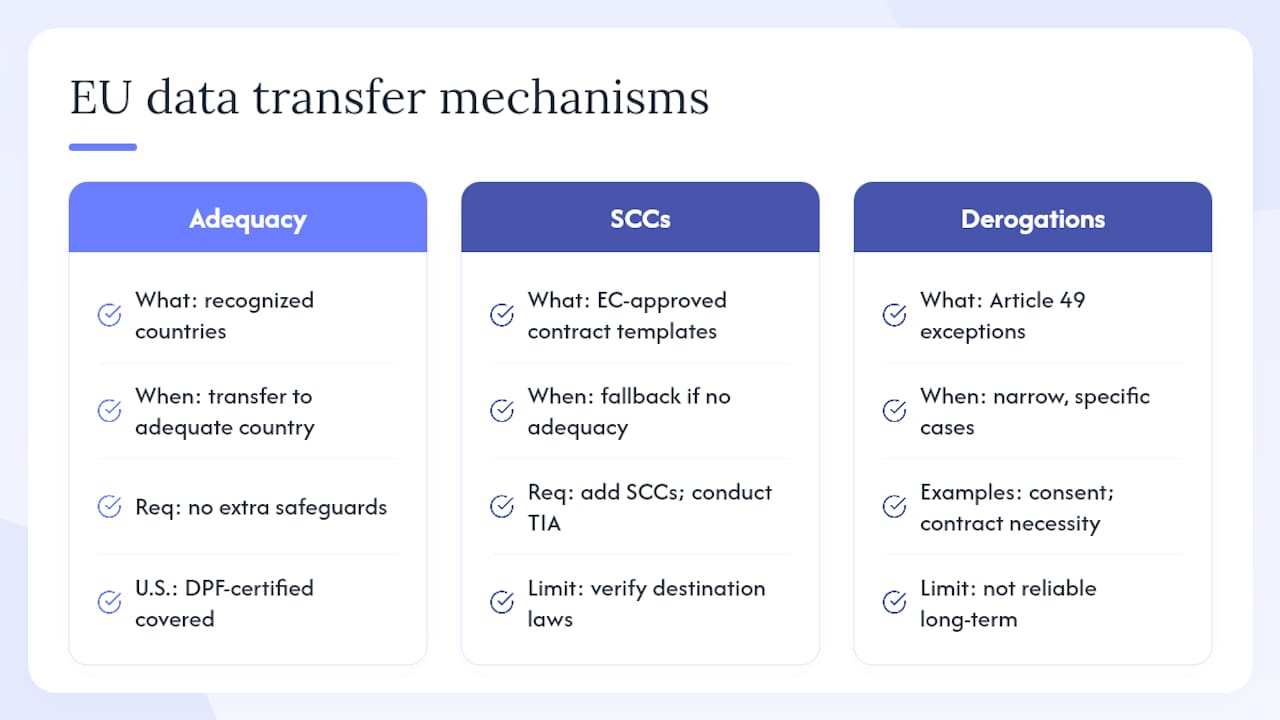
Standard Contractual Clauses (SCCs) are the fallback for vendors not covered by an adequacy decision. The European Commission publishes approved SCC templates. You incorporate them into your vendor contracts, but Schrems II added a requirement: you must also conduct a Transfer Impact Assessment (TIA) to verify that the destination country’s laws don’t undermine the SCCs’ protections.
Derogations (Article 49 exceptions) are narrow and not a reliable long-term strategy for routine transfers. They cover things like explicit consent for a specific transfer or transfers necessary to perform a contract with the data subject.
Transfer impact assessment checklist
Before exporting EU personal data to a U.S. processor, document:
- Whether the vendor is DPF-certified (check the DPF list)
- The legal basis for government access to data in the vendor’s jurisdiction
- Whether data is encrypted in transit and at rest
- Whether pseudonymization or anonymization reduces the risk
- What contractual protections (SCCs) are in place
- Whether EU-hosted processing is available as an alternative
For most small sites, the pragmatic route is: prefer vendors with EU data centers or DPF certification, execute SCCs where needed, and document the decision. That documentation is what regulators look for.
What records do you need, and what happens if there’s a breach?
What to record (your ROPA and beyond)
The accountability principle under GDPR means you must be able to demonstrate your compliance decisions, not just assert them. Your documentation set should include:
- ROPA: processing activities, purposes, lawful bases, data categories, retention periods, and recipients
- Consent logs: timestamp, user identifier, policy version, and choices made for each consent event
- DPA evidence: signed agreements with every processor
- Security measures: a brief description of technical controls (encryption, access controls, MFA)
- Breach log: a record of any incidents, even those below the notification threshold
Breach response: the 72-hour clock
If a personal data breach occurs, GDPR requires notification to your lead supervisory authority within 72 hours of becoming aware of it — unless the breach is unlikely to result in risk to individuals. That 72-hour window starts the moment you have reasonable certainty a breach has occurred, not when you’ve finished investigating.
Minimum information to gather immediately:
- Nature of the breach (what happened, how)
- Categories and approximate number of individuals affected
- Categories and approximate volume of records affected
- Likely consequences
- Measures taken or proposed to address it
If the breach is likely to result in high risk to individuals, you must also notify those individuals directly without undue delay.
When a DPIA is required
A Data Protection Impact Assessment (DPIA) is mandatory before processing that is likely to result in high risk. For small sites, the most common triggers are:
- Behavioral profiling or automated decision-making that produces legal or similarly significant effects
- Large-scale processing of sensitive data (health, financial, biometric)
- Systematic monitoring of a publicly accessible area
A simple DPIA for a small site covers: what you’re doing and why, the necessity and proportionality of the processing, the risks to individuals, and the measures you’re taking to mitigate those risks. It doesn’t need to be long — it needs to be honest and documented.
On enforcement: regulators commonly look for accountability and proportionate remediation. Documentation and a demonstrated effort to fix issues matter more than perfection on day one. For most small businesses, the realistic risk profile is a complaint, a corrective order, and reputational friction with EU partners — not an immediate maximum fine.
Templates and checklist snippets you can use right now
30/90/180-day workstream checklist
30 days (stop the bleeding):
- Block all non-essential cookies and tracking scripts
- Publish or update your privacy policy with required elements
- Sign DPAs with your top three to five vendors
- Set up a DSAR intake email address
90 days (build the foundation):
- Complete your ROPA spreadsheet
- Implement a CMP with consent logging
- Conduct a transfer impact assessment for U.S.-based processors
- Document your security measures
180 days (sustain and optimize):
- Set annual review dates for ROPA, vendor list, and privacy policy
- Run an automated scan to verify technical controls
- Train anyone with admin access on breach response basics
- Confirm DPF certification or SCC status for all data-exporting vendors
Sample privacy policy snippet
Data We Collect and Why We collect [types of data, e.g., name, email address, IP address] when you [action, e.g., submit a contact form, visit our site]. We process this data to [purpose, e.g., respond to your inquiry, analyze site performance]. The lawful basis for this processing is [e.g., your consent / our legitimate interests / performance of a contract]. We retain this data for [retention period]. We share it with [processor names or categories] under signed Data Processing Agreements. You have the right to access, correct, delete, or export your data by contacting us at [contact email].
Sample cookie banner first-layer text
DPA checklist: minimum clauses to confirm
| Clause | What to look for | Red flag |
|---|---|---|
| Subject matter and duration | Matches your actual use case | Vague or unlimited scope |
| Data subject rights assistance | Vendor commits to help you respond to DSARs | No mention of DSAR support |
| Sub-processor disclosure | List of sub-processors with notification of changes | No sub-processor list |
| Security measures | Specific technical controls named | Generic “industry standard” only |
| Breach notification | Vendor notifies you without undue delay | No breach notification clause |
| Deletion/return on termination | Data deleted or returned within defined period | No deletion commitment |
When should you hire a developer or consultant?
Some compliance tasks are configuration work any site owner can handle. Others require developer time or legal expertise. Knowing the difference saves money and avoids half-measures.
Tasks that require a developer
- Script gating: Wrapping third-party tags in consent-conditional logic, especially on custom-built sites or complex tag manager setups
- Server-side consent enforcement: Ensuring that server-side analytics or API calls also respect consent signals
- Encryption implementation: Configuring encryption at rest for databases or file storage
- SCC technical annexes: Implementing the technical safeguards described in a Transfer Impact Assessment
- Custom DSAR workflows: Building a form, verification flow, and data export mechanism for handling access requests
What to ask before you hire
When scoping a compliance project with a developer or consultant, get clear answers on:
- What deliverables will be tested and how (automated scan results, manual verification checklist)?
- Will the DPA between you and them be updated to reflect the compliance work?
- What’s the rollback plan if a consent gating change breaks site functionality?
- What’s the expected timeline, and what do you need to provide (vendor list, current tag manager access, hosting credentials)?
Example scope breakdowns
A privacy-first landing page update (updated privacy policy, footer links, contact form consent checkbox) typically takes a developer four to eight hours. A complete cookie gating rollout on a mid-size WordPress or Webflow site, including CMP configuration, tag manager integration, and consent log setup, runs roughly one to three days of developer time. A vendor DPA review and transfer assessment for five to ten vendors is primarily legal and administrative work, but a developer may be needed to verify technical safeguards described in vendor documentation.
Ctrlaltorion specializes in exactly this kind of custom implementation — cookie gating, consent logging, privacy-policy updates, and vendor DPA remediation — for small business websites that need it done right without a six-month agency engagement.
The tradeoffs most compliance guides won’t tell you about
The standard advice is “implement GDPR and move on.” The reality for small businesses is messier, and pretending otherwise sets you up for either over-engineering or under-delivering.
Strict global opt-in consent — applying GDPR-level consent requirements to all visitors, not just EU ones — reduces your analytics data significantly. You will see lower reported traffic, fewer attributed conversions, and gaps in funnel data. That’s not a bug; it’s the cost of respecting user choice. The tradeoff is real: tighter privacy controls mean less behavioral data to optimize against. For most small sites, that’s an acceptable cost, because the alternative (running non-consensual tracking globally) creates regulatory exposure and, increasingly, friction with privacy-conscious customers.
Regional targeting — showing the consent banner only to EU visitors based on geolocation — improves data quality for non-EU traffic but introduces its own complexity. You need reliable geolocation logic, and you need to maintain it as your site evolves. A misconfigured geo-rule that fails to trigger the banner for EU visitors is worse than a global banner, because it creates a false sense of compliance.
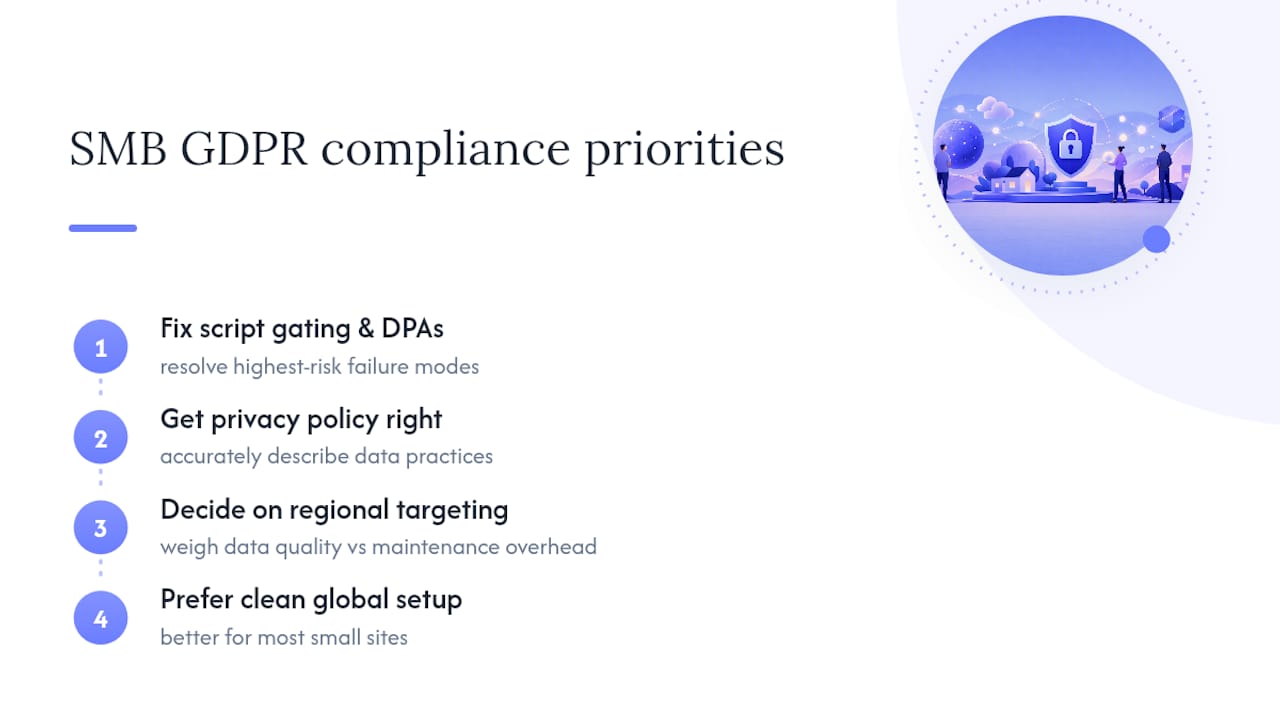
My practical guidance for SMBs with limited developer time: fix script gating and DPAs first. Those two items resolve the highest-risk failure modes. Then get your privacy policy right. Then, once the foundation is solid, decide whether regional targeting is worth the maintenance overhead for your traffic mix. Most small sites are better served by a clean global implementation than a fragile regional one.
Ctrlaltorion handles the technical compliance work for you
GDPR compliance for websites isn’t a one-time checkbox — it’s a set of technical controls, legal documents, and operational processes that need to work together. Getting the cookie gating wrong, or signing a DPA that doesn’t cover your actual use case, leaves you exposed even if the banner looks right.

Ctrlaltorion builds and implements the technical side of website compliance for small businesses: cookie consent gating, CMP configuration, consent logging, privacy-policy updates, vendor DPA remediation, and transfer impact documentation. A typical engagement runs one to eight weeks depending on scope, and you come away with a site that passes automated scans, documented processing records, and signed DPAs with your key vendors.
To get started, reach out to Ctrlaltorion with your current vendor list, a note on your site’s tech stack (CMS, tag manager, analytics tools), and any existing privacy documentation. That’s enough to scope a first call and give you a realistic timeline and cost estimate.
Sources
5 refs- Data protection - European Commissionec.europa.eu
- EUR-Lex: 2018/1725 (GDPR legal text)eur-lex.europa.eu
- GDPR Checklist for Websites 2026 | CookieBeamcookiebeam.com
- GDPR Compliance for Websites: The Complete Guide | GetGDPRScangetgdprscan.com
- How to make your website GDPR compliant in 8 steps | Vantavanta.com
This article provides general information about GDPR website compliance and is not a substitute for legal advice. Confirm your specific obligations with a qualified privacy attorney or your relevant supervisory authority.
comments
loading comments…
No comments yet. Start the thread.